Introduction
In the previous post we gave some structure to our Node.js project by way of a service and a repository. We also discussed the role of callbacks in asynchronous code execution, i.e. the “next” parameter. However, we still return some hard-coded JSON to all queries. It’s time to connect to the MongDb database we set up in part 2. The goal of this post is to replace the following code…
module.exports.getAll = function () {
    return { name: "Great Customer", orders: "none yet" };
};

module.exports.getById = function (customerId) {
    return { name: "Great Customer with id " + customerId, orders: "none yet" }
};
…with real DB access code.
In addition, we’ll operate with callbacks all the way from the controller to the repository. It might be overkill for this small demo project but I wanted to demonstrate something that’s similar to the await-async paradigm in .NET. If you’ve worked with the await-async keywords in .NET then you’ll know that once you decorate a method with “async” then the caller of that method will be “async” as well, and so on all the way up on the call stack.
MongoDb driver
There’s no built-in library in Node to access data in a database. There’s however a number of drivers available for download through the Node Package Manager. Keep in mind that we’re still dealing with JSON objects so forget the mapping convenience you’ve got used to while working with Entity Framework in a .NET project. Some would on the other hand say that this is actually a benefit because we can work with data in a raw format without the level of abstraction imposed by an object relational mapper. So whether or not this is a (dis)advantage depends on your preferences.
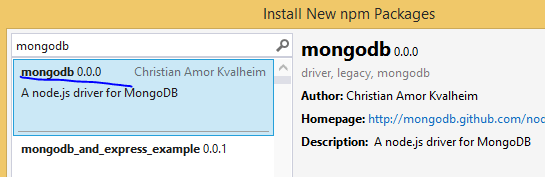
We’ll go for a simplistic driver for MongoDb which allows us to interact with the database at a low level, much like we did through the command line interface in parts 2 and 3 of this series. Open the project we’ve been working on and right-click npm. Select the driver called “mongodb”:
The central access
Add a new file called “access.js” to the repositories folder. Insert the following code in the file:
var mongoDb = require('mongodb');
var connectionString = "mongodb://localhost:27017/customers";
var database = null;

module.exports.getDbHandle = function (next) {
    if (!database) {
        mongoDb.MongoClient.connect(connectionString, function (err, db) {
            if (err) {
                next(err, null);
            }
            else {
                database = db;
                next(null, database);
            }
        });
    }
    else {
        next(null, database);
    }
};
The purpose of this file is to provide universal access to our MongoDb database to all our repositories. We first declare the following:
- We import the mongodb library
- We declare the connection string which includes the name of our database, i.e. “customers”
- We set up a field that will be a reference to the database
The getDbHandle function accepts a callback function called “next” which we’re familiar with by now. We then check if the “database” field is null – we don’t want to re-open the database every time we need something, MongoDb handles connection pooling automatically. If “database” has been set then we simply return it using the “next” callback and pass in null for the exception.
Otherwise we use the “connect” function of the mongodb library to connect to the database using the connection string and a callback. The connect function will populate the “err” parameter with any error during the operation and the “db” parameter with a handle to the database. As we saw before we call the “next” callback with the error if there’s one otherwise we set our “database” field and pass it back to the “next” callback.
The new customer repository
The updated customer repository – customerRepository.js – looks as follows:
var databaseAccess = require('./access');

module.exports.getAll = function (next) {
    databaseAccess.getDbHandle(function (err, db) {
        if (err) {
            next(err, null);
        }
        else {
            db.collection("customers").find().toArray(function (err, res) {
                if (err) {
                    next(err, null);
                }
                else {
                    next(null, res);
                }
            });
        }
    });
};

module.exports.getById = function (customerId, next) {
    databaseAccess.getDbHandle(function (err, db) {
        if (err) {
            next(err, null);
        }
        else {
            var mongoDb = require('mongodb');
            var BSON = mongoDb.BSONPure;
            var objectId = new BSON.ObjectID(customerId);
            db.collection("customers").find({ '_id': objectId }).toArray(function (err, res) {
                if (err) {
                    next(err, null);
                }
                else {
                    next(null, res);
                }
            });
        }
    });
};
We import access.js to get access to the DB handle. The getAll function accepts a “next” callback and calls upon getDbHandle we’ve seen above. If there’s an error while opening the database we populate the error field of “next” and pass “null” as the result. Otherwise we can go on and query the database. We need to reference the “customers” collection within the database. Our goal is to find all customers and from part 2 of this series we know that the “find()” function with no parameters will do just that. So we call find(). We’re not done as we need to turn it into an array which also accepts a callback with the usual signature: error and result. As usual, if there’s an error, we call next with error and null otherwise we set null as the error and pass the result. If all went well then “res” will include all customers as JSON.
The getById function follows the same setup. Part 2, referred to above, showed how to pass a query to the find() method so this should be familiar. The only somewhat complex thing is that we need to turn the incoming “customerId” string parameter into an ObjectId object which MongoDb understands. We then pass the converted object id as the search parameter of the “_id” field.
Calling the repository from the service
The updated customerService code follows the same callback passing paradigm as we saw above:
var customerRepository = require('../repositories/customerRepository');

module.exports.getAllCustomers = function (next) {
    customerRepository.getAll(function (err, res) {
        if (err) {
            next(err, null);
        }
        else {
            next(null, res);
        }
    });
};

module.exports.getCustomerById = function (customerId, next) {
    customerRepository.getById(customerId, function (err, res) {
        if (err) {
            next(err, null);
        }
        else {
            next(null, res);
        }
    });
};
This doesn’t add much functionality to the service apart from calling the repository. Later on when we have the POST/PUT/DELETE functions in place we’ll be able to add validation rules.
index.js in the services folder will be updated accordingly:
var customerService = require('./customerService');

module.exports.getAllCustomers = function (next) {
    customerService.getAllCustomers(function (err, res) {
        if (err) {
            next(err, null);
        }
        else {
            next(null, res);
        }
    });
};

module.exports.getCustomerById = function (id, next) {
    customerService.getCustomerById(id, function (err, res) {
        if (err) {
            next(err, null);
        }
        else {
            next(null, res);
        }
    });
};
Updating the controller
Finally, we’ll extend the controller function to respond with a 400 in case of an error:
var customerService = require('../services');

module.exports.start = function (app) {
    app.get("/customers", function (req, res) {

        customerService.getAllCustomers(function (err, customers) {
            if (err) {
                res.status(400).send(err);
            }
            else {
                res.set('Content-Type', 'application/json');
                res.status(200).send(customers);
            }
        });
    });

    app.get("/customers/:id", function (req, res) {

        var customerId = req.params.id;
        customerService.getCustomerById(customerId, function (err, customer) {
            if (err) {
                res.status(400).send(err);
            }
            else {
                res.set('Content-Type', 'application/json');
                res.status(200).send(customer);
            }
        });

    });
};
Note that we set the status code using the “status” function and the response body using the “send” function. In a real project you’d probably refine the response codes further but this will be fine for demo purposes.
Test
Run the application and navigate to /customers. Depending on how closely you followed part 2 and 3 of this series you can have different responses from the database. In my case I got the following:
[
   {
      "_id":"544cbaf1da8014d9145c85e7",
      "name":"Donald Duck",
      "orders":[

      ]
   },
   {
      "_id":"544cb61fda8014d9145c85e6",
      "name":"Great customer",
      "orders":[
         {
            "item":"Book",
            "quantity":2,
            "itemPrice":10
         },
         {
            "item":"Car",
            "quantity":1,
            "itemPrice":2000
         }
      ]
   }
]
Copy the _id field and enter it as /customers/[id] in the browser, e.g. /customers/544cb61fda8014d9145c85e6 in the above case. The browser shows the following output:
[
   {
      "_id":"544cb61fda8014d9145c85e6",
      "name":"Great customer",
      "orders":[
         {
            "item":"Book",
            "quantity":2,
            "itemPrice":10
         },
         {
            "item":"Car",
            "quantity":1,
            "itemPrice":2000
         }
      ]
   }
]
Great, we have the findAll and findById functionality in place.
We’ll continue with insertions in the next post.
View all posts related to Node here.

 Exercises in .NET with Andras Nemes