Java 8 Date and time API: the LocalDate class

Introduction

The Date and time API in Java 8 has been completely revamped. Handling dates, time zones, calendars etc. had been cumbersome and fragmented in Java 7 with a lot of deprecated methods. Developers often had to turn to 3rd party date handlers for Java such as Joda time.

One of many new key concepts in the java.time package of Java 8 is the immutable LocalDate class. A LocalDate represents a date at the level of days such as April 04 1988.

LocalDate

You can easily get hold of the current date of the default time zone of the local computer – in my case it’s CET:

LocalDate localDate = LocalDate.now();

…or you can construct a date using the static “of” method:

LocalDate someDayInApril = LocalDate.of(1988, Month.APRIL, 4);

LocalDate comes with the following constants:

  • LocalDate.MAX: ranges until year-month-day of ‘+999999999-12-31’
  • LocalDate.MIN: reaches as far back as years-months-days ‘-999999999-01-01’

Period

The Period class is strongly related to LocalDate. You can find the time span between two LocalDate instances using the “until” method which returns a Period object:

Period timeSpan = someDayInApril.until(localDate);
int years = timeSpan.getYears();
int months = timeSpan.getMonths();
int days = timeSpan.getDays();

At the time of writing this post there were 26 years, 6 months and 27 days between the two dates.

The Period class has a static “between” method to achieve the same:

Period between = Period.between(someDayInApril, localDate);

…which yields the same time difference as the “until” method above.

Normalisation

A period can be normalised so that values like 13 months can be changed to 1 year and 1 month instead. Let’s create a 23-month period and normalise it:

Period ofMonths = Period.ofMonths(23);
Period normalized = ofMonths.normalized();

“normalized” will have 1 year and 11 months for the getYears and getMonths values respectively. “ofMonth” would have 0 years and 23 months instead.

Let’s test this with days:

Period ofDays = Period.ofDays(4322);
Period daysNormalised = ofDays.normalized();

In this case, however, both will yield getDays = 4322, years and months will be 0. This is expected as the number of days in a month can vary so the calculation would be based on some average, like 30 days at best but that result would almost certainly be incorrect. The previous example succeeded as the number of months in a year is set.

Zero period

The isZero() method of Period returns true if we compare two periods and they refer to the same date:

Period zeroPeriod = someDayInApril.until(someDayInApril);
boolean zero = zeroPeriod.isZero();

…zero will be “true”.

Negative period

Negative periods occur if we compare two LocalDate instances and take the later date as point of reference in the comparison:

Period negativePeriod = localDate.until(someDayInApril);
boolean negative = negativePeriod.isNegative();

“negative” will be true. The year, month and day values will be -26, -6 and -27.

You can easily transform that into a positive period though:

Period negated = negativePeriod.negated();

The year, month and day values of “negated” will be 26, 6 and 27.

Multiplication

You can multiply a Period with an integer which will multiply the year, month and day values with that integer without normalising the date. So in case you need to get a twice as long period you can do as follows:

Period twiceAsLong = ofDays.multipliedBy(2);

Plus and minus methods

Both the LocalDate and the Period classes have methods whose names start with “plus” or “minus” which serve to add or subtract a certain amount of time to and from a date/period. Examples:

LocalDate plusDays = localDate.plusDays(20);
LocalDate minusYears = localDate.minusYears(15);
Period minusMonths = between.minusMonths(11);

You can probably guess what these operations do.

Total number of time units

What if you’d like to know the total number of days between two LocalDate instances? The “until” method has an overload that you can use. E.g. here’s how you find the total number of days between “localDate” and “someDayInApril”:

long until = someDayInApril.until(localDate, ChronoUnit.DAYS);

…which at this time gives 9706 days. The ChronoUnit enumeration in the java.time.temporal package has other values to find the total number of “x” between two local dates but not all of them are supported in the “until” operation. E.g. you cannot calculate the number of hours or nanoseconds between two LocalDate instances. Any level of detail more fine grained than DAYS will throw an exception of type java.time.temporal.UnsupportedTemporalTypeException as LocalDate is only available at the day level: there’s no concept of hours, minutes etc. in the case of LocalDate.

In the next post we’ll look at the LocalTime class.

View all posts related to Java here.

Architecture of a Big Data messaging and aggregation system using Amazon Web Services part 5

Introduction

In the previous post we extended our Amazon Big Data design with Amazon RedShift. In this post we’ll look at some data storage options for the aggregated data. Also, we’ll look at an option on how to keep this flow running, i.e. how to make sure that aggregation happens at regular intervals automatically.

Storing aggregated data

Say that the aggregation mechanism has finished the aggregations that are interesting to your business. The aggregated data must also be stored somewhere that’s accessible to other systems. By “other systems” I mean applications where the end users can view the aggregations and run other queries, like a web site with lots of nice graphs. The input data for those graphs should be easily accessible from a data store.

For Elastic MapReduce you have 2 options at the time of writing this post. You can either export the aggregated data back to S3 or to DynamoDb. We’ve seen S3 before in this series but DynamoDb is new.

DynamoDb is Amazon’s cloud-based NoSql database. If you worked with databases like MongoDb or RavenDb before then you’ll see that DynamoDb is similar. There are no schemas, you can store any type of unstructured data in DynamoDb documents. I’d say that DynamoDb provides better structuring and the usual CRUD mechanisms are better supported than in S3. If you’d like to save your aggregated data from EMR somewhere else, like RedShift or Amazon Relational Database Service (RDS) then you’ll have to do it indirectly: save the data in S3 first and then export it to RedShift or RDS from S3 via some automation service like Amazon Import/Export or Amazon Data Pipeline – more on Data Pipeline below.

If you use RedShift as the aggregation mechanism then RedShift provides excellent PostgreSQL-based tabular storage as well so there’s probably no need to look any further. You can probably export the aggregation results to DynamoDb or S3 but I don’t really see the point. RedShift tables are easily accessible for a wide range of technologies: .NET, Java, Python etc.

Let’s extend our architecture diagram with the storage mechanisms:

Amazon Big Data Diagram with aggregation result storage

Automation

By automation I mean the automation of the aggregation jobs. You’ll probably want the aggregation job to run at defined intervals, say every 15 minutes. At the same time you might want to start an ad-hoc aggregation job outside the automation interval. One Amazon-based option is the following setup:

  • Build a “normal” Java application that goes through the application process by way of calling he aggregation mechanism – EMR or RedShift – to run one or more aggregation scripts
  • Compile the Java app into a JAR file
  • Save the JAR file in S3
  • Let the JAR file be executed by another Amazon service called Data Pipeline using a shell script (.sh) which is also stored in S3

AWS Data Pipeline (DP) is an automation tool that can run a variety of job types – or activities as they are called in DP. DP can execute jobs at intervals or just once, log the result, re-try failed jobs and much more. If you decide to try this solution then ShellCommandActivity is the activity type you’re looking for. I won’t provide any details here how to set up ShellCommandActivity here as this blog post is entirely dedicated to that.

Let’s add DP to our diagram:

Amazon Big Data Diagram with Amazon Data Pipeline

Extensions

We’re actually done with the core of our Big Data system. However, it can be extended in numerous ways, here are some examples:

  • Accessing Kinesis requires that you provide your security credentials in the Kinesis producer, i.e. the application that sends the raw data messages to Kinesis. E.g. if you’re collecting the response times from a HTML page then the underlying JS file will need to include your credentials which makes your Amazon account very vulnerable. An option to alleviate the problem is to set up a public web page in front of Kinesis, like a web service. This service can then itself forward the message to Kinesis. Another option is to set up temporary credentials for the producers. This page describes how to do that with the AWS Security Token Service.
  • Amazon has an efficient in-memory caching solution called ElastiCache. The aggregation mechanism could potentially save the aggregated data in the data store and also push it to the cache. The consuming application will then first consult the cache instead of the database to ease the load

I have another blog series dedicated to Big Data with .NET where I go through some of these components in greater detail and a lot of code examples.

This post concludes this series. I hope you’ve learnt a lot of good stuff.

View all posts related to Amazon Web Services here.

Extracting information from a text using Regex and Match in C# .NET

Occasionally you need to extract some information from a free-text form. Consider the following text:

First name: Elvis
Last name: Presley
Address: 1 Heaven Street
City: Memphis
State: TN
Zip: 12345

Say you need to extract the full name, the address, the city, the state and the zip code into a pipe-delimited string. The following function is one option:

private static string ExtractJist(string freeText)
{
	StringBuilder patternBuilder = new StringBuilder();
	patternBuilder.Append(@"First name: (?<fn>.*$)\n")
		.Append("Last name: (?<ln>.*$)\n")
		.Append("Address: (?<address>.*$)\n")
		.Append("City: (?<city>.*$)\n")
		.Append("State: (?<state>.*$)\n")
		.Append("Zip: (?<zip>.*$)");
	Match match = Regex.Match(freeText, patternBuilder.ToString(), RegexOptions.Multiline | RegexOptions.IgnoreCase);
	string fullname = string.Concat(match.Groups["fn"], " ", match.Groups["ln"]);
	string address = match.Groups["address"].ToString();
	string city = match.Groups["city"].ToString();
	string state = match.Groups["state"].ToString();
	string zip = match.Groups["zip"].ToString();
	return string.Concat(fullname, "|", address, "|", city, "|", state, "|", zip);
}

Call the function as follows:

string source = @"First name: Elvis
Last name: Presley
Address: 1 Heaven Street
City: Memphis
State: TN
Zip: 12345
";
string extracted = ExtractJist(source);

View all posts related to string and text operations here.

Big Data: using Amazon Kinesis with the AWS.NET API Part 3: sending to the stream

Introduction

In the previous post of this series we set up the Kinesis stream, installed the .NET SDK and inserted a very simple domain object into a Kinesis producer console application.

In this post we’ll start posting to our Kinesis stream.

Open the AmazonKinesisProducer demo application and let’s get to it.

Preparations

We cannot just call the services within the AWS SDK without proper authentication. This is an important reference page to handle your credentials in a safe way. We’ll the take the recommended approach and create a profile in the SDK Store and reference it from app.config.

This series is not about AWS authentication so we won’t go into temporary credentials but later on you may be interested in that option too. Since we’re programmers and it takes a single line of code to set up a profile we’ll go with the programmatic options. Add the following line to Main:

Amazon.Util.ProfileManager.RegisterProfile("demo-aws-profile", "your access key id", "your secret access key");

I suggest you remove the code from the application later on in case you want to distribute it. Run the application and it should execute without exceptions. Next open app.config and add the appSettings section with the following elements:

<appSettings>
        <add key="AWSProfileName" value="demo-aws-profile"/>
	<add key="KinesisStreamName" value="test-stream"/>
</appSettings>

Generating web transactions

We’ll create web transaction objects using the console. Add the following private methods to Program.cs:

private static List<WebTransaction> GetTransactions()
{
	List<WebTransaction> webTransactions = new List<WebTransaction>();
	Console.WriteLine("Enter your web transactions. ");
	Console.Write("URL - type 'x' and press Enter to exit: ");
	string url = Console.ReadLine();
	while (url != "x")
	{
		WebTransaction wt = new WebTransaction();
		wt.Url = url;
		wt.UtcDateUnixMs = ConvertToUnixMillis(DateTime.UtcNow);

		Console.Write("Customer name: ");
		string customerName = Console.ReadLine();
		wt.CustomerName = customerName;

		Console.Write("Response time (ms): ");
		int responseTime = Convert.ToInt32(Console.ReadLine());
		wt.ResponseTimeMs = responseTime;

		Console.Write("Web method: ");
		string method = Console.ReadLine();
		wt.WebMethod = method;

		webTransactions.Add(wt);

		Console.Write("URL - enter 'x' and press enter to exit: ");
		url = Console.ReadLine();
	}
	return webTransactions;
}

private static long ConvertToUnixMillis(DateTime dateToConvert)
{
	return Convert.ToInt64(dateToConvert.Subtract(new DateTime(1970,1,1,0,0,0,0)).TotalMilliseconds);
}

GetTransactions() is a simple loop you must have done in your C# course #2 or 3. Note that I haven’t added any validation, such as the feasibility of the web method or the response time. So be gentle and enter “correct” values later on during the tests. ConvertToUnixMillis simply converts a date to a UNIX timestamp in milliseconds. .NET4.5 doesn’t natively support UNIX dates but it’s coming in C# 6.

Sending the transactions to the stream

We’ll send each message one by one in the following method which you can add to Program.cs:

private static void SendWebTransactionsToQueue(List<WebTransaction> transactions)
{
	AmazonKinesisConfig config = new AmazonKinesisConfig();
	config.RegionEndpoint = Amazon.RegionEndpoint.EUWest1;
	AmazonKinesisClient kinesisClient = new AmazonKinesisClient(config);
	String kinesisStreamName = ConfigurationManager.AppSettings["KinesisStreamName"];

	foreach (WebTransaction wt in transactions)
	{
		string dataAsJson = JsonConvert.SerializeObject(wt);
		byte[] dataAsBytes = Encoding.UTF8.GetBytes(dataAsJson);
		using (MemoryStream memoryStream = new MemoryStream(dataAsBytes))
		{
			try
			{						
				PutRecordRequest requestRecord = new PutRecordRequest();
				requestRecord.StreamName = kinesisStreamName;
				requestRecord.PartitionKey = "url-response-times";
				requestRecord.Data = memoryStream;

				PutRecordResponse responseRecord = kinesisClient.PutRecord(requestRecord);
				Console.WriteLine("Successfully sent record {0} to Kinesis. Sequence number: {1}", wt.Url, responseRecord.SequenceNumber);
			}
			catch (Exception ex)
			{
				Console.WriteLine("Failed to send record {0} to Kinesis. Exception: {1}", wt.Url, ex.Message);
			}
		}
	}
}

You’ll need to reference the System.Configuration library to make this work.

We first configure our access to Kinesis using the AmazonKinesisConfig object. We set the region to the one where we set up the stream. In my case it’s eu-west-1, but you may need to provide something else. We also read the stream name from app.config.

Then for each of the WebTransaction objects we go through the following process:

  • Get the JSON representation of the object
  • Convert the JSON to a byte array
  • Put byte array into a MemoryStream
  • We set up the PutRecordRequest object with the stream name, the partition key and the data we want to publish
  • The record is sent to Kinesis using the PutRecord method
  • If it’s successful then we print the sequence number of the message
  • Otherwise we print an exception message

What is a partition key? It is a key to group the data within a stream into shards. And a sequence number? It is a unique ID that each message gets upon insertion into the stream. This page with the key concepts will be a good friend of yours while working with Kinesis.

Test

We can call these functions from Main as follows:

List<WebTransaction> webTransactions = GetTransactions();
SendWebTransactionsToQueue(webTransactions);

Console.WriteLine("Main done...");
Console.ReadKey();

Start the application and create a couple of WebTransaction objects using the console. Then if all goes well you should see a printout similar to the following in the console window:

Messages sent to Kinesis stream console output

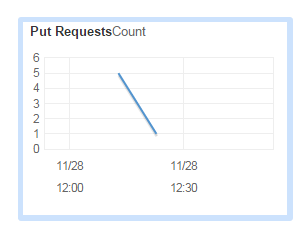
Let’s see what the Kinesis dashboard is telling us:

PutRequest count on AWS Kinesis dashboard

The PutRequest graph increased to 5 – and since I then put one more message to the stream the number decreased to 1:

PutRequest count on AWS Kinesis dashboard

In the next post we’ll see how to read the messages from the stream.

View all posts related to Amazon Web Services and Big Data here.

Replacing substrings using Regex in C# .NET: phone number example

In this post we saw an application of Regex and Match to reformat date strings. Let’s check another example: change the following phone number formats…:

  • (xxx)xxx-xxxx: (123)456-7890
  • (xxx) xxx-xxxx: (123) 456-7890
  • xxx-xxx-xxxx: 123-456-7890
  • xxxxxxxxxx: 1234567890

…into (xxx) xxx-xxxx.

Here’s a possible solution:

private static string ReformatPhone(string phone)
{
	Match match = Regex.Match(phone, @"^\(?(\d{3})\)?[\s\-]?(\d{3})\-?(\d{4})$");
	return string.Format("({0}) {1}-{2}", match.Groups[1], match.Groups[2], match.Groups[3]);
}

If you call this function with any of the above 4 examples it will return “(123) 456-7890”.

View all posts related to string and text operations here.

Phone and ZIP format checker examples from C# .NET

It’s a common task to check the validity of an input in any application. Some inputs must follow a specific format, like phone numbers and ZIP codes. Here come two regular expression examples that will help you with that:

private static bool IsValidPhone(string candidate)
{
	return Regex.IsMatch(candidate, @"^\(?\d{3}\)?[\s\-]?\d{3}\-?\d{4}$");
}

The above regular expression will return true for the following formats:

  • (xxx)xxx-xxxx: (123)456-7890
  • (xxx) xxx-xxxx: (123) 456-7890
  • xxx-xxx-xxxx: 123-456-7890
  • xxxxxxxxxx: 1234567890

Let’s now see a possible solution for a US ZIP code:

private static bool IsValidZip(string candidate)
{
	return Regex.IsMatch(candidate, @"^\d{5}(\-\d{4})?$");
}

This function returns true for the following formats:

  • xxxxx-xxxx: 01234-5678
  • xxxxx: 01234

View all posts related to string and text operations here.

Using Amazon Kinesis with the AWS.NET API Part 2: stream, NET SDK and domain setup

Introduction

In the previous post we went through an introduction of Amazon Kinesis. We established that Kinesis is an ideal out-of-the-box starting point for your Big Data analysis needs. It takes a lot of burden off your shoulders regarding scaling, maintenance and redundancy. We also said that Kinesis only provided a 24-hour storage of the messages so we’ll need to build an application, a Kinesis Client, that will ultimately process the messages in some way: filtering, sorting, saving etc.

In this post we’ll create our Kinesis stream and install the AWS SDK.

Creating the stream

Log onto the AWS console and locate the Kinesis service:

Kinesis icon on AWS console

Probably every service you use with AWS has a region that you can select in the top right section of the UI:

Amazon region selector

These regions are significant for the services with a couple of exceptions. E.g. S3, which we’ll discuss in the next series, is global and has less regional significance. In the case of Kinesis when you create a new stream then that stream will be available in the selected region. It doesn’t, however, mean that users cannot send messages to a stream in Ireland from Australia. However, it will take Australian users a bit more time to send messages to this stream than it does for a user in the UK. Also, we’ll see later that the region must be specified in code when configuring the access to AWS otherwise you may be wondering why your stream cannot be located.

You can create a new stream with the Create Stream button:

Create stream button on Amazon Kinesis

Note that Kinesis has at the time of writing this post no free-tier pricing. According to the current pricing table example it costs about $4.22 a day to process 1000 messages per second where each message is 5KB in size. We will only test with some individual messages in this series so the total cost should be minimal.

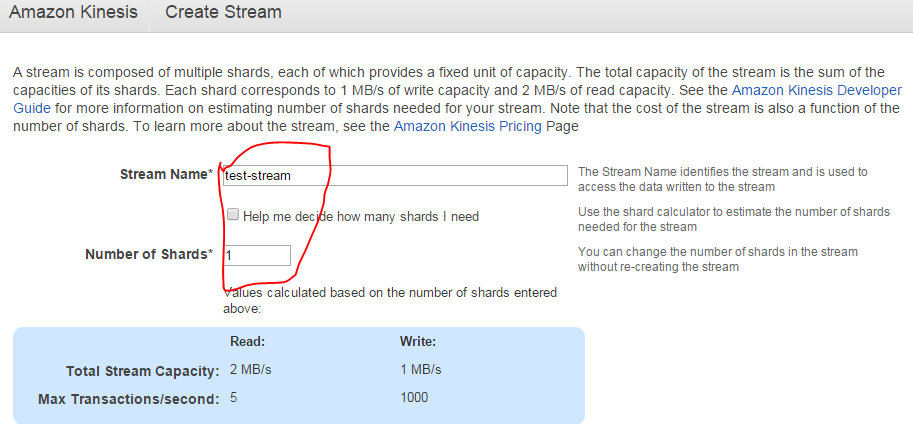
Enter a stream name and set the number of shards to 1, that will be enough for testing:

Creating a test stream in Kinesis

Press “Create” and you’ll be redirected to the original screen with the list of streams. Your new stream should be in “CREATING” status:

Kinesis stream in creating status

…which will shortly switch to “ACTIVE”.

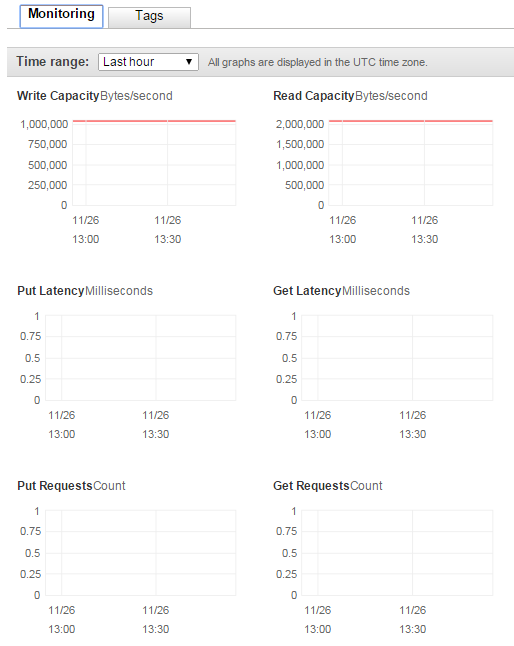
You can click the name of the stream which will open a screen with a number of performance indicators:

Kinesis stream performance indicators

We haven’t processed any messages yet so there are no put or get requests yet.

That’s it, we have a functioning Kinesis stream up and running. Let’s move on.

Installing the SDK

The Amazon .NET SDK is available through NuGet. Open Visual Studio 2012/2013 and create a new C# console application called AmazonKinesisProducer. The purpose of this application will be to send messages to the stream. In reality the message producer could by any type of application:

  • A website
  • A Windows/Android/iOS app
  • A Windows service
  • A traditional desktop app

…i.e. any application that’s capable of sending HTTP/S PUT requests to a service endpoint. We’ll keep it simple and not waste time with view-related tasks.

Install the following NuGet package:

AWS SDK NuGet package

We’ll also be working with JSON data so let’s also install the popular NewtonSoft Json package as well:

Json.NET NuGet package

Domain

In this section we’ll set up the data structure of the messages we’ll be processing. I’ll reuse a simplified version of the messages we had in a real-life project similar to what we’re going through. We’ll pretend that we’re measuring the total response time of web pages that our customers visit.

A real-life solution would involve a JavaScript solution embedded into the HTML of certain pages. That JavaScript will collect data like “transaction start” and “transaction finish” which make it possible to measure the response time of a web page as it’s experienced by a real end user. The JavaScript will then send the transaction data to a web service as JSON.

In our case of course we’ll not go through all that. We’ll pre-produce our data points using a C# object and JSON.

Insert the following class into the Kinesis producer app:

public class WebTransaction
{
	public long UtcDateUnixMs { get; set; }
	public string CustomerName { get; set; }
	public string Url { get; set; }
	public string WebMethod { get; set; }
	public int ResponseTimeMs { get; set; }
}

Dates are easiest to handle as UNIX timestamps in milliseconds as most systems will be able to handle it. DateTime in .NET4.5 doesn’t have any built-in support for UNIX timestamps but that’s easy to solve. Formatted date strings are more difficult to parse so we won’t go with that. You’ll probably understand the purpose of the other properties.

We’ll start sending message to our stream in the next post.

View all posts related to Amazon Web Services and Big Data here.

Architecture of a Big Data messaging and aggregation system using Amazon Web Services part 4

Introduction

In the previous post we looked at two components in our architecture:

  • Elastic Beanstalk to host the Java Kinesis Client Application
  • Elastic MapReduce, a Hadoop-based Amazon component as an alternative data aggregation platform

In this post we’ll look at another AWS component that very well suits data aggregation jobs: RedShift.

Amazon RedShift

Amazon RedShift is Amazon’s data warehousing solution. It follows a columnar DBMS architecture and it was designed especially for heavy data mining requests.

RedShift is based on PostgreSQL with some Amazon specific additions e.g. for importing raw data values from and S3 bucket. PostgreSQL syntax is very similar to other SQL languages you may be familiar with such as MS SQL. Therefore learning the basics of the language doesn’t require a lot of time and effort and you can become productive quite fast.

Having said all that, here comes a warning – a serious warning. The version of PostgreSQL employed on RedShift has some serious limitations compared to the full blown PostgreSQL. E.g. stored procedures, triggers, functions, auto-incrementing primary keys, enforced secondary keys etc. are NOT SUPPORTED. RedShift is still optimised for aggregation functions but it’s a good idea to be aware of the limits. This page has links to the lists of all missing or limited features.

RedShift vs. Elastic MapReduce

You may be asking which of the two aggregation mechanism is faster, EMR with Hive or RedShift with PostgreSQL. According to the tests we’ve performed in our project RedShift aggregation jobs run faster. A lot faster. RedShift can also be used as the storage device for the aggregated data. Other platforms like web services or desktop apps can easily pull the data from a RedShift table. You can also store the aggregated data on EMR on the Hadoop file system but those are not as readily available to other external platforms. We’ll look at some more storage options in the next part of this series so I won’t give any more details here.

This doesn’t mean that EMR is completely out of game but if you’re facing a scenario such as the one described in this series then you’re probably better off using RedShift for the aggregation purposes.

DB schema for RedShift

Data warehousing requires a different mindset to what you might be accustomed to from your DB-driven development experience. In a “normal” database of a web app you’ll probably have tables according to your domain like “Customer”, “Product”, “Order” etc. Then you’ll have secondary keys and intermediate tables to represent 1-to-M and M-to-M relationships. Also, you’ll probably keep your tables normalised.

That’s often simply not good enough for analytic and data mining applications. In data analysis apps your customers will be after some complex aggregation queries:

  • What was the maximum response time of /Products.aspx on my web page for users in Seattle using IE 10 on January 12 2015?
  • What was the average sales of product ‘ABC’ in our physical shops in the North-America region between 01 and 20 December 2014?
  • What is the total value of product XYZ sold on our web shop from iOS mobile apps in France in February 2015 after running a campaign?

You can replace “average” and “maximum” with any other aggregation type such as the 95th-percentile and median. With so many aggregation combinations your aggregation scripts would need to go through a very long list of aggregations. Also, trying to save every thinkable aggregation combination in different tables would cause the number of tables to explode. Such a setup will require a lot of lookups and joins which greatly reduce the performance. We haven’t even mentioned the difficulty with adding new aggregation types and storing historical data.

Data mining applications have adopted two schema types specially designed to solve this problem:

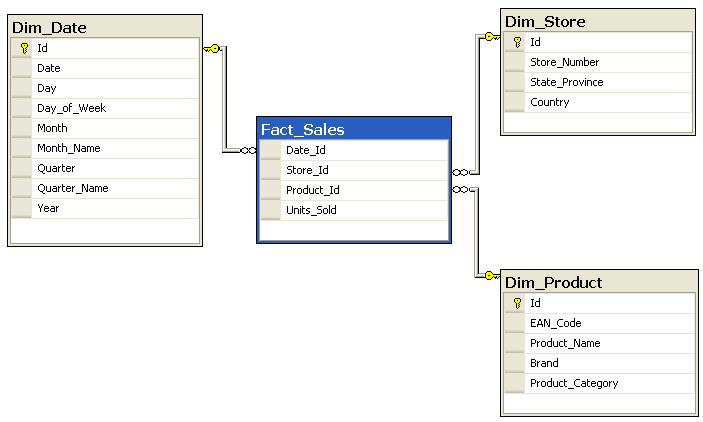
  • Star schema: a design with a Fact table in the middle and one or more Dimension tables around. The dimension tables are often denormalised
  • Snowflake schema: very similar to a star schema but the dimension tables are normalised. Therefore the fact table is surrounded by the dimension tables and their own broken-out sub-tables

I will not even attempt to describe these schema types here as the post – and the series – would explode with stuff that’s out of scope. I just wanted to make you aware of these ideas. Here’s an example for each type from Wikipedia to give you a taste.

Star:

Star schema example

Snowflake:

Snowflake schema example

They are often used by analytic applications such as SQL Server Analysis Services. If you’re planning to take on data mining at a serious level then it’s inevitable to get accustomed with them.

Of course, if you’re only planning to support some basic aggregation types then such schema designs may be overkill. It all depends on your goals.

RedShift is very well suited for both Star and Snowflake schema types. There’s long article that goes through Star and Snowflake in RedShift available here.

Let’s add RedShift to our diagram as another alternative:

Amazon Big Data Diagram with RedShift

In the next post – which will finish up this series – we’ll look into potential storage mechanisms for both RedShift and EMR.

View all posts related to Amazon Web Services here.

Architecture of a Big Data messaging and aggregation system using Amazon Web Services part 3

Introduction

In the previous post of this series we went through a possible data storage solution for our raw data points. We said that Amazon S3 was a likely candidate for our needs. We also discussed a little bit how the raw data points should be formatted in the storage files and how the S3 buckets should be organised.

In this post we’ll see how to deploy our Java Kinesis Client app and we’ll also look into a possible mechanism for data aggregation.

Deploying the Kinesis client application: Beanstalk for Java

We’ll need to see how the Kinesis client application can be deployed. It doesn’t make any difference which technology you use: Java, .NET, Python etc., the client app will be a worker process that must be deployed within a host.

Currently I’m only familiar with hosting Java-based Kinesis client applications but the proposed solution might work for other platforms. Amazon’s Elastic Beanstalk offers a highly scalable deployment platform for a variety of application types: .NET, Java, Ruby etc. For a .NET KCL app you may be looking into Microsoft Azure if you’d like to deploy the solution in the cloud.

Beanstalk is a wrapper around a full-blown EC2 machine with lots of details managed for you. If you start a new EC2 instance then you can use your Amazon credentials to log onto it, customise its settings, deploy various software on it etc., in other words use as a “normal” virtual machine. With Beanstalk a lot of settings will be managed for you and you won’t be able to log onto the underlying EC2 instance. Beanstalk also lets you manage deployment packages and you can easily add new environments and applications and deploy different versions of your product on them. It is an ideal platform to house a worker application like our Kinesis client. You can also add autoscaling rules that describe when a new instance should be added to a cluster. So you’ll get a lot of extras in exchange for not having the full control over the EC2 instance.

I’ve written an article on how to deploy a Kinesis client application on Beanstalk available here.

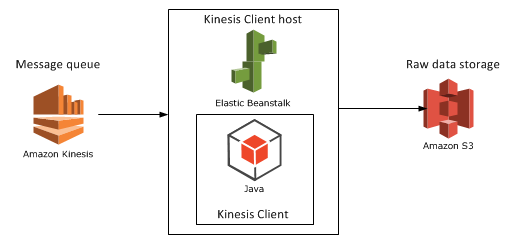
Let’s add Beanstalk as the Kinesis client host to our diagram:

Step 4 with Beanstalk as host

Aggregation mechanism option 1: Elastic MapReduce

Elastic MapReduce (EMR) is Amazon’s web service with the Hadoop framework installed. What’s MapReduce? I’ve introduced MapReduce in an unrelated post elsewhere on this blog. I’ll copy the relevant section for a short introduction:

Short summary of MapReduce

MapReduce – or Map/Filter/Reduce – is eagerly used in data mining and big data applications to find information from a large, potentially unstructured data set. E.g. finding the average age of all Employees who have been employed for more than 5 years is a good candidate for this algorithm.

The individual parts of Map/Filter/Reduce, i.e. the Map, the Filter and the Reduce are steps or operations in a chain to compute something from a collection. Not all 3 steps are required in all data mining cases. Examples:

  • Finding the average age of employees who have been working at a company for more than 5 years: you map the age property of each employee to a list of integers but filter out those who have been working for less than 5 years. Then you calculate the average of the elements in the integer list, i.e. reduce the list to a single outcome.
  • Finding the ids of every employee: if the IDs are strings then you can map the ID fields into a list of strings, there’s no need for any filtering or reducing.
  • Finding the average age of all employees: you map the age of each employee into an integer list and then calculate the average of those integers in the reduce phase, there’s no need for filtering
  • Find all employees over 50 years of age: we filter out the employees who are younger than 50, there’s no need for mapping or reducing the employees collection.

MapReduce implementations in reality can become quite complex depending on the query and structure of the source data.

You can read more about MapReduce in general here.

EMR continued

Hadoop is eagerly used in the distributed computing world where large amounts of potentially unstructured input files are stored across several servers. The final goal is of course to process these raw data files in some way, like what we’re trying to do in this series. If you’re planning to work with Big Data and data-mining then you’ll definitely come across Hadoop at some point. Hadoop is a large system with a steep learning curve.

Also, there’s a whole ecosystem built on top of Hadoop to simplify writing MapReduce functions and queries. There are even companies out there, like Hortonworks, who specialise in GUI tools around Hadoop so that you don’t have to write plain queries in a command line tool.

Some of the technologies around Hadoop are the following:

  • Java MapReduce: you can write MapReduce applications with Java. These are quite low-level operations and probably not too many Big Data developers go with this option in practice but I might be wrong here
  • Hive: an SQL-like language that creates Java MapReduce functions under the hood and runs them. This is a lot less complex solution than writing a Java MapReduce function
  • Pig: Pig – or Pig Latin – is another language/technology to handle large amounts of data in a fast, parallel and efficient way

…and a whole lot more but Hive and Pig seem to be the most popular ones at the time of writing this post.

Hadoop is normally installed on Linux machines although it can be deployed on Windows with some tricks – and luck :-). However, on production systems you’ll probably not want to have Hadoop on Windows. Therefore if you start a new instance of EMR in Amazon then you’ll be given a Linux EC2 machine with Hadoop and a couple of other tools installed, e.g. Hive and Pig will follow along although you can opt out of those when you start a new Hadoop instance. It’s good to have them installed so that you can test your Hive/Pig scripts on them.

Connecting EMR with S3

Now the big question is how we can import the S3 data and analyse them on a Hadoop EMR instance. Amazon extended the Hive language so that it can easily interact with S3. The following Hive statement imports all files from a given S3 bucket. Note that every record within the S3 bucket/folder will be imported, you don’t need to provide the file names.

CREATE EXTERNAL TABLE IF NOT EXISTS raw_data_points (customerId string, url string,date string,response_time int,http_verb string,http_response_code int)
PARTITIONED BY (customerId string)
ROW FORMAT DELIMITED
FIELDS TERMINATED BY ','
LOCATION 's3://raw-data-points/00-15-11-10-2014';

I won’t go into every detail of these statements, you’ll need to explore Hive yourself, but here’s the gist of it:

  • We create a temporary table with the columns listed in brackets
  • We indicate that the fields in the raw data source are delimited by ‘,’
  • Finally we show where the raw data files are located

You can then run the Hive aggregation functions on that temporary table and export the result into another data source – which we’ll explore later. You can probably achieve the same with Pig, which is claimed to run faster than Hive, but I’m not familiar with it at all.

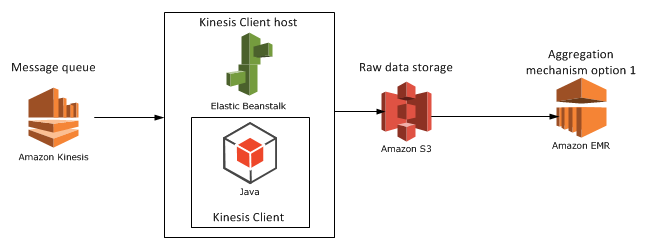
We’ll look at another candidate for the aggregation mechanism, RedShift in the next post. For the time being let’s add EMR to our diagram:

Step 5 with EMR

View all posts related to Amazon Web Services here.

Replacing substrings using Regex in C# .NET: string cleaning example

We often need to sanitize string inputs where the input value is out of our control. Some of those inputs can come with unwanted characters. The following method using Regex removes all non-alphanumeric characters except for ‘@’, ‘-‘ and ‘.’:

private static string RemoveNonAlphaNumericCharacters(String input)
{
	return Regex.Replace(input, @"[^\w\.@-]", string.Empty);
}

Calling this method like…

string cleanString = RemoveNonAlphaNumericCharacters("()h{e??l#'l>>o<<");

…returns “hello”.

View all posts related to string and text operations here.

Elliot Balynn's Blog

A directory of wonderful thoughts

Software Engineering

Web development

Disparate Opinions

Various tidbits

chsakell's Blog

WEB APPLICATION DEVELOPMENT TUTORIALS WITH OPEN-SOURCE PROJECTS

Once Upon a Camayoc

ARCHIVED: Bite-size insight on Cyber Security for the not too technical.