Introduction to ASP.NET Core part 8: MVC continued with controller actions and our first view

Introduction

In the previous post we started looking into MVC in .NET Core. We added a new library through NuGet and wired up the MVC middleware in Startup.cs. Routing is about mapping parts of the requested URL to a controller and an action. The controller is a normal C# class which most often derives from the Controller base class. The action is a C# function that returns some type of response to the HTTP request. The action can have 0, 1 or more parameters that must match the query parameters of the URL otherwise the routing engine won’t find it. We also wrote our first controller called the HomeController and the first action called Index which corresponds to the /home/index URL. We also discussed the basics of routing and added a very basic convention based route to Startup.cs.
Read more of this post

Introduction to ASP.NET Core part 7: starting with MVC

Introduction

In the previous post we took a look at how to work with various environments and their settings. With environment we now mean things like the development, alpha, beta, production etc. environments that a typical web application goes through. New things are tested in development, then the changes are deployed to beta/release/staging and when everyone is happy with the features then the application is deployed to the production environment. The most important point in our discussion was that an application will likely have different settings in different environments. A setting such as “RabbitMqServiceUrl” will have a certain value in the alpha environment but it will most definitely differ from the service URL in the production environment. We saw that the various configuration sources behave like cascading style sheets. We can load multiple settings sources in code. The first one will contain the generic values and the subsequent ones the values of a certain environment. The environment specific settings will override the generic ones.

In this post we’ll start looking at how to work with MVC in .NET Core.

Read more of this post

Introduction to ASP.NET Core part 6: environments and settings

Introduction

In the previous post we looked at how to deal with static files in .NET Core. Examples of static files include JS, CSS files, images and HTML pages such as index.html. They are normally placed within the web root folder called wwwroot in an ASP.NET project although we can configure other folders in code. These static files are not reachable via a URL at first. Navigation needs to be turned on in Startup.cs using specialised middleware. Hence handling static files is a good example of the modularity that .NET Core claims to display. We also saw how to activate the built-in welcome page via another middleware. It is also a static page and its main purpose is to check whether our ASP.NET web application has been correctly started by the web server. We also saw how to serve up a default and a customised home page for the site visitors.

In this post we’ll investigate the various environments available for an ASP.NET Core project.

Read more of this post

Introduction to ASP.NET Core part 5: static files

Introduction

In the previous post we looked at what middleware means and how it works in .NET Core. A piece of middleware is a component that can be installed during the startup phase of the application in the Configure method of Startup.cs. The components make up a pipeline that the web request travels through until it reaches a so-called terminal component. Once the request has been processed by a terminal component it travels back through the same pipeline in the opposite direct in order to provide some answer to the request. We saw a couple of examples of built-in middleware and we also investigated how to build our own custom component. We also built a wrapper around our component so that it could be easily installed as an extension method of the application builder.

Understanding the basics of middleware is a good foundation for many other areas in .NET as a lot of functionality requires the installation of middleware in Startup.cs. The topic of this post is no exception. We’re going to look at how to work with static files.

Read more of this post

Introduction to ASP.NET Core part 4: middleware and the component pipeline

Introduction

In the previous post we saw how to add a configuration file to an ASP.NET Core application and how to extract the various settings from it. We now know that the traditional web.config file has been replaced by appsettings.json and JSON is used in favour of XML. We also demonstrated that retrieving the settings values is achieved in a very different way compared to how it was done before. The ConfigurationBuilder object with its various extension methods help us load and read the configuration settings. In addition, various techniques such as using the generic IOptions of T interface let us process the different sections in appsettings.json so that we only distribute those settings that are relevant to the consuming classes that they really need. This is in contrast to passing the full list of configuration key-value pairs everywhere. The consuming class can then read the settings in an object oriented way from specialised options objects.

In this post we’ll start looking at middleware and the component pipeline in .NET Core. We’ll also write a simple custom middleware.

Read more of this post

Introduction to ASP.NET Core part 3: the configuration file

Introduction

In the previous post we looked at how dependencies and dependency injection work in .NET Core. New libraries can be downloaded to the solution in various ways: through the NuGet GUI, The NuGet package manager console, by editing project.json directly or letting Visual Studio figure out if a certain library could solve a missing reference problem. Dependency injection can be achieved through a built-in IoC – Inversion of Control container – where we register the abstractions and the corresponding dependencies in Startup.cs. We can give various lifetimes to the dependencies: transient, scoped and singleton. Then whenever a class requires a dependency the IoC container will serve up the registered concrete implementation automatically.

In this post we’ll see how to add a configuration file to the project and how to read from it.

Read more of this post

Introduction to ASP.NET Core part 2: dependencies and dependency injection

Introduction

In the previous post we started looking at the anatomy of an ASP.NET Core application. .NET Core is a cross-platform, highly modular and lightweight application framework that is meant to be the future of application development in .NET. We identified some significant changes compared to traditional ASP.NET applications that we saw before. There are a couple of new JSON files such as global.json and project.json. Global.asax.cs is gone and has been totally replaced by Startup.cs. There’s still a web.config file but it’s not used for the same kind of configuration as before. A different json file which we haven’t seen yet will be used for that purpose. The file structure is also different in that the source files are stored in a folder called “src” by default. Note that .NET Core is still in preview mode at the time of writing this series.

In this post we’ll look at adding dependencies and using them via dependency injection and service registration.

Read more of this post

Introduction to ASP.NET Core part 1: anatomy of an empty web project

Introduction

ASP.NET Core is a brand new portable web framework by Microsoft. It is similar to the “normal” ASP.NET versions we’ve seen so far, such as ASP.NET 4.5. ASP.NET 4.5 targets the .NET 4.5 framework and conversely ASP.NET Core is primarily targeted at the .NET Core framework. However, it can also target the other .NET frameworks like .NET 4.5 or 4.6. It is currently in preview mode at the time of writing this post but developers are free to play around with it already now. It’s good to get familiar with the new features because .NET Core is meant to be the future direction of .NET development. There’s a number of significant changes compared to the earlier versions of ASP.NET that .NET developers will need to get used to.

Currently .NET Core is a subset of the full-blown .NET framework meaning that not all features of .NET are available in it. However, as the product matures the gap between .NET Core and full .NET should diminish. Eventually all new .NET projects should target .NET Core.

.NET Core marks a significant shift from Microsoft’s past policies and attitude of targeting Windows only and keeping as much as possible secret and paid. .NET Core is cross-platform and designed to run on multiple operating systems: Windows, Mac OS and Linux. It is also open-source, you can view its public GitHub repository here.

Read more of this post

.NET source code reference

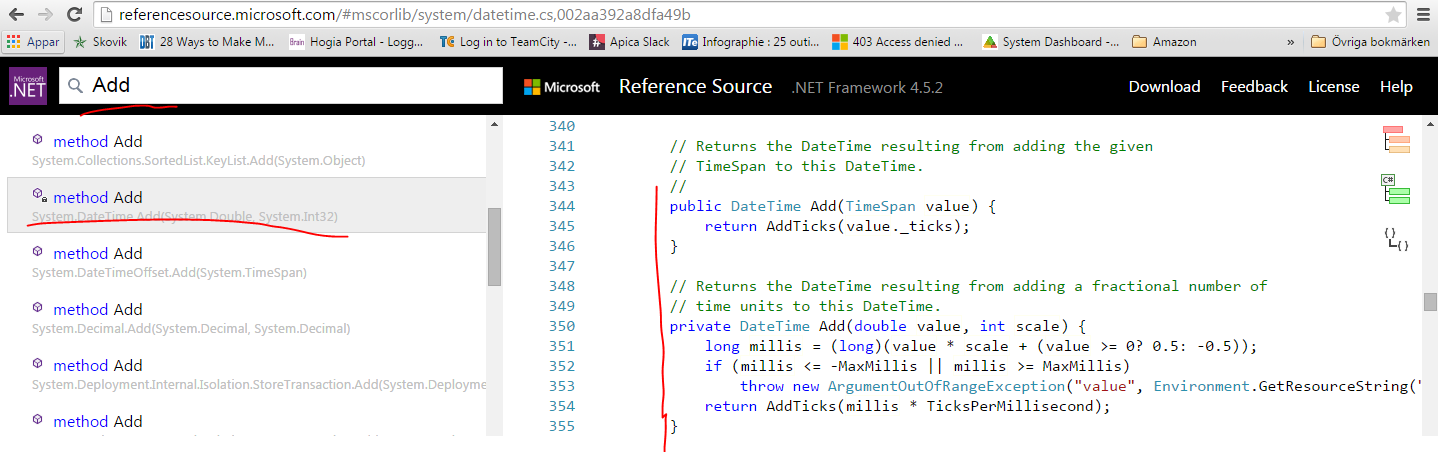
This is just a tip if you’d like to check how a certain built-in method in .NET is implemented. The .NET core library has a reference page available here:

http://referencesource.microsoft.com/

You can search for a method, click the correct method name and view the exact implementation details:

Search for add method on .NET reference page

Elliot Balynn's Blog

A directory of wonderful thoughts

Software Engineering

Web development

Disparate Opinions

Various tidbits

chsakell's Blog

WEB APPLICATION DEVELOPMENT TUTORIALS WITH OPEN-SOURCE PROJECTS

Once Upon a Camayoc

ARCHIVED: Bite-size insight on Cyber Security for the not too technical.