Grouping elements in LINQ .NET using GroupBy and an EqualityComparer

The GroupBy operator has the same function as GROUP BY in SQL: group elements in a sequence by a common key. The GroupBy operator comes with 8 different signatures. Each returns a sequence consisting of objects that implement the IGrouping interface of type K – the key type – and T – the type of the objects in the sequence. IGrouping implements IEnumerable of T. So when we iterate through the result the we can first look at the outer sequence of keys and then the inner sequence of each object with that key.

The simplest version of GroupBy accepts a Func delegate of T and K, which acts as the key selector. It will compare the objects in the sequence using a default comparer. E.g. if you want to group the objects by their integer IDs then you can let the default comparer do its job. Another version of GroupBy lets you supply your own comparer to define a custom grouping or if the Key is an object where you want to define your own rules for equality.

We’ll need an example sequence which has an ID. In the posts on LINQ we often take the following collections for the demos:

IEnumerable<Singer> singers = new List<Singer>() 
	{
		new Singer(){Id = 1, FirstName = "Freddie", LastName = "Mercury"} 
		, new Singer(){Id = 2, FirstName = "Elvis", LastName = "Presley"}
		, new Singer(){Id = 3, FirstName = "Chuck", LastName = "Berry"}
		, new Singer(){Id = 4, FirstName = "Ray", LastName = "Charles"}
		, new Singer(){Id = 5, FirstName = "David", LastName = "Bowie"}
	};
IEnumerable<Concert> concerts = new List<Concert>()
	{
		new Concert(){SingerId = 1, ConcertCount = 53, Year = 1979}
		, new Concert(){SingerId = 1, ConcertCount = 74, Year = 1980}
		, new Concert(){SingerId = 1, ConcertCount = 38, Year = 1981}
		, new Concert(){SingerId = 2, ConcertCount = 43, Year = 1970}
		, new Concert(){SingerId = 2, ConcertCount = 64, Year = 1968}
		, new Concert(){SingerId = 3, ConcertCount = 32, Year = 1960}
		, new Concert(){SingerId = 3, ConcertCount = 51, Year = 1961}
		, new Concert(){SingerId = 3, ConcertCount = 95, Year = 1962}
		, new Concert(){SingerId = 4, ConcertCount = 42, Year = 1950}
		, new Concert(){SingerId = 4, ConcertCount = 12, Year = 1951}
		, new Concert(){SingerId = 5, ConcertCount = 53, Year = 1983}
	};

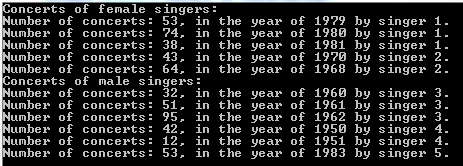
The singers collection won’t actually be needed for the code example, it simply shows the purpose of the concerts collection. Let’s imagine that our Singers collection includes both male and female singers and that ids below 3 are female singers and the others are all male singers. Our goal is to group the concerts based on gender using this information. We can have the following custom equality comparer:

public class SingerGenderComparer : IEqualityComparer<int>
{
	private int _femaleSingerIdLimit = 3;
		
	public bool Equals(int x, int y)
	{
		return IsPerformedByFemaleSinger(x) == IsPerformedByFemaleSinger(y);
	}

	public int GetHashCode(int obj)
	{
		return IsPerformedByFemaleSinger(obj) ? 1 : 2;
	}

	public bool IsPerformedByFemaleSinger(int singerId)
	{
		return singerId < _femaleSingerIdLimit;
	}
}

Here’s the grouping of the Concerts collection using the custom comparer:

SingerGenderComparer comparer = new SingerGenderComparer();

IEnumerable<IGrouping<int, Concert>> concertGroups = concerts.GroupBy(c => c.SingerId, comparer);
foreach (IGrouping<int, Concert> concertGroup in concertGroups)
{
	Console.WriteLine("Concerts of {0} singers: ", comparer.IsPerformedByFemaleSinger(concertGroup.Key) ? "female" : "male");
	foreach (Concert concert in concertGroup)
	{
		Console.WriteLine("Number of concerts: {0}, in the year of {1} by singer {2}.", concert.ConcertCount, concert.Year, concert.SingerId);
	}
}

This yields the following output:

GroupBy output with custom comparer and default selector

You can define the type of object that will be selected from the base sequence using another version of GroupBy which allows you to provide a key selector:

IEnumerable<IGrouping<int, int>> concertGroupsFiltered = concerts.GroupBy(c => c.SingerId, c => c.ConcertCount, comparer);
foreach (IGrouping<int, int> concertGroup in concertGroupsFiltered)
{
	Console.WriteLine("Concerts of {0} singers: ", comparer.IsPerformedByFemaleSinger(concertGroup.Key) ? "female" : "male");
	foreach (int concertCount in concertGroup)
	{
		Console.WriteLine("Number of concerts: {0}.", concertCount);
	}
}

…which gives the following output:

GroupBy output with custom comparer and custom selector

You can view all LINQ-related posts on this blog here.

RabbitMQ in .NET C#: more complex error handling in the Receiver

Introduction

In the previous part on RabbitMQ .NET we looked at ways how to reject a message if there was an exception while handling the message on the Receiver’s side. The message could then be discarded or re-queued for a retry. However, the exception handling logic was very primitive in that the same message could potentially be thrown at the receiver infinitely causing a traffic jam in the messages.

This post builds upon the basics of RabbitMQ in .NET. If you are new to this topic you should check out all the previous posts listed on this page. I won’t provide any details on bits of code that we’ve gone through before.

Most of the posts on RabbitMQ on this blog are based on the work of RabbitMQ guru Michael Stephenson.

So we cannot just keep retrying forever. We can instead finally discard the message after a certain amount of retries or depending on what kind of exception was encountered.

The logic around retries must be implemented in the receiver as there’s no simple method in RabbitMQ .NET, like “BasicRetry”. Why should there be anyway? Retry strategies can be very diverse so it’s easier to let the receiver handle it.

The strategy here is to reject the message without re-queuing it. We’ll then create a new message based on the one that caused the exception and attach an integer value to it indicating the number of retries. Then depending on a maximum ceiling we either create yet another message for re-queuing or discard it altogether.

We’ll build on the demo we started on in the previous post referred to above so have it ready.

Demo

We’ll reuse the queue from the previous post which we called “BadMessageQueue”. We’ll also reuse the code in BadMessageSender as there’s no variation on the Sender side.

BadMessageReceiver will however handle the messages in a different way. Currently there’s a method called ReceiveBadMessages which is called upon from Main. Comment out that method call. Insert the following method in ReceiveBadMessages.Program.cs and call it from Main:

private static void ReceiveBadMessageExtended(IModel model)
{
	model.BasicQos(0, 1, false);
	QueueingBasicConsumer consumer = new QueueingBasicConsumer(model);
	model.BasicConsume(RabbitMqService.BadMessageBufferedQueue, false, consumer);
	string customRetryHeaderName = "number-of-retries";
	int maxNumberOfRetries = 3;
	while (true)
	{
		BasicDeliverEventArgs deliveryArguments = consumer.Queue.Dequeue() as BasicDeliverEventArgs;
		String message = Encoding.UTF8.GetString(deliveryArguments.Body);
		Console.WriteLine("Message from queue: {0}", message);
		Random random = new Random();
		int i = random.Next(0, 3);
		int retryCount = GetRetryCount(deliveryArguments.BasicProperties, customRetryHeaderName);
		if (i == 2) //no exception, accept message
		{
			Console.WriteLine("Message {0} accepted. Number of retries: {1}", message, retryCount);
			model.BasicAck(deliveryArguments.DeliveryTag, false);
		}
		else //simulate exception: accept message, but create copy and throw back
		{
			if (retryCount < maxNumberOfRetries)
			{
				Console.WriteLine("Message {0} has thrown an exception. Current number of retries: {1}", message, retryCount);
				IBasicProperties propertiesForCopy = model.CreateBasicProperties();
				IDictionary<string, object> headersCopy = CopyHeaders(deliveryArguments.BasicProperties);
				propertiesForCopy.Headers = headersCopy;
				propertiesForCopy.Headers[customRetryHeaderName] = ++retryCount;
				model.BasicPublish(deliveryArguments.Exchange, deliveryArguments.RoutingKey, propertiesForCopy, deliveryArguments.Body);
				model.BasicAck(deliveryArguments.DeliveryTag, false);
				Console.WriteLine("Message {0} thrown back at queue for retry. New retry count: {1}", message, retryCount);
			}
			else //must be rejected, cannot process
			{
				Console.WriteLine("Message {0} has reached the max number of retries. It will be rejected.", message);
				model.BasicReject(deliveryArguments.DeliveryTag, false);
			}
		}
	}
}

…where CopyHeaders and GetRetryCount look as follows:

private static IDictionary<string, object> CopyHeaders(IBasicProperties originalProperties)
{
	IDictionary<string, object> dict = new Dictionary<string, object>();
	IDictionary<string, object> headers = originalProperties.Headers;
	if (headers != null)
	{
		foreach (KeyValuePair<string, object> kvp in headers)
		{
			dict[kvp.Key] = kvp.Value;
		}
	}

	return dict;
}

private static int GetRetryCount(IBasicProperties messageProperties, string countHeader)
{
	IDictionary<string, object> headers = messageProperties.Headers;
	int count = 0;
	if (headers != null)
	{
		if (headers.ContainsKey(countHeader))
		{
			string countAsString = Convert.ToString( headers[countHeader]);
			count = Convert.ToInt32(countAsString);
		}
	}

	return count;
}

Let’s see what’s going on here. We define a custom header to store the number of retries for a message. We also set an upper limit of 3 on the number of retries. Then we accept the messages in the usual way. A random number between 0 and 3 is generated – where the upper limit is exclusive – to decide whether to simulate an exception or not. If this number is 2 then we accept and acknowledge the message, so there’s a higher probability of “throwing an exception” just to make this demo more interesting. We also extract the current number of retries using the GetRetryCount method. This helper method simply checks the headers of the message for the presence of the custom retry count header.

If we simulate an exception then we need to check if the current retry count has reached the max number of retries. If not then the exciting new stuff begins. We create a new message where we copy the elements of the original message. We also set the new value of the retry count header. We send the message copy back to where it came from and acknowledge the original message. Otherwise if the max number of retries has been reached we reject the message completely using the BasicReject method we saw in the previous part.

Run both the Sender and Receiver apps and start sending messages from the Sender. Depending on the random number generated in the Receiver you’ll see a differing number of retries but you may get something like this:

Advanced retry console output

We can see the following here:

  • Message hello was rejected at first and then accepted after 1 retry
  • Message hi was accepted immediately
  • Message bye was accepted after 2 retries
  • Message seeyou was rejected completely

So we’ve seen how to add some more logic into how to handle exceptions.

Other considerations and extensions:

  • You can specify different max retries depending on the exception type. In that case you can add the exception type to the headers as well
  • You might consider storing the retry count somewhere else than the message itself, e.g. within the Receiver – the advantage of storing the retry count in the message is that if you have multiple receivers waiting for messages from the same queue then they will all have access to the retry property
  • If there’s a dependency between messages then exception handling becomes a bigger challenge: if message B depends on message A and message A throws an exception, what do we do with message B? You can force related messages to be processed in an ordered fashion which will have a negative impact on the message throughput. On the other hand you may simply ignore this scenario if it’s not important enough for your case – “enough” depends on the cost of slower message throughput versus the cost of an exception in interdependent messages. Somewhere between these two extremes you can decide to keep the order of related messages only and let all others be delivered normally. In this case you can put the sequence number, such as “5/10” in the header so that the receiver can check if all messages have come in correctly. If you have multiple receivers then the sequence number must be stored externally so that all receivers will have access to the same information. Otherwise you can have a separate queue or even a separate RabbitMQ instance for related messages in case the proportion of related messages in total number of messages is small.

View the list of posts on Messaging here.

Converting a sequence of objects into a Lookup with LINQ C#

A Lookup in .NET is one of the lesser known data structures. It is similar to a Dictionary but the keys are not unique. You can insert multiple elements for the same key.

Say you have the following object and collection:

public class Singer
{
	public int Id { get; set; }
	public string FirstName { get; set; }
	public string LastName { get; set; }
	public int BirthYear { get; set; }
}
IEnumerable<Singer> singers = new List<Singer>() 
	{
		new Singer(){Id = 1, FirstName = "Freddie", LastName = "Mercury", BirthYear=1964}
		, new Singer(){Id = 2, FirstName = "Elvis", LastName = "Presley", BirthYear = 1954}
		, new Singer(){Id = 3, FirstName = "Chuck", LastName = "Berry", BirthYear = 1954}
		, new Singer(){Id = 4, FirstName = "Ray", LastName = "Charles", BirthYear = 1950}
		, new Singer(){Id = 5, FirstName = "David", LastName = "Bowie", BirthYear = 1964}
	};

You can group the singers into an ILookup as follows:

ILookup<int, Singer> singersByBirthYear = singers.ToLookup(s => s.BirthYear);
IEnumerable<Singer> filtered = singersByBirthYear[1964];
foreach (Singer s in filtered)
{
	Console.WriteLine(s.LastName);
}

…which outputs “Mercury” and “Bowie”.

You can also set the elements inserted into the ILookup using an overloaded variant where you specify the element selector:

ILookup<int, string> singerNamesByBirthYear = singers.ToLookup(s => s.BirthYear, si => string.Concat(si.LastName, ", ", si.FirstName));
IEnumerable<string> filtered2 = singerNamesByBirthYear[1964];
foreach (string s in filtered2)
{
	Console.WriteLine(s);
}

…which prints “Mercury, Freddie” and “Bowie, David”.

You can view all LINQ-related posts on this blog here.

Grouping elements in LINQ .NET using GroupBy

The GroupBy operator has the same function as GROUP BY in SQL: group elements in a sequence by a common key. The GroupBy operator comes with 8 different signatures. Each returns a sequence consisting of objects that implement the IGrouping interface of type K – the key – and T – the type of the objects in the sequence. IGrouping implements IEnumerable of T. So when we iterate through the result the we can first look at the outer sequence of keys and then the inner sequence of each object with that key.

The simplest version of GroupBy accepts a Func delegate of T and K, which acts as the key selector. We’ll need an example sequence which has an ID. In the posts on LINQ we often take the following collections for the demos:

IEnumerable<Singer> singers = new List<Singer>() 
	{
		new Singer(){Id = 1, FirstName = "Freddie", LastName = "Mercury"} 
		, new Singer(){Id = 2, FirstName = "Elvis", LastName = "Presley"}
		, new Singer(){Id = 3, FirstName = "Chuck", LastName = "Berry"}
		, new Singer(){Id = 4, FirstName = "Ray", LastName = "Charles"}
		, new Singer(){Id = 5, FirstName = "David", LastName = "Bowie"}
	};
IEnumerable<Concert> concerts = new List<Concert>()
	{
		new Concert(){SingerId = 1, ConcertCount = 53, Year = 1979}
		, new Concert(){SingerId = 1, ConcertCount = 74, Year = 1980}
		, new Concert(){SingerId = 1, ConcertCount = 38, Year = 1981}
		, new Concert(){SingerId = 2, ConcertCount = 43, Year = 1970}
		, new Concert(){SingerId = 2, ConcertCount = 64, Year = 1968}
		, new Concert(){SingerId = 3, ConcertCount = 32, Year = 1960}
		, new Concert(){SingerId = 3, ConcertCount = 51, Year = 1961}
		, new Concert(){SingerId = 3, ConcertCount = 95, Year = 1962}
		, new Concert(){SingerId = 4, ConcertCount = 42, Year = 1950}
		, new Concert(){SingerId = 4, ConcertCount = 12, Year = 1951}
		, new Concert(){SingerId = 5, ConcertCount = 53, Year = 1983}
	};

The singers collection won’t actually be needed for the code example, it simply shows the purpose of the concerts collection. Here’s the grouping of the Concerts collection by singer ID:

IEnumerable<IGrouping<int, Concert>> concertGroups = concerts.GroupBy(c => c.SingerId);
foreach (IGrouping<int, Concert> concertGroup in concertGroups)
{
	Console.WriteLine("Concerts for singer of ID {0}:", concertGroup.Key);
	foreach (Concert concert in concertGroup)
	{
		Console.WriteLine("Number of concerts: {0}, in the year of {1}.", concert.ConcertCount, concert.Year);
	}
}

GroupBy operator basic output

You can define the type of object that will be selected from the base sequence using another version of GroupBy which allows you to provide a key selector:

IEnumerable<IGrouping<int, int>> concertGroupsFiltered = concerts.GroupBy(c => c.SingerId, c => c.ConcertCount);
foreach (IGrouping<int, int> concertGroup in concertGroupsFiltered)
{
	Console.WriteLine("Concerts for singer of ID {0}:", concertGroup.Key);
	foreach (int concertCount in concertGroup)
	{
		Console.WriteLine("Number of concerts: {0}.", concertCount);
	}
}

GroupBy operator key selector output

View the list of posts on LINQ here.

RabbitMQ in .NET C#: basic error handling in Receiver

Introduction

This post builds upon the basics of RabbitMQ in .NET. If you are new to this topic you should check out all the previous posts listed on this page. I won’t provide any details on bits of code that we’ve gone through before.

Most of the posts on RabbitMQ on this blog are based on the work of RabbitMQ guru Michael Stephenson.

It can happen that the Receiver is unable to process a message it has received from the message queue.

In some cases the receiver may not be able to accept an otherwise well-formed message. That message needs to be put back into the queue for later re-processing.

There’s also a case where processing a message throws an exception every time the receiver tries to process it. It will keep putting the message back to the queue only to receive the same exception over and over again. This also blocks the other messages from being processed. We call such a message a Poison Message.

In a third scenario the Receiver simply might not understand the message. It is malformed, contains unexpected properties etc.

The receiver can follow 2 basic strategies: retry processing the message or discard it after the first exception. Both options are easy to implement with RabbitMQ .NET.

Demo

If you’ve gone through the other posts on RabbitMQ on this blog then you’ll have a Visual Studio solution ready to be extended. Otherwise just create a new blank solution in Visual Studio 2012 or 2013. Add a new solution folder called FailingMessages to the solution. In that solution add the following projects:

  • A console app called BadMessageReceiver
  • A console app called BadMessageSender
  • A C# library called MessageService

Add the following NuGet package to all three projects:

RabbitMQ new client package NuGet

Add a project reference to MessageService from BadMessageReceiverand BadMessageSender. Add a class called RabbitMqService to MessageService with the following code to set up the connection with the local RabbitMQ instance:

public class RabbitMqService
{
		private string _hostName = "localhost";
		private string _userName = "guest";
		private string _password = "guest";

		public static string BadMessageBufferedQueue = "BadMessageQueue";

		public IConnection GetRabbitMqConnection()
		{
			ConnectionFactory connectionFactory = new ConnectionFactory();
			connectionFactory.HostName = _hostName;
			connectionFactory.UserName = _userName;
			connectionFactory.Password = _password;

			return connectionFactory.CreateConnection();
		}
}

Let’s set up the queue. Add the following code to Main of BadMessageSender:

RabbitMqService rabbitMqService = new RabbitMqService();
IConnection connection = rabbitMqService.GetRabbitMqConnection();
IModel model = connection.CreateModel();
model.QueueDeclare(RabbitMqService.BadMessageBufferedQueue, true, false, false, null);

Run the Sender project. Check in the RabbitMq management console that the queue has been set up.

Comment out the call to model.QueueDeclare, we won’t need it.

Add the following code in Program.cs of the Sender:

private static void RunBadMessageDemo(IModel model)
{
	Console.WriteLine("Enter your message. Quit with 'q'.");
	while (true)
	{
		string message = Console.ReadLine();
		if (message.ToLower() == "q") break;
		IBasicProperties basicProperties = model.CreateBasicProperties();
		basicProperties.SetPersistent(true);
		byte[] messageBuffer = Encoding.UTF8.GetBytes(message);
		model.BasicPublish("", RabbitMqService.BadMessageBufferedQueue, basicProperties, messageBuffer);
	}
}

This is probably the most basic message sending logic available in RabbitMQ .NET. Insert a call to this method from Main.

Now let’s turn to the Receiver. Add the following code to Main in Program.cs of BadMessageReceiver:

RabbitMqService messageService = new RabbitMqService();
IConnection connection = messageService.GetRabbitMqConnection();
IModel model = connection.CreateModel();
ReceiveBadMessages(model);

…where ReceiveBadMessages looks as follows:

private static void ReceiveBadMessages(IModel model)
{
	model.BasicQos(0, 1, false);
	QueueingBasicConsumer consumer = new QueueingBasicConsumer(model);
	model.BasicConsume(RabbitMqService.BadMessageBufferedQueue, false, consumer);
	while (true)
	{
		BasicDeliverEventArgs deliveryArguments = consumer.Queue.Dequeue() as BasicDeliverEventArgs;
		String message = Encoding.UTF8.GetString(deliveryArguments.Body);
		Console.WriteLine("Message from queue: {0}", message);
		Random random = new Random();
		int i = random.Next(0, 2);

		//pretend that message cannot be processed and must be rejected
		if (i == 1) //reject the message and discard completely
		{
			Console.WriteLine("Rejecting and discarding message {0}", message);
			model.BasicReject(deliveryArguments.DeliveryTag, false);
		}
		else //reject the message but push back to queue for later re-try
		{
			Console.WriteLine("Rejecting message and putting it back to the queue: {0}", message);
			model.BasicReject(deliveryArguments.DeliveryTag, true);
		}
	}
}

The only new bit compared to the basics is the BasicReject method. It accepts the delivery tag and a boolean parameter. If that’s set to false then the message is sent back to RabbitMQ which in turn will discard it, i.e. the message is not re-entered into the queue. Else if it’s true then the message is put back into the queue for a retry.

Let’s run the demo. Start the Sender app first. Then right-click the Receiver app in VS, select Debug and Run new instance. You’ll have two console windows up and running. Start sending messages from the Sender. Depending on the outcome of the random integer on the Receiver side you should see an output similar to this one:

Basic retry console output 1

In the above case the following has happened:

  • Message “hello” was received and immediately discarded
  • Same happened to “hello again”
  • Message “bye” was put back into the queue several times before it was finally discarded – see the output below

Basic retry console output 2

Note that I didn’t type “bye” multiple times. The reject-requeue-retry cycle was handled automatically.

The message “bye” in this case was an example of a Poison Message. In the code it was eventually rejected because the random number generator produced a 0.

This strategy was OK for demo purposes but you should do something more sophisticated in a real project. You can’t just rely on random numbers. On the other hand if you don’t build in any mechanism to finally discard a message then it will just keep coming back to the receiver. That will cause a “traffic jam” in the message queue as all messages will keep waiting to be delivered.

We’ll look at some other strategies in the next post.

View the list of posts on Messaging here.

Joining common values from two sequences using the LINQ Intersect operator

Say you have the following two sequences:

string[] first = new string[] {"hello", "hi", "good evening", "good day", "good morning", "goodbye" };
string[] second = new string[] {"whatsup", "how are you", "hello", "bye", "hi"};

If you’d like to find the common elements in the two arrays and put them to another sequence then it’s very easy with the Intersect operator:

IEnumerable<string> intersect = first.Intersect(second);
foreach (string value in intersect)
{
	Console.WriteLine(value);
}

The ‘intersect’ variable will include “hello” and “hi” as they are common elements to both arrays.

The intersect operator uses a comparer to determine whether two elements are equal. In this case .NET has a built-in default comparer to compare strings so you didn’t have to implement any custom comparer. However, if you have custom objects in the two arrays then the default object reference comparer won’t be enough:

public class Singer
{
	public int Id { get; set; }
	public string FirstName { get; set; }
	public string LastName { get; set; }
}

IEnumerable<Singer> singersA = new List<Singer>() 
{
	new Singer(){Id = 1, FirstName = "Freddie", LastName = "Mercury"} 
	, new Singer(){Id = 2, FirstName = "Elvis", LastName = "Presley"}
	, new Singer(){Id = 3, FirstName = "Chuck", LastName = "Berry"}

};

IEnumerable<Singer> singersB = new List<Singer>() 
{
	new Singer(){Id = 1, FirstName = "Freddie", LastName = "Mercury"} 
	, new Singer(){Id = 2, FirstName = "Elvis", LastName = "Presley"}
	, new Singer(){Id = 4, FirstName = "Ray", LastName = "Charles"}
	, new Singer(){Id = 5, FirstName = "David", LastName = "Bowie"}
};

IEnumerable<Singer> singersIntersection = singersA.Intersect(singersB);
foreach (Singer s in singersIntersection)
{
	Console.WriteLine(s.Id);
}

The singersIntersection sequence will be empty of course as each object is different as far as their references are concerned. This is where another prototype of the operator enters the scene where you can define your own comparison function:

public class DefaultSingerComparer : IEqualityComparer<Singer>
{
	public bool Equals(Singer x, Singer y)
	{
		return x.Id == y.Id;
	}

	public int GetHashCode(Singer obj)
	{
		return obj.Id.GetHashCode();
	}
}

So we say that singerA == singerB if their IDs are equal. You can use this comparer as follows:

IEnumerable<Singer> singersIntersection = singersA.Intersect(singersB, new DefaultSingerComparer());
foreach (Singer s in singersIntersection)
{
	Console.WriteLine(s.Id);
}

singersIntersection will now include singers #1 and #2.

You can view all LINQ-related posts on this blog here.

RabbitMQ in .NET: handling large messages

Introduction

This post builds upon the basics of RabbitMQ in .NET. If you are new to this topic you should check out all the previous posts listed on this page. I won’t provide any details on bits of code that we’ve gone through before.

Most of the posts on RabbitMQ on this blog are based on the work of RabbitMQ guru Michael Stephenson.

Messaging systems that handle very large amounts of messages per second are normally designed to take care of small and concise messages. This is logical; it is a lot more efficient to process a small message than a large one.

RabbitMQ can handle large messages with 2 different techniques:

  • Chunking: the large message is chunked into smaller units by the Sender and reassembled by the Receiver
  • Buffering: the message is buffered and sent in one piece

However, note that handling large messages means a negative impact on performance depending on the storage mechanism of the message: in memory – not persistent – or on disk – persistent.

Despite the general recommendation for small messages there may be occasions where you simply have to deal with large ones. A typical example is when you need to send the contents of a file.

A strategy you may follow is to have a special dedicated server with a RabbitMQ instance installed which is designated to handle large messages. “Normal” short messages are then handled by the main RabbitMQ instances.

There’s no magic built-in method in the RabbitMq library to handle chunking and buffering, we’ll have to write some code to make them work. Don’t worry, it just simple standard .NET File I/O.

Buffered message demo

If you’ve gone through the other posts on RabbitMQ on this blog then you’ll have a Visual Studio solution ready to be extended. Otherwise just create a new blank solution in Visual Studio 2012 or 2013. Add a new solution folder called LargeMessages to the solution. In that solution add the following projects:

  • A console app called LargeMessageReceiver
  • A console app called LargeMessageSender
  • A C# library called MessagingService

Add the following NuGet package to all three projects:

RabbitMQ new client package NuGet

Add a project reference to MessagingService from LargeMessageReceiver and LargeMessageSender. Add a class called RabbitMqService to MessagingService with the following code:

public class RabbitMqService
{
	private string _hostName = "localhost";
	private string _userName = "guest";
	private string _password = "guest";

	public static string LargeMessageBufferedQueue = "LargeMessageBufferedQueue";

	public IConnection GetRabbitMqConnection()
	{
		ConnectionFactory connectionFactory = new ConnectionFactory();
		connectionFactory.HostName = _hostName;
		connectionFactory.UserName = _userName;
		connectionFactory.Password = _password;

		return connectionFactory.CreateConnection();
	}
}

Let’s set up the queue. Add the following code to Main of LargeMessageSender:

RabbitMqService rabbitMqService = new RabbitMqService();
IConnection connection = rabbitMqService.GetRabbitMqConnection();
IModel model = connection.CreateModel();
model.QueueDeclare(RabbitMqService.LargeMessageBufferedQueue, true, false, false, null);

Run the Sender project. Check in the RabbitMq management console that the queue has been set up.

Comment out the call to model.QueueDeclare, we won’t need it.

Next get a text file ready that is about 15-18 MB in size. Copy or download some large text from the internet and save it on your hard drive somewhere.

Add the following code in Program.cs of the Sender:

private static void RunBufferedMessageExample(IModel model)
{
	string filePath = @"c:\large_file.txt";
	ConsoleKeyInfo keyInfo = Console.ReadKey();
	while (true)
	{
		if (keyInfo.Key == ConsoleKey.Enter)
		{
			IBasicProperties basicProperties = model.CreateBasicProperties();
			basicProperties.SetPersistent(true);
			byte[] fileContents = File.ReadAllBytes(filePath);
			model.BasicPublish("", RabbitMqService.LargeMessageBufferedQueue, basicProperties, fileContents);
		}
                keyInfo = Console.ReadKey();
	}
}

So when we press Enter then the large file is read into a byte array. The byte array is then sent to the queue we’ve just set up. Insert a call to this method from Main.

Now let’s turn to the Receiver. Add the following code to Main in Program.cs of LargeMessageReceiver:

RabbitMqService commonService = new RabbitMqService();
IConnection connection = commonService.GetRabbitMqConnection();
IModel model = connection.CreateModel();
ReceiveBufferedMessages(model);

…where ReceiveBufferedMessages looks as follows:

private static void ReceiveBufferedMessages(IModel model)
{
	model.BasicQos(0, 1, false);
	QueueingBasicConsumer consumer = new QueueingBasicConsumer(model);
	model.BasicConsume(RabbitMqService.LargeMessageBufferedQueue, false, consumer);
	while (true)
	{
		BasicDeliverEventArgs deliveryArguments = consumer.Queue.Dequeue() as BasicDeliverEventArgs;
		byte[] messageContents = deliveryArguments.Body;
		string randomFileName = string.Concat(@"c:\large_file_from_rabbit_", Guid.NewGuid(), ".txt");
                Console.WriteLine("Received message, will save it to {0}", randomFileName);
		File.WriteAllBytes(randomFileName, messageContents);
		model.BasicAck(deliveryArguments.DeliveryTag, false);
	}
}

Run the Sender application. Next, start the Receiver as well: right-click on it in VS, select Debug, Start new instance. There should be 2 console windows up and running. Have the Sender as active and press Enter. The file should be read and sent over to the receiver and saved under the random file name:

Large file received by receiver

Chunked messages

Let’s set up a different queue for this demo. Add the following static string to RabbitMqService:

public static string ChunkedMessageBufferedQueue = "ChunkedMessageBufferedQueue";

We’ll reorganise the code a bit in Main of LargeMessageSender.Program.cs:

static void Main(string[] args)
{
	RabbitMqService rabbitMqService = new RabbitMqService();
	IConnection connection = rabbitMqService.GetRabbitMqConnection();
	IModel model = connection.CreateModel();
	//model.QueueDeclare(RabbitMqService.LargeMessageBufferedQueue, true, false, false, null);
	//RunBufferedMessageExample(model);
	model.QueueDeclare(RabbitMqService.ChunkedMessageBufferedQueue, true, false, false, null);
}

Run the Sender to create the queue. Check in the RabbitMq management console that it was in fact created. Comment out the call to model.QueueDeclare. Add the following private method to Program.cs of LargeMessageSender:

private static void RunChunkedMessageExample(IModel model)
{
	string filePath = @"c:\large_file.txt";
	int chunkSize = 4096;	
	while (true)
	{
                ConsoleKeyInfo keyInfo = Console.ReadKey();
		if (keyInfo.Key == ConsoleKey.Enter)
		{
			Console.WriteLine("Starting file read operation...");
			FileStream fileStream = File.OpenRead(filePath);
			StreamReader streamReader = new StreamReader(fileStream);
			int remainingFileSize = Convert.ToInt32(fileStream.Length);
			int totalFileSize = Convert.ToInt32(fileStream.Length);
			bool finished = false;
			string randomFileName = string.Concat("large_chunked_file_", Guid.NewGuid(), ".txt");
			byte[] buffer;
			while (true)
			{
				if (remainingFileSize <= 0) break;
				int read = 0;
				if (remainingFileSize > chunkSize)
				{
					buffer = new byte[chunkSize];
					read = fileStream.Read(buffer, 0, chunkSize);
				}
				else
				{
					buffer = new byte[remainingFileSize];
					read = fileStream.Read(buffer, 0, remainingFileSize);						
					finished = true;
				}

				IBasicProperties basicProperties = model.CreateBasicProperties();
				basicProperties.SetPersistent(true);
				basicProperties.Headers = new Dictionary<string, object>();
				basicProperties.Headers.Add("output-file", randomFileName);
				basicProperties.Headers.Add("finished", finished);

				model.BasicPublish("", RabbitMqService.ChunkedMessageBufferedQueue, basicProperties, buffer);
				remainingFileSize -= read;
			}
			Console.WriteLine("Chunks complete.");
		}
	}
}

That’s a bit longer than what we normally have. We define a chunk size of 4KB. Then upon pressing enter we start reading the file. We read chunks of 4kb into the variable called ‘buffer’. In the inner while loop we keep reading the file until all bytes have been processed. Upon each iteration we send some metadata about the message in the Headers section: the file name that the receiver can start saving the data into and whether there’s any more message to be expected. We then publish the partial message. Add a call to this method from Main.

Now let’s turn to the Receiver. Re-organise the current code in Main as follows:

static void Main(string[] args)
{
	RabbitMqService commonService = new RabbitMqService();
	IConnection connection = commonService.GetRabbitMqConnection();
	IModel model = connection.CreateModel();
	//ReceiveBufferedMessages(model);
	ReceiveChunkedMessages(model);
}

…where ReceiveChunkedMessages looks as follows:

private static void ReceiveChunkedMessages(IModel model)
{
	model.BasicQos(0, 1, false);
	QueueingBasicConsumer consumer = new QueueingBasicConsumer(model);
	model.BasicConsume(RabbitMqService.ChunkedMessageBufferedQueue, false, consumer);
	while (true)
	{
		BasicDeliverEventArgs deliveryArguments = consumer.Queue.Dequeue() as BasicDeliverEventArgs;
		Console.WriteLine("Received a chunk!");
		IDictionary<string, object> headers = deliveryArguments.BasicProperties.Headers;
		string randomFileName = Encoding.UTF8.GetString((headers["output-file"] as byte[]));
		bool isLastChunk = Convert.ToBoolean(headers["finished"]);
		string localFileName = string.Concat(@"c:\", randomFileName);
		using (FileStream fileStream = new FileStream(localFileName, FileMode.Append, FileAccess.Write))
		{
			fileStream.Write(deliveryArguments.Body, 0, deliveryArguments.Body.Length);
			fileStream.Flush();
		}
		Console.WriteLine("Chunk saved. Finished? {0}", isLastChunk);
		model.BasicAck(deliveryArguments.DeliveryTag, false);
	}
}

Most of this is standard RabbitMq code from previous posts. The new things are that the we read the headers and save the contents of the message body in a file on the C drive.

Run the Sender application. Then run the Receiver the same way as in the previous demo. You’ll have two console windows up and running. Make sure that the Sender is selected and press Enter. You’ll see that the chunks are sent over to the Receiver and are processed accordingly:

Chunks complete

Check the target file destination to see if the file has been saved.

With the chunking pattern it’s probably a good idea to keep your infrastructure as simple as possible:

  • Start with a single Receiver: you can have multiple receivers as we saw int the post on worker queues but then you’ll face the challenge of putting the chunks into the right order
  • Have a dedicated queue for chunked messages: multi-purpose queues are cumbersome as we saw [here], you shouldn’t add chunking to the complexity if you can avoid that

Read the next part in this series here.

View the list of posts on Messaging here.
Reading the outcome of parallel loops in .NET C#

The Parallel.For() and Parallel.ForEach() methods both return a ParallelLoopResult object. This object has two properties which you can use to read if Break or Stop have been called:

  • IsCompleted: true if all loop iterations have been completed without calling either Break or Stop
  • LowestBreakIteration: the index of the lowest iteration in which the Break method was called

Example:

ParallelLoopResult parallelLoopResult =
        Parallel.For(0, 10, (int index, ParallelLoopState parallelLoopState) =>
	{
		if (index == 5)
		{
			parallelLoopState.Stop();
		}
	});

Console.WriteLine("IsCompleted: {0}", parallelLoopResult.IsCompleted);
Console.WriteLine("BreakValue: {0}", parallelLoopResult.LowestBreakIteration.HasValue?       parallelLoopResult.LowestBreakIteration.Value
				: -1);

The properties return the following values:

IsCompleted (IC): false
LowestBreakIteration.HasValue (LBI): false

Here come the possible value pairs and their meaning:

  • IC true, LBI false: all iterations were completed without breaking or stopping
  • IC false, LBI false: Stop was called
  • IF false, LBI true: Break was called

View the list of posts on the Task Parallel Library here.

Determine if two sequences are equal with LINQ C#

Say you have two sequences of objects:

string[] bands = { "ACDC", "Queen", "Aerosmith", "Iron Maiden", "Megadeth", "Metallica", "Cream", "Oasis", "Abba", "Blur", "Chic", "Eurythmics", "Genesis", "INXS", "Midnight Oil", "Kent", "Madness", "Manic Street Preachers"							 , "Noir Desir", "The Offspring", "Pink Floyd", "Rammstein", "Red Hot Chili Peppers", "Tears for Fears"						 , "Deep Purple", "KISS"};

string[] bandsTwo = { "ACDC", "Queen", "Aerosmith", "Iron Maiden", "Megadeth", "Metallica", "Cream", "Oasis", "Abba", "Blur", "Chic", "Eurythmics", "Genesis", "INXS", "Midnight Oil", "Kent", "Madness", "Manic Street Preachers"							 , "Noir Desir", "The Offspring", "Pink Floyd", "Rammstein", "Red Hot Chili Peppers", "Tears for Fears"						 , "Deep Purple", "KISS"};

If you’d like to check whether the two sequences include the same elements then you can use the SequenceEquals LINQ operator:

bool equal = bands.SequenceEqual(bandsTwo);
Console.WriteLine(equal);

This approach works fine for objects where a good built-in comparer exists. .NET can compare two strings, two integers etc. and determine whether they are equal. It’s a different story with reference types such as your custom objects:

public class Singer
{
	public int Id { get; set; }
	public string FirstName { get; set; }
	public string LastName { get; set; }
	public int BirthYear { get; set; }
}

IEnumerable<Singer> singers = new List<Singer>() 
			{
				new Singer(){Id = 1, FirstName = "Freddie", LastName = "Mercury", BirthYear=1964}
				, new Singer(){Id = 2, FirstName = "Elvis", LastName = "Presley", BirthYear = 1954}
				, new Singer(){Id = 3, FirstName = "Chuck", LastName = "Berry", BirthYear = 1954}
				, new Singer(){Id = 4, FirstName = "Ray", LastName = "Charles", BirthYear = 1950}
				, new Singer(){Id = 5, FirstName = "David", LastName = "Bowie", BirthYear = 1964}
			};

IEnumerable<Singer> singersTwo = new List<Singer>() 
			{
				new Singer(){Id = 1, FirstName = "Freddie", LastName = "Mercury", BirthYear=1964}
				, new Singer(){Id = 2, FirstName = "Elvis", LastName = "Presley", BirthYear = 1954}
				, new Singer(){Id = 3, FirstName = "Chuck", LastName = "Berry", BirthYear = 1954}
				, new Singer(){Id = 4, FirstName = "Ray", LastName = "Charles", BirthYear = 1950}
				, new Singer(){Id = 5, FirstName = "David", LastName = "Bowie", BirthYear = 1964}
			};

bool singersEqual = singers.SequenceEqual(singersTwo);
Console.WriteLine(singersEqual);

This will yield false as .NET doesn’t automatically know how to compare the Singer objects in a way that makes sense to you. Instead, the comparison will be based on reference equality.

This is where an overloaded version of SequenceEquals enters the scene, one where you can specify your own equality comparer:

public class DefaultSingerComparer : IEqualityComparer<Singer>
{
	public bool Equals(Singer x, Singer y)
	{
		return x.Id == y.Id;
	}

	public int GetHashCode(Singer obj)
	{
		return obj.Id.GetHashCode();
	}
}

So we say that if the singer Ids are equal then the Singer objects are equal:

bool singersEqual = singers.SequenceEqual(singersTwo, new DefaultSingerComparer());
Console.WriteLine(singersEqual);

…which yields true.

You can view all LINQ-related posts on this blog here.

RabbitMQ in .NET: data serialisation II

Introduction

In the previous post we discussed the basics of data serialisation in RabbitMQ .NET. We saw how to set the content type and the object type.

This last point is open for further investigation as the object type is a string which gives you a very wide range of possibilities how to define the object type.

In this post we’ll take a closer look at the scenario where the same .NET objects are used in both the sender and receiver applications.

We’ll build on the demo we started in the previous post so have it ready.

.NET objects

If it’s guaranteed that both the Sender and the Receiver are .NET projects then it’s the fully qualified object name will be a good way to denote the object type. We had the following object in the SharedObjects library:

[Serializable]
public class Customer
{
     public string Name { get; set; }
}

Insert another one which has the same structure but a different classname:

[Serializable]
public class NewCustomer
{
	public string Name { get; set; }
}

Add two new Console apps to the Serialisation folder: DotNetObjectSender and DotNetObjectReceiver. Add the following NuGet packages to both:

RabbitMQ new client package NuGet

Newtonsoft JSON.NET NuGet package

Add a reference to the SharedObjects library to both console apps.

Let’s set up the queue. Add the following field to CommonService.cs:

public static string DotNetObjectQueueName = "DotNetObjectQueue";

Add the following code to Program.cs Main of the Sender app:

CommonService commonService = new CommonService();
IConnection connection = commonService.GetRabbitMqConnection();
IModel model = connection.CreateModel();
model.QueueDeclare(CommonService.DotNetObjectQueueName, true, false, false, null);

Run DotNetObjectSender so that the queue is created. You can check in the RabbitMq management console if the queue has been set up. Comment out the call to model.QueueDeclare.

We’ll go with JSON serialisation as it is very popular, but XML and binary serialisation are also possible. We saw in the previous post how to serialise and deserialise in those formats if you need them. Add the following method to Program.cs of the Sender and call it from Main:

private static void RunDotNetObjectDemo(IModel model)
{
	Console.WriteLine("Enter customer name. Quit with 'q'.");
	while (true)
	{
		string customerName = Console.ReadLine();
		if (customerName.ToLower() == "q") break;
		Random random = new Random();
		int i = random.Next(0, 2);
		String type = "";
		String jsonified = "";
		if (i == 0)
		{
			Customer customer = new Customer() { Name = customerName };
			jsonified = JsonConvert.SerializeObject(customer);
			type = customer.GetType().AssemblyQualifiedName;
		}
		else
		{
			NewCustomer newCustomer = new NewCustomer() { Name = customerName };
			jsonified = JsonConvert.SerializeObject(newCustomer);
			type = newCustomer.GetType().AssemblyQualifiedName;
		}
				
		IBasicProperties basicProperties = model.CreateBasicProperties();
		basicProperties.SetPersistent(true);
		basicProperties.ContentType = "application/json";
		basicProperties.Type = type;
		byte[] customerBuffer = Encoding.UTF8.GetBytes(jsonified);
		model.BasicPublish("", CommonService.DotNetObjectQueueName, basicProperties, customerBuffer);
	}
}

All of this should be familiar from the previous discussion. We randomly construct either a Customer or a NewCustomer and set the message type accordingly.

Let’s turn to the Receiver and see how it can read the message. Add the following code to Main in Program.cs:

CommonService commonService = new CommonService();
IConnection connection = commonService.GetRabbitMqConnection();
IModel model = connection.CreateModel();
ReceiveDotNetObjects(model);

…where ReceiveDotNetObjects looks as follows:

private static void ReceiveDotNetObjects(IModel model)
{
	model.BasicQos(0, 1, false);
	QueueingBasicConsumer consumer = new QueueingBasicConsumer(model);
	model.BasicConsume(CommonService.DotNetObjectQueueName, false, consumer);
	while (true)
	{			
		BasicDeliverEventArgs deliveryArguments = consumer.Queue.Dequeue() as BasicDeliverEventArgs;
		string objectType = deliveryArguments.BasicProperties.Type;
		Type t = Type.GetType(objectType);				
		String jsonified = Encoding.UTF8.GetString(deliveryArguments.Body);
		object rawObject = JsonConvert.DeserializeObject(jsonified, t);
		Console.WriteLine("Object type: {0}", objectType);
								
		if (rawObject.GetType() == typeof(Customer))
		{
			Customer customer = rawObject as Customer;
			Console.WriteLine("Customer name: {0}", customer.Name);
		}
		else if (rawObject.GetType() == typeof(NewCustomer))
		{
			NewCustomer newCustomer = rawObject as NewCustomer;
			Console.WriteLine("NewCustomer name: {0}", newCustomer.Name);
		}
		model.BasicAck(deliveryArguments.DeliveryTag, false);
	}
}

We extract the fully qualified name of the incoming object from the full assembly name and deserialise it accordingly.

Start the Sender application. The right-click the Receiver project in Visual Studio, Select Debug, Create new instance. You’ll have two console windows up and running. Start sending customer names to the Receiver. You’ll see that the Receiver can handle both Customer and NewCustomer objects:

Dot net objects serialised

Read the next part in this series here.

View the list of posts on Messaging here.

Elliot Balynn's Blog

A directory of wonderful thoughts

Software Engineering

Web development

Disparate Opinions

Various tidbits

chsakell's Blog

WEB APPLICATION DEVELOPMENT TUTORIALS WITH OPEN-SOURCE PROJECTS

Once Upon a Camayoc

ARCHIVED: Bite-size insight on Cyber Security for the not too technical.