How to send emails in .NET part 4: other features of the MailMessage object

We looked at the MailMessage object in various posts here, here and here. Let’s look at some less frequently used features of this object.

Notification options

You can instruct the SMTP server to send a notification to the From address depending on the status of the message. The available statuses are stored in the DeliveryNotificationOptions enumeration:

  • Never: don’t send any notification regardless of what happens with the message
  • Delay: send notification in case of a delay in the delivery
  • None: the default value, let the SMPT server decide whether to send any notification
  • OnFailure: send notification if failed
  • OnSuccess: send notification if delivery succeeded

You can also chain the options as follows:

string from = "andras.nemes@company.com";
string to = "john.smith@company.com";
string subject = "Testing notification options-";
string plainTextBody = "This is a great message.";
MailMessage mailMessage = new MailMessage(from, to, subject, plainTextBody);
mailMessage.DeliveryNotificationOptions = DeliveryNotificationOptions.OnSuccess | DeliveryNotificationOptions.OnFailure;

Note, however, that the SMTP server may refuse to send any notification to the From address depending on its settings. So setting this property is more of a wish, unless you directly control the email server settings.

Different ReplyTo

You can change the ReplyTo address(es) of the email using the ReplyToList object of type MailMessageCollection. The effect will be that when the recipient presses Reply in her email client the To field will be populated with this modified ReplyTo address:

mailMessage.ReplyToList.Add(new MailAddress("info@company.com"));

So in case you’d like the recipient send the response to an address different from the “From” email then use this option.

Priority

Would you like to send you email with an exclamation mark so that the recipient knows that it is super-urgent? Use the Priority enumeration: High, Low or Normal, which is the default:

mailMessage.Priority = MailPriority.High;

Read all posts related to emailing in .NET here.

MongoDB in .NET part 9: storing files

Introduction

In the previous post we looked at a couple of query techniques in the MongoDb C# driver. Before that in this series we saw how to store, update, delete and query “usual” objects like Car. Storing files, such as a PDF or Word file, on the other hand is a different matter. They take up a lot of space in the data store and require special data types to store the bytes.

In this post we’ll look at how files can be stored in MongoDb using its GridFS technology. GridFS stores files in MongoDb documents just like normal objects. However, it stores the file contents in chunks of 256KB. Each chunk is stored in a MongoDb document. Recall that a single MongoDocument can store 16MB of data. Below 16MB you can still opt for storing the byte array contents of a file in a single MongoDb document but for consistency you probably should store all your files in GridFS. GridFS also stores the file metadata in a separate MongoDocument with appropriate links to the constituent chunks.

GridFS is similar to a file system such as the Windows file directory. However, it is independent of the platform it’s running on, i.e. GridFS is not constrained by any limitations of the file system of the OS.

Also, as each chunk is stored in a MongoDb document, GridFS prepares the way for content replication in a Replica Set scenario.

Atomic operations are not available for files in GridFS. You cannot locate and update a file in a single step. Also, the only way to update a file is by replacing an existing one. You cannot send an Update document to the Mongo server to update a small part of a file. So GridFS is probably a good option for files that don’t change too often.

GridFS in the C# driver

GridFS is represented by the GridFS property of MongoDatabase. The GridFS instance with the default settings can be reached in our demo CarRental demo as follows:

MongoGridFS gridFsDefault = CarRentalContext.CarRentalDatabase.GridFS;

You can use the GetGridFS method of MongoDatabase to override the default settings:

MongoGridFSSettings gridFsSettings = new MongoGridFSSettings();
gridFsSettings.ChunkSize = 1024;
MongoGridFS gridFsCustom = CarRentalContext.CarRentalDatabase.GetGridFS(gridFsSettings);

The files can be retrieved using the Files property of MongoGridFS. By default it returns a collection of BsonDocuments but it can be serialised into MongoGridFSFileInfo objects. They allow us to easily extract the metadata about a file in an object oriented way: file name, size in bytes, date uploaded, content type etc. As the files stored in GridFS are independent of the local file system many of these properties can be provided by the user, such as the file name or a list of aliases.

If you ever wish to view individual chunks of a file then you can retrieve them using the Chunks property:

MongoCollection<BsonDocument> chunks = gridFsDefault.Chunks;

These cannot be serialised into any strongly types object yet. Each BsonDocument has a files_id field by which you can identify the chunks belonging to a single file. You can get the file id from the MongoGridFSFileInfo object. You can put the chunks into the right order using the numeric ‘n’ field which denotes the place of a chunk in the sequence. The binary data can be extracted using the ‘data’ field.

We can upload files using one of the overloaded Upload functions of MongoGridFS. One such overload allows us to specify a Stream, a remote file name – to change the file name representation in the metadata – and a MongoGridFSCreateOptions object. This last parameter will let us further define the options for uploading a single file: a list of aliases, chunk size, content type, custom metadata, upload date and an id. The Upload function returns a MongoGridFSFileInfo object.

Another way to upload files is to use the Create and CreateText methods of MongoDatabase.

Demo

We’ll extend our CarRental demo. The first goal is to be able to upload an image linked to a Car. Locate Index.cshtml in the Views/Cars folder. It contains a set of links for each Car entry: Edit, Details and Delete. Add the Image action link to that list:

<td>
        @Html.ActionLink("Edit", "Edit", new { id=item.Id }) |
        @Html.ActionLink("Details", "Details", new { id=item.Id }) |
        @Html.ActionLink("Delete", "Delete", new { id=item.Id }) |
       	@Html.ActionLink("Image", "Image", new { id=item.Id })
</td>

Add the following method to CarsController.cs:

public ActionResult Image(string id)
{
	Car car = CarRentalContext.Cars.FindOneById(new ObjectId(id));
	return View(car.ConvertToViewModel());
}

Right-click “Image” and select Add View…:

Add car rental image view

You’ll get an empty cshtml file. We’ll fill it out in a little bit. We’ll certainly need a POST action in CarsController that accepts the posted file and the Car id. Also, we’ll need a property on the Car object to store the image id. OK, let’s start from the bottom. Add the following property to Car:

public string ImageId { get; set; }

Add it to CarViewModel.cs as well:

[Display(Name = "Image ID")]
public string ImageId { get; set; }

We won’t yet see the image itself until the next post so we’ll only show the image id first. Locate ConvertToViewModel in DomainExtensions.cs and add the new property to the conversion:

CarViewModel carViewModel = new CarViewModel()
{
	Id = carDomain.Id
	, DailyRentalFee = carDomain.DailyRentalFee
	, Make = carDomain.Make
	, NumberOfDoors = carDomain.NumberOfDoors
	, ImageId = carDomain.ImageId
};

In Views/Cars/Index.cshtml we’ll extend the table to view the image IDs:

...
<th>
	@Html.DisplayNameFor(model => model.ImageId)
</th>
...

<td>
	@Html.DisplayFor(modelItem => item.ImageId)
</td>

...

Run the application to test if it’s still working. The image IDs will be empty of course in the Cars table. Click the Image link to see if it leads us to the empty Image view.

In CarsController add the following private method:

private void AttachImageToCar(HttpPostedFileBase file, Car car)
{
	ObjectId imageId = ObjectId.GenerateNewId();
	car.ImageId = imageId.ToString();
	CarRentalContext.Cars.Save(car);
	MongoGridFSCreateOptions createOptions = new MongoGridFSCreateOptions()
	{
		Id = imageId
		, ContentType = file.ContentType
	};
	CarRentalContext.CarRentalDatabase.GridFS.Upload(file.InputStream, file.FileName, createOptions);
}

We construct a new object id and set it as the ImageId property of the Car object. We then call the Save function to update the Car in the database. Then we use an overload of the Upload function to upload the file to GridFS. Note how we got hold of the default GridFS instance through the GridFS property. As we specify the ID and the content type ourselves we can use the MongoGridFSCreateOptions to convey the values. Call this function from the following POST method in CarsController:

[HttpPost]
public ActionResult Image(string id, HttpPostedFileBase file)
{
	Car car = CarRentalContext.Cars.FindOneById(new ObjectId(id));
	AttachImageToCar(file, car);
	return RedirectToAction("Index");
}

We can now fill in Image.cshtml:

@model CarRentalWeb.ViewModels.CarViewModel

@{
    ViewBag.Title = "Image";
}

<h2>Car image</h2>

@using (Html.BeginForm(null, null, FormMethod.Post, new { enctype = "multipart/form-data" }))
{
	@Html.AntiForgeryToken()

	<div>
        
		<div>
			<label>Make: </label>
			<div>
				@Model.Make
			</div>
		</div>
		
		<div>
			<label>Image: </label>
			<div>
				<input type="file" id="file" name="file"/>
			</div>
		</div>

		<div>
			<div>
				<input type="submit" value="Save"/>
			</div>
		</div>
	</div>
}

<div>
	@Html.ActionLink("Back to Cars", "Index")
</div>

Specifying multipart form data in “enctype = multipart/form-data” will enable us to post the entire form data along with the posted file. Run the application, navigate to /cars, link on the Image link on one of the cars and post an image file. We haven’t included any user input checks but in a real application we would validate the user input. For now just make sure that you post an image file: jpg, jpeg, png, gif etc. We’ll show the file in the next post. Don’t worry if you don’t have images showing cars, that’s not the point.

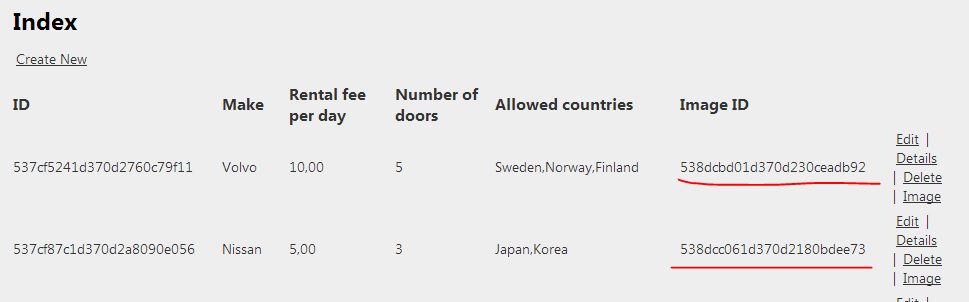
If everything goes well then the Cars table should show the image IDs:

Image IDs shown in the Cars table

In the next post, which will be the last in this series on MongoDb, we’ll show and update the image.

View the posts related to data storage here.

How to send emails in .NET part 3: multiple recipients, CC and BCC

In this post we looked at how to send a plain text email. Let’s see how we can refine the recipient list of the email message.

The MailMessage object has a To property of type MailAddressCollection. You can add MailAddress objects to this collection if you’d like to send the message to multiple recipients:

MailMessage mailMessage = new MailMessage();
mailMessage.To.Add(new MailAddress("xxx.yyy@yyy.com"));
mailMessage.To.Add(new MailAddress("zzz.nnn@fff.com"));
mailMessage.To.Add(new MailAddress("ttt.ddd@jjj.com"));
mailMessage.Subject = "subject";
mailMessage.Body = "body";

Similarly, the MailMessage object has a CC and Bcc property of type MailAddressCollection to hold the carbon copy and blind carbon copy recipients of the message. You can add MailAddress objects to those properties the same way as above:

mailMessage.CC.Add(new MailAddress("ggg@hhh.com"));
mailMessage.Bcc.Add(new MailAddress("lll@kkk.com"));

You can also specify a list of email addresses in a comma-separated string instead of adding MailAddress objects one by one:

mailMessage.To.Add("x@y.com,z@n.com,elvis@presley.com");

Read all posts related to emailing in .NET here.

MongoDB in .NET part 8: queries

Introduction

So far in this series we’ve gone through the most important database operations in MongoDb .NET: create, update and delete which was the topic of the previous post. We’ve also seen some query examples such as finding an element by ID.

In this post we’ll look more closely at querying in MongoDb .NET. The C# driver provides the following ways of querying documents:

  • The various Find methods of MongoCollection where you supply a Mongo query
  • LINQ: the current version of the C# driver supports LINQ queries
  • Aggregation: querying in a functional style

We’ll be working on the same demo web app as before in this series so have it open in Visual Studio.

The Find methods

We’ve already seen FindOneById when locating a single Car object:

Car car = CarRentalContext.Cars.FindOneById(new ObjectId(id));

We can use the same method to complete the Cars view. Run the web app and navigate to /cars. For each record in the cars list there are 3 links: Edit, Details, Delete. We’ve implemented the Edit and Delete functions but not the Details yet. Let’s do it.

Add the following action methid on CarsController:

public ActionResult Details(string id)
{
	Car car = CarRentalContext.Cars.FindOneById(new ObjectId(id));
	return View(car.ConvertToViewModel());
}

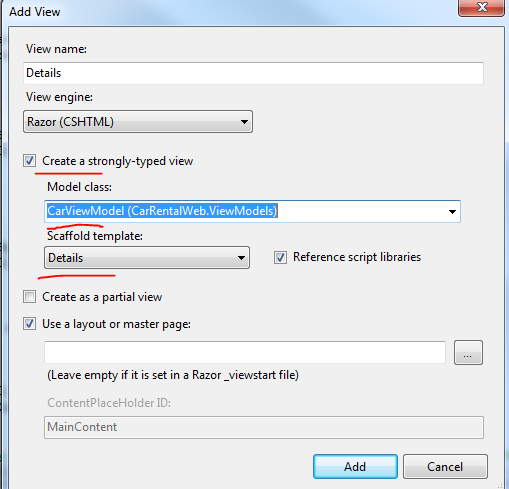
Right-click “Details” and select Add View. Add the following View:

Add Details view for Car object

This will give you a simple table showing the details of the selected Car:
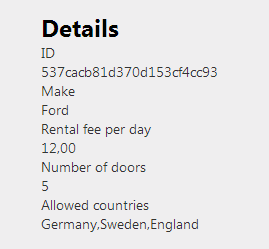
Car details show in Details view

The generic FindOneById method internally calls the FindOneByIdAs method which converts a document into an object. In case you need to convert a document into another object type then you can do it like this:

Customer customer = CarRentalContext.Cars.FindOneByIdAs<Customer>(new ObjectId("dfsdfs"));

This example is a bit stupid, I know, but you get the idea. You can use this method to construct different views of the same domain depending on the rights of the logged on user: FullCar, PartialCar, MinimalCar etc. The properties of each domain version will make sure that only the relevant fields are extracted from the document to construct the object:

LimitedCar limitedCar = CarRentalContext.Cars.FindOneByIdAs<LimitedCar>(new ObjectId("dfsdfs"));

There are other versions of the Find method that each return the first matching document:

  • FindOne(): finds the very first element in the collection
  • FindOne(IMongoQuery query): we’ve seen examples of how to construct an IMongoQuery. The Query object can be used to build query documents

Example: say you want to find the first Car whose rental costs less than or equal to 5:

IMongoQuery query = Query<Car>.LTE(c => c.DailyRentalFee, 5);
Car firstCheapCar = CarRentalContext.Cars.FindOne(query);

You can further refine your search in some overloads of the Find method where you can pass in a FindOneArgs object:

FindOneArgs findOneArgs = new FindOneArgs()
{
	Query = Query<Customer>.NE(c => c.Name, "samsung")
	, ReadPreference = new ReadPreference(ReadPreferenceMode.SecondaryPreferred)
};
Customer cust = CarRentalContext.Cars.FindOneAs<Customer>(findOneArgs);

Here we want to find the first customer whose name is NOT Samsung and we want to read from a secondary replica set member.

I encourage you to the explore the operators available on the Query object. Just type “Query.” or its generic counterpart in VisualStudio and IntelliSense will give you a long list of available options to build your query. There are so many that it’s not possible to cover them all in a single blog post. Keep in mind that you can always chain your queries with the And, Or and Not operators.

You can of course also locate several documents:

  • FindAll(): retrieves all documents in the collection
  • Find(IMongoQuery query): retrieves all documents matching the query

These two methods return a MongoCursor of type T. This object can be enumerated. Say you want to find all cars which have more than 3 doors:

IMongoQuery doorQuery = Query<Car>.GT(c => c.NumberOfDoors, 3);
MongoCursor<Car> bigCars = CarRentalContext.Cars.Find(doorQuery);

MongoCursor implements IEnumerable so you can perform the usual IEnumerable operations on it. E.g. the cursor can be enumerated:

foreach (Car c in bigCars)
{
     //do something
}

…or can also be turned into a List of cars:

List<Car> carsList = bigCars.ToList();

Like in the case of deferred operations in LINQ, the MongoDb Find query is not executed until you call an action on the cursor which enumerates it, such as iterating it or calling ToList.

Before the cursor is enumerated you can set extra options specific to MongoCursor, i.e. which are not part of IEnumerable. E.g. you can set the sort order as follows:

MongoCursor<Car> bigCars = CarRentalContext.Cars.Find(doorQuery);
IMongoSortBy sortByCars = SortBy<Car>.Descending(c => c.DailyRentalFee);
bigCars.SetSortOrder(sortByCars);
foreach (Car c in bigCars)
{
}

MongoCursor has a number of useful methods like that which all start with “Set”:

  • For pagination you can use the SetLimit(int limit) function in conjunction with SetSkip(int i). They behave like the Skip and Take LINQ operators
  • With SetFields you can provide the names of the fields to be returned in case you need to increase the performance. This has an effect similar to a limited SQL query: SELECT name, id FROM …

In case you want to know the number of matching documents without enumerating the cursor there’s the Count method:

MongoCursor<Car> bigCars = CarRentalContext.Cars.Find(doorQuery);
long howMany = bigCars.Count();

Let’s test the sorting method. In CarsController.Index we currently have the following contents:

public ActionResult Index()
{
	List<Car> carsInDb = CarRentalContext.Cars.FindAll().ToList();
        return View(carsInDb.ConvertAllToViewModels());
}

Change it to this so that we show the cars in a descending order by make:

public ActionResult Index()
{
	MongoCursor<Car> carsInDbCursor = CarRentalContext.Cars.FindAll();
        IMongoSortBy sortByCars = SortBy<Car>.Descending(c => c.Make);
	carsInDbCursor.SetSortOrder(sortByCars);
	return View(carsInDbCursor.ConvertAllToViewModels());
}

Run the app and you’ll see that the cars are indeed sorted according to the sort criteria. One thing to keep in mind is that the cursor is frozen as soon as the enumeration in begins by whatever enumeration operator. E.g. you cannot change the ordering of the cursor within a foreach loop.

LINQ

The MongoCollection object provides an AsQueryable extension method which is the starting point of building LINQ expressions:

MongoCursor<Car> carsInDbCursor = CarRentalContext.Cars.FindAll();
IEnumerable<Car> cars = carsInDbCursor.AsQueryable().Where(c => c.NumberOfDoors > 3);

Note that the Linq extensions in the MongoDb driver are evolving continuously. Not every query is possible to build by Linq that are found in the Query builder. In case you’re trying to run an unsupported Linq operator you’ll get an exception. You can read more about LINQ support in the driver here.

Aggregations

The aggregation mechanism in MongoDb provides not only search functions such as FindOne, FindAll etc. It also allows us to perform projections, groupings and summaries on documents to build a set of transformed documents.

You can combine transformation steps in a pipeline to build the final transformed document.

The entry point into creating aggregations is the Aggregate method of MongoCollection. The Aggregate method has a couple of overloads but the most flexible one accepts an AggregateArgs object. It returns an IEnumerable of BsonDocuments which is understandable. The transformed document is very unlikely to look like the original one so it cannot easily be deserialised into a domain object.

Taking the Car domain object we’ve been working with in this series we can have the following AggregateArgs to build a transformation pipeline:

AggregateArgs aggregateArgs = new AggregateArgs()
{
	Pipeline = new[]
	{
		new BsonDocument("$match", Query<Car>.LTE(c => c.DailyRentalFee, 10).ToBsonDocument())
		, new BsonDocument("$match", Query<Car>.GTE(c => c.DailyRentalFee, 3).ToBsonDocument())
		, new BsonDocument("$sort", new BsonDocument("DailyRentalFee", 1))
	}
};
IEnumerable<BsonDocument> documents = CarRentalContext.Cars.Aggregate(aggregateArgs);

This is a simple query but it’s a good starting point. We want to find the cars whose rental fee lies between 3 and 10 and then sort the documents by the rental fee in ascending order. For descending order use -1. This is also a good example to show that the transformation pipeline can be extended as much as you want in the BsonDocument array.

Aggregations can become quite involved. You’ll find lots of great examples on this website.

In the next post we’ll look at storing files in MongoDb.

View the posts related to data storage here.

How to send emails in .NET part 2: the MailAddress object

In the previous post on this topic we saw how to send a plain text email with the MailMessage and SmtpClient objects.

You can refine the From and To fields of the message using the MailAddress object. You can specify the email address, a display name and an encoding. Specifying an encoding is seldom necessary.

So if you’d like to joke with your colleagues then this is one option:

MailAddress from = new MailAddress("andras.nemes@company.com", "Your boss");
MailAddress to = new MailAddress("john.smith@company.com");
string subject = "You are fired.";
string plainTextBody = "See you in hell.";
MailMessage mailMessage = new MailMessage(from, to);
mailMessage.Subject = subject;
mailMessage.Body = plainTextBody;

string smtpServer = "mail.company.com";
SmtpClient client = new SmtpClient(smtpServer);
client.Send(mailMessage);

The recipient will see an email similar to the following:

Changing display name of sender

Of course they will eventually see the actual email address of the sender but they might get scared at first.

Read all posts related to emailing in .NET here.

How to send emails in .NET part 1: basics of MailMessage

We’ll look at techniques around sending emails in .NET in this series of short posts.

If your single aim is to send a plain text email with no attachments then it’s very simple. The System.Net.Mail package includes most objects you’ll need for emailing but the following 2 are probably the most important:

  • MailMessage
  • SmtpClient

You use the MailMessage object to construct the message. Example:

string from = "andras.nemes@company.com";
string to = "john.smith@company.com";
string subject = "This is the subject";
string plainTextBody = "This is a great message.";
MailMessage mailMessage = new MailMessage(from, to, subject, plainTextBody);

The fields, like “from” and “to” are probably easy to understand.

For sending the message you’ll need a valid SMTP server which is needed for the SmtpClient object:

string smtpServer = "mail.company.com";
SmtpClient client = new SmtpClient(smtpServer);
client.Send(mailMessage);

This will send the email in a sequential manner, i.e. Send blocks the code until it returns.

SmtpClient.Send has an overload which enables you to bypass the creation of MailMessage entirely:

client.Send(from, to, subject, plainTextBody);

The MailMessage object internally validates the email address so you don’t need to worry about some magic regex string. E.g. the following will throw a FormatException:

MailMessage mm = new MailMessage("helloFrom", "helloTo");

That’s it for starters. We’ll look at emailing in a lot more depth in the upcoming parts.

Read all posts related to emailing in .NET here.

MongoDB in .NET part 7: deleting documents

Introduction

In the previous post in this series we looked at how to update documents. So we now know how to insert, save and modify documents. We also need to be able to remove documents.

Remove and RemoveAll

Removing a document can be performed using the Remove method of IMongoCollection which has similar overloads to Update and returns a WriteConcernResult. However, while Update updates a single document by default even if there are multiple matching ones, Remove removes all matching documents. Most often we’ll remove a single document which matches an ID query but we can certainly construct an IMongoQuery which matches multiple documents. However, even if multiple documents are removed, the group of remove operations are not treated as a transaction. Each removal is a distinct operation.

You can supply a WriteConcern parameter which has the same purpose as in the case of Save and Update. You can also provide a RemoveFlags parameter which has 2 values: None and Single. With Single you can indicate that you only want to remove a single document if the query matches 2 or more documents. “None” simply means no flags which is the default value.

RemoveAll removes all documents in a collection while leaving indexes and metadata intact. There’s also a Drop method which is faster then RemoveAll but removes indexes and metadata too. If you need to remove the entire collection quickly then use the Drop method.

There’s also an atomic version called FindAndRemove which works in much the same way as FindAndUpdate we saw in the previous part.

Demo

We’ll extend the demo application we’ve been working on so far so have it ready in Visual Studio. This will be really simple actually. The Index.cshtml file of Cars already prepared a link for the Delete operation:

@Html.ActionLink("Delete", "Delete", new { id=item.Id })

We don’t yet have a Delete action so let’s add it to the CarsController:

public ActionResult Delete(string id)
{
	CarRentalContext.Cars.Remove(Query.EQ("_id", ObjectId.Parse(id)));
	return RedirectToAction("Index");
}

As you type Cars.Remove you’ll see the overloads of Remove where you can specify the parameters mentioned above. Run the application, navigate to /cars and press the Delete link on one of the items. The item should be removed from the list of items.

In the next part we’ll look more into MongoDb queries.

View the posts related to data storage here.
Finding the user’s current region using RegionInfo in .NET C#

The CultureInfo object helps a lot in finding information about the user’s current culture. However, on occasion it may not be enough and you need to find out more about that user’s regional characteristics. You can easily retrieve a RegionInfo object from CultureInfo which will hold information about a particular country or region.

You can find the current region in two ways from CultureInfo:

CultureInfo cultureInfo = Thread.CurrentThread.CurrentCulture;
RegionInfo regionInfo = new RegionInfo(cultureInfo.LCID);
// or 
regionInfo = new RegionInfo(cultureInfo.Name);

string englishName = regionInfo.EnglishName;
string currencySymbol = regionInfo.CurrencySymbol;
string currencyEnglishName = regionInfo.CurrencyEnglishName;
string currencyLocalName = regionInfo.CurrencyNativeName;

My computer is set to use Swedish-Sweden as the specific culture so I get the following values from top to bottom:

  • Sweden
  • kr
  • Swedish krona
  • Svensk krona

If I change the current culture to my home country, i.e. Hungary…

CultureInfo hungaryCulture = new CultureInfo("hu-HU");
Thread.CurrentThread.CurrentCulture = hungaryCulture;
regionInfo = new RegionInfo(hungaryCulture.LCID);
englishName = regionInfo.EnglishName;
currencySymbol = regionInfo.CurrencySymbol;
currencyEnglishName = regionInfo.CurrencyEnglishName;
currencyLocalName = regionInfo.CurrencyNativeName;

…then the values are of course adjusted accordingly:

  • Hungary
  • Ft
  • Hungarian Forint
  • forint

Read all posts related to Globalisation in .NET here.

MongoDB in .NET part 6: updating documents

Introduction

In the previous part of this series we looked at write concerns, write acknowledgements and replacing documents with the Save method. We said that Save() works as an Insert if the document ID is not found. If the ID exists then the whole document is replaced with a new one.

The Update method

It is possible to update an existing document without replacing it using the Update method of MongoCollection. The Update method can be finetuned using its overloaded versions. The Save() method sends a completely new document to the Mongo server for replacement. The Update method instead sends an update document to the server containing one or more modification instructions. Update is used by the Save method behind the scenes. Our Save method in CarsController…

CarRentalContext.Cars.Save(modifiedCar);	

…can be mimicked by Update as follows:

CarRentalContext.Cars.Update(Query.EQ("_id", ObjectId.Parse(updateCarViewModel.Id)), Update.Replace(modifiedCar), UpdateFlags.Upsert);	

“Update” is a builder which helps build Update instructions – update documents – to the Mongo server. Notice the “Replace” update instruction which – as you may have guessed – will replace any existing document with a matching ID with the new one. Then we have the UpdateFlag where we specify an Upsert operation which we are familiar with by now. Skipping this flag would mean that a document is only updated if it exists by the given ID.

The Update builder contains a lot of operators. The operators return an IMongoUpdate object which represents a modification document and can be used in the Update method as a parameter. Just type “Update.” in Visual Studio and IntelliSense will show you about 20 different ones. Examples:

  • Inc: increments a numeric field – int, double, long – by a specified value
  • Rename: change the name of a field, e.g. from “Make” to “Type” in our Car domain object
  • Set: change the value of a field or insert it if it doesn’t exist, e.g. change 12 to 15 of the field DailyRentalFee
  • Unset: remove a field
  • Push: an array operation which allows us to append a value to an array
  • PopFirst and PopLast: removes the first or the last element of an array
  • Pull: remove specific elements from an array
  • AddToSet: add item to an array if it doesn’t exist

Some array operators have versions with “Each” in the method name. They allow to pass in several values e.g. in the AddToSetEach method. These operators are all fluent ones, i.e. you can chain them together to create a composite IMongoUpdate document.

“Update” is not the only way to build update documents. The following statements are all equivalent:

Update.Set("price", 1);
new UpdateBuilder().Set("price", 1);
Update<Car>.Set(c => c.DailyRentalFee, 2);
new UpdateBuilder<Car>().Set(c => c.DailyRentalFee, 3);

You will probably want to use the strongly typed versions to avoid hard coded string values.

So if you want to specifically update the rental fee of a Car object you can write as follows:

CarRentalContext.Cars.Update(Query.EQ("_id", ObjectId.Parse(updateCarViewModel.Id)), Update<Car>.Set(c => c.DailyRentalFee, 12));

By default the Update method will only update the first document that matches the query. If you want all documents to be updated that match the query then the Multi flag must be given. To change the fee of all Ford cars you can write as follows:

CarRentalContext.Cars.Update(Query.EQ("Make", "Ford"), Update<Car>.Set(c => c.DailyRentalFee, 2), UpdateFlags.Multi);

How to update then?

We’ve now seen two ways of updating a document: Save and Update. Here are some considerations:

  • Save is much more compact: you type less, it’s easier to test, is more robust than the Update equivalent
  • Update results in a more procedural style of code whereas Save is more OOP
  • Replacing a document has more overhead than modifying it, so Update performs better. The Save method fetches a document, modifies it and puts it in place of the original
  • While the Save method performs these steps we might run into concurrency issues. To exclude the possibility of data corruption during an update you may want to go for atomic updates, e.g. the FindAndModify method
  • Update allows for some very fine-grained modifications. They can be very useful in a data migration scenario, especially the Multi updates

We mentioned the FindAndModify atomic method above. It returns a FindAndModifyResult and accepts a FindAndModifyArgs object. Example:

FindAndModifyArgs args = new FindAndModifyArgs()
{
	Query = Query.EQ("_id", ObjectId.Parse(updateCarViewModel.Id))
	,Update = Update<Car>.Set(c => c.DailyRentalFee, 3)
	,Upsert = false
	,SortBy = SortBy<Car>.Ascending(c => c.Id)
	,VersionReturned = FindAndModifyDocumentVersion.Original
};
FindAndModifyResult res = CarRentalContext.Cars.FindAndModify(args);

You’ll recognise the Query, Upsert and Update properties. FindAndModify always modifies a single document. If there are more matching documents then the SortBy property can be used to determine which document will be updated: first or last. In the above example we’re querying on the ID field so this shouldn’t be an issue. The FindAndModifyResult return object includes a ModifiedDocument property of type BsonDocument. It represents the modified document but the exact representation depends on the VersionReturned argument. If it’s set to “Original” then ModifiedDocument will show the document before the modification. If it’s set to “Modified” then the modified document will be returned. The point is that if you run the Update method then and then query for the same document then someone else might have modified the same document. With FindAndModify you can avoid this as it can return the document in the way that you have modified it. The BsonDocument can be deserialised with the GetModifiedDocumentAs method of the FindAndModifyResult object.

Miscellaneous

  • A document is limited to 16MB – this can hold a very large domain. However, always consider how large your domain can grow especially with nested arrays
  • Atomic updates to documents are atomic per document. If you batch update several documents then each document will be updated atomically one by one but the whole operation is not atomic, i.e. we have no transactions
  • There’s no built-in mechanism to check for concurrent access to a document. The EntityFramework object context ensures that each operation is carried out in a thread-safe manner. There’s no equivalent of this context object in MongoDb so it’s possible that while you’re updating a document someone else deletes it. Or you change the rental fee to 2 and someone else updates it to 3 at the same time. The update to be processed last will win. However, this is nothing new – we could easily fill a whole textbook with concurrency issues in databases

In the next post we’ll look at how to delete documents.

View the posts related to data storage here.
Using DateTimeFormatInfo to localise date and time in .NET C#

Every programmer loves working with dates and time, right? Whether or not you like it it is inevitable to show the dates in a format that the viewer understands. You should not show dates presented according to the US format in Japan and vice versa.

The DateTimeFormatInfo class includes a range of useful properties to localise date and time. The entry point to the DateTimeFormatInfo class is CultureInfo. E.g. if you’d like to format a date according to various cultures – Swedish, Hungarian and German – then you can do it as follows:

CultureInfo swedishCulture = new CultureInfo("sv-SE");
DateTimeFormatInfo swedishDateFormat = swedishCulture.DateTimeFormat;

CultureInfo hungarianCulture = new CultureInfo("hu-HU");
DateTimeFormatInfo hungarianDateFormat = hungarianCulture.DateTimeFormat;

CultureInfo germanCulture = new CultureInfo("de-DE");
DateTimeFormatInfo germanDateFormat = germanCulture.DateTimeFormat;
			
DateTime utcNow = DateTime.UtcNow;

string formattedDateSweden = utcNow.ToString(swedishDateFormat.FullDateTimePattern);
string formattedDateHungary = utcNow.ToString(hungarianDateFormat.FullDateTimePattern);
string formattedDateGermany = utcNow.ToString(germanDateFormat.FullDateTimePattern);

…which yields the following formatted dates:

  • den 12 juni 2014 20:08:30
  • 2014. június 12. 20:08:30
  • Donnerstag, 12. Juni 2014 20:08:30

DateTimeFormatInfo includes patterns for other types of date representations, such as MonthDayPattern, LongDatePattern etc.

You can also get the names of the days and months:

string[] swedishDays = swedishDateFormat.DayNames;
string[] germanDays = germanDateFormat.DayNames;
string[] hungarianDays = hungarianDateFormat.DayNames;

string[] swedishMonths = swedishDateFormat.MonthNames;
string[] hungarianMonths = hungarianDateFormat.MonthNames;
string[] germanMonths = germanDateFormat.MonthNames;

You can do a lot more with DateTimeFormatInfo:

  • The Calendar associated with the culture
  • The date separator
  • Abbreviated month and day names
  • First day of the week

…and more. I encourage you to inspect the available properties of the DateTimeFormatInfo object with IntelliSense in Visual Studio.

Read all posts related to Globalisation in .NET here.

Elliot Balynn's Blog

A directory of wonderful thoughts

Software Engineering

Web development

Disparate Opinions

Various tidbits

chsakell's Blog

WEB APPLICATION DEVELOPMENT TUTORIALS WITH OPEN-SOURCE PROJECTS

Once Upon a Camayoc

ARCHIVED: Bite-size insight on Cyber Security for the not too technical.
