Using NumberStyles to parse numbers in C# .NET Part 1

There are a lot of number formats out there depending on the industry we’re looking at. E.g. negative numbers can be represented in several different ways:

  • -14
  • (14)
  • 14-
  • 14.00-
  • (14,00)

…and so on. Accounting, finance and other, highly “numeric” fields will have their own standards to represent numbers. Your application may need to parse all these strings and convert them into proper numeric values. The static Parse method of the numeric classes, like int, double, decimal all accept a NumberStyles enumeration. This enumeration is located in the System.Globalization namespace.

Read more of this post

The Conditional attribute to control execution of parts of the code in C# .NET

In this post we saw how to use the #if preprocessor to control the execution of code. The compiler will understand those instructions and compile away bits of code.

There’s another way to achieve something similar using the Conditional attribute. You can decorate methods with this attribute. It accepts a string parameter which defines the name of the symbol that must be defined in order for the method to be carried out.

Read more of this post

Using Amazon Elastic MapReduce with the AWS .NET API Part 7: indirect Hive with .NET

Introduction

In the previous post we looked at the basics of how EMR can interact with Amazon S3 and DynamoDb using some additional commands and properties of Hive. In part 5 of this series we saw how to start a new cluster and assign a couple of steps to it using .NET. In this post we’ll marry the two: we’ll start up a new cluster and assign the full aggregation job flow to it in code.

It’s not possible to send a set of Hive commands in plain text to the cluster. The Hive script must be stored somewhere where EMR can find it. The .NET code can only point out the location. All this means that we’ll need to prepare the Hive script beforehand. An ideal place to store all types of files is of course Amazon S3 and we’ll follow that line here as well. This is the reason why I called this post “indirect Hive”.

Preparation

First delete all records from the aggregation-tests DynamoDb table from the previous post so that we won’t confuse the old results with the new ones.

Next, create a text file called hive-aggregation-script.txt and insert the following statements:

create external table if not exists raw_urls (url string, response_time int) row format delimited fields terminated by '|' location 's3://raw-urls-data/';
create external table if not exists aggregations (id string, url string, avg_response_time double) stored by 'org.apache.hadoop.hive.dynamodb.DynamoDBStorageHandler' tblproperties("dynamodb.table.name" = "aggregation-tests", "dynamodb.region" = "eu-west-1", "dynamodb.column.mapping" = "id:id,url:url_name,avg_response_time:average_response_time");
create table if not exists temporary_local_aggregation (id string, url string, avg_response_time double);
insert overwrite table temporary_local_aggregation SELECT reflect("java.util.UUID", "randomUUID"), url, avg(response_time) FROM raw_urls GROUP BY url;
insert into table aggregations select * from temporary_local_aggregation;
drop table aggregations;
drop table raw_urls;

All of these statements are copied directly from the previous post. It’s just a step-by-step instruction to create the external tables, run the aggregations and store them in DynamoDb.

Upload hive-aggregation-script.txt to S3 in a bucket called “hive-aggregation-scripts”.

.NET

Open the EMR tester console application we started building in part 5 referenced above. We have a method called StartCluster in EmrDemoService.cs. We’ll first insert a similar method. It starts a cluster and returns the job flow id. Insert the following method in EmrDemoService:

public string StartNewActiveWaitingJobFlow()
{
	using (IAmazonElasticMapReduce emrClient = GetEmrClient())
	{
		try
		{
			StepFactory stepFactory = new StepFactory(RegionEndpoint.EUWest1);

			StepConfig installHive = new StepConfig()
			{
				Name = "Install Hive step",
				ActionOnFailure = "TERMINATE_JOB_FLOW",
				HadoopJarStep = stepFactory.NewInstallHiveStep(StepFactory.HiveVersion.Hive_Latest)
			};

			StepConfig installPig = new StepConfig()
			{
				Name = "Install Pig step",
				ActionOnFailure = "TERMINATE_JOB_FLOW",
				HadoopJarStep = stepFactory.NewInstallPigStep()
			};

			JobFlowInstancesConfig jobFlowInstancesConfig = new JobFlowInstancesConfig()
			{
				Ec2KeyName = "insert-your-ec2-key-name",
				HadoopVersion = "2.4.0",
				InstanceCount = 3,
				KeepJobFlowAliveWhenNoSteps = true,
				MasterInstanceType = "m3.xlarge",
				SlaveInstanceType = "m3.xlarge"
			};

			RunJobFlowRequest runJobFlowRequest = new RunJobFlowRequest()
			{
				Name = "EMR cluster",
				Steps = { installHive, installPig },
				Instances = jobFlowInstancesConfig
			};

			RunJobFlowResponse runJobFlowResponse = emrClient.RunJobFlow(runJobFlowRequest);
			String jobFlowId = runJobFlowResponse.JobFlowId;
			Console.WriteLine(string.Format("Job flow id: {0}", jobFlowId));
			bool oneStepNotFinished = true;
			while (oneStepNotFinished)
			{
				DescribeJobFlowsRequest describeJobFlowsRequest = new DescribeJobFlowsRequest(new List<string>() { jobFlowId });
				DescribeJobFlowsResponse describeJobFlowsResponse = emrClient.DescribeJobFlows(describeJobFlowsRequest);
				JobFlowDetail jobFlowDetail = describeJobFlowsResponse.JobFlows.First();
				List<StepDetail> stepDetailsOfJob = jobFlowDetail.Steps;
				List<string> stepStatuses = new List<string>();
				foreach (StepDetail stepDetail in stepDetailsOfJob)
				{
					StepExecutionStatusDetail status = stepDetail.ExecutionStatusDetail;
					String stepConfigName = stepDetail.StepConfig.Name;
					String statusValue = status.State.Value;
					stepStatuses.Add(statusValue.ToLower());
					Console.WriteLine(string.Format("Step config name: {0}, step status: {1}", stepConfigName, statusValue));
				}
				oneStepNotFinished = stepStatuses.Contains("pending") || stepStatuses.Contains("running");
				Thread.Sleep(10000);
			}
			return jobFlowId;
		}
		catch (AmazonElasticMapReduceException emrException)
		{
			Console.WriteLine("Cluster list creation has failed.");
			Console.WriteLine("Amazon error code: {0}",
				string.IsNullOrEmpty(emrException.ErrorCode) ? "None" : emrException.ErrorCode);
			Console.WriteLine("Exception message: {0}", emrException.Message);
		}
	}

	return string.Empty;
}

You should understand all of that from part 5 referred to above. It is just a slightly reduced form of the StartCluster method: we have no logging, no tags, no termination protection, we don’t need those right now.

So the method returns a job flow ID. We can use that ID to add new steps to be executed in the cluster. Adding extra steps is also performed by the StepFactory and StepConfig objects. StepFactory has a method called NewRunHiveScriptStep which accepts the S3 address of the Hive script you’d like to have executed.

The below method adds a step to the job flow, monitors its progress and periodically prints out the step status, such as “pending” or “running”. When the step has completed the method prints the final status to the console window. The cluster is finally terminated:

public void RunHiveScriptStep()
{
	using (IAmazonElasticMapReduce emrClient = GetEmrClient())
	{
		try
		{
			String activeWaitingJobFlowId = StartNewActiveWaitingJobFlow();
			if (!string.IsNullOrEmpty(activeWaitingJobFlowId))
			{
				StepFactory stepFactory = new StepFactory(RegionEndpoint.EUWest1);
				String scriptLocation = "s3://hive-aggregation-scripts/hive-aggregation-script.txt";
				StepConfig runHiveScript = new StepConfig()
				{
					Name = "Run Hive script",
					HadoopJarStep = stepFactory.NewRunHiveScriptStep(scriptLocation),
					ActionOnFailure = "TERMINATE_JOB_FLOW"
				};
				AddJobFlowStepsRequest addHiveRequest = new AddJobFlowStepsRequest(activeWaitingJobFlowId, new List<StepConfig>(){runHiveScript});
				AddJobFlowStepsResult addHiveResponse = emrClient.AddJobFlowSteps(addHiveRequest);
				List<string> stepIds = addHiveResponse.StepIds;
				String hiveStepId = stepIds[0];

				DescribeStepRequest describeHiveStepRequest = new DescribeStepRequest() { ClusterId = activeWaitingJobFlowId, StepId = hiveStepId };
				DescribeStepResult describeHiveStepResult = emrClient.DescribeStep(describeHiveStepRequest);
				Step hiveStep = describeHiveStepResult.Step;
				StepStatus hiveStepStatus = hiveStep.Status;
				string hiveStepState = hiveStepStatus.State.Value.ToLower();
				bool failedState = false;
				StepTimeline finalTimeline = null;
				while (hiveStepState != "completed")
				{
					describeHiveStepRequest = new DescribeStepRequest() { ClusterId = activeWaitingJobFlowId, StepId = hiveStepId };
					describeHiveStepResult = emrClient.DescribeStep(describeHiveStepRequest);
					hiveStep = describeHiveStepResult.Step;
					hiveStepStatus = hiveStep.Status;
					hiveStepState = hiveStepStatus.State.Value.ToLower();
					finalTimeline = hiveStepStatus.Timeline;
					Console.WriteLine(string.Format("Current state of Hive script execution: {0}", hiveStepState));
					switch (hiveStepState)
					{
						case "pending":
						case "running":
							Thread.Sleep(10000);
							break;
						case "cancelled":
						case "failed":
						case "interrupted":
							failedState = true;
							break;
					}
					if (failedState)
					{
						break;
					}
				}
				if (finalTimeline != null)
				{
					Console.WriteLine(string.Format("Hive script step {0} created at {1}, started at {2}, finished at {3}"
						, hiveStepId, finalTimeline.CreationDateTime, finalTimeline.StartDateTime, finalTimeline.EndDateTime));
				}
				TerminateJobFlowsRequest terminateRequest = new TerminateJobFlowsRequest(new List<string> { activeWaitingJobFlowId });
				TerminateJobFlowsResponse terminateResponse = emrClient.TerminateJobFlows(terminateRequest);
			}
			else
			{
				Console.WriteLine("No valid job flow could be created.");
			}
		}
		catch (AmazonElasticMapReduceException emrException)
		{
			Console.WriteLine("Hive script execution step has failed.");
			Console.WriteLine("Amazon error code: {0}",
				string.IsNullOrEmpty(emrException.ErrorCode) ? "None" : emrException.ErrorCode);
			Console.WriteLine("Exception message: {0}", emrException.Message);
		}
	}
}

Call the method from Main:

static void Main(string[] args)
{		

	EmrDemoService emrDemoService = new EmrDemoService();
	emrDemoService.RunHiveScriptStep();

	Console.WriteLine("Main done...");
	Console.ReadKey();
}

Here’s a sample output from the start of the program execution:

Hive query execution preparation program output NET

Here’s a sample printout from the start of the Hive script execution:

Hive script execution started NET

The step is also visible in the EMR GUI:

Hive script execution started visible in EMR GUI

The step has completed:

Hive query execution completed program output NET

Let’s check in DynamoDb if the aggregation script has actually worked. Indeed it has:

Aggregations visible in Amazon DYnamoDb after Hive query execution

In the next part we’ll apply all we have learnt about EMR to our original overall Big Data demo we started building in the series on Amazon Kinesis.

View all posts related to Amazon Web Services and Big Data here.

Combining parts of full file path in C# .NET

The Path class in the System.IO namespace provides a number of useful filepath-related methods. Say that you have the following ingredients of a full file path:

string drive = @"C:\";
string folders = @"logfiles\october\";
string fileName = "log.txt";

Read more of this post

Using Amazon Elastic MapReduce with the AWS .NET API Part 6: Hive with Amazon S3 and DynamoDb

Introduction

In the previous post we looked at how to interact with EMR using the AWS .NET SDK. We saw examples of how to get the cluster list, start a new cluster, assign steps to the cluster and finally terminate it.

In this post we’ll return to the Hive CLI to see how EMR can interact with Amazon S3 and DynamoDb. We investigated both components here and here.

Read more of this post

Converting a string into a DateTime with an exact date format in C# .NET

How do you read the date “03-10-2014”? For some of you this will be October 03 2014. For others, especially those from the US this will be interpreted as March 10 2014. This is because dates are represented in different formats in different cultures.

Consider the following code:

string dateString = "03-10-2014";
DateTime parsedDate = DateTime.Parse(dateString);
string toString = parsedDate.ToLongDateString();

Read more of this post

Creating a read-only collection from an array in C#

The Array class has a number of interesting methods. One of them allows you to easily convert an array of T into a read-only collection of T:

string[] bands = new string[5] { "Queen", "ACDC", "Metallica", "Genesis", "INXS" };
IReadOnlyCollection<string> readOnlyBands = Array.AsReadOnly<string>(bands);

Note that readOnlyBands is, well, read-only, so there’s no Add or Remove method that otherwise are often available on lists.

View all various C# language feature related posts here.

Using Amazon Elastic MapReduce with the AWS .NET API Part 5: cluster-related code

Introduction

In the previous post we looked at some basic Hive and Hadoop commands. We created a database for the URLs and a table which stores URLs and response times. Finally we executed an aggregation function on the table data and stored the results in another table.

So far in this series we haven’t seen any C# code. It’s time to rectify that. We’ll see a couple of cluster-related examples such as finding the clusters and starting a new one.

Note that we’ll be concentrating on showing and explaining the technical code examples related to AWS. We’ll ignore software principles like SOLID and layering so that we can stay focused. It’s your responsibility to organise your code properly. There are numerous posts on this blog that take up topics related to software architecture.

Installing the SDK

The Amazon .NET SDK is available through NuGet. Open Visual Studio 2012/2013 and create a new C# console application called ElasticMapReduceDemo. The purpose of this application will be to demonstrate the different parts of the SDK around EMR. In reality the EMR handler could be any type of application:

  • A website
  • A Windows/Android/iOS app
  • A Windows service
  • etc.

…i.e. any application that’s capable of sending HTTP/S requests to a web service endpoint. We’ll keep it simple and not waste time with view-related tasks.

Install the following NuGet package:

AWS SDK NuGet package

Preparations

We cannot just call the services within the AWS SDK without proper authentication. This is an important reference page to handle your credentials in a safe way. We’ll the take the recommended approach and create a profile in the SDK Store and reference it from app.config.

This series is not about AWS authentication so we won’t go into temporary credentials but later on you may be interested in that option too. Since we’re programmers and it takes a single line of code to set up a profile we’ll go with the programmatic options. Add the following line to Main:

Amazon.Util.ProfileManager.RegisterProfile("demo-aws-profile", "your access key id", "your secret access key");

I suggest you remove the code from the application later on in case you want to distribute it. Run the application and it should execute without exceptions. Next open app.config and add the appSettings section with the following elements:

<appSettings>
        <add key="AWSProfileName" value="demo-aws-profile"/>
</appSettings>

Storing the EMR handle

We’ll put all our test code into a separate class. Insert a cs file called EmrDemoService. We’ll need a method to build a handle to the service which is of type IAmazonElasticMapReduce:

private IAmazonElasticMapReduce GetEmrClient()
{
	return Amazon.AWSClientFactory.CreateAmazonElasticMapReduceClient(RegionEndpoint.EUWest1);
}

Note that we didn’t need to provide our credentials here. They will be extracted automatically using the profile name in the config file.

Get clusters list

public List<ClusterSummary> GetClusterList()
{
	using (IAmazonElasticMapReduce emrClient = GetEmrClient())
	{
		try
		{
			ListClustersResponse listClustersResponse = emrClient.ListClusters();
			List<ClusterSummary> clusters = listClustersResponse.Clusters;
			Console.WriteLine(string.Format("Found {0} EMR clusters.", clusters.Count));
			foreach (ClusterSummary cluster in clusters)
			{
				Console.WriteLine(string.Format("Cluster id: {0}, cluster name: {1}, cluster status: {2}",
					cluster.Id, cluster.Name, cluster.Status.State));
			}
			return clusters;
		}
		catch (AmazonElasticMapReduceException emrException)
		{
			Console.WriteLine("Cluster list extraction has failed.");
			Console.WriteLine("Amazon error code: {0}",
				string.IsNullOrEmpty(emrException.ErrorCode) ? "None" : emrException.ErrorCode);
			Console.WriteLine("Exception message: {0}", emrException.Message);
			throw;
		}
	}
}

Call from Main:

static void Main(string[] args)
{
	EmrDemoService emrDemoService = new EmrDemoService();
	emrDemoService.GetClusterList();

	Console.WriteLine("Main done...");
	Console.ReadKey();
}

If you followed along the series so far then you might get 1 or more terminated instances:

Found 2 EMR clusters.
Cluster id: j-3ZUB7Z727QPS, cluster name: My cluster, cluster status: TERMINATED
Cluster id: j-3ILS4ATXBUI3M, cluster name: Test cluster, cluster status: TERMINATED

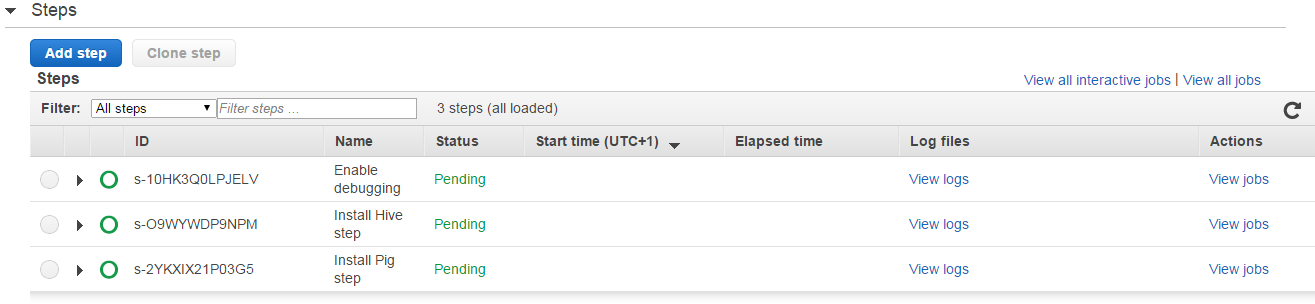
Note that the cluster IDs start with a “j” which stands for “job”. It’s important to note the difference between a “job” and a “step” in EMR. A job is an overall EMR activity which can have 1 or more steps. A step is an activity within a job, like “install Hive” or “run a Hive script”. So a job is a collection of steps. A job is complete once all its steps have been completed, whether with or without exceptions. Step IDs start with an “s”. You can see those on the EMR dashboard which shows how the steps are progressing, like “pending”, “running” and “completed”.

Starting a cluster and terminating it in code

We’ve seen that there are many things to consider before starting an EMR cluster. Think of the sections on the EMR GUI. We need to specify the EC2 instance types, security, logging, the steps, the tags etc. So no wonder that the code to start a cluster, i.e. a job, is also relatively long with lots of steps. Add the following method to EmrDemoService:

public void StartCluster()
{
	using (IAmazonElasticMapReduce emrClient = GetEmrClient())
	{
		try
		{
			List<ClusterSummary> clusters = GetClusterList();
			List<ClusterSummary> activeWaitingClusters = (from c in clusters where c.Status.State.Value.ToLower() == "waiting" select c).ToList();
			if (!activeWaitingClusters.Any())
			{
				StepFactory stepFactory = new StepFactory(RegionEndpoint.EUWest1);
				StepConfig enableDebugging = new StepConfig()
				{
					Name = "Enable debugging",
					ActionOnFailure = "TERMINATE_JOB_FLOW",
					HadoopJarStep = stepFactory.NewEnableDebuggingStep()
				};

				StepConfig installHive = new StepConfig()
				{
					Name = "Install Hive step",
					ActionOnFailure = "TERMINATE_JOB_FLOW",
					HadoopJarStep = stepFactory.NewInstallHiveStep(StepFactory.HiveVersion.Hive_Latest)
				};

				StepConfig installPig = new StepConfig()
				{
					Name = "Install Pig step",
					ActionOnFailure = "TERMINATE_JOB_FLOW",
					HadoopJarStep = stepFactory.NewInstallPigStep()
				};

				JobFlowInstancesConfig jobFlowInstancesConfig = new JobFlowInstancesConfig()
				{
					Ec2KeyName = "your-iam-key",
					HadoopVersion = "2.4.0",
					InstanceCount = 3,
					KeepJobFlowAliveWhenNoSteps = true,
					MasterInstanceType = "m3.xlarge",
					SlaveInstanceType = "m3.xlarge",
					TerminationProtected = true
				};

				List<Tag> tags = new List<Tag>();
				tags.Add(new Tag("Environment", "Test"));
				tags.Add(new Tag("Library", ".NET"));

				RunJobFlowRequest runJobFlowRequest = new RunJobFlowRequest()
				{
					Name = "EMR cluster creation demo",
					Steps = { enableDebugging, installHive, installPig },
					LogUri = "s3://log",
					Instances = jobFlowInstancesConfig,
					Tags = tags,
				};

				RunJobFlowResponse runJobFlowResponse = emrClient.RunJobFlow(runJobFlowRequest);
				String jobFlowId = runJobFlowResponse.JobFlowId;
				Console.WriteLine(string.Format("Job flow id: {0}", jobFlowId));						
				bool oneStepNotFinished = true;
				while (oneStepNotFinished)
				{
					DescribeJobFlowsRequest describeJobFlowsRequest = new DescribeJobFlowsRequest(new List<string>() { jobFlowId });
					DescribeJobFlowsResponse describeJobFlowsResponse = emrClient.DescribeJobFlows(describeJobFlowsRequest);
					JobFlowDetail jobFlowDetail = describeJobFlowsResponse.JobFlows.First();
					List<StepDetail> stepDetailsOfJob = jobFlowDetail.Steps;
					List<string> stepStatuses = new List<string>();
					foreach (StepDetail stepDetail in stepDetailsOfJob)
					{
						StepExecutionStatusDetail status = stepDetail.ExecutionStatusDetail;
						String stepConfigName = stepDetail.StepConfig.Name;
						String statusValue = status.State.Value;
						stepStatuses.Add(statusValue.ToLower());
						Console.WriteLine(string.Format("Step config name: {0}, step status: {1}", stepConfigName, statusValue));
					}
					oneStepNotFinished = stepStatuses.Contains("pending") || stepStatuses.Contains("running");
					Thread.Sleep(10000);
				}
				SetTerminationProtectionRequest setProtectionRequest = new SetTerminationProtectionRequest();
				setProtectionRequest.JobFlowIds = new List<string> { jobFlowId };
				setProtectionRequest.TerminationProtected = false;
				SetTerminationProtectionResponse setProtectionResponse = emrClient.SetTerminationProtection(setProtectionRequest);
						
				TerminateJobFlowsRequest terminateRequest = new TerminateJobFlowsRequest(new List<string> { jobFlowId });
				TerminateJobFlowsResponse terminateResponse = emrClient.TerminateJobFlows(terminateRequest);
				Console.WriteLine(string.Format("Termination HTTP status code: {0}", terminateResponse.HttpStatusCode));
			}
		}
		catch (AmazonElasticMapReduceException emrException)
		{
			Console.WriteLine("Cluster list creation has failed.");
			Console.WriteLine("Amazon error code: {0}",
				string.IsNullOrEmpty(emrException.ErrorCode) ? "None" : emrException.ErrorCode);
			Console.WriteLine("Exception message: {0}", emrException.Message);
		}
	}
}

Let’s go through this step by step:

  • We first check whether we have any clusters in status “waiting”, i.e. clusters that are free to take on one or more steps. If not then we start the job creation process
  • Each step is defined by a StepConfig object. We define 3 steps to be completed in the job
  • The steps are: enable debugging, install Hive and install Pig. If one step fails then we want to terminate the job
  • Each step can be defined using a step factory which returns out-of-the-box definitions of common steps, like Hive and Pig installation. For Hive we can even specify the Hive version to be installed in an enumeration. Step factory includes other step types like “run Hive script” or “run Pig script”
  • After the step configuration we define the instances. The Ec2KeyName property defines the name of the security key which you used to log into the master node. Provide its name as a string
  • We’ll need 3 instances: they will be divided up as 1 master node and 2 slave nodes
  • KeepJobFlowAliveWhenNoSteps indicates whether we want the cluster to continue running after each step has been completed
  • We also specify the Ec2 instance types here and whether the cluster is protected from termination
  • After the instances we specify a couple of tags
  • We tie all these elements together in a RunJobFlowRequest objects. We give it a name, the steps to be carried out, a log URI in S3 – which is optional – , the tags and the instances
  • We then ask the Emr client to run the job. If everything goes well then we get a Job id back which can look like j-3T2YZG4I1A4NV

After all these steps we continue to poll the job status until all steps have completed either with or without exceptions. We use the DescribeJobFlowsRequest to define the job flow ID which we want to check. We only have one so we take the first JobFlowDetail object of the DescribeJobFlowsResponse object that the Emr client returned. We then check the status of each step in the job with an interval of 10 seconds. We print their statuses and wait until they are in a status other than “pending” or “running”.

After the steps have completed we revoke the termination protection and terminate the job.

Note that in order for the above code to work your AWS user must be authorised to start EC2 instances. You’ll get an Amazon exception if that’s not the case so you’ll know. The IAM portal is used to define what a user or user group is allowed to do in AWS. The policies are defined as JSON strings:

IAM policies

If your user lacks EC2 rights you can extend this JSON using the “Manage policy” link in the same row. An EC2 policy which allows all operations can look like this:

{
“Sid”: “Stmt1410436730000”,
“Effect”: “Allow”,
“Action”: [
“ec2:*”
],
“Resource”: [
“*”
]
}

Call from Main:

static void Main(string[] args)
{
	EmrDemoService emrDemoService = new EmrDemoService();
	emrDemoService.StartCluster();

	Console.WriteLine("Main done...");
	Console.ReadKey();
}

You can monitor the progress in the EMR dashboard also and check if the values, like the tags and job flow name are correct:


Emr starting cluster from .NET

Emr steps in Emr gui after creation in code

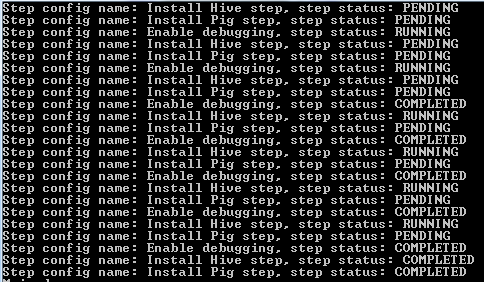
In the console you’ll first see the PENDING statuses:

Emr job flow startup output in console

The steps are finally all complete:

Console output after all steps finished in code

The status of the cluster briefly switches to “waiting” when it receives the termination request from our console application.

That’s enough for now. We’ll return to the Hive CLI in the next post to see how EMR can interact with S3 and DynamoDb.

View all posts related to Amazon Web Services and Big Data here.

How to indicate that code is obsolete in C# .NET

Say you have a class or a class member that you’d like to remove at a later stage. You’ve probably seen compiler warnings or even errors with a message like “abc.efg is obsolete: ‘some message'”.

Let’s see quickly how to achieve it in C#.

The attribute to be aware of is Obsolete. It can decorate both classes, properties and methods. You can attach a useful message to it and make the compiler issue an error instead of the default warning. Let’s see an example:

[Obsolete]
public class CurrentCustomer
{
	public void Buy()
	{
	}
}

Read more of this post

Using Amazon Elastic MapReduce with the AWS.NET API Part 4: Hive basics with Hadoop

Introduction

In the previous post we started our first Amazon EMR cluster with Hadoop, Hive and a couple of other tools installed. We saw even our first examples of the Hive query language to retrieve the available tables and databases.

In this post we’ll continue with the basics of Hive. We’ll create a database and a table, fill it with some raw data and execute a couple of aggregation scripts on the data. We’ll finally store the aggregated values in another database.

Read more of this post

Elliot Balynn's Blog

A directory of wonderful thoughts

Software Engineering

Web development

Disparate Opinions

Various tidbits

chsakell's Blog

WEB APPLICATION DEVELOPMENT TUTORIALS WITH OPEN-SOURCE PROJECTS

Once Upon a Camayoc

ARCHIVED: Bite-size insight on Cyber Security for the not too technical.