Basics of working with pipes in C# .NET part 1: send and receive a single byte

Pipes are used for interprocess communication. Typically there’s a single pipe server that one or more clients can connect to and exchange messages.

There are named and anonymous pipes. Anonymous pipes come with a couple of limitations compared to named pipes:

  • They are one-way only i.e. the server and client cannot exchange messages. Communication where both the server and client are allowed to send messages is called duplex
  • Anonymous pipes only allow communication with a single client. Named pipes provide a multi-client scenario
  • Anonymous pipes cannot function over the network. They are limited to the same machine. Named pipes have no such limitation

Read more of this post

Various topics from software architecture part 1: the RequestResponse messaging pattern

Introduction

In this series we’ll look at a couple of topics from the world of software architecture. If you have read other architecture-related series on this blog then some of them will be familiar to you by now.

I’m planning to write an updated series dedicated to Domain Driven Design during/after the summer of 2015. I don’t want to rewrite everything that’s been said in the original series. Therefore I decided to factor some major chunks out into separate posts for easier reference. Most of them appear within the series but are “hidden”, meaning it’s difficult to just refer to them separately.

We’ll start by looking at a simple pattern used in messaging, called RequestResponse.

The RequestResponse

Read more of this post

LIFO collections with Stack of T in .NET C#

LIFO, that is last-in-first-out, collections are represented by the generic Stack of T class in .NET. Stacks are collections where a new element is placed on top of the collection and is removed first when an item is being retrieved. Hence the item that was entered first will get to stay longest in the stack.

Let’s say that you’re throwing a party where you follow a Stack policy as far as guests are concerned. As time goes by you’d like all of them to leave eventually and the first one to go will be the last person who has arrived. This might not be a very fair way to treat your guests but there you go.

Read more of this post

HTTPS and X509 certificates in .NET Part 5: validating certificates in code

Introduction

In the previous post we looked at some basic classes in the .NET framework that deal with X509 certificates. We saw how to load, inspect, install and remove certificates.

In this post we’ll continue working with certificates in code and concentrate on validation techniques.

Certificate validation in C#

The two most important objects in .NET that will help you validate a certificate are X509Chain and X509ChainPolicy.

The X509Chain object represents the chain of trust when checking the validity of a certificate. X509ChainPolicy fine-tunes how you’d like to validate the certificate, i.e. which criteria the chain of trust should fulfil.

Let’s see how the self-signed certificate we created before can be validated. Consider the following sample code:

private static void RunValidation()
{
	X509Store computerCaStore = new X509Store(StoreName.My, StoreLocation.LocalMachine);
	try
	{
		computerCaStore.Open(OpenFlags.ReadOnly);
		X509Certificate2Collection certificatesInStore = computerCaStore.Certificates;
		X509Certificate2Collection findResult = certificatesInStore.Find(X509FindType.FindBySubjectName, "mylocalsite.local", false);				
		foreach (X509Certificate2 cert in findResult)
		{
			X509Chain chain = new X509Chain();
			X509ChainPolicy chainPolicy = new X509ChainPolicy()
			{
				RevocationMode = X509RevocationMode.Online,
				RevocationFlag = X509RevocationFlag.EntireChain
			};
			chain.ChainPolicy = chainPolicy;
			if (!chain.Build(cert))
			{
				foreach (X509ChainElement chainElement in chain.ChainElements)
				{
					foreach (X509ChainStatus chainStatus in chainElement.ChainElementStatus)
					{
						Debug.WriteLine(chainStatus.StatusInformation);
					}
				}
			}
		}				
	}
	finally
	{
		computerCaStore.Close();
	}
}

You’ll recognise the part of this code where we open the certificate store and load the self-signed derived certificate. Note that the Find method will return a collection of X509 certificates but there’s no way to extract just a single element from a X509Certificate2Collection object. Even if you know that there’s only one certificate that fulfils the search criteria you’ll need to iterate over the collection.

Anyway, the validation part of the code starts within the foreach loop by constructing an X509Chain object. We then build a policy for the chain by specifying a couple of properties.

The RevokationMode enumeration will define whether or not we want to check the revocation list for this certificate: check it on-line, off-line or not at all. X509RevocationFlag will specify if we want to check the revocation list with or without the CA root. The X509ChainPolicy object has some more properties that will let you fine-grain the chain policy. The VerificationFlags enumeration will let you switch off parts of the chain, e.g.:

VerificationFlags = X509VerificationFlags.IgnoreInvalidName | X509VerificationFlags.IgnoreNotTimeValid

Normally you’d want to verify all properties so you’ll leave VerificationFlags untouched.

We then want to build the chain by calling the Build method with the certificate. If Build returns false then we know that something isn’t correct with the validation chain. So for each element in the chain elements we want to check the element status messages.

If you run the above code then you should get a validation error:

“The revocation function was unable to check revocation for the certificate.”

That’s because we specified that the online revocation list should be checked. However, there’s no revocation list anywhere on Earth that knows about our self-signed certificate. If we change the code to…

X509ChainPolicy chainPolicy = new X509ChainPolicy()
{
	RevocationMode = X509RevocationMode.NoCheck,
        RevocationFlag = X509RevocationFlag.EntireChain
};

…then the Build method passes as everything is fine with the certificate.

Open IIS for another test. We’ll use the IIS GUI to quickly create another certificate. Double-click on the following icon:

Certificates button in IIS

Then click on the following link in the right-hand panel:
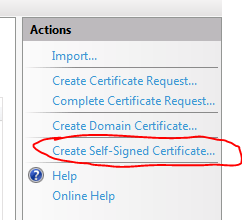
Create self signed certificate link in IIS

Provide some friendly name for the certificate and click OK.

The certificate should appear in the Personal folder in the Certificates snap-in after a refresh. I called my certificate “iiscertificate”:

Certificate created in IIS visible in MMC snap in

If you double-click this certificate then you’ll see that it is valid. Now if we change the code back to online revocation list checking…

X509ChainPolicy chainPolicy = new X509ChainPolicy()
{
	RevocationMode = X509RevocationMode.Online,
        RevocationFlag = X509RevocationFlag.EntireChain
};

…and search for the IIS certificate…:

X509Certificate2Collection findResult = certificatesInStore.Find(X509FindType.FindBySubjectName, "andras1.Apica.local", false);

…then Build will return true, the IIS certificate is fully trusted even after the CRL is checked.

The certificate was also inserted into the Trusted Root Certification Authorities folder:

IIS certificate also listed among CA certificates

If you don’t see it then refresh the list by pressing F5.

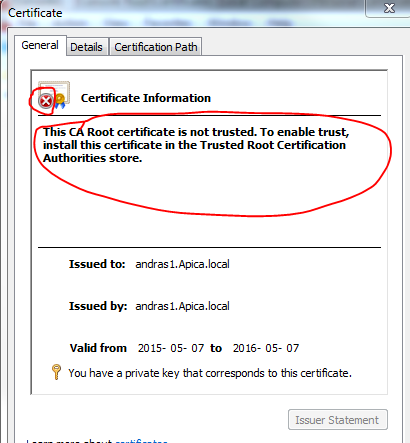
Now remove the certificate from the trusted CA folder. Then go back to the Personal folder and double-click the IIS certificate. You should see that it is not trusted any more:

IIS certificate not trusted after removing from global CA store

If we run the same code again then Build returns false and we get the following validation error:

“A certificate chain processed, but terminated in a root certificate which is not trusted by the trust provider.”

The message clearly says that the root certificate is not trusted.

A more compact solution

The above code lets you fine-grain your chain building logic. There are specialised X509 validators in .NET that provide a more compact way of validating a certificate. Add the following references to your project:
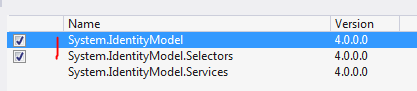
References for X509 validators

The below example will build a validator that validates the chain of trust with all the validation flags turned on:

X509CertificateValidator chainTrustValidator = X509CertificateValidator.ChainTrust;
try
{
	chainTrustValidator.Validate(cert);
}
catch (Exception ex)
{
	Debug.WriteLine(ex.Message);
}

The Validate method will throw an exception if the validation fails. The untrusted IIS certificate will give the following exception message:

“The X.509 certificate CN=andras1.Apica.local chain building failed. The certificate that was used has a trust chain that cannot be verified. Replace the certificate or change the certificateValidationMode. A certificate chain processed, but terminated in a root certificate which is not trusted by the trust provider.”

That’s all folks about the basics of certificate validation in .NET.

This was the last post in this HTTPS basics series.

You can view the list of posts on Security and Cryptography here.

Concatenate two IEnumerable sequences in C# .NET

We can use the Range method to build two integer sequences as follows:

IEnumerable<int> firstRange = Enumerable.Range(10, 10);
IEnumerable<int> secondRange = Enumerable.Range(5, 20);

You can join the two sequences using the Concat method:

List<int> concatenated = firstRange.Concat(secondRange).ToList();
concatenated.ForEach(i => Debug.WriteLine(i));

You’ll see that the concatenated sequence holds all numbers from the first and the second sequence:

Read more of this post

Using linked lists in .NET with C#

Linked lists are very efficient if you want to insert and remove items in a collection frequently. Linked lists do not store their elements in contiguous regions in memory, like e.g. the List of T object. Instead elements in linked lists can be stored anywhere.

The elements are linked by their “next” and “previous” references. The first element will have a “next” pointer to the element that comes after that. The second element in turn will have a reference to the previous and next elements. The first element will of course only have a reference to the “next” element and “previous” will be null, whereas the last element will point to the previous element and “next” will be null. All elements in between will have two references. Such a linked list is also called a doubly linked list.

One big difference between linked lists and “normal” lists is that linked lists have no index accessors. You just cannot extract the element #3 for example without looping through the linked list and stopping at the third element.

Read more of this post

HTTPS and X509 certificates in .NET Part 4: working with certificates in code

Introduction

In the previous post we successfully installed our self-signed CA certificate in the Trusted Root CA folder. We also installed a derived certificate in the Personal certificates folder. We then saw how to make IIS use our certificate for a secured web site.

In this post we’ll start looking into the certificate-related classes in .NET.

Loading a certificate from a file

Digital certificates are represented by the X509Certificate2 class in .NET located in the System.Security.Cryptography.X509Certificates namespace. The class has numerous overloaded constructors. You can pass in the file path to the certificate, a byte array content, a password etc. Let’s see whether we can load the CA certificate we created before in this series:

Read more of this post

Keeping the key-values sorted by using a SortedDictionary with C# .NET

You can use the generic SortedDictionary of Key and Value to automatically keep the key value items sorted by their keys. Any time you add a new key value pair the dictionary will reorder the items. The SortedDictionary was optimised for frequent changes to its list of items. Keep in mind that the items will be sorted by their key and not their value.

Consider the following simple custom object:

public class Student
{
	public string Name { get; set; }
	public string SchoolName { get; set; }
}

Let’s organise a couple of students into a sorted dictionary by their birthdates:

SortedDictionary<int, List<Student>> birthDates = new SortedDictionary<int, List<Student>>();
birthDates[1990] = new List<Student>()
{
	new Student()
	{
		Name = "John", 
		SchoolName ="Great school"
	},
	new Student()
	{
		Name = "Diana", 
		SchoolName ="Great school"
	},
	new Student()
	{
		Name = "Peter", 
		SchoolName ="Awesome school"
	}
};

birthDates[1979] = new List<Student>()
{
	new Student()
	{
		Name = "Daniel", 
		SchoolName ="Great school"
	},
	new Student()
	{
		Name = "Hanna", 
		SchoolName ="Awesome school"
	}
};

birthDates[1985] = new List<Student>()
{
	new Student()
	{
		Name = "Daniel", 
		SchoolName ="Awesome school"
	},
	new Student()
	{
		Name = "Hanna", 
		SchoolName ="Great school"
	}
};

foreach (var kvp in birthDates)
{
	Debug.WriteLine(kvp.Key);
}

The code prints the years in ascending order:

1979
1985
1990

Remember though that this is a Dictionary so if you add another key-value with an existing key then the existing key will be overwritten.

This was a simple case as ordering – and uniqueness – is based on an integer key, i.e. the year of birth. .NET can order primitive types like integers in a natural way, we don’t have to give it any help. .NET can also compare primitive types, i.e. it can determine whether two integers or two strings are equal.

However, what if the key is a custom object? Say we’d like to have Student objects as keys and a list of strings as values. The list of strings can store the titles of the essays they have written at school. How will .NET be able to determine the ordering and uniqueness of Student? It cannot of course. We’ll have to declare how two student objects can be ordered and compared. Both can be achieved by overriding the generic IComparable of T interface like we saw in this post. Let’s order the Student objects by their Name properties:

public class StudentNameComparer : IComparer<Student>
{
	public int Compare(Student x, Student y)
	{
		return x.Name.CompareTo(y.Name);
	}
}

The following example shows how you can supply the custom comparer to a sorted dictionary. I’ve ignored assigning school names and the list of essay titles, those are not relevant now:

SortedDictionary<Student, List<string>> essays = new SortedDictionary<Student, List<string>>(new StudentNameComparer());
essays.Add(new Student() { Name = "John" }, new List<string>());
essays.Add(new Student() { Name = "Adam" }, new List<string>());
essays.Add(new Student() { Name = "Paul" }, new List<string>());
essays.Add(new Student() { Name = "Hannah" }, new List<string>());
essays.Add(new Student() { Name = "Eve" }, new List<string>());
essays.Add(new Student() { Name = "Anne" }, new List<string>());
essays.Add(new Student() { Name = "Mary" }, new List<string>());

foreach (var kvp in essays)
{
	Debug.WriteLine(kvp.Key.Name);
}

This prints the names in the correct alphabetical order:

Adam
Anne
Eve
Hannah
John
Mary
Paul

View all various C# language feature related posts here.

HTTPS and X509 certificates in .NET Part 3: how to install certificates and use them with IIS

Introduction

In the previous post we looked at the command line tools makecert and pvk2pfx. We saw how they could be used to create a root and a derived certificate and to package the private key and certificate files.

In this post we will install the certificates in the Windows certificate store so that they are trusted by IIS. We’ll also see how to tell IIS to use a specific SSL certificate.

certmgr and MMC snap in

The c:\windows\system32 folder includes two GUI tools for certificate management: certmgr.msc and mmc.exe. MMC.exe is a more general tool where you can import so-called snap-ins. Certificates have their own snap-in.

Run mmc.exe as an administrator. The following empty window will open:

Read more of this post

Modifying a shared integer in a thread-safe manner in .NET

The Interlocked class in the System.Threading namespace provides a number of useful methods to modify the value of an integer that is shared among multiple threads.

Consider the following code. It updates the same shared integer in a loop on 5 different threads and prints the final status at the end. 3 threads add 1 to the integer 600 times and 2 threads subtracts 1 600 times. Therefore we’re expecting the shared integer to be 600 at the end:

Read more of this post

Elliot Balynn's Blog

A directory of wonderful thoughts

Software Engineering

Web development

Disparate Opinions

Various tidbits

chsakell's Blog

WEB APPLICATION DEVELOPMENT TUTORIALS WITH OPEN-SOURCE PROJECTS

Once Upon a Camayoc

ARCHIVED: Bite-size insight on Cyber Security for the not too technical.