SOLID principles in .NET revisited part 6: the Interface Segregation Principle

Introduction

In the previous post we continued to discuss the Liskov Substitution Principle. We saw a subtle example of breaking LSP by trying to force an object to implement an interface even though not all methods of the interface made sense for it. The client object, i.e. OnDemandAgentService cannot consume all implementations of IAuthorizationService without fully being able to carry out its tasks.

A possible solution comes in the form of letter ‘I’ in SOLID, which stands for the Interface Segregation Principle (ISP). ISP states that clients should not be forced to depend on interfaces and methods they do not use. Applying ISP correctly will result in a lot of small interfaces instead of handful of large ones with lots of methods. The more methods to an interface has the more likely it is that an implementation will not be able to fulfil all parts of the contract. The IAuthorizationService only has 2 methods and we immediately found an example where a class, the AuthorizationService only could implement one of them.

Read more of this post

SOLID principles in .NET revisited part 5: the Liskov Substitution Principle 2

Introduction

In the previous post we looked at letter ‘L’ in SOLID, i.e. the Liskov Substitution Principle. We saw how adhering to the LSP helps remove implementation-specific details from a client class that consumes those implementations. The client class will be able to consume the services of an abstraction without worrying about the actual implementation of the abstraction. The goal of LSP is that any implementation of an abstraction will work seamlessly within the consuming class.

We looked at the following cases that can indicate a violation of LSP:

  • switch or if-else blocks checking for the value of an enumeration
  • Code blocks that check the actual type of an abstraction to branch logic. This can be coupled with downcasting the abstraction to a concrete implementation type
  • Blocks with magic strings that check for a value in some string parameter and branch logic accordingly

There’s at least one more indicator which we haven’t seen so far. I decided to devote a separate article to that case as it brings us closer to the next constituent of SOLID, i.e. the Interface Segregation Principle.

Read more of this post

SOLID principles in .NET revisited part 4: the Liskov Substitution Principle

Introduction

In the previous post we looked at the Open-Closed Principle, i.e. ‘O’ in the SOLID acronym. We saw how the OCP facilitated the flexibility and extensibility of a class. It also places a constraint on a class by making it “append-only”. In other words you can extend a class but you cannot change the implementation of existing parts of a class.

In this post we’ll take a look at letter ‘L’ which stands for the Liskov Substitution Principle LSP.

Definition of LSP

LSP stands for the interchangeability of different implementations of an abstraction. An abstraction in C#, and probably most other popular object-oriented programming languages, can either be an abstract base class or an interface. According to LSP it shouldn’t make any difference what implementation of an abstraction you call from a client. Any concrete implementation of the abstraction should behave in a way that doesn’t break the client and doesn’t produce any unexpected and/or incorrect results. The client shouldn’t ever be concerned with the implementation details of an abstraction. It should be able to consume any concrete implementation “without batting an eye”.

Read more of this post

SOLID principles in .NET revisited part 3: the Open-Closed principle

Introduction

In the previous post we looked at the letter ‘S’ in SOLID, i.e. the single responsibility principle. We identified the reasons for change in the OnDemandAgentService class and broke out 3 of them into separate classes. The OnDemandAgentService can now concentrate on starting a new on-demand agent and delegate other tasks to specialised services such as EmailService. Also, an additional benefit is that other classes in the assembly can re-use those specialised services so that e.g. logging can be centralised.

In this post we’ll look at the second constituent of the SOLID principles, the letter ‘O’ which stands for the Open-Closed Principle OCP.

Read more of this post

SOLID principles in .NET revisited part 2: Single Responsibility Principle

Introduction

In the previous post we set the tone for the recycled series on SOLID. We also presented a piece of code to be improved. There are several issues with this code and we’ll try to improve it step by step as we go through the principles behind SOLID.

In this post we’ll start with ‘S’, i.e. the Single Responsibility Principle (SRP). We’ll partly improve the code by applying SRP to it. Note that the code will still have a lot of faults left after this but we’ll improve it gradually.

Read more of this post

SOLID principles in .NET revisited part 1: introduction with code to be improved

Introduction

Probably every single programmer out there wants to write good code. Nobody has the desire to be ashamed of the code base they have written. Probably no programmer wants to turn a large software project into a failure by deliberately writing low quality code.

What is good code anyway? Opinions differ on this point but we can generally say that good code means code that is straightforward to extend and maintain, code that’s easy to test, code that is flexible, code that is relatively easy to read, code that is difficult to break and code that can swiftly be adapted to changes in the requirements without weeks of refactoring. These traits are interdependent. E.g. code that’s flexible will be easier to change in line with new requirements. The English word “solid” has the meaning of “difficult to break” or “resistant to change” which is naturally applicable to good code.

However, it’s very difficult to write good code in practice. On the other hand it’s very easy to write bad code. Compilers do not understand software engineering principles so they won’t complain if your code is “bad” in any way – except if your code contains faulty syntax but that’s not what we mean by bad code here. Modern object oriented languages like C#, Java or Python provide a lot of flexibility to the programmer. He or she can construct code which performs one or more functions in lots of different ways. Also, different programmers might point out different parts in the same code base as being “bad”.

Read more of this post

A model .NET web service based on Domain Driven Design Part 9: the Web layer

Introduction

We’re now ready to build the ultimate consumer of the application, the web layer. As we said before this layer can be any type of presentation layer: MVC, a web service interface, WPF, a console app, you name it. The backend design that we’ve built up so far should be flexible enough to support either a relatively simple switch of UI type or the addition of new types. You may want to have several multiple entry points into your business app so it’s good if they can rely on the same foundations. Otherwise you may need to build different apps just to support different presentation methods, which is far from optimal.

Here we’ll build a web service layer powered by Web API. If you don’t know what it is you can read about it on its official homepage. Here comes a summary:

In short the Web API is a technology by Microsoft to build HTTP-based web services. Web Api uses the standard RESTful way of building a web service with no SOAP overhead; only plain old HTTP messages are exchanged between the client and the server. The client sends a normal HTTP request to a web service with some URI and receives a HTTP response in return.

The technology builds heavily on MVC: it has models and controllers just like a normal MVC web site. It lacks any views of course as a web service provides responses in JSON, XML, plain text etc., not HTML. There are some other important differences:

  • The actions in the controllers do not return Action Results: they can return any string based values and HttpResponse objects
  • The controllers derive from the ApiController class, not the Controller class as in standard MVC

The routing is somewhat different:

  • In standard MS MVC the default routing may look as follows: controller/action/parameters
  • In Web API the ‘action’ is omitted by default: Actions will be routed based on the HTTP verb of the incoming HTTP message: GET, POST, PUT, DELETE, HEAD, OPTIONS
  • The action method signatures follow this convention: Get(), Get(int id), Post(), Put(), Delete(int id)
  • As long as you keep to this basic convention the routing will work without changing the routing in WebApiConfig.cs in the App_Start folder

Routing example: say that the client wants to get data on a customer with id 23. They will send a GET request to our web service with the following URI: http://www.api.com/customers/21. The Web API routing engine will translate this into a Get(int id) method within the controller called CustomersController. If however they want to delete this customer then he will send a DELETE request to the same URI and the routing engine will try to find a Delete(int id) method in CustomersController.

In other words: the supported HTTP verbs have a corresponding method in the correct controller. If a resource does not support a specific verb, e.g. a Customer cannot be deleted, then just omit the Delete(int id) method in the CustomersController and Web API will return a HTTP exception message saying that there’s no suitable method.

The basic convention allows some freedom of naming your action methods. Get, Post etc. can be named Get[resource], Post[resource], e.g. GetCustomer, PostCustomer, DeleteCustomer and the routing will still work. If for any reason you don’t like the default naming conventions you can still use the standard HttpGet, HttpPost type of attributes known from MS MVC.

I won’t concentrate on the details of Web API in this post. If there’s something you don’t understand along the way then make sure to check out the link provided above.

We’ll also see how the different dependencies can be injected into the services, repositories and other items that are dependent upon abstractions. So far we have diligently given room for injecting dependencies according to the letter ‘D‘ in SOLID, like here:

public CustomerService(ICustomerRepository customerRepository, IUnitOfWork unitOfWork)

However, at some point we’ll need to inject these dependencies, right? We could follow poor man’s DI by constructing a new CustomerRepository and a new InMemoryUnitOfWork object as they implement the necessary ICustomerRepository and IUnitOfWork interfaces. However, modern applications use one of the many available Inversion-of-Control containers to take care of these plumbing tasks. In our case we’ll use StructureMap which is quite common to and works very well with .NET projects. IoCs can be difficult to grasp at first as they seem to do a lot of magic, but don’t worry much about them. StructureMap can do a lot for you without having to dig deep into the details on how it works as it’s easy to install and get started with using NuGet.

The web layer

Add a new Web API project by taking the following steps.

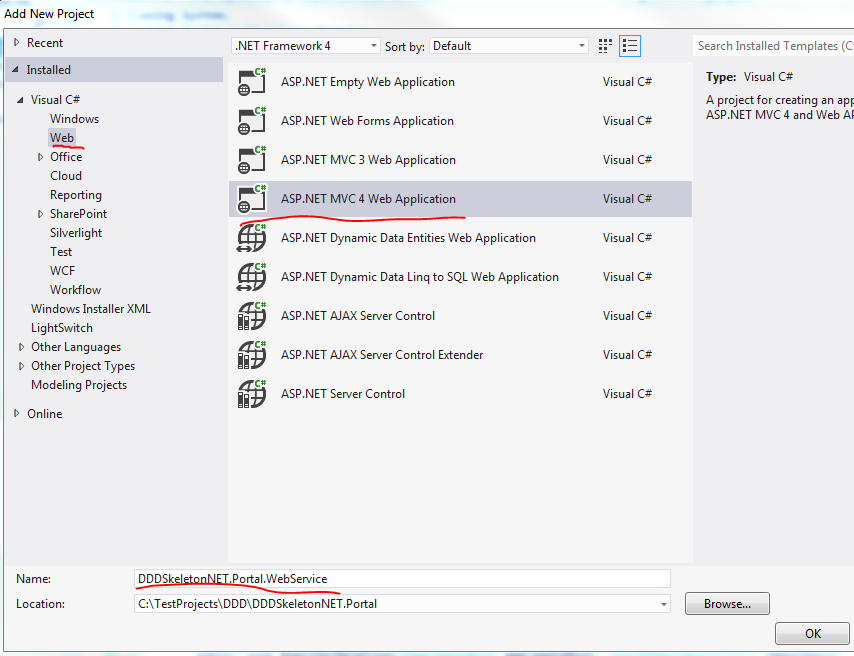
1. Add new project

2. Select Web/MVC 4 web application:

Add new MVC project

Call it DDDSkeletonNET.Portal.WebService.

3. Select Web API in the Project template:
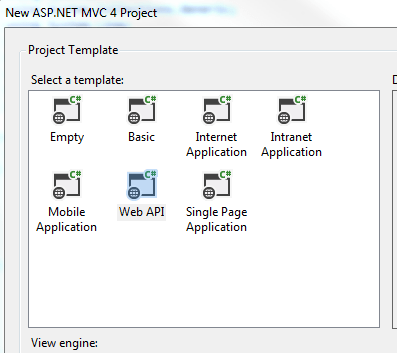
Web API in project template

The result is actually a mix between an MVC and a Web API project. Take a look into the Controllers folder. It includes a HomeController which derives from the MVC Controller class and a ValuesController which derives from the Web API ApiController. The project also includes images, views and routing related to MVC. The idea is that MVC views can also consume Web API controllers. Ajax calls can also be directed towards Web API controllers. However, our goal is to have a pure web service layer so let’s clean this up a little:

  • Delete the Content folder
  • Delete the Images folder
  • Delete the Views folder
  • Delete the Scripts folder
  • Delete both controllers from the Controllers folder
  • Delete favicon.ico
  • Delete BundleConfig.cs from the App_Start folder
  • Delete RouteConfig.cs from the App_Start folder
  • Delete the Models folder
  • Delete the Areas folder
  • In WebApiConfig.Register locate the routeTemplate parameter. It says “api/…” by default. Remove the “api/” bit so that it says {controller}/{id}
  • Locate Global.asax.cs. It is trying to call RouteConfig and BundleConfig – remove those calls

The WebService layer should be very slim at this point with only a handful of folders and files. Right-click the Controllers folder and add a new empty API controller called CustomersController:

Add api controller to web api layer

We’ll need to have an ICustomerService object in the CustomersController so add a reference to the ApplicationServices layer.

Add the following private backing field and constructor to CustomersController:

private readonly ICustomerService _customerService;

public CustomersController(ICustomerService customerService)
{
	if (customerService == null) throw new ArgumentNullException("CustomerService in CustomersController");
	_customerService = customerService;
}

We’ll want to return Http messages only. Http responses are represented by the HttpResponseMessage object. As all our contoller methods will return a HttpResponseMessage we can assign an extension method to build these messages. Insert a folder called Helpers in the web layer. Add the following extension method to it:

public static class HttpResponseBuilder
{
	public static HttpResponseMessage BuildResponse(this HttpRequestMessage requestMessage, ServiceResponseBase baseResponse)
	{
		HttpStatusCode statusCode = HttpStatusCode.OK;
		if (baseResponse.Exception != null)
		{
			statusCode = baseResponse.Exception.ConvertToHttpStatusCode();
			HttpResponseMessage message = new HttpResponseMessage(statusCode);
			message.Content = new StringContent(baseResponse.Exception.Message);
			throw new HttpResponseException(message);
		}
		return requestMessage.CreateResponse<ServiceResponseBase>(statusCode, baseResponse);
	}
}

We’re extending the HttpRequestMessage object which represents the http request coming to our web service. We build a response based on the Response we received from the service layer. We assume that the http status is OK (200) but if there’s been any exception then we adjust that status and throw a HttpResponseException exception. Make sure to set the namespace to DDDSkeletonNET.Portal so that the extension is visible anywhere in the project without having to add using statements.

ConvertToHttpStatusCode() is also an extension method. Add another class called ExceptionDictionary to the Helpers folder:

public static class ExceptionDictionary
{
	public static HttpStatusCode ConvertToHttpStatusCode(this Exception exception)
	{
		Dictionary<Type, HttpStatusCode> dict = GetExceptionDictionary();
		if (dict.ContainsKey(exception.GetType()))
		{
			return dict[exception.GetType()];
		}
		return dict[typeof(Exception)];
	}

	private static Dictionary<Type, HttpStatusCode> GetExceptionDictionary()
	{
		Dictionary<Type, HttpStatusCode> dict = new Dictionary<Type, HttpStatusCode>();
		dict[typeof(ResourceNotFoundException)] = HttpStatusCode.NotFound;
		dict[typeof(Exception)] = HttpStatusCode.InternalServerError;
		return dict;
	}
}

Here we maintain a dictionary of Exception/HttpStatusCode pairs. It would be nicer of course to read this directly from the Exception object possibly through an Adapter but this solution is OK for now.

Let’s implement the get-all-customers method in CustomersController. So we’ll need a Get method without any parameters that corresponds to the /customers route. That should be as easy as the following:

public HttpResponseMessage Get()
{
	ServiceResponseBase resp = _customerService.GetAllCustomers();
	return Request.BuildResponse(resp);
}

We ask the service to retrieve all customers and convert that response into a HttpResponseMessage object.

We cannot yet use this controller as ICustomerService is null, there’s no concrete type behind it yet within the controller. This is where StructureMap enters the scene. Open the Manage NuGet Packages window and install the following package:
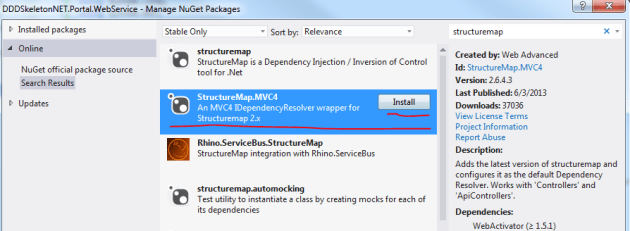
Install StructureMap IoC in web api layer

The installer adds a couple of new files to the web service layer:

  • 3 files in the DependencyResolution folder
  • StructuremapMvc.cs in the App_Start folder

The only file we’ll consider in any detail is IoC.cs in the DependencyResolution folder. Don’t worry about the rest, they are not important to our main discussion. Here’s a short summary:

StructuremapMvc was auto-generated by the StructureMap NuGet package and it can safely be ignored, it simply works.

DependencyResolution folder: IoC.cs is important to understand, the other auto-generated classes can be ignored. In IoC.cs we declare which concrete types we want StructureMap to inject in place of the abstractions. If you are not familiar with IoC containers then you may wonder how ICustomerService is injected in CustomerController and how ICustomerRepository is injected in CustomerService. This is achieved automagically through StructureMap and IoC.cs is where we instruct it where to look for concrete types and in special cases tell it explicitly which concrete type to take.

StructureMap follows a simple built-in naming convention: if it encounters an interface starting with an ‘I’ it will look for a concrete type with the same name without the ‘I’ in front. Example: if it sees that an ICustomerService interface is needed then it will try to fetch a CustomerService object. This is expressed by the scan.WithDefaultConventions() call. It is easy to register new naming conventions for StructureMap if necessary – let me know in the comment section if you need any code sample.

We also need to tell StructureMap where to look for concrete types. It won’t automatically find the implementations of our abstractions, we need to give it some hints. We can declare this in the calls to scan.AssemblyContainingType of type T. Example: scan.AssemblyContainingType() of type CustomerRepository means that StructureMap should go and look in the assembly which contains the CustomerRepository object. Note that this does not mean that CustomerRepository must be injected at all times. It simply says that StructureMap will look in that assembly for concrete implementations of an abstraction. I could have picked any object from that assembly, it doesn’t matter. So these calls tell StructureMap to look in each assembly that belong to the same solution.

There are cases where the standard naming convention is not enough. Then you can explicitly tell StructureMap which concrete type to inject. Example: x.For()[abstraction].Use()[implementation]; means that if StructureMap sees a dependency on ‘abstraction’ then it should inject a new ‘implementation’ type.

ObjectFactory.AssertConfigurationIsValid() will make sure that an exception is thrown during project start-up if StructureMap sees a dependency for which it cannot find any suitable implementation.

Update the Initialize() method in IoC.cs to the following:

public static IContainer Initialize()
{
	ObjectFactory.Initialize(x =>
	{
        	x.Scan(scan =>
		{
	        	scan.TheCallingAssembly();
			scan.AssemblyContainingType<ICustomerRepository>();
		        scan.AssemblyContainingType<CustomerRepository>();
			scan.AssemblyContainingType<ICustomerService>();
			scan.AssemblyContainingType<BusinessRule>();
			scan.WithDefaultConventions();
		});
		x.For<IUnitOfWork>().Use<InMemoryUnitOfWork>();
		x.For<IObjectContextFactory>().Use<LazySingletonObjectContextFactory>();
	});
	ObjectFactory.AssertConfigurationIsValid();
	return ObjectFactory.Container;
}

You’ll need to reference all other layers from the Web layer for this to work. We’re telling StructureMap to scan all other assemblies by declaring all types that are contained in those assemblies – again, I could have picked ANY type from the other projects, so don’t get hung up on questions like “Why did he choose BusinessRule?”. These calls will make sure that the correct implementations will be found based on the default naming convention mentioned above. There are two cases where this convention is not enough: IUnitOfWork and IObjectContextFactory. Here we use the For and Use extension methods to declare exactly what we need. Finally we want to assert that all implementations have been found. You can test it for yourself: comment out the line on IUnitOfWork, start the application – make sure to set the web layer as the startup project – and you should get a long exception message, here’s the gist of it:

StructureMap.Exceptions.StructureMapConfigurationException was unhandled by user code
No Default Instance defined for PluginFamily DDDSkeletonNET.Infrastructure.Common.UnitOfWork.IUnitOfWork

StructureMap couldn’t resolve the IUnitOfWork dependency so it threw an error.

Open the properties window of the web project and specify the route to customers:

Specify starting route in properties window

Set a breakpoint at this line in CustomersController:

ServiceResponseBase resp = _customerService.GetAllCustomers();

…and press F5. Execution should stop at the break point. Hover over _customerService with the mouse to check the status of the dependency. You’ll see it is not null, so StructureMap has correctly found and constructed a CustomerService object for us. Step through the code with F11 to see how it is all connected. You’ll see that all dependencies have been resolved correctly.

However, at the end of the loop, when the 3 customers that were retrieved from memory should be presented, we get the following exception:

The ‘ObjectContent`1’ type failed to serialize the response body for content type ‘application/xml; charset=utf-8’.

Open WebApiConfig and add the following lines of code to the Register method:

var json = config.Formatters.JsonFormatter;
json.SerializerSettings.PreserveReferencesHandling = Newtonsoft.Json.PreserveReferencesHandling.Objects;
config.Formatters.Remove(config.Formatters.XmlFormatter);

This will make sure that we return our responses in JSON format.

Re-run the app and you should see some JSON on your browser:

Json response from get all customers

Yaaay, after much hard work we’re getting somewhere at last! How can we retrieve a customer by id? Add the following overloaded Get method to the Customers controller:

public HttpResponseMessage Get(int id)
{
	ServiceResponseBase resp = _customerService.GetCustomer(new GetCustomerRequest(id));
	return Request.BuildResponse(resp);
}

Run the application and enter the following route in the URL window: customers/1. You should see that the customer with id 1 is returned:

Get one customer JSON response

Now try this with an ID that you know does not exist, such as customers/5. An exception will be thrown in the application. Let the execution continue and you should see the following exception message in your web browser:

Resource not found JSON

This is the message we set in the code if you recall.

What if we want to format the data slightly differently? It’s good that we have a customer view model and request-response objects where we are free to change what we want without modifying the corresponding domain object. Open the application services layer and add a reference to the System.Runtime.Serialization library. Modify the CustomerViewModel object as follows:

[DataContract]
public class CustomerViewModel
{
	[DataMember(Name="Customer name")]
	public string Name { get; set; }
	[DataMember(Name="Address")]
	public string AddressLine1 { get; set; }
	public string AddressLine2 { get; set; }
	[DataMember(Name="City")]
	public string City { get; set; }
	[DataMember(Name="Postal code")]
	public string PostalCode { get; set; }
	[DataMember(Name="Customer id")]
	public int Id { get; set; }
}

Re-run the application and navigate to customers/1. You should see the updated property names:

Data member and data contract attribute

You can decorate the Response objects as well with these attributes.

This was a little change in the property names only but feel free to add extra formats to the view model, it’s perfectly fine.

We’re missing the insert, update and delete methods. Let’s implement them here and we’ll test them in the next post.

As far as I’ve seen there’s a bit of confusion over how the web methods PUT and POST are supposed to be used in web requests. DELETE is clear, we want to delete a resource. GET is also straightforward. However, PUT and POST are still heavily debated. This post is not the time and place to decide once and for all what their roles are, so I’ll take the following approach:

  • POST: insert a resource
  • PUT: update a resource

Here come the implementations:

public HttpResponseMessage Post(CustomerPropertiesViewModel insertCustomerViewModel)
		{
			InsertCustomerResponse insertCustomerResponse = _customerService.InsertCustomer(new InsertCustomerRequest() { CustomerProperties = insertCustomerViewModel });
			return Request.BuildResponse(insertCustomerResponse);
		}

public HttpResponseMessage Put(UpdateCustomerViewModel updateCustomerViewModel)
{
	UpdateCustomerRequest req =
		new UpdateCustomerRequest(updateCustomerViewModel.Id)
		{
			CustomerProperties = new CustomerPropertiesViewModel()
			{
				AddressLine1 = updateCustomerViewModel.AddressLine1
				,AddressLine2 = updateCustomerViewModel.AddressLine2
				,City = updateCustomerViewModel.City
				,Name = updateCustomerViewModel.Name
				,PostalCode = updateCustomerViewModel.PostalCode
			}
		};
	UpdateCustomerResponse updateCustomerResponse =	_customerService.UpdateCustomer(req);
	return Request.BuildResponse(updateCustomerResponse);
}

public HttpResponseMessage Delete(int id)
{
	DeleteCustomerResponse deleteCustomerResponse = _customerService.DeleteCustomer(new DeleteCustomerRequest(id));
	return Request.BuildResponse(deleteCustomerResponse);
}

…where UpdateCustomerViewModel derives from CustomerPropertiesViewModel:

public class UpdateCustomerViewModel : CustomerPropertiesViewModel
{
	public int Id { get; set; }
}

We’ll test these in the next post where we’ll also draw the conclusions of what we have achieved to finish up the series.

View the list of posts on Architecture and Patterns here.
A model .NET web service based on Domain Driven Design Part 1: introduction

Introduction

Layered architecture has been the norm in enterprise projects for quite some time now. We layer our solutions into groups of responsibilities: UI, services, data access, infrastructure and others. We can connect these layers by setting references to them from the consuming layer. There are various ways to set these layers and references. The choices you make here depend on the project type – Web, WPF, WCF, games etc. – you’re working on and the philosophy you follow.

On the one hand you may be very technology driven and base your choices primarily on the technologies available to build your project: Entity Framework, Ajax, MVC etc. Most programmers are like that and that’s natural. It’s a safe bet that you’ve become a developer because you’re interested in computers and computer-related technologies like video games and the Internet. It’s exciting to explore and test new technologies as they emerge: .NET, ORM, MVC, WebAPI, various JavaScript libraries, WebSockets, HighCharts, you name it. In fact, you find programming so enthralling that you would keep doing it for free, right? Just don’t tell your boss about it in the next salary review… With this approach it can happen in a layered architecture that the objects in your repository layer, i.e. the data access layer, such as an SQL Server database, will receive the top focus in your application. This is due to the popular ORM technologies available in .NET: EntityFramework and Linq to SQL. They generate classes based on some database representation of your domain objects. All other layers will depend on the data access layer. We’ll see an example of this below.

On the other hand you may put a different part of the application to the forefront: the domain. What is the domain? The domain describes your business. It is a collection of all concepts and logic that drive your enterprise. If you follow this type of philosophy, which is the essence of Domain Driven Design (DDD), then you give the domain layer the top priority. It will be the most important ingredient of the application. All other layers will depend on the domain layer. The domain layer will be an entirely independent one that can function on its own. The most important questions won’t be “How do we solve this with WebSockets?” or “How does it work with AngularJs?” but rather like these ones:

  • How does the Customer fit into our domain?
  • Have we modelled the Product domain correctly?
  • Is this logic part of the Product or the OrderItem domain?
  • Where do we put the pricing logic?

Technology-related questions will suddenly become implementation details where the exact implementation type can vary. We don’t really care which graph package we use: it’s an implementation detail. We don’t really care which ORM technology we use: it’s an implementation detail.

Of course technology-related concerns will be important aspects of the planning phase, but not as important as how to correctly represent our business in code.

In a technology-driven approach it can easily happen that the domain is given low priority and the technology choices will directly affect the domain: “We have to change the Customer domain because its structure doesn’t fit Linq to SQL”. In DDD the direction is reversed: “An important part of our Customer domain structure has changed so we need to update our Linq to SQL classes accordingly.”. A change in the technology should never force a change in your domain. Your domain is an independent entity that only changes if your business rules change or you discover that your domain logic doesn’t represent the true state of things.

Keep in mind that it is not the number of layers that makes your solution “modern”. You can easily layer your application in a way that it becomes a tightly coupled nightmare to work with and – almost – impossible to extend. If you do it correctly then you will get an application that is fun and easy to work with and is open to all sorts of extensions, even unanticipated ones. This last aspect is important to keep in mind. Nowadays customers’ expectations and wishlists change very often. You must have noticed that the days of waterfall graphs, where the the first version of the application may have rolled out months or even years after the initial specs were written, are over. Today we have a product release every week almost where we work closely with the customer on every increment we build in. Based on these product increments the customer can come with new demands and you better be prepared to react fast instead of having to rewrite large chunks of your code.

Goals of this series

I’ll start with stating what’s definitely not the goal: give a detailed account on all details and aspects of DDD. You can read all about DDD by its inventor Eric Evans in this book. It’s a book that discusses all areas of DDD you can think of. It’s no use regurgitating all of that in these posts. Also, building a model application which uses all concepts from DDD may easily grow into full-fledged enterprise application, such as SAP.

Instead, I’ll try to build the skeleton of a .NET solution that takes the most important ideas from DDD. The result of this skeleton will hopefully be a solution that you can learn from and even tweak it and use in your own project. Don’t feel constrained by this specific implementation – feel free to change it in a way that fits your philosophy.

However, if you’re completely new to DDD then you should still benefit from these posts as I’ll provide explanations for those key concepts. I’ll try to avoid giving you too much theory and rather concentrate on code but some background must be given in order to explain the key ideas. We’ll need to look at some key terms before providing any code. I’ll also refer to ideas from SOLID here and there – if you don’t understand this term then start here.

Also, it would be great to build the example application with TDD, but that would add a lot of noise to the main discussion. If you don’t know what TDD means, start here.

The ultimate goal is to end up with a skeleton solution with the following layers:

  • Infrastructure: infrastructure services to accommodate cross-cutting concerns
  • Data access (repository): data access and persistence technology layer, such as EntityFramework
  • Domain: the domain layer with our business entities and logic, the centre of the application
  • Application services: thin layer to provide actions for the consumer(s) such as a web or desktop app
  • Web: the ultimate consumer of the application whose only purpose is to show data and accept requests from the user

…where the layers communicate with each other in a loosely coupled manner through abstractions. It should be easy to replace an implementation with another. Of course writing a new version of – say – the repository layer is not a trivial task and layering won’t make it easier. However, the switch to the new implementation should go with as little pain as possible without the need to modify any of the other layers.

The Web layer implementation will actually be a web service layer using the Web API technology so that we don’t need to waste time on CSS and HTML. If you don’t know what Web API is about, make sure you understand the basics from this post.

UPDATE: the skeleton application is available for download on GitHub here.

Doing it wrong

Let’s take an application that is layered using the technology-driven approach. Imagine that you’ve been tasked with creating a web application that lists the customers of the company you work for. You know that layered architectures are the norm so you decide to build these 3 layers:

  • User Interface
  • Domain logic
  • Data access

You know more or less what the Customer domain looks like so you create the following table in SQL Server:

Customer table in SQL Server

Then you want to use the ORM capabilities of Visual Studio to create the Customer class for you using the Entity Framework Data Model Wizard. Alternatively you could go for a Linq to SQL project type, it doesn’t make any difference to our discussion. At this point you’re done with the first layer in your project, the data access one:

Entity Framework model context

EntityFramework has created a DbContext and the Customer class for us.

Next, you know that there’s logic attached to the Customer domain. In this example we want to refine the logic of what price reduction a customer receives when purchasing a product. Therefore you implement the Domain Logic Layer, a C# class library. To handle Customer-related queries you create a CustomerService class:

public class CustomerService
{
	private readonly ModelContext _objectContext;

	public CustomerService()
	{
		_objectContext = new ModelContext();
	}

	public IEnumerable<Customer> GetCustomers(decimal totalAmountSpent)
	{
		decimal priceDiscount = totalAmountSpent > 1000M ? .9m : 1m;
		List<Customer> allCustomers = (from c in _objectContext.Customers select c).ToList();
		return from c in allCustomers select new Customer()
		{
			Address = c.Address
			, DiscountGiven = c.DiscountGiven * priceDiscount
			, Id = c.Id
			, IsPreferred = c.IsPreferred
			, Name = c.Name
		};
	}
}

As you can see the final price discount depends also on the amount of money spent by the customer, not just the value currently stored in the database. So, that’s some extra logic that is now embedded in this CustomerService class. If you’re familiar with SOLID then the ‘_objectContext = new ModelContext();’ part immediately raises a warning flag for you. If not, then make sure to read about the Dependency Inversion Principle.

In order to make this work I had to add a library reference from the domain logic to the data access layer. I also had to add a reference to the EntityFramework library due to the following exception:

The type ‘System.Data.Entity.DbContext’ is defined in an assembly that is not referenced. You must add a reference to assembly ‘EntityFramework, Version=4.4.0.0, Culture=neutral, PublicKeyToken=b77a5c561934e089’.

So I import the EntityFramework library into the DomainLogic layer to make the project compile.

At this point I have the following projects in the solution:

Data access and domain logic layer

The last layer to add is the UI layer, we’ll go with an MVC solution. The Index() method which lists all customers might look like the following:

public class HomeController : Controller
{
	public ActionResult Index()
	{
		decimal totalAmountSpent = 1000; //to be fetched with a different service, ignored here
		CustomerService customerService = new CustomerService();
		IEnumerable<Customer> customers = customerService.GetCustomers(totalAmountSpent);
		return View(customers);
	}	
}

In order to make this work I had to reference both the DomainLogic AND the DataAccess projects from the UI layer. I now have 3 layers in the solution:

DDD three layers

So I press F5 and… …get an exception:

“No connection string named ‘ModelContext’ could be found in the application config file.”

This exception is thrown at the following line within CustomerService.GetCustomers:

List<Customer> allCustomers = (from c in _objectContext.Customers select c).ToList();

The ModelContext object implicitly expects that a connection string called ModelContext is available in the web.config file. It was originally inserted into app.config of the DataAccess layer by the EntityFramework code generation tool. So a quick fix is to copy the connection string from this app.config to web.config of the web UI layer:

<connectionStrings> 
    <add name="ModelContext" connectionString="metadata=res://*/Model.csdl|res://*/Model.ssdl|res://*/Model.msl;provider=System.Data.SqlClient;provider connection string=&quot;data source=mycomputer;initial catalog=Test;integrated security=True;MultipleActiveResultSets=True;App=EntityFramework&quot;" providerName="System.Data.EntityClient" />
</connectionStrings>

Evaluation

Have we managed to build a “modern” layered application? Well, we certainly have layers, but they are tightly coupled. Both the UI and the Logic layer are strongly dependent on the DataAccess layer. Examples of tight coupling:

  • The HomeController/Index method constructs a CustomerService object
  • The HomeController/Index directly uses the Customer object from the DataAccess layer
  • The CustomerService constructs a new ModelContext object
  • The UI layer is forced to include an EntityFramework-specific connection string in its config file

At present we have the following dependency graph:

DDD wrong dependency graph

It’s immediately obvious that the UI layer can easily bypass any logic and consult the data access layer directly. It can read all customers from the database without applying the extra logic to determine the price discount.

Is it possible to replace the MVC layer with another UI type, say WPF? It certainly is, but it does not change the dependency graph at all. The WPF layer would also need to reference both the Logic and the DataAccess layers.

Is it possible to replace the data access layer? Say you’re done with object-relational databases and want to switch to file-based NoSql solutions such as MongoDb. Or you might want to move to a cloud and go with an Azure key-value type of storage. We don’t need to go as far as entirely changing the data storage mechanism. What if you only want to upgrade your technology Linq to SQL to EntityFramework? It can be done, but it will be a difficult process. Well, maybe not in this small example application, but imagine a real-world enterprise app with hundreds of domains where the layers are coupled to such a degree with all those references that removing the data access layer would cause the application to break down immediately.

The ultimate problem is that the entire domain model is defined in the data access layer. We’ve let the technology – EntityFramework – take over and it generated our domain objects based on some database representation of our business. It is an entirely acceptable solution to let an ORM technology help us with programming against a data storage mechanism in a strongly-typed object-oriented fashion. Who wants to work with DataReaders and SQL commands in a plain string format nowadays? However, letting some data access automation service take over our core business and permeate the rest of the application is far from desirable. The CustomerService constructor tightly couples the DomainLogic to EntityFramework. Since we need to reference the data access layer from within our UI even the MVC layer is coupled to EntityFramework. In case we need to change the storage mechanism or the domain logic layers we potentially have a considerable amount of painful rework to be done where you have to manually overwrite e.g. the Linq to SQL object context references to EntityFramework object context ones.

We have failed miserably in building a loosely coupled, composable application whose layers have a single responsibility. The domain layer, as stated in the introduction, should be the single most important layer in your application which is independent of all other layers – possibly with the exception of infrastructure services which we’ll look at in a later post in this series. Instead, now it is a technological data access layer which rules and where the domain logic layer is relegated to a second-class citizen which can be circumvented entirely.

The domain is at the heart of our business. It exists regardless of any technological details. If we sell cars, then we sell cars even if the car objects are stored in an XML file or in the cloud. It is a technological detail how our business is represented in the data storage. It is something that the Dev department needs to be concerned with. The business rules and domains have a lot higher priority than that: it is known to all departments of the company.

Another project type where you can easily confuse the roles of each layer is ASP.NET WebForms with its code behind. It’s very easy to put a lot of logic, database calls, validation etc. into the code-behind file. You’ll soon end up with the Smart UI anti-pattern where the UI is responsible for all business aspects of your application. Such a web application is difficult to compose, unit test and decouple. This doesn’t mean that you must forget WebForms entirely but use it wisely. Look into the Model-View-Presenter pattern, which is sort of MVC for WebForms, and then you’ll be fine.

So how can we better structure our layers? That will be the main topic of the series. However, we’ll need to lay the foundation for our understanding with some theory and terms which we’ll do in the next post.

View the list of posts on Architecture and Patterns here.

SOLID design principles in .NET: the Dependency Inversion Principle Part 5, Hello World revisited

Introduction

I realise that the previous post should have been the last one on the Dependency Inversion Principle but I decided to add one more, albeit a short one. It can be beneficial to look at one more example where we take a very easy starting point and expand it according to the guidelines we’ve looked at in this series.

The main source in the series on Dependency Injection is based on the work of Mark Seemann and his great book on DI.

Demo

The starting point of the exercise is the good old one-liner Hello World programme:

static void Main(string[] args)
{
	Console.WriteLine("Hello world");
}

Now that we’re fluent in DIP and SOLID we can immediately see a couple of flaws with this solution:

  • We can only write to the Console – if we want to write to a file then we’ll have to modify Main
  • We can only print Hello world to the console – we have to manually overwrite this bit of code if we want to print something else
  • We cannot easily extend this application in a sense that it lacks any seams that we discussed before – what if we want to add logging or security checks?

Let’s try to rectify these shortcomings. We’ll tackle the problem of message printing first. The Adapter pattern solves the issue by abstracting away the Print operation in an interface:

public interface ITextWriter
{
	void WriteText(string text);
}

We can then implement the Console-based solution as follows:

public class ConsoleTextWriter : ITextWriter
{
	public void WriteText(string text)
	{
		Console.WriteLine(text);
	}
}

Next let’s find a solution for collecting what the text writer needs to output. We’ll take the same approach and follow the adapter pattern:

public interface IMessageCollector
{
	string CollectMessageFromUser();
}

…with the corresponding Console-based implementation looking like this:

public class ConsoleMessageCollector : IMessageCollector
{
	public string CollectMessageFromUser()
	{
		Console.Write("Type your message to the world: ");
		return Console.ReadLine();
	}
}

These loose dependencies must be injected into another object, let’s call it PublicMessage:

public class PublicMessage
{
	private readonly IMessageCollector _messageCollector;
	private readonly ITextWriter _textWriter;

	public PublicMessage(IMessageCollector messageCollector, ITextWriter textWriter)
	{
		if (messageCollector == null) throw new ArgumentNullException("Message collector");
		if (textWriter == null) throw new ArgumentNullException("Text writer");
		_messageCollector = messageCollector;
		_textWriter = textWriter;
	}

	public void Shout()
	{
		string message = _messageCollector.CollectMessageFromUser();
		_textWriter.WriteText(message);
	}
}

You’ll realise some of the most basic techniques we’ve looked at in this series: constructor injection, guard clause, readonly private backing fields.

We can use these objects from Main as follows:

static void Main(string[] args)
{
	IMessageCollector messageCollector = new ConsoleMessageCollector();
	ITextWriter textWriter = new ConsoleTextWriter();
	PublicMessage publicMessage = new PublicMessage(messageCollector, textWriter);
	publicMessage.Shout();

	Console.ReadKey();
}

Now we’re free to inject any implementation of those interfaces: read from a database and print to file; read from a file and print to an email; read from the console and print to some web service. The PublicMessage class won’t care, it’s oblivious of the concrete implementations.

This solution is a lot more extensible. We can use the decorator pattern to add functionality to the text writer. Let’s say we want to add logging to the text writer through the following interface:

public interface ILogger
{
	void Log();
}

We can have some default implementation:

public class DefaultLogger : ILogger
{
	public void Log()
	{
		//implementation ignored
	}
}

We can wrap the text printing functionality within logging as follows:

public class LogWriter : ITextWriter
{
	private readonly ILogger _logger;
	private readonly ITextWriter _textWriter;

	public LogWriter(ILogger logger, ITextWriter textWriter)
	{
		if (logger == null) throw new ArgumentNullException("Logger");
		if (textWriter == null) throw new ArgumentNullException("TextWriter");
		_logger = logger;
		_textWriter = textWriter;
	}

	public void WriteText(string text)
	{
		_logger.Log();
		_textWriter.WriteText(text);
	}
}

In Main you can have the following:

static void Main(string[] args)
{
	IMessageCollector messageCollector = new ConsoleMessageCollector();
	ITextWriter textWriter = new LogWriter(new DefaultLogger(), new ConsoleTextWriter());
	PublicMessage publicMessage = new PublicMessage(messageCollector, textWriter);
	publicMessage.Shout();

	Console.ReadKey();
}

Notice that we didn’t have to do anything to PublicMessage. We passed in the interface dependencies as before and now we have the logging function included in message writing. Also, note that Main is tightly coupled to a range of objects, but it is acceptable in this case. We construct our objects in the entry point of the application, i.e. the composition root which is the correct place to do that. We don’t new up any dependencies within PublicMessage.

This was of course a very contrived example. We expanded the original code to a lot more complex solution with a lot higher overhead. However, real life applications, especially enterprise ones are infinitely more complicated where requirements change a lot. Customers are usually not sure what they want and wish to include new and updated features in the middle of the project. It’s vital for you as a programmer to be able to react quickly. Enabling loose coupling like that will make your life easier by not having to change several seemingly unrelated parts of your code.

View the list of posts on Architecture and Patterns here.

SOLID design principles in .NET: the Dependency Inversion Principle Part 4, Interception and conclusions

Introduction

I briefly mentioned the concept of Interception in the this post. It is a technique that can help you implement cross-cutting concerns such as logging, tracing, caching and other similar activities. Cross-cutting concerns include actions that are not strictly related to a specific domain but can potentially be called from many different objects. E.g. you may want to cache certain method results pretty much anywhere in your application so potentially you’ll need an ICacheService dependency in many places. In the post mentioned above I went through a possible DI pattern – ambient context – to implement such actions with all its pitfalls.

If you’re completely new to these concepts make sure you read through all the previous posts on DI in this series. I won’t repeat what was already explained before.

The idea behind Interception is quite simple. When a consumer calls a service you may wish to intercept that call and execute some action before and/or after the actual service is invoked.

It happens occasionally that I do the shopping on my way home from work. This is a real life example of interception: the true purpose of my action is to get home but I “intercept” that action with another one, namely buying some food. I can also do the shopping when I pick up my daughter from the kindergarten or when I want to go for a walk. So I intercept the main actions PickUpFromKindergarten() and GoForAWalk() with the shopping action because it is convenient to do so. The Shopping action can be injected into several other actions so in this case it may be considered as a Cross-Cutting Concern. Of course the shopping activity can be performed in itself as the main action, just like you can call a CacheService directly to cache something, in which case it too can be considered as the main action.

The main source in the series on Dependency Injection is based on the work of Mark Seemann and his great book on DI.

The problem

Say you have a service that looks up an object with an ID:

public interface IProductService
{
	Product GetProduct(int productId);
}
public class DefaultProductService : IProductService
{
	public Product GetProduct(int productId)
	{
		return new Product();
	}
}

Say you don’t want to look up this product every time so you decide to cache the result for 10 minutes.

Possible solutions

Total lack of DI

The first “solution” is to directly implement caching within the GetProduct method. Here I’m using the ObjectCache object located in the System.Runtime.Caching namespace:

public Product GetProduct(int productId)
{
	ObjectCache cache = MemoryCache.Default;
	string key = "product|" + productId;
	Product p = null;
	if (cache.Contains(key))
	{
		p = (Product)cache[key];
	}
	else
	{
		p = new Product();
		CacheItemPolicy policy = new CacheItemPolicy();
		DateTimeOffset dof = DateTimeOffset.Now.AddMinutes(10);
		policy.AbsoluteExpiration = dof;
		cache.Add(key, p, policy);
	}
	return p;
}

We check the cache using the cache key and retrieve the Product object if it’s available. Otherwise we simulate a database lookup and put the Product object in the cache with an absolute expiration of 10 minutes.

If you’ve read through the posts on DI and SOLID then you should know that this type of code has numerous pitfalls:

  • It is tightly coupled to the ObjectCache class
  • You cannot easily specify a different caching strategy – if you want to increase the caching time to 20 minutes then you’ll have to come back here and modify the method
  • The method signature does not tell anything to the caller about caching, so it violates the idea of an Intention Revealing Interface mentioned before
  • Therefore the caller will need to intimately know the internals of the GetProduct method
  • The method is difficult to test as it’s impossible to abstract away the caching logic. The test result will depend on the caching mechanism within the code so it will be inconclusive

Nevertheless you have probably encountered this style of coding quite often. There is nothing stopping you from writing code like that. It’s quick, it’s dirty, but it certainly works.

As an attempt to remedy the situation you can factor out the caching logic to a service:

public class SystemRuntimeCacheStorage
{
	public void Remove(string key)
	{
		ObjectCache cache = MemoryCache.Default;
		cache.Remove(key);
	}

	public void Store(string key, object data)
	{
		ObjectCache cache = MemoryCache.Default;
		cache.Add(key, data, null);
	}

	public void Store(string key, object data, DateTime absoluteExpiration, TimeSpan slidingExpiration)
	{
		ObjectCache cache = MemoryCache.Default;
		var policy = new CacheItemPolicy
		{
			AbsoluteExpiration = absoluteExpiration,
			SlidingExpiration = slidingExpiration
		};

		if (cache.Contains(key))
		{
			cache.Remove(key);
		}
		cache.Add(key, data, policy);
	}

	public T Retrieve<T>(string key)
	{
		ObjectCache cache = MemoryCache.Default;
		return cache.Contains(key) ? (T)cache[key] : default(T);
	}
}

This is a generic class to store, remove and retrieve objects of type T. As the next step you want to call this service from the DefaultProductService class as follows:

public class DefaultProductService : IProductService
{
	private SystemRuntimeCacheStorage _cacheStorage;

	public DefaultProductService()
	{
		_cacheStorage = new SystemRuntimeCacheStorage();
	}

	public Product GetProduct(int productId)
	{
		string key = "product|" + productId;
		Product p = _cacheStorage.Retrieve<Product>(key);
		if (p == null)
		{
        		p = new Product();
			_cacheStorage.Store(key, p);
		}
		return p;
	}
}

We’ve seen a similar example in the previous post where the consuming class constructs its own dependency. This “solution” has the same errors as the one above – it’s only the stacktrace that has changed. You’ll get the same faulty design with a factory as well. However, this was a step towards a loosely coupled solution.

Dependency injection

As you know by now abstractions are the way to go to reach loose coupling. We can factor out the caching logic into an interface:

public interface ICacheStorage
{
	void Remove(string key);
	void Store(string key, object data);
	void Store(string key, object data, DateTime absoluteExpiration, TimeSpan slidingExpiration);
	T Retrieve<T>(string key);
}

Then using constructor injection we can inject the caching mechanism as follows:

public class DefaultProductService : IProductService
{
	private readonly ICacheStorage _cacheStorage;

	public DefaultProductService(ICacheStorage cacheStorage)
	{
		_cacheStorage = cacheStorage;
	}

	public Product GetProduct(int productId)
	{
		string key = "product|" + productId;
		Product p = _cacheStorage.Retrieve<Product>(key);
		if (p == null)
		{
			p = new Product();
			_cacheStorage.Store(key, p);
		}
		return p;
	}
}

Now we can inject any type of concrete caching solution which implements the ICacheStorage interface. As far as tests are concerned you can inject an empty caching solution using the Null object pattern so that the test can concentrate on the true logic of the GetProduct method.

This is certainly a loosely coupled solution but you may need to inject similar interfaces to a potentially large number of services:

public ProductService(ICacheStorage cacheStorage, ILoggingService loggingService, IPerformanceService performanceService)
public CustomerService(ICacheStorage cacheStorage, ILoggingService loggingService, IPerformanceService performanceService)
public OrderService(ICacheStorage cacheStorage, ILoggingService loggingService, IPerformanceService performanceService)

These services will permeate your class structure. Also, you may create a base service for all services like this:

public ServiceBase(ICacheStorage cacheStorage, ILoggingService loggingService, IPerformanceService performanceService)

If all services must inherit this base class then they will start their lives with 3 abstract dependencies that they may not even need. Also, these dependencies don’t represent the true purpose of the services, they are only “sidekicks”.

Ambient context

For a discussion on this type of DI and when and why (not) to use it consult this post.

Interception using the Decorator pattern

The Decorator design pattern can be used as a do-it-yourself interception. The product service class can be reduced to its true purpose:

public class DefaultProductService : IProductService
	{		
		public Product GetProduct(int productId)
		{
			return new Product();
		}
	}

A cached product service might look as follows:

public class CachedProductService : IProductService
{
	private readonly IProductService _innerProductService;
	private readonly ICacheStorage _cacheStorage;

	public CachedProductService(IProductService innerProductService, ICacheStorage cacheStorage)
	{
		if (innerProductService == null) throw new ArgumentNullException("ProductService");
		if (cacheStorage == null) throw new ArgumentNullException("CacheStorage");
		_cacheStorage = cacheStorage;
		_innerProductService = innerProductService;
	}

	public Product GetProduct(int productId)
	{
		string key = "Product|" + productId;
		Product p = _cacheStorage.Retrieve<Product>(key);
		if (p == null)
		{
			p = _innerProductService.GetProduct(productId);
			_cacheStorage.Store(key, p);
		}

		return p;
	}
}

The cached product service itself implements IProductService and accepts another IProductService in its constructor. The injected product service will be used to retrieve the product in case the injected cache service cannot find it.

The consumer can actively use the cached implementation of the IProductService in place of the DefaultProductService class to deliberately call for caching. Here the call to retrieve a product is intercepted by caching. The cached service can concentrate on its task using the injected ICacheStorage object and delegates the actual product retrieval to the injected IProductService class.

You can imagine that it’s possible to write a logging decorator, a performance decorator etc., i.e. a decorator for any type of cross-cutting concern. You can even decorate the decorator to include logging AND caching. Here you see several applications of SOLID. You keep the product service clean so that it adheres to the Single Responsibility Principle. You extend its functionality through the cached product service decorator which is an application of the Open-Closed principle. And obviously injecting the dependencies through abstractions is an example of the Dependency Inversion Principle.

The Decorator is a well-tested pattern to implement interception in a highly flexible object-oriented way. You can implement a lot of decorators for different purposes and you will adhere to SOLID pretty well. However, imagine that in a large business application with hundreds of domains and hundreds of services you may potentially have to write hundreds of decorators. As each decorator executes one thing only to adhere to SRP you may need to implement 3-4 decorators for each service.

That’s a lot of code to write… This is actually a practical limitation of solely using this pattern in a large application to achieve interception: it’s extremely repetitive and time consuming.

Aspect oriented programming (AOP)

The idea behind AOP is strongly related to attributes in .NET. An example of an attribute in .NET is the following:

[PrincipalPermission(SecurityAction.Demand, Role = "Administrator")]
protected void Page_Load(object sender, EventArgs e)
{
}

This is also an example of interception. The PrincipalPermission attribute checks the role of the current principal before the decorated method can continue. In this case the ASP.NET page won’t load unless the principal has the Administrator role. I.e. the call to Page_Load is intercepted by this Security attribute.

The decorator pattern we saw above is an example of imperative coding. The attributes are an example of declarative interception. Applying attributes to declare aspects is a common technique in AOP. Imagine that instead of writing all those decorators by hand you could simply decorate your objects as follows:

[Cached]
[Logged]
[PerformanceChecked]
public class DefaultProductService : IProductService
{		
	public Product GetProduct(int productId)
	{
		return new Product();
	}
}

It looks attractive, right? Well, let’s see.

The PrincipalPermission attribute is special as it’s built into the .NET base class library (BCL) along with some other attributes. .NET understands this attribute and knows how to act upon it. However, there are no built-in attributes for caching and other cross-cutting concerns. So you’d need to implement your own aspects. That’s not too difficult; your custom attribute will need to derive from the System.Attribute base class. You can then decorate your classes with your custom attribute but .NET won’t understand how to act upon it. The code behind your implemented attribute won’t run just like that.

There are commercial products, like PostSharp, that enable you to write attributes that are acted upon. PostSharp carries out its job by modifying your code in the post-compilation step. The “normal” compilation runs first, e.g. by csc.exe and then PostSharp adds its post-compilation step by taking the code behind your custom attribute(s) and injecting it into the code compiled by csc.exe in the correct places.

This sounds enticing. At least it sounded to me like heaven when we tested AOP with PostSharp: we wanted to measure the execution time and save several values about the caller of some very important methods of a service. So we implemented our custom attributes and very extremely proud of ourselves. Well, until someone else on the team started using PostSharp in his own assembly. When I referenced his project in mine I suddenly kept getting these funny notices that I have to activate my PostSharp account… So what’s wrong with those aspects?

  • The code you write will be different from what will be executed as new code will be injected into the compiled one in the post-compilation step. This may be tricky in a debugging session
  • The vendors will be happy to provide helper tools for debugging which may or may not be included in the base price and push you towards an anti-pattern where you depend on certain external vendors – also a form of tight coupling
  • All attributes must have default parameterless constructors – it’s not easy to consume dependencies from within an attribute. Your best bet is using ambient context – or abandon DI and go with default implementations of the dependencies
  • It can be difficult to fine-grain the rules when to apply an aspect. You may want to go with a convention-based applicability such as “apply the aspect on all objects whose name ends with ‘_log'”
  • The aspect itself is not an abstraction; it’s not straightforward to inject different implementations of an aspect – therefore if you decide to go with the System.Runtime.Cache in your attribute implementation then you cannot change your mind afterwards. You cannot implement a factory or any other mechanism to inject a certain aspect in place of some abstract aspect as there’s no such thing

This last point is probably the most serious one. It pulls you towards the dreaded tight-coupling scenario where you cannot easily redistribute a class or a module due to the concrete dependency introduced by an aspect. If you consume such an external library, like in the example I gave you, then you’re stuck with one implementation – and you better make sure you have access to the correct credentials to use that unwanted dependency…

Dynamic interception with a DI container

We briefly mentioned DI containers, or IoC containers in this series. You may be familiar with some of them, such as StructureMap and CastleWindsor. I won’t get into any details regarding those tools. There are numerous tutorials available on the net to get you started. As you get more and more exposed to SOLID in your projects then eventually you’ll most likely become familiar with at least one of them.

Dynamic interception makes use of the ability of .NET to dynamically emit types. Some DI containers enable you to automate the generation of decorators to be emitted straight into a running process.

This approach is fully object-oriented and helps you avoid the shortcomings of AOP attributes listed above. You can register your own decorators with the IoC container, you don’t need to rely on a default one.

If you are new to DI containers then make sure you understand the basics before you go down the dynamic interception route. I won’t show you any code here on how to implement this technique as it depends on the type of IoC container of your choosing. The key steps as far as CastleWindsor is concerned are as follows:

  • Implement the IInterceptor interface for your decorator
  • Register the interceptor with the container
  • Activate the interceptor by implementing the IModelInterceptorsSelector interface – this is the step where you declare when and where the interceptors will be invoked
  • Register the class that implements the IModelInterceptorsSelector interface with the container

Carefully following these steps will ensure that you can implement dynamic interception without the need for attributes. Note that not all IoC containers come with the feature of dynamic interception.

Conclusions

In this mini-series on DI within the series about SOLID I hope to have explained the basics of the Dependency Inversion Principle. This last constituent of SOLID is probably the one that has caused the most controversy and misunderstanding of the 5. Ask 10 developers on the purposes of DIP and you’ll get 11 different answers. You may absolutely have come across ideas in these posts that you disagree with – feel free to comment in that case.

However, I think there are several myths and misunderstandings about DI and DIP that were successfully dismissed:

  • DI is the same as IoC containers: no, IoC containers can automate DI but you can by any means apply DI in your code without a tool like that
  • DI can be solved with factories: look at the post on DI anti-patterns and you’ll laugh at this idea
  • DI requires an IoC containers: see the first point, this is absolutely false
  • DI is only necessary if you want to enable unit testing: no, DI has several advantages as we saw, effective unit testing being only one of them
  • Interception is best done with AOP: no, see above
  • Using an IoC container will automatically result in DI: no, you have to prepare your code according to the DI patterns otherwise an IoC container will have nothing to inject

View the list of posts on Architecture and Patterns here.

Elliot Balynn's Blog

A directory of wonderful thoughts

Software Engineering

Web development

Disparate Opinions

Various tidbits

chsakell's Blog

WEB APPLICATION DEVELOPMENT TUTORIALS WITH OPEN-SOURCE PROJECTS

Once Upon a Camayoc

ARCHIVED: Bite-size insight on Cyber Security for the not too technical.