Web farms in .NET and IIS part 1: a general introduction

Introduction

In this series I’ll try to give you an overview of web farms in the context of IIS and .NET. The target audience is programmers who want to get started with web farms and the MS technologies built around them. I used IIS 7.5 and .NET4.5 in all demos but you should be fine with IIS7.0 and .NET4.0 as well and things should not be too different in IIS8.0 either.

What is a web farm?

A web farm is when you have two servers that perform the same service. You make an exact copy of an existing web server and put a load balancer in front of them like this:

Web farms basic diagram

It is the load balancer that catches all web requests to your domain and distributes them among the available servers based on their current load.

The above structure depicts the web farm configuration type called Local Content. In this scenario each web farm machine keeps the content locally. It is up to you or your system administrator to deploy the web site to each node after all the necessary tests have been passed. If the web site writes to a local file then the contents of that file should be propagated immediately to every node in the web farm.

With Local Content the servers are completely isolated. If something goes wrong with one of them then the system can continue to function with the other servers up and running. This setup is especially well suited for distributing the load evenly across the servers.

Disadvantages include the need for an automated content replication across servers which may become quite complicated if you have many elements to replicate: web content, certificates, COM+ objects, GAC, registry entries etc. Also, as mentioned above, if the web site writes to disk then the contents of that file must be propagated to the other nodes immediately. You can alternatively have a file share but that introduces a single point of failure so make sure it is redundant.

Local Content is probably the most common solution for many high traffic websites on the Internet today. There are other options though:

  • Shared network content, which uses a central location to manage the content where all web servers in the farm point to that location
  • Shared Storage Area Network (SAN) or Storage Spaces in Windows Server 2012, which allow the storage space to be attached as a local volume so that it can be mounted as a drive or a folder on the system

We’ll concentrate on the Local Content option as it is the easiest to get started with and it suits most web farm scenarios out there. If you’re planning to build the next Google or Facebook then your requirements are way beyond the scope of this post anyway: take a look at the web farming frameworks by Microsoft mentioned at the very end of this post. They are most suitable for large websites, especially Windows Azure Services.

Why use a web farm?

The main advantage is reliability. The load balancer “knows” if one of the web servers is out of service, due to maintenance or a general failure, it doesn’t matter, and makes sure that no web request is routed to that particular server. If you need to patch one of the servers in the farm you can simply temporarily remove it from the farm, perform the update and then bring the server up again:
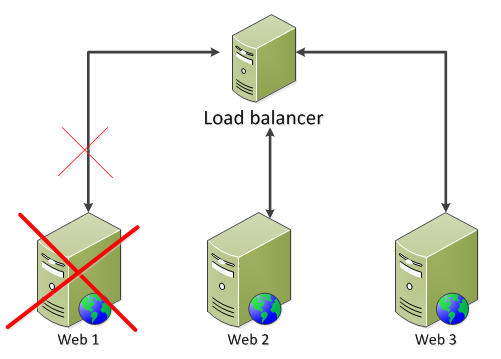
One server off

You can even deploy your web deployment package on each server one after the other and still maintain a continuous service to your customers.

The second main advantage of a web farm is to be able to scale up the web tier. In case you have a single web server and you notice that it cannot handle the amount of web traffic you can copy the server so that the load will be spread out by the load balancer. The servers don’t have to be powerful machines with a lot of CPU and RAM. This is called scaling out.

By contrast scaling out the data tier, i.e. the database server has been a lot more difficult. There are available technologies today that make this possible, such as NoSql databases. However, the traditional solution to increase the responsiveness of the data tier has been to scale up – note ‘up’, not ‘out’ – which means adding more capacity to the machine serving as the data tier: more RAM, more CPU, bigger servers. This approach is more expensive than buying more smaller web machines, so scaling out has an advantage in terms of cost effectiveness:

Data tier vs web tier

Load balancers

How do load balancers distribute the web traffic? There are several algorithms:

  • Round-robin: each request is assigned to the next server in the list, one server after the other. This is also called the poor man’s load balancer as this is not true load balancing. Web traffic is not distributed according to the actual load of each server.
  • Weight-based: each server is given a weight and requests are assigned to the servers according to their weight. Can be an option if your web servers are not of equal quality and you want to direct more traffic to the stronger ones.
  • Random: the server to handle the request is randomly selected
  • Sticky sessions: the load balancer keeps track of the sessions and ensures that return visits within the session always return to the same server
  • Least current request: route traffic to the server that currently has the least amount of requests
  • Response time: route traffic to the web server with the shortest response time
  • User or URL information: some load balancers offer the ability to distribute traffic based on the URL or the user information. Users from one geographic location region may be sent to the server in that location. Requests can be routed based on the URL, the query string, cookies etc.

Apart from algorithms we can group load balancers according to the technology they use:

  • Reverse Proxy: a reverse proxy takes an incoming request and makes another request on behalf of the user. We say that the Reverse Proxy server is a middle-man or a man-in-the-middle in between the web server and the client. The load balancer maintains two separate TCP connections: one with the user and one with the web server. This option requires only minimal changes to your network architecture. The load balancer has full access to the all the traffic on the way through allowing it to check for any attacks and to manipulate the URL or header information. The downside is that as the reverse proxy server maintains the connection with the client you may need to set a long time-out to prepare for long sessions, e.g. in case of a large file download. This opens the possibility for DoS attacks. Also, the web servers will see the load balancer server as the client. Thus any logic that is based on headers like REMOTE_ADDR or REMOTE_HOST will see the IP of the proxy server rather than the original client. There are software solutions out there that rewrite the server variables and fool the web servers into thinking that they had a direct line with the client.
  • Transparent Reverse Proxy: similar to Reverse Proxy except that the TCP connection between the load balancer and the web server is set with the client IP as the source IP so the web server will think that the request came directly from the client. In this scenario the web servers must use the load balancer as their default gateway.
  • Direct Server Return (DSR): this solution runs under different names such as nPath routing, 1 arm LB, Direct Routing, or SwitchBack. This method forwards the web request by setting the web server’s MAC address. The result is that the web server responds directly back to the client. This method is very fast which is also its main advantage. As the web response doesn’t go through the load balancer, even less capable load balancing solutions can handle a relatively large amount of web requests. However, this solution doesn’t offer some of the great options of other load balancers, such as SSL offloading – more on that later
  • NAT load balancing: NAT, which stands for Network Address Translation, works by changing the destination IP address of the packets
  • Microsoft Network Load Balancing: NLB manipulates the MAC address of the network adapters. The servers talk among themselves to decide which one of them will respond to the request. The next blog post is dedicated to NLB.

Let’s pick 3 types of load balancers and the features available to them:

  • Physical load balancers that sit in front of the web farm, also called Hardware
  • ARR: Application Request Routing which is an extension to IIS that can be placed in front of the web tier or directly on the web tier
  • NLB: Network Load Balancing which is built into Windows Server and performs some basic load balancing behaviour

Load balancers feature comparison

No additional failure points:

This point means whether the loadbalancing solution introduces any additional failure points in the overall network.

Physical machines are placed in front of your web farm and they can of course fail. You can put a multiple of these to minimise the possibility of a failure but we still have this possible failure point.

With ARR you can put the load balancer in front of your web farm on a separate machine or a web farm of load balancers or on the same web tier as the web servers. If it’s on a separate tier then it has some additional load balancing features. Putting it on the same tier adds complexity to the configuration but eliminates additional failure points, hence the -X sign in the appropriate cell.

NLB runs on the web server itself so there are no additional failure points.

Health checks

This feature means whether the load balancer can check whether the web server is healthy. This usually means a check where we instruct the load balancer to periodically send a request to the web servers and expect some type of response: either a full HTML page or just a HTTP 200.

NLB is only solution that does not have this feature. NLB will route traffic to any web server and will be oblivious of the answer: can be a HTTP 500 or even no answer at all.

Caching

This feature means the caching of static – or at least relatively static – elements on your web pages, such as CSS or JS, or even entire HTML pages. The effect is that the load balancer does not have to contact the web servers for that type of content which decreases the response times.

NLB does not have this feature. If you put ARR on your web tier then this feature is not available really as it will be your web servers that perform caching.

SSL offload

SSL Offload means that the load balancer will take over the SSL encryption-decryption process from the web servers which also adds to the overall efficiency. SSL is fairly expensive from a CPU perspective so it’s nice to relieve the web machine of that responsibility and hand it over to the probably lot more powerful load balancer.

NLB doesn’t have this feature. Also, if you put ARR on your web tier then this feature is not available really as it will be your web servers that perform SSL encryption and decryption.

A benefit of this feature is that you only have to install the certificate on the load balancer. Otherwise you must make sure to replicate the SSL certificate(s) on every node of the web farm.

If you go down this path then make sure to go through the SSL issuing process on one of the web farm servers – create a Certificate Signing Request (CSR) and send it to a certificate authority (CA). The certificate that the CA generates will only work on the server where the CSR was generated. Install the certificate on the web farm server where you initiated the process and then you can export it to the other servers. The CSR can only be used on one server but an exported certificate can be used on multiple servers.

There’s a new feature in IIS8 called Central Certificate Store which lets you synchronise your certificates across multiple servers.

Geo location

Physical loadbalancers and ARR provide some geolocation features. You can employ many load balancers throughout the world to be close to your customers or have your load balancer point to different geographically distributed data centers. In reality you’re better off looking at cloud based solutions or CDNs such as Akamai, Windows Azure or Amazon.

Low upfront cost

Hardware load balancers are very expensive. ARR and NLB are for free meaning that you don’t have to pay anything extra as they are built-in features of Windows Server and IIS. You probably want to put ARR on a separate machine so that will involve some extra cost but nowhere near what hardware loadbalancers will cost you.

Non-HTTP traffic

Hardware LBs and NLB can handle non-HTTP traffic whereas ARR is a completely HTTP based solution. So if you’re looking into possibilities to distribute other types of traffic such as for SMTP based mail servers then ARR is not an option.

Sticky sessions

This feature means that if a client returns for a second request then the load balancer will redirect that traffic to the same web server. It is also called client affinity. This can be important for web servers that store session state locally so that when the same visitor comes back then we don’t want the state relevant to that user to be unavailable because the request was routed to a different web server.

Hardware LBs and ARR provide a lot of options to introduce sticky sessions including cookie-based solutions. NLB can only perform IP-based sticky sessions, it doesn’t know about cookies and HTTP traffic.

Your target should be to avoid sticky sessions and solve your session management in a different way – more on state management in a future post. If you have sticky sessions then the load balancer is forced to direct traffic to a certain server irrespective of its actual load, thus beating the purpose of load distribution. Also, if the server that received the first request becomes unavailable then the user will lose all session data and may receive an exception or unexpected default values in place of the values saved in the session variables.

Other types of load balancers

Software

With software load balancers you can provide your own hardware while using the vendor-supported software for load balancing. The advantage is that you can provide your own hardware to meet your load balancing needs which can save you a lot of money.

We will in a later post look at Application Request Routing (ARR) which is Microsoft’s own software based reverse proxy load balancer which is a plug-in to IIS.

Another solution is HAProxy but it doesn’t run on Windows.

A commercial solution that runs on Windows is KEMP LoadMaster by KEMP Technologies.

Frameworks

There are frameworks that unite load balancers and other functionality together into a cohesive set of functions. Web Farm Framework and Windows Azure Services are both frameworks provided by Microsoft that provide additional functionality on top of load balancing. We’ll look at WFF in a later post in more depth.

Design patterns and practices in .NET: the Facade pattern

Introduction

Even if you’ve just started learning about patterns chances are the you used the Facade pattern before. You just didn’t know that it had a name.

The main intention of the pattern is to hide a large, complex and possibly poorly written body of code behind a purpose-built interface. The poorly written code obviously wasn’t written by you but by those other baaaad programmers you inherited the code from.

The pattern is often used in conjunction with legacy code – if you want to shield the consumers from the complexities of some old-style spaghetti code you will want to hide its methods behind a simplified interface with a couple of methods. In other words you put a facade in front of the complex code. The interface doesn’t necessary cover all the functionality of the complex code, only the parts that are the most interesting and useful for a consumer. Thus the client code doesn’t need to contact the complex code directly, it will communicate with it through the facade interface.

Another typical scenario is when you reference a large external library with hundreds of methods of which you only need a handful. Instead of making the other developers go through the entire library you can extract the most important functions into an interface that all calling code can use. The fact that a lot larger library sits behind the interface is not important to the caller.

It is perfectly fine to create multiple facades to factor out different chunks of functionality from a large API. The facade will also need to be extended and updated if you wish to expose more of the underlying API.

Demo

We’ll simulate an application which looks up the temperature of our current location using several services. We want to show the temperature in Fahrenheit and Celsius as well.

Start Visual Studio and create a new Console application. We start with the simplest service which is the one that converts Fahrenheit to Celsius. Call this class MetricConverterService:

public class MetricConverterService
{
	public double FarenheitToCelcius(double degrees)
	{
		return ((degrees - 32) / 9.0) * 5.0;
	}
}

Next we’ll need a service that looks up our location based on a zip code:

public class GeoLocService
{
	public Coordinates GetCoordinatesForZipCode(string zipCode)
	{
		return new Coordinates()
		{
			Latitude = 10,
			Longitude = 20
		};
	}

	public string GetCityForZipCode(string zipCode)
	{
		return "Seattle";
	}

	public string GetStateForZipCode(string zipCode)
	{
		return "Washington";
	}
}

I don’t actually know the coordinates of Seattle, but building a true geoloc service is way beyond the scope and true purpose of this post.

The Coordinates class is very simple:

public class Coordinates
{
	public double Latitude { get; set; }
	public double Longitude { get; set; }
}

The WeatherService is also very basic:

public class WeatherService
{
	public double GetTempFarenheit(double latitude, double longitude)
	{
		return 86.5;
	}
}

We return the temperature in F based on the coordinates of the location. We of course ignore the true implementation of such a service.

The first implementation of the calling code in the Main method may look as follows:

static void Main(string[] args)
{
	const string zipCode = "SeattleZipCode";

	GeoLocService geoLookupService = new GeoLocService();

	string city = geoLookupService.GetCityForZipCode(zipCode);
	string state = geoLookupService.GetStateForZipCode(zipCode);
	Coordinates coords = geoLookupService.GetCoordinatesForZipCode(zipCode);

	WeatherService weatherService = new WeatherService();
	double farenheit = weatherService.GetTempFarenheit(coords.Latitude, coords.Longitude);

	MetricConverterService metricConverter = new MetricConverterService();
	double celcius = metricConverter.FarenheitToCelcius(farenheit);

	Console.WriteLine("The current temperature is {0}F/{1}C. in {2}, {3}",
		farenheit.ToString("F1"),
		celcius.ToString("F1"),
		city,
        	state);
        Console.ReadKey();
}

The Main method will use the 3 services we created before to perform its work. We first get back some information from the geoloc service based on the zip code. Then we ask the weather service and the metric converter service to get the temperature at that zip code in both F and C.

Run the application and you’ll see some temperature info in the console.

The Main method has to do a lot of things. Getting the zip code in the beginning and writing out the information at the end are trivial tasks, we don’t need to worry about them. However, the method talks to 3 potentially complicated API:s in between. The services may be dlls we downloaded from NuGet or external web services. The Main method will need to know about all three of these services/libraries to carry out its work. It will also need to know how they work, what parameters they need, in what order they must be called etc. Whereas all we really want is to take a ZIP code and get the temperature with the city and state information. It would be beneficial to hide this complexity behind an easy-to-use class or interface.

Let’s insert a new interface:

public interface ITemperatureService
{
	LocalTemperature GetTemperature(string zipCode);
}

…where the LocalTemperature class looks as follows:

public class LocalTemperature
{
	public double Celcius { get; set; }
	public double Farenheit { get; set; }
	public string City { get; set; }
	public string State { get; set; }
}

The interface represents the ideal way to get all information needed by the Main method. LocalTemperature encapsulates the individual bits of information.

Let’s implement the interface as follows:

public class TemperatureService : ITemperatureService
{
	readonly WeatherService _weatherService;
	readonly GeoLocService _geoLocService;
	readonly MetricConverterService _converter;

        public TemperatureService() : this(new WeatherService(), new GeoLocService(), new MetricConverterService())
	{}

	public TemperatureService(WeatherService weatherService, GeoLocService geoLocService, MetricConverterService converter)
	{
		_weatherService = weatherService;
		_converter = converter;
		_geoLocService = geoLocService;
	}

	public LocalTemperature GetTemperature(string zipCode)
	{
		Coordinates coords = _geoLocService.GetCoordinatesForZipCode(zipCode);
		string city = _geoLocService.GetCityForZipCode(zipCode);
		string state = _geoLocService.GetStateForZipCode(zipCode);

		double farenheit = _weatherService.GetTempFarenheit(coords.Latitude, coords.Longitude);
		double celcius = _converter.FarenheitToCelcius(farenheit);

		LocalTemperature localTemperature = new LocalTemperature()
		{
			Farenheit = farenheit,
			Celcius = celcius,
			City = city,
			State = state
		};

		return localTemperature;
	}
}

This is really nothing else than a refactored version of the API calls in the Main method. The dependencies on the external services have been moved to this temperature service implementation. In a more advanced solution those dependencies would be hidden behind interfaces to avoid the tight coupling between them and the Temperature Service and injected via constructor injection. Note that this class structure is not specific to the Facade pattern, so don’t feel obliged to introduce an empty constructor and an overloaded one etc. The goal is to simplify the usage of those external components from the caller’s point of view.

The revised Main method looks as follows:

static void Main(string[] args)
{
	const string zipCode = "SeattleZipCode";

	ITemperatureService temperatureService = new TemperatureService();
	LocalTemperature localTemp = temperatureService.GetTemperature(zipCode);

	Console.WriteLine("The current temperature is {0}F/{1}C. in {2}, {3}",
						localTemp.Farenheit.ToString("F1"),
						localTemp.Celcius.ToString("F1"),
						localTemp.City,
						localTemp.State);

	Console.ReadKey();
}

I think you agree that this is a lot more streamlined solution. So as you see the facade pattern in this case is equal to some sound refactoring of code. Run the application and you’ll see the same output as before we had the facade in place.

Examples from .NET include File I/O operations such as File.ReadAllText(string filename) and the data access types such as Linq to SQL and the Entity Framework. The tedious operations of opening and closing files and database connections are hidden behind simple methods.

View the list of posts on Architecture and Patterns here.

Design patterns and practices in .NET: the Flyweight pattern

Introduction

The main intent of the Flyweight pattern is to structure objects so that they can be shared among multiple contexts. It is often mistaken for factories that are responsible for object creation. The structure of the pattern involves a flyweight factory to create the correct implementation of the flyweight interface but they are certainly not the same patterns.

Object oriented programming is considered a blessing by many .NET and Java programmers and by all others that write code in other object oriented languages. However, it has a couple of challenges. Consider a large object domain where you try to model every component as an object. Example: an Excel document has a large amount of cells. Imagine creating a new Cell object when Excel opens – that would create a large amount of identical objects. Another example is a skyscraper with loads of windows. The windows are potentially identical but there may be some variations to them. As soon as you create a skyscraper object your application may need thousands of window objects as well. If you then create a couple more skyscraper objects your application may eat up all the available memory of your machine.

The flyweight pattern can come to the rescue as it helps reduce the storage cost of a large number of objects. It also allows us to share objects across multiple contexts simultaneously.

The pattern lets us achieve these goals by retaining object oriented granularity and flexibility at the same time.

An anti-pattern solution to the skyscraper-window problem would be to build a superobject that incorporates all window types. You may think that the number of objects may be reduced if you create one type of object instead of 2 or more. However, why should that number decrease??? You still have to new up the window objects, right? In addition, such superobjects can quickly become difficult to maintain as you need to accommodate several different types of objects within it and you’ll end up with lots of if statements, possibly nested ones.

The ideal solution in this situation is to create shared objects. Why build 1000 window objects if 1 suffices or at least as few as possible?

The key to creating shared objects is to distinguish between the intrinsic and extrinsic state of an object. The shared objects in the pattern are called Flyweights.

Extrinsic state is supplied to the flyweight from the outside as a parameter when some operation is called on it. This state is not stored inside the flyweight. Example: a Window object may have a Draw operation where the object draws itself. The initial implementation of the Window object may have X and Y co-ordinates plus Width and Height. Those states are contextual can be externalised as parameters to the Draw method: Draw(int x, int y, int width, int height).

Intrinsic state on the other hand is stored inside the flyweight. It does not depend on the context hence it is shareable. The Window object may have a Brush object that is used to draw it. The Brush used to draw the window is the same irrespective of the co-ordinates and size of the window. Thus a single brush can be shared across window objects to draw the windows of the same size.

We still need to make sure that the clients do not end up creating their own flyweights. Even if we implement the extrinsic and intrinsic states everyone is free to create their own copies of the object, right? The answer to that challenge is to use a Flyweight factory. This factory creates and manages flyweights. The client will communicate with the factory if it needs a flyweight. The factory will either provide an existing one or create a new one depending on inputs coming from the client. The client doesn’t care which.

Also, we can have distinct Window objects that are somehow unique among all window objects. There may only be a handful of those on a skyscraper. These may not be shared and they store all their state. These objects are unshared flyweights.

Note however that if the objects must be identified by an ID then this pattern will not be applicable. In other words if you need to distinguish between the second window from the right on the third floor and the sixth window from the left on the fifth floor then you cannot possibly share the objects. In Domain Driven Design such id-less objects are called Value Objects as opposed to Entities that have a unique ID. Value Objects have no ID so it doesn’t make any difference which specific window object you put in which position. If you have such objects in your domain model then they are a good candidate for flyweights.

Demo

In the demo we’ll demonstrate sharing Window objects. Fire up Visual Studio and create a new blank solution. Insert a class library called Domain. Every Window will need to implement the IWindow interface:

public interface IWindow
{
	void Draw(Graphics g, int x, int y, int width, int height);
}

You’ll need to add a reference to the System.Drawing library. Note that we pass in parameters that you may first introduce as object properties: x, y, width, height. These are the parameters that represent the extrinsic state mentioned before. They are computed and supplied by the consumer of the object. They can even be stored in a database table if the Window objects have pre-set sizes which is very likely.

We have the following concrete window types:

public class RedWindow : IWindow
	{
		public static int ObjectCounter = 0;
		Brush paintBrush;

		public RedWindow()
		{
			paintBrush = Brushes.Red;
			ObjectCounter++;
		}

		public void Draw(Graphics g, int x, int y, int width, int height)
		{
			g.FillRectangle(paintBrush, x, y, width, height);
		}
	}
public class BlueWindow : IWindow
	{
		public static int ObjectCounter = 0;

		Brush paintBrush;

		public BlueWindow()
		{
			paintBrush = Brushes.Blue;
			ObjectCounter++;
		}

		public void Draw(Graphics g, int x, int y, int width, int height)
		{
			g.FillRectangle(paintBrush, x, y, width, height);
		}
	}

You’ll see that we have a static object counter. This will help us verify how many objects were really created by the client. The Brush object represents an intrinsic state as mentioned above. It is stored within the object.

The Window objects are built by the WindowFactory:

public class WindowFactory
	{
		static Dictionary<string, IWindow> windows = new Dictionary<string, IWindow>();

		public static IWindow GetWindow(string windowType)
		{
			switch (windowType)
			{
				case "Red":
					if (!windows.ContainsKey("Red"))
						windows["Red"] = new RedWindow();
					return windows["Red"];
				case "Blue":
					if (!windows.ContainsKey("Blue"))
						windows["Blue"] = new BlueWindow();
					return windows["Blue"];
				default:
					break;
			}
			return null;
		}
	}

The client will contact the factory to get hold of a Window object. It will send in a string parameter which describes the type of the window. You’ll note that the factory has a dictionary where it stores the available Window types. This is a tool for the factory to manage the pool of shared tiles. Look at the switch statement: the factory checks if the requested window type is already available in the dictionary using the window type description as the key. If not then it creates a new concrete window and adds it to the dictionary. Finally it returns the correct window object. Note that the factory only creates a new window the first time it is contacted. It returns the existing object on all subsequent requests.

How would a client use this code? Add a new Windows Forms Application called SkyScraper to the solution. Rename Form1 to WindowDemo. Put a label control on the form and name it lblObjectCounter. Put it as far to one of the edges of the form as possible.

We’ll use a random number generator to generate the size parameters of the window objects. We will paint 40 windows on the form: 20 red and 20 blue ones. The total number of objects created should however be 2: one blue and one red. The WindowDemo code behind looks as follows:

public partial class WindowDemo : Form
	{
		Random random = new Random();

		public WindowDemo()
		{
			InitializeComponent();
		}

		protected override void OnPaint(PaintEventArgs e)
		{
			base.OnPaint(e);

			for (int i = 0; i < 20; i++)
			{
				IWindow redWindow = WindowFactory.GetWindow("Red");
				redWindow.Draw(e.Graphics, GetRandomNumber(),
					GetRandomNumber(), GetRandomNumber(), GetRandomNumber());
			}

			for (int i = 0; i < 20; i++)
			{
				IWindow stoneTile = WindowFactory.GetWindow("Blue");
				stoneTile.Draw(e.Graphics, GetRandomNumber(),
					GetRandomNumber(), GetRandomNumber(), GetRandomNumber());
			}

			this.lblObjectCounter.Text = "Total Objects Created : " +
				Convert.ToString(RedWindow.ObjectCounter
				+ BlueWindow.ObjectCounter);
		}

		private int GetRandomNumber()
		{
			return (int)(random.Next(100));
		}       
	}

You’ll need to add a reference to the Domain project.

We’ll paint the Window objects in the overridden OnPaint method. Otherwise the code should be pretty easy to follow. Compile and run the application. You should see red and blue squares painted on the form. The object counter label should say 2 verifying that our flyweight implementation was correct.

Before I close this post try the following bit of code:

string s1 = "flyweight";
string s2 = "flyweight";
bool areEqual = ReferenceEquals(s1, s2);

Can you guess what value areEqual will have? You may think it’s false as s1 and s2 are two different objects and strings are reference types. However, .NET maintains a string pool to manage space and replaces the individual strings to a shared instance.

View the list of posts on Architecture and Patterns here.

Design patterns and practices in .NET: the Mediator pattern

Introduction

The Mediator pattern can be applicable when several objects of a related type need to communicate with each other and this communication is complex. Consider a scenario where incoming aircraft need to carefully communicate with each other for safety reasons. They constantly need to know the position of all other planes, meaning that each aircraft needs to communicate with all other aircraft.

Think of a first naive solution in this case. You have 3 types of aircraft in your domain model: Boeing, Airbus and Fokker. Consider that each type needs to communicate with the other two types. The first approach would be to check the type of the other aircraft directly in code such as this in the Airbus class:

if (otherAircraft is Boeing)
{
    //do something
}
else if (otherAircraft is Fokker)
{
    //do something else
}

You would have similar if-else statements in the other two classes. You can imagine how this gets out of control as we add new types of aircraft. You’ll need to revisit the code of all other types and extend the if-else statements to accommodate the new type thereby violating the open-close design principle. Also, it’s bad practice to let one class intimately know about the inner workings of another class, which is the case here.

We need to decouple the related objects from each other. This is where a Mediator enters the scene. A mediator encapsulates the interaction logic among related objects. The pattern allows loose coupling between objects by keeping them from directly referring to each other explicitly. The interaction logic is centralised in one place only.

The above problem has been solved through air traffic controllers in the real world. It is those professionals that will monitor the position of each aircraft in their zone and communicate with them directly. I don’t know if pilots of different commercial planes directly contact each other but I can imagine that it occurs very rarely. If we applied the same solution in this case then the pilots would need to know if every type of aircraft they may encounter during their flight.

There are a couple of formal elements to the Mediator pattern:

  • Colleagues: components that need to communicate with each other, very often of the same base type. These objects will have no knowledge of each other but will know about the Mediator component
  • Mediator: a centralised component that manages communication between the colleagues. The colleagues will have a dependency on this object through an abstraction

Demo

We’ll build on the idea mentioned above: the colleague elements are the incoming aircraft and the mediator is represented by an air traffic controller.

Start up Visual Studio and create a new Console application. Insert a base class for all colleagues called Aircraft:

public abstract class Aircraft
	{
		private readonly IAirTrafficControl _atc;
		private int _currentAltitude;

		protected Aircraft(string callSign, IAirTrafficControl atc)
		{
			_atc = atc;
			CallSign = callSign;
			_atc.RegisterAircraftUnderGuidance(this);
		}

		public abstract int Ceiling { get; }

		public string CallSign { get; private set; }

		public int Altitude
		{
			get { return _currentAltitude; }
			set
			{
				_currentAltitude = value;
				_atc.ReceiveAircraftLocation(this);
			}
		}

		public void Climb(int heightToClimb)
		{
			Altitude += heightToClimb;
		}

		public override bool Equals(object obj)
		{
			if (obj.GetType() != this.GetType()) return false;

			var incoming = (Aircraft)obj;
			return this.CallSign.Equals(incoming.CallSign);
		}

		public override int GetHashCode()
		{
			return CallSign.GetHashCode();
		}

		public void WarnOfAirspaceIntrusionBy(Aircraft reportingAircraft)
		{
			//do something in response to the warning
		}
	}

Every aircraft will have a call sign and a dependency on an air flight controller in the form of the IAirTrafficController interface. We’ll take a look at that interface shortly but you’ll see that we put the aircraft under the responsibility of that air traffic control. We tell the mediator that there’s a new object that it needs to communicate with.

You can imagine that as commercial aircraft fly to their destinations they enter and leave the zones of various air traffic controls on their way. So in a more complete interface would have a de-register method as well but we can omit that to keep the demo simple.

Then comes an abstract property called Ceiling that shows the maximum flying altitude of the aircraft. Each concrete type will need to communicate this property about itself. This is followed by the current Altitude of the aircraft. You’ll see that in the property setter we send the current location to the air traffic controller.

The rest of the class is pretty simple: we let the aircraft climb, we make them comparable and we let them receive a warning signal if there is another aircraft too close.

The IAirTrafficControl interface looks as follows:

public interface IAirTrafficControl
	{
		void ReceiveAircraftLocation(Aircraft location);
		void RegisterAircraftUnderGuidance(Aircraft aircraft);
	}

The type that implements the IAirTrafficControl interface will be responsible to implement these methods. The Aircraft object doesn’t care how its position is registered at the control.

We have the following concrete types of aircraft:

public class Boeing : Aircraft
	{
		public Boeing(string callSign, IAirTrafficControl atc)
			: base(callSign, atc)
		{
		}

		public override int Ceiling
		{
			get { return 33000; }
		}
	}
public class Fokker : Aircraft
	{
		public Fokker(string callSign, IAirTrafficControl atc) : base(callSign, atc)
        {
        }

		public override int Ceiling
		{
			get { return 40000; }
		}
	}
public class Airbus : Aircraft
	{
		public Airbus(string callSign, IAirTrafficControl atc)
			: base(callSign, atc)
		{
		}

		public override int Ceiling
		{
			get { return 40000; }
		}
	}

These should be fairly easy to follow. If you later want to introduce a new type of aircraft just derive from the Aircraft base class and then it will automatically become a colleague component to the existing types. The important thing to note is that in any concrete type there is no reference to any other type. The colleagues are completely independent. That dependency is replaced by the IAirTrafficControl abstraction which is the definition of the mediator. You can imagine that we can pass in different types of air traffic control as the plane flies towards its destination: Stockholm, Copenhagen, Hamburg etc. They may all treat the aircraft in their zones little differently.

Let’s take a look at the concrete mediator:

public class Tower : IAirTrafficControl
	{
		private readonly IList<Aircraft> _aircraftUnderGuidance = new List<Aircraft>();

		public void ReceiveAircraftLocation(Aircraft reportingAircraft)
		{
			foreach (Aircraft currentAircraftUnderGuidance in _aircraftUnderGuidance.
				Where(x => x != reportingAircraft))
			{
				if (Math.Abs(currentAircraftUnderGuidance.Altitude - reportingAircraft.Altitude) < 1000)
				{
					reportingAircraft.Climb(1000);
					//communicate to the class
					currentAircraftUnderGuidance.WarnOfAirspaceIntrusionBy(reportingAircraft);
				}
			}
		}

		public void RegisterAircraftUnderGuidance(Aircraft aircraft)
		{
			if (!_aircraftUnderGuidance.Contains(aircraft))
			{
				_aircraftUnderGuidance.Add(aircraft);
			}
		}
	}

The Tower maintains a list of Aircraft that belong under its control. The list is augmented using the implemented RegisterAircraftUnderGuidance method.

The ReceiveAircraftLocation method includes a bit of logic. When an aircraft reports its position then the Tower loops through the list of aircraft currently under its control – except for the one reporting its position – and if any other plane is within 1000 feet then the reporting aircraft needs to climb 1000 feet and the current aircraft in the loop is warned of another aircraft flying too close. This emergency call is a form of indirect communication between two colleagues: the reporting aircraft communicates tells the other aircraft of the violation of the flying distance. The communication is mediated using the Tower class, the two concrete aircraft still have no knowledge about each other, all communication is handled through abstractions.

Let’s look at the Main method:

static void Main(string[] args)
{
	IAirTrafficControl tower = new Tower();

	Aircraft flight1 = new Airbus("AC159", tower);
	Aircraft flight2 = new Boeing("WS203", tower);
	Aircraft flight3 = new Fokker("AC602", tower);

	flight1.Altitude += 1000;
}

We create a mediator and the aircraft currently flying. That’s all we need to introduce a new aircraft: tell it about the mediator it can use for its communication purposes through its constructor.

The last row says that the Airbus will increase its altitude by 1000 feet. If you recall then the Altitude property setter will initiate a communication with the air traffic control. The aircraft indicates its new altitude and the Tower will loop through the list of aircraft currently under its control and see of any other aircraft object is too close to the reporting one.

The main advantage of the mediator pattern is abstraction: we hide the communicating colleagues from each other and let them talk to each other through another abstraction, i.e. the mediator. An aircraft can only belong to a single mediator and a mediator can have many colleagues under its control, i.e. this is a one-to-many relationship. If we remove the mediator then we’re immediately dealing with a many-to-many relationship among colleagues. If you’re like me then you probably prefer the former type of relationship to the latter.

The disadvantage of the mediator lies in its possible complexity. Our example is still very simple but in real life examples the communication can become very messy with if statements checking the type of the colleague. The mediator can grow very large as more and more communication logic enters the picture. The problem can be mitigated by breaking down the mediator to smaller chunks adhering to the single responsibility principle.

View the list of posts on Architecture and Patterns here.

Design patterns and practices in .NET: the Interpreter pattern

Introduction

The Interpreter pattern is somewhat different from the other design patterns. It’s easily overlooked and many find it difficult to understand and apply. Formally the pattern is about handling languages based on a set of rules. So we have a language – any language – and its rules, i.e. the grammar. We also have an interpreter that takes the set of rules to interpret the sentences of the language. You will probably not use this pattern in your everyday programming work – except maybe if you work with robots that need to read some formal representation of an object.

Barcodes are real life examples of the pattern. Barcodes are usually not readable by humans because we don’t know the rules of the barcode language. However, we can take an interpreter, i.e. a barcode reader which will use the barcode rules stored within it to tell us what kind of product we have just bought. The language is represented by the bars of the barcode. The grammar is represented by the numerical values of the bars.

What does all that have to do with programming??? We’ll try to find out.

Demo

Open Visual Studio and create a new Console application. In our demo we’ll simulate a sandwich builder. We’ll create a sandwich language and we want to print the instructions for building the sandwich.

We want to represent a sandwich as follows. We have the top bread and the bottom bread with as many ingredients in between as you like. The ingredients can be condiments such as ketchup or mayo and other ingredients such as ham or vegetables. An additional rule is that the ingredients cannot be applied in any order. We first have one or more condiments, then some ‘normal’ ingredients such as chicken, followed by some more condiments.

We will have the following spices: mayo, mustard and ketchup. Ingredients include lettuce, tomato and chicken. Bread can be either white bread or wheat bread. The ingredients are grouped into a condiment list and an ingredient list. Each list can contain 0 or more elements. In an extreme case we can have a very plain sandwich with only the top and bottom bread.

The goal is to give instructions to a machine which will build sandwiches for us. We won’t go overboard with our notations so that the result can be understood by a human, but you can replace the ingredients and bread types with any symbol you like.

The ingredients of our sandwich – bread, condiment, etc. – and the sandwich itself are the sentences or expressions in our sandwich language. This will be the first element in our programme, the IExpression interface:

public interface IExpression
	{
		void Interpret(Context context);
	}

Each expression has a meaning so it can be interpreted, hence the Interpret method. The sandwich means something. The list of condiments and ingredients mean something, they are all expressions. In order to understand the meaning of a sandwich we need to know the meaning of each ingredient and condiment. The Context class represents the context within which the Expression is interpreted. In this case it’s a very simple class:

public class Context
	{
		public string Output { get; set; }
	}

We only use the context for our output.

Each condiment implements the ICondiment interface which is extremely simple:

public interface ICondiment : IExpression { }

Each ingredient implements the IIngredient interface which again is very simple:

public interface IIngredient : IExpression{}

Here come the condiment types, they should be easy to follow. The Interpret method appends the name of the condiment to the string output in each case. This is possible as a single condiment doesn’t have any children so it can interpret itself:

public class KetchupCondiment : ICondiment
	{
		public void Interpret(Context context)
		{
			context.Output += string.Format(" {0} ", "Ketchup");
		}
	}
public class MayoCondiment : ICondiment
	{
		public void Interpret(Context context)
		{
			context.Output += string.Format(" {0} ", "Mayo");
		}
	}
public class MustardCondiment : ICondiment
	{
		public void Interpret(Context context)
		{
			context.Output += string.Format(" {0} ", "Mustard");
		}
	}

The condiments are grouped in a Condiment list:

public class CondimentList : IExpression
	{
		private readonly List<ICondiment> condiments;

		public CondimentList(List<ICondiment> condiments)
		{
			this.condiments = condiments;
		}

		public void Interpret(Context context)
		{
			foreach (ICondiment condiment in condiments)
				condiment.Interpret(context);
		}
	}

The Interpret method simply iterates through the members of the Condiment list and calls the interpret method on each.

Here come the ingredients which implement the Interpret method the same way:

public class LettuceIngredient : IIngredient
	{
		public void Interpret(Context context)
		{
			context.Output += string.Format(" {0} ", "Lettuce");
		}
	}
public class ChickenIngredient : IIngredient
	{
		public void Interpret(Context context)
		{
			context.Output += string.Format(" {0} ", "Chicken");
		}
	}

The ingredients are also grouped into an ingredient list:

public class IngredientList : IExpression
	{
		private readonly List<IIngredient> ingredients;

		public IngredientList(List<IIngredient> ingredients)
		{
			this.ingredients = ingredients;
		}

		public void Interpret(Context context)
		{
			foreach (IIngredient ingredient in ingredients)
				ingredient.Interpret(context);
		}
	}

Now all we need is to represent the bread somehow:

public interface IBread : IExpression{}

Here come the bread types:

public class WheatBread : IBread
	{
		public void Interpret(Context context)
		{
			context.Output += string.Format(" {0} ", "Wheat-Bread");
		}
	}
public class WhiteBread : IBread
	{
		public void Interpret(Context context)
		{
			context.Output += string.Format(" {0} ", "White-Bread");
		}
	}

Now we have all the elements ready to build our Sandwich class:

public class Sandwhich : IExpression
	{
		private readonly IBread topBread;
		private readonly CondimentList topCondiments;
		private readonly IngredientList ingredients;
		private readonly CondimentList bottomCondiments;
		private readonly IBread bottomBread;

		public Sandwhich(IBread topBread, CondimentList topCondiments, IngredientList ingredients, CondimentList bottomCondiments, IBread bottomBread)
		{
			this.topBread = topBread;
			this.topCondiments = topCondiments;
			this.ingredients = ingredients;
			this.bottomCondiments = bottomCondiments;
			this.bottomBread = bottomBread;
		}

		public void Interpret(Context context)
		{
			context.Output += "|";
			topBread.Interpret(context);
			context.Output += "|";
			context.Output += "<--";
			topCondiments.Interpret(context);
			context.Output += "-";
			ingredients.Interpret(context);
			context.Output += "-";
			bottomCondiments.Interpret(context);
			context.Output += "-->";
			context.Output += "|";
			bottomBread.Interpret(context);
			context.Output += "|";
			Console.WriteLine(context.Output);
		}
	}

We build the sandwich using the 5 objects in the constructor: the top bread, top condiments, ingredients in the middle, bottom condiments and finally the bottom bread. The Interpret method builds our sandwich machine language:

  • We start with a delimiter ‘|’
  • Followed by the top bread interpretation
  • Then comes the bread delimiter again ‘|’
  • “<–"; indicates the start of the things in the sandwich
  • Then come the top condiments interpretation
  • Followed by a ‘-‘ delimiter
  • Ingredients
  • Againt followed by the ‘-‘ delimiter
  • Bottom condiments
  • The sandwich filling is then closed with “–>”
  • The bottom bread is surrounded by pipe characters like the top bread

Note that every element in the sandwich, including the sandwich itself, can interpret itself. This is of course due to the fact that every element here is an expression, a sentence that has a meaning and can be interpreted.

The Interpret method in each implementation builds up the grammar of our sandwich language. The ultimate Interpret method in the Sandwich class builds up the sentences in sandwich language according to the rules of that grammar. We let each expression interpret itself – it is a lot easier to let each element do it instead of going through some complicated string operation and if-else statements trying build up our sentences. Not just that – we built our object model with our domain knowledge in mind so the solution is a lot more object oriented and reflects our business logic.

Let’s see how this can be used by a client. Let’s insert the following in the Main method:

class Program
	{
		static void Main(string[] args)
		{
			Sandwhich sandwhich = new Sandwhich(
				new WheatBread(),
				new CondimentList(
					new List<ICondiment> { new MayoCondiment(), new MustardCondiment() }),
				new IngredientList(
					new List<IIngredient> { new LettuceIngredient(), new ChickenIngredient() }),
				new CondimentList(new List<ICondiment> { new KetchupCondiment() }),
				new WheatBread());

			sandwhich.Interpret(new Context());


			Console.ReadKey();
		}
	}

We build a sandwich using the Sandwich constructor where we pass in each element of the sandwich. As the sandwich itself is also an expression we can call its interpret method to output the representation of the sandwich.

Run the application and you’ll see our beautiful instructions to build a sandwich. Feel free to change the ingredients and check the output in the console.

View the list of posts on Architecture and Patterns here.

Design patterns and practices in .NET: the Composite pattern

Introduction

The Composite pattern deals with putting individual objects together to form a whole. In mathematics the relationship between the objects and the composite object they build can be described by a part-whole hierarchy. The ingredient objects are the parts and the composite is the whole.

In essence we build up a tree – a composite – that consists of one or more children – the leaves. The client calling upon the composite should be able to treat the individual parts of the whole in a uniform way.

A real life example is sending emails. If you want to send an email to all developers in your organisation one option is that you type in the names of each developer in the ‘to’ field. This is of course not efficient. Fortunately we can construct recipient groups, such as Developers. If you then also want to send the email to another person outside the Developers group you can simply put their name in the ‘to’ box along with Developers. We treat both the group and the individual emails in a uniform way. We can insert both groups and individual emails in the ‘to’ box. We rely on the email engine to take the group apart and send the email to each recipient in that group. We don’t really care how it’s done – apart from a couple network geeks I guess.

Demo

We will first build a demo application that does not use the pattern and then we’ll refactor it. We’ll simulate a game where play money is split among the players in a group if they manage to kill a monster.

Start up Visual Studio and create a new console application. Insert a new class called Player:

public class Player
	{
		public string Name { get; set; }
		public int Gold { get; set; }

		public void Stats()
		{
			Console.WriteLine("{0} has {1} coins.", Name, Gold);
		}
	}

This is easy to follow I believe. A group of players is represented by the Group class:

public class Group
	{
		public string Name { get; set; }
		public List<Player> Members { get; set; }

		public Group()
		{
			Members = new List<Player>();
		}
	}

The money splitting mechanism is run in the Main method as follows:

static void Main(string[] args)
{
	int goldForKill = 1023;
	Console.WriteLine("You have killed the Monster and gained {0} coins!", goldForKill);

	Player andy = new Player { Name = "Andy" };
	Player jane = new Player { Name = "Jane" };
	Player eve = new Player { Name = "Eve" };
	Player ann = new Player { Name = "Ann" };
	Player edith = new Player { Name = "Edith" };
	Group developers = new Group { Name = "Developers", Members = { andy, jane, eve } };

	List<Player> individuals = new List<Player> { ann, edith };
	List<Group> groups = new List<Group> { developers };

	double totalToSplitBy = individuals.Count + groups.Count;
	double amountForEach = goldForKill / totalToSplitBy;
	int leftOver = goldForKill % totalToSplitBy;

	foreach (Player individual in individuals)
	{
		individual.Gold += amountForEach + leftOver;
		leftOver = 0;
		individual.Stats();
	}

	foreach (Group group in groups)
	{
		double amountForEachGroupMember = amountForEach / group.Members.Count;
		int leftOverForGroup = amountForEachGroupMember % group.Members.Count;
		foreach (Player member in group.Members)
		{
			member.Gold += amountForEachGroupMember + leftOverForGroup;
			leftOverForGroup = 0;
			member.Stats();
		}
	}

	Console.ReadKey();
}

So our brilliant game starts off where the monster was killed and we’re ready to hand out the reward among the players. We have 5 players. Three of them make up a group and the other two make up a list of individual players. We’re then ready to split the gold among the participants where the group is counted as one unit i.e. we have 3 elements: the two individual players and the Developer group. Then we go through each individual and give them their share. We do the same to each group as well where we also divide the group’s share among the individuals within that group.

Build and run the application and you’ll see in the console that the 1023 pieces of gold was divided up. The code works but it’s definitely quite messy. Keep in mind that our tree hierarchy is very simple: we can have individuals and groups. Think of a more complicated scenario: within the Developers group we can have subgroups, such as .NET developers, Java developers who are further subdivided into web and desktop developers and even individuals that do not fit into any group. In the code we iterate through the individuals and the groups manually. We also iterate the players in the group. Imagine that we’d have to iterate through the subgroups of the subgroups of the group if we are facing a deeper hierarchy. The foreach loop would keep growing and the splitting logic would become very challenging to maintain.

So let’s refactor the code. The composite pattern states that the client should be able to treat the individual part and the whole in a uniform way. Thus the first step is to make the Person and the Group class uniform in some way. As it turns out the logical way to do this is that both classes implement an interface that the client can communicate with. So the client won’t deal with groups and individuals but with a uniform object, such as Participant.

Insert an interface called IParticipant:

public interface IParticipant
{
	int Gold { get; set; }
	void Stats();
}

Every participant of the game will have some gold and will be able to write out the current statistics regardless of them being individuals or groups. We let Player and Group implement the interface:

public class Player : IParticipant
	{
		public string Name { get; set; }
		public int Gold { get; set; }

		public void Stats()
		{
			Console.WriteLine("{0} has {1} coins.", Name, Gold);
		}
	}

The Player class implements the interface without changes in its body.

The Group class will encapsulate the gold sharing logic we saw in the Main method above:

public class Group : IParticipant
	{
		public string Name { get; set; }
		public List<IParticipant> Members { get; set; }

		public Group()
		{
			Members = new List<IParticipant>();
		}

		public int Gold
		{
			get
			{
				int totalGold = 0;
				foreach (IParticipant member in Members)
				{
					totalGold += member.Gold;
				}

				return totalGold;
			}
			set
			{
				double eachSplit = value / Members.Count;
				int leftOver = value % Members.Count;
				foreach (IParticipant member in Members)
				{
					member.Gold += eachSplit + leftOver;
					leftOver = 0;
				}
			}
		}

		public void Stats()
		{
			foreach (IParticipant member in Members)
			{
				member.Stats();
			}
		}
	}

In the Gold property getter we simply loop through the group members and add up their amount of gold. In the setter we split up the total amount of gold among the group members. Note also that Group can have a list of IParticipant objects representing either individual players or subgroups. You can imagine that those subgroups in turn can also have subgroups so the setters and getters will automatically collect the information from the nested members as well. The leftover variable is set to 0 as the first member will be given all the left over, we don’t care about such details.

In the Stats method we simply call the statistics of each group member – again group members can be individuals and subgroups. If it’s a subgroup then the Stats method of the members of the subgroup will automatically be called.

The modified Main method looks as follows:

static void Main(string[] args)
{
	int goldForKill = 1023;
	Console.WriteLine("You have killed the Monster and gained {0} coins!", goldForKill);

	IParticipant andy = new Player { Name = "Andy" };
	IParticipant jane = new Player { Name = "Jane" };
	IParticipant eve = new Player { Name = "Eve" };
	IParticipant ann = new Player { Name = "Ann" };
	IParticipant edith = new Player { Name = "Edith" };
	IParticipant oldBob = new Player { Name = "Old Bob" };
	IParticipant newBob = new Player { Name = "New Bob" };
	IParticipant bobs = new Group { Members = { oldBob, newBob } };
	IParticipant developers = new Group { Name = "Developers", Members = { andy, jane, eve, bobs } };

	IParticipant participants = new Group { Members = { developers, ann, edith } };
	participants.Gold += goldForKill;
	participants.Stats();

	Console.ReadKey();
}

You can see that the client, i.e. the Main method calls the methods of IParticipant where IParticipant can be an individual, a group or a group within a group. When we set the level gold through the Gold property the gold distribution logic of each concrete type is called which even takes care of sharing the gold among the groups within a group. The participants variable includes all members of the game.

The main advantage of this pattern is that now the tree structure can be as deep as you can imagine and you don’t have to change the logic within the Player and Group classes. Also, we contain the differences between a leaf and a group in the Player and Group classes separately. In addition, they can also tested independently.

Build and run the project and you should see the amount of gold split among all participants of the game.

View the list of posts on Architecture and Patterns here.

Design patterns and practices in .NET: the Chain of Responsibility pattern

Introduction

The Chain of Responsibility is an ordered chain of message handlers that can process a specific type of message or pass the message to the next handler in the chain. This pattern revolves around messaging between a sender and one more receivers. This probably sounds very cryptic – just like the basic description of design patterns in general – so let’s see a quick example in words.

Suppose we have a Sender that knows the first receiver in the messaging chain, call it Receiver A. Receiver A is in turn aware of Receiver B and so on. When a message comes in to a sender we can only perform one thing: pass it along to the first receiver. Receiver A inspects the message and decides whether it can process it or not. If not then it passes the message along to Receiver B and Receiver B will perform the same message inspection as Receiver A. It then decides to either process the Message or send it further down the messaging chain. If it processes the message then it will send a Response back to the Sender.

In this example the Sender sent a message to the first Receiver and received a Response from a different one. However, the Sender is not aware of Receiver B. If the messaging stops at Receiver B then Receiver C remained completely inactive: it has no knowledge of the Message and that the messaging actually occurred.

The example also showcases the traits of the pattern:

  • The Sender is only aware of the first receiver
  • Each receiver only knows of the next receiver down the messaging chain
  • Receivers can process the Message or send it down the chain
  • The Sender will have no knowledge about which Receiver received the message
  • The first receiver that was able to process the message terminates the chain
  • The order of the receiver list matters

Demo

In the demo we’ll simulate the hierarchy of a company: an employee would like to make a large expenditure so he asks his manager. The manager is not entitled to approve the large sum and sends the request forward to the VP. The VP is not entitled either to approve the request so sends it to the President. The President is the highest authority in the hierarchy who will either approve or disapprove the request and sends the response back to the original employee.

Open Visual Studio and create a blank solution. Insert a class library called Domain. You can remove Class1.cs. We’ll build up the components one by one. We’ll start with the abstraction for an expense report, IExpenseReport:

public interface IExpenseReport
    {
        Decimal Total { get; }
    }

An expense report can thus have a total sum.

The IExpenseApprover interface represents any object that is entitled to approve expense reports:

public interface IExpenseApprover
	{
		ApprovalResponse ApproveExpense(IExpenseReport expenseReport);
	}

…where ApprovalResponse is an enumeration:

public enum ApprovalResponse
	{
		Denied,
		Approved,
		BeyondApprovalLimit,
	}

The concrete implementation of the IExpenseReport is very straightforward:

public class ExpenseReport : IExpenseReport
	{
		public ExpenseReport(Decimal total)
		{
			Total = total;
		}

		public decimal Total
		{
			get;
			private set;
		}
	}

The Employee class implements the IExpenseApprover interface:

public class Employee : IExpenseApprover
	{
		public Employee(string name, Decimal approvalLimit)
		{
			Name = name;
			_approvalLimit = approvalLimit;
		}

		public string Name { get; private set; }

		public ApprovalResponse ApproveExpense(IExpenseReport expenseReport)
		{
			return expenseReport.Total > _approvalLimit
					? ApprovalResponse.BeyondApprovalLimit
					: ApprovalResponse.Approved;
		}

		private readonly Decimal _approvalLimit;
	}

As you see the constructor needs a name and an approval limit. The implemented ApproveExpense method simply checks if the total value of the expense report is above or below the approval limit. If total is lower than the limit, then the expense is approved, otherwise the method indicates that the total is too much for the employee to approve.

Add a Console application called Approval to the solution and add a reference to the Domain library. We’ll first check how the approval process may look like without the pattern applied:

static void Main(string[] args)
		{
			List<Employee> managers = new List<Employee>
                                          {
                                              new Employee("William Worker", Decimal.Zero),
                                              new Employee("Mary Manager", new Decimal(1000)),
                                              new Employee("Victor Vicepres", new Decimal(5000)),
                                              new Employee("Paula President", new Decimal(20000)),
                                          };

			Decimal expenseReportAmount;
			while (ConsoleInput.TryReadDecimal("Expense report amount:", out expenseReportAmount))
			{
				IExpenseReport expense = new ExpenseReport(expenseReportAmount);

				bool expenseProcessed = false;

				foreach (Employee approver in managers)
				{
					ApprovalResponse response = approver.ApproveExpense(expense);

					if (response != ApprovalResponse.BeyondApprovalLimit)
					{
						Console.WriteLine("The request was {0}.", response);
						expenseProcessed = true;
						break;
					}
				}

				if (!expenseProcessed)
				{
					Console.WriteLine("No one was able to approve your expense.");
				}
			}
		}

…where ConsoleInput is a helper class that looks as follows:

public static class ConsoleInput
	{
		public static bool TryReadDecimal(string prompt, out Decimal value)
		{
			value = default(Decimal);

			while (true)
			{
				Console.WriteLine(prompt);
				string input = Console.ReadLine();

				if (string.IsNullOrEmpty(input))
				{
					return false;
				}

				try
				{
					value = Convert.ToDecimal(input);
					return true;
				}
				catch (FormatException)
				{
					Console.WriteLine("The input is not a valid decimal.");
				}
				catch (OverflowException)
				{
					Console.WriteLine("The input is not a valid decimal.");
				}
			}
		}
	}

What can we say about the Main method? We first set up our employees with the approval limits in increasing order. The next step is to read an expense report from the command line. Using that sum we construct an expense report which is given to every employee in the list. Each employee is asked to approve the limit and we check the outcome. If the expense is approved then we break the foreach loop.

Build and run the application. Enter 5000 in the console and you’ll see that the expense was approved. You’ll recall that the VP had an approval limit of 5000 so it was that employee in the chain to approve. Enter 50000 and you’ll see that nobody was able to approve the expense because it exceeds the limit of every one of them.

What is wrong with this implementation? After all we iterate through the employee list to see if anyone is able to approve the expense. We get our response and we get to know the outcome.

The problem is that the caller is responsible for iterating through the list. This means that the logic of handling expense reports is encapsulated at the wrong level. Imagine that you as an employee should not ask each one of the managers above you for a yes or no answer. You should only have to turn to your boss who in turn will ask his or her boss etc. Our code should reflect this.

In order to achieve that we need to insert a new interface:

public interface IExpenseHandler
	{
		ApprovalResponse Approve(IExpenseReport expenseReport);
		void RegisterNext(IExpenseHandler next);
	}

The Approve method should look familiar from the previous descriptions. The RegisterNext method registers the next approver in the chain. It means that if I cannot approve the expense then I should go and ask the next person in line.

This interface represents a single link in the chain of responsibility.

The IExpenseHandler interface is implemented by the ExpenseHandler class:

public class ExpenseHandler : IExpenseHandler
	{
		private readonly IExpenseApprover _approver;
		private IExpenseHandler _next;

		public ExpenseHandler(IExpenseApprover expenseApprover)
		{
			_approver = expenseApprover;
			_next = EndOfChainExpenseHandler.Instance;
		}

		public ApprovalResponse Approve(IExpenseReport expenseReport)
		{
			ApprovalResponse response = _approver.ApproveExpense(expenseReport);

			if (response == ApprovalResponse.BeyondApprovalLimit)
			{
				return _next.Approve(expenseReport);
			}

			return response;
		}

		public void RegisterNext(IExpenseHandler next)
		{
			_next = next;
		}
	}

This class will need an IExpenseApprover in its constructor. This approver is an Employee just like before. The constructor makes sure that there is always a special end of chain Employee in the approval chain through the EndOfChainExpenseHandler class. The Approve method receives an expense report. We ask the approver if they are able to approver the expense. If not, then we go to the next person in the hierarchy, i.e. to the “next” variable.

The implementation of the EndOfChainExpenseHandler class follows below. It also implements the IExpenseHandler method and it represents – as the name implies – the last member in the approval hierarchy. Its Instance property returns this special member of the chain according to the singleton pattern – more on that here.

public class EndOfChainExpenseHandler : IExpenseHandler
	{
		private EndOfChainExpenseHandler() { }

		public static EndOfChainExpenseHandler Instance
		{
			get { return _instance; }
		}

		public ApprovalResponse Approve(IExpenseReport expenseReport)
		{
			return ApprovalResponse.Denied;
		}

		public void RegisterNext(IExpenseHandler next)
		{
			throw new InvalidOperationException("End of chain handler must be the end of the chain!");
		}

		private static readonly EndOfChainExpenseHandler _instance = new EndOfChainExpenseHandler();
	}

The purpose of this class is to make sure that if the last person in the hierarchy, i.e. the President, is unable to approve the report then it is not passed on to a null reference – as there’s nobody above the President – but that there’s an automatic message handler that gives some default answer. Here we follow the null object pattern. In this case we reject the expense in the Approve method. If we made it this far in the approval chain then the expense must be rejected.

The revised Main method looks as follows:

static void Main(string[] args)
{
	ExpenseHandler william = new ExpenseHandler(new Employee("William Worker", Decimal.Zero));
	ExpenseHandler mary = new ExpenseHandler(new Employee("Mary Manager", new Decimal(1000)));
	ExpenseHandler victor = new ExpenseHandler(new Employee("Victor Vicepres", new Decimal(5000)));
	ExpenseHandler paula = new ExpenseHandler(new Employee("Paula President", new Decimal(20000)));

	william.RegisterNext(mary);
	mary.RegisterNext(victor);
	victor.RegisterNext(paula);

	Decimal expenseReportAmount;
	if (ConsoleInput.TryReadDecimal("Expense report amount:", out expenseReportAmount))
	{
		IExpenseReport expense = new ExpenseReport(expenseReportAmount);
		ApprovalResponse response = william.Approve(expense);
		Console.WriteLine("The request was {0}.", response);
	}
        Console.ReadKey();
}

You’ll see that we have not registered anyone for the President. This is where it becomes important that we set up a default end of chain approver in the ExpenseHandler constructor.

This is a significantly smaller amount of code than before. We start off by wrapping our employees into expense handlers, so each employee becomes an expense handler. Instead of putting them in a list we register the next employee in the hierarchy for each of them. Then as before we read the user’s input from the console, create an expense report and then we go to the first approver in the chain – william. The response from william will be abstracted away in the management chain we set up through the RegisterNext method.

Build and run the application. Enter 1000 and you’ll see that it is approved. Enter 30000 and you’ll see that it is rejected and the caller is oblivious of who and why rejected the request.

So this is the Chain of Responsibility pattern for you!

View the list of posts on Architecture and Patterns here.

Design patterns and practices in .NET: the Template Method design pattern

Introduction

The Template Method pattern is best used when you have an algorithm consisting of certain steps and you want to allow for different implementations of these steps. The implementation details of each step can vary but the structure and order of the steps are enforced.

A good example is games:

  1. Set up the game
  2. Take turns
  3. Game is over
  4. Display the winner

A large number of games can implement this algorithm, such as Monopoly, Chess, card games etc. Each game is set up and played in a different way but they follow the same order.

The Template pattern is very much based around inheritance. The algorithm represents an abstraction and the concrete game types are the implementations, i.e. the subclasses of that abstraction. It is of course plausible that some steps in the algorithm will be implemented in the abstraction while the others will be overridden in the implementing classes.

Note that a prerequisite for this pattern to be applied properly is the rigidness of the algorithm steps. The steps must be known and well defined. The pattern relies on inheritance, rather than composition, and merging two child algorithms into one can prove difficult. If you find that the Template pattern is too limiting in your application then consider the Strategy or the Decorator patterns.

This pattern helps to implement the so-called Hollywood principle: Don’t call us, we’ll call you. It means that high level components, i.e. the superclasses, should not depend on low-level ones, i.e. the implementing subclasses. A base class with a template method is a high level component and clients should depend on this class. The base class will include one or more template method that the subclasses implement, i.e. it is the base class calling the implementation and not vice versa. In other words, the Hollywood principle is applied from the point of view of the base classes: dear implementing classes, don’t call us, we’ll call you.

Demo

Open Visual Studio and create a new blank solution. We’ll simulate a simple dispatch service where shipping an item must go through specific steps regardless of which specific service completes the shipment. Insert a new Console application to the solution.

We’ll start with the most important component of the pattern: the base class that must be respected by each implementation. Add a class called OrderShipment:

public abstract class OrderShipment
    {
        public string ShippingAddress { get; set; }
        public string Label { get; set; }
        public void Ship(TextWriter writer)
        {
            VerifyShippingData();
            GetShippingLabelFromCarrier();
            PrintLabel(writer);
        }

        public virtual void VerifyShippingData()
        {
            if (String.IsNullOrEmpty(ShippingAddress))
            {
                throw new ApplicationException("Invalid address.");
            }
        }
        public abstract void GetShippingLabelFromCarrier();
        public virtual void PrintLabel(TextWriter writer)
        {
            writer.Write(Label);
        }
    }

The template method that implements the order of the steps is Ship. It calls three methods in a specific order. Two of them – VerifyShippingData and PrintLabel are virtual and have a default implementation. They can of course be overridden. The third method, i.e. GetShippingLabelFromCarrier is the abstract method that the base class cannot implement. The superclass has no way of knowing what a service-specific shipping label looks like – it is delegated to the implementations. We’ll simulate two services, UPS and FedEx:

public class FedExOrderShipment : OrderShipment
	{
		public override void GetShippingLabelFromCarrier()
		{
			// Call FedEx Web Service
			Label = String.Format("FedEx:[{0}]", ShippingAddress);
		}
	}
public class UpsOrderShipment : OrderShipment
	{
		public override void GetShippingLabelFromCarrier()
		{
			// Call UPS Web Service
			Label = String.Format("UPS:[{0}]", ShippingAddress);
		}
	}

The implementations should be quite straighforward: they create service-specific shipping labels and set those values to the Label property. There’s of course nothing stopping the concrete classes from overriding any other step in the algorithm. Adding new shipping services is very easy: just create a new implementation. Let’s see how a client would communicate with the services:

static void Main(string[] args)
{
	OrderShipment service = new UpsOrderShipment();
	service.ShippingAddress = "New York";
	service.Ship(Console.Out);

	OrderShipment serviceTwo = new FedExOrderShipment();
	serviceTwo.ShippingAddress = "Los Angeles";
	serviceTwo.Ship(Console.Out);
        
        Console.ReadKey();
}

Run the programme and you’ll see the service-specific labels in the Console. The client calls the Template method Ship which ensures that the steps in the shipping algorithm are carried out in a certain order.

It is of course not optimal to create the specific OrderShipment classes like that, i.e. directly with the new keyword as it introduces tight coupling. Consider using a factory for building the correct implementation. However, this solution is satisfactory for demo purposes.

View the list of posts on Architecture and Patterns here.

Design patterns and practices in .NET: the State pattern

Introduction

The State design pattern allows to change the behaviour of a method through the state of an object. A typical scenario where the state pattern is used when an object goes through different phases. An issue in a bug tracking application can have the following states: inserted, reviewed, rejected, processing, resolved and possibly many others. Depending on the state of the bug the behaviour of the underlying system may also change: some methods will become (un)available and some of them will change their behaviour. You may have seen or even produced code similar to this:

public void ProcessBug()
{
	switch (state)
	{
		case "Inserted":
			//call another method based on the current state
			break;
		case "Reviewed":
			//call another method based on the current state
			break;
		case "Rejected":
			//call another method based on the current state
			break;
		case "Resolved":
			//call another method based on the current state
			break;
	}
}

Here we change the behaviour of the ProcessBug() method based on the state of the “state” parameter, which represents the state of the bug. You can imagine that once a bug has reached the Rejected status then it cannot be Reviewed any more. Also, once it has been reviewed, it cannot be deleted. There are other similar scenarios like that where the available actions and paths depend on the actual state of an object.

Suppose you have public methods to perform certain operations on an object: Insert, Delete, Edit, Resolve, Reject. If you follow the above solution then you will have to insert a switch statement in each and check the actual state of the object and act accordingly. This is clearly not maintainable; it’s easy to get lost in the chain of the logic, it gets difficult to update the code if the rules change and the class code grows unreasonably large compared to the amount of logic carried out.

There are other issues with the naive switch-statement approach:

  • The states are hard coded which offers no or little extensibility
  • If we introduce a new state we have to extend every single switch statement to account for it
  • All actions for a particular state are spread around the actions: a change in one state action may have an effect on the other states
  • Difficult to unit test: each method can have a switch statement creating many permutations of the inputs and the corresponding outputs

In the switch statement solution the states are relegated to simple string properties. In reality they are more likely to be more important objects that are part of the core Domain. Hence that logic should be encapsulated into separate objects that can be tested independently of the other concrete state types.

Demo

We’ll simulate an e-commerce application where an order can go through the following states: New, Shipped, Cancelled. The rules are simple: a new order can be shipped or cancelled. Shipped and cancelled orders cannot be shipped or cancelled again.

Fire up Visual Studio and create a blank solution. Insert a Windows class library called Domains. You can delete Class1.cs. The first item we’ll insert is a simple enumeration:

public enum OrderStatus
	{
		New
		, Shipped
		, Cancelled
	}

Next we’ll insert the interface that each State will need to implement, IOrderState:

public interface IOrderState
	{
		bool CanShip(Order order);
		void Ship(Order order);
		bool CanCancel(Order order);
		void Cancel(Order order);
                OrderStatus Status {get;}
	}

Each concrete state will need to handle these methods independently of the other state types. The Order domain looks like this:

public class Order
	{
		private IOrderState _orderState;

		public Order(IOrderState orderState)
		{
			_orderState = orderState;
		}

		public int Id { get; set; }
		public string Customer { get; set; }
		public DateTime OrderDate { get; set; }
		public OrderStatus Status
		{
			get
			{
				return _orderState.Status;
			}
		}
		public bool CanCancel()
		{
			return _orderState.CanCancel(this);
		}
		public void Cancel()
		{
			if (CanCancel())
				_orderState.Cancel(this);
		}
		public bool CanShip()
		{
			return _orderState.CanShip(this);
		}
		public void Ship()
		{
			if (CanShip())
				_orderState.Ship(this);
		}

		void Change(IOrderState orderState)
		{
			_orderState = orderState;
		}
	}

As you can see each Order related action is delegated to the OrderState object where the Order object is completely oblivious of the actual state. It only sees the interface, i.e. an abstraction, which facilitates loose coupling and enhanced testability.

Let’s implement the Cancelled state first:

public class CancelledState : IOrderState
	{
		public bool CanShip(Order order)
		{
			return false;
		}

		public void Ship(Order order)
		{
			throw new NotImplementedException("Cannot ship, already cancelled.");
		}

		public bool CanCancel(Order order)
		{
			return false;
		}

		public void Cancel(Order order)
		{
			throw new NotImplementedException("Already cancelled.");
		}

		public OrderStatus Status
		{
			get
			{
				return OrderStatus.Cancelled;
			}
		}
	}

This should be easy to follow: we incorporate the cancellation and shipping rules within this concrete state.

ShippedState.cs is also straighyforward:

 
public class ShippedState : IOrderState
	{
		public bool CanShip(Order order)
		{
			return false;
		}

		public void Ship(Order order)
		{
			throw new NotImplementedException("Already shipped.");
		}

		public bool CanCancel(Order order)
		{
			return false;
		}

		public void Cancel(Order order)
		{
			throw new NotImplementedException("Already shipped, cannot cancel.");
		}

		public OrderStatus Status
		{
			get { return OrderStatus.Shipped; }
		}
	}

NewState.cs is somewhat more exciting as we change the state of the order after it has been shipped or cancelled:

 
public class NewState : IOrderState
	{
		public bool CanShip(Order order)
		{
			return true;
		}

		public void Ship(Order order)
		{
			//actual shipping logic ignored, only changing the status
			order.Change(new ShippedState());
		}

		public bool CanCancel(Order order)
		{
			return true;
		}

		public void Cancel(Order order)
		{
			//actual cancellation logic ignored, only changing the status;
			order.Change(new CancelledState());
		}

		public OrderStatus Status
		{
			get { return OrderStatus.New; }
		}
	}

That’s it really, the state pattern is not more complicated than this.

We separated out the state-dependent logic to standalone classes that can be tested independently. It’s now easy to introduce new states later. We won’t have to extend dozens of switch statements – the new state object will handle that logic internally. The Order object is no longer concerned with the concrete state objects – it delegates the cancellation and shipping actions to the states.

View the list of posts on Architecture and Patterns here.

Design patterns and practices in .NET: the Singleton pattern

Introduction

The idea of the singleton pattern is that a certain class should only have one single instance in the application. All other classes that depend on it should all share the same instance instead of a new one. Usually singletons are only created when they are first needed – the same existing instance is returned upon subsequent calls. This is called lazy construction.

The singleton class is responsible for creating the new instance. It also needs to ensure that only this one instance is created and the existing instance is used in subsequent calls.

If you are sure that there should be only one instance of a class then a singleton pattern is certainly a possible solution. Note the following additional rules:

  • The singleton class must be accessible to clients
  • The class should not require parameters for its construction, as input parameters are a sign that multiple different versions of the class are created – this breaks the most important rule, i.e. that “there can be only one”

You may have seen public methods that take the following very simple form:

SingletonClass instance = SingletonClass.GetInstance();

This almost certainly returns a singleton instance. The GetInstance() method is the only way a client can get hold of an instance, i.e. the client cannot call new SingletonClass(). This is due to a private constructor hidden within the SingletonClass implementation.

Basic demo

Open Visual Studio and create a blank solution called Singleton. Add a class library to the solution, remove Class1 and add a class called Singleton to it. The most simple implementation of the singleton pattern looks like this:

public class Singleton
	{
		private static Singleton _instance;

		private Singleton()
		{
		}

		public static Singleton Instance
		{
			get
			{
				if (_instance == null)
				{
					_instance = new Singleton();
				}
				return _instance;
			}
		}
	}

Inspect the code and you’ll note the following characteristics:

  • The class has a single static instance of itself
  • The constructor is private
  • The object instance is available through the static Instance property
  • The property inspects the state of the private instance; if it’s null then it creates a new instance otherwise just returns the existing one – lazy loading

Note that this implementation is not thread safe, so don’t use this example in case the singleton class is accessed from multiple threads, e.g. in an ASP.NET web application. We’ll see a thread-safe example soon.

It’s perfectly acceptable that the Singleton class has multiple public methods. You can then access those methods as follows:

Singleton.Instance.PerformWork();

Singleton instance = Singleton.Instance;
instance.PerformWork();

//pass as parameter
PerformSomeOtherWork(Singleton.Instance);

Add a new class to the class library called ThreadSafeSingleton with the following implementation:

public class ThreadSafeSingleton
	{
		private ThreadSafeSingleton()
		{
		}

		public static ThreadSafeSingleton Instance
		{
			get { return Nested.instance; }
		}

		private class Nested
		{
			static Nested()
			{
			}

			internal static readonly ThreadSafeSingleton instance = new ThreadSafeSingleton();
		}
	}

This is the construction that is recommended for multithreaded environments, such as web applications. Note that it doesn’t use locks which would slow down the performance. Note the following:

  • As in the previous implementation we have a private constructor
  • We also have a public static property to get hold of the singleton instance
  • The implementation relies on the way type initialisers work in .NET
  • The C# compiler will guarantee that a type initialiser is instantiated lazily if it is not marked with the beforefieldinit flag
  • We can ensure this for the nested class Nested by including a static constructor
  • Apparently there’s no need for the static constructor but it does have an important role for the C# compiler
  • Within the nested class we have a static ThreadSafeSingleton field
  • This field is set to a new ThreadSafeSingleton statically when it’s first referenced
  • That reference only occurs in the Instance property getter which refers to the nested ‘instance’ field
  • The first time the Instance getter is called a new ThreadSafeSingleton class is initialised using the ‘instance’ private field of the nested class
  • Subsequent requests will simply receive the existing instance of this static field
  • This way the “There can be only one” rule is enforced

Drawbacks

Singletons introduce tight coupling between the caller and the singleton making the software design more fragile. Singletons are also very difficult to test and are therefore often regarded as an anti-pattern by fierce advocates of testable code. In addition, singletons violate the ‘S’ in SOLID software design: the Single Responsibility Principle. Managing the object lifetime is not considered the responsibility of a class. This should be performed by a separate class.

However, using an Inversion-of-control (IoC) container we can avoid all of these drawbacks. The demo will show you a possible solution.

Demo

The demo will concentrate on an implementation of the pattern where we eliminate its drawbacks outlined above. This means that you should be somewhat familiar with dependency injection and IoC containers in general. You may have come across IoC containers such as StructureMap before. Even if you haven’t met these concepts before, it may still be worthwhile to read on, you may learn some new things.

The demo application will simulate the simultaneous use of a file for file writes. The solution will make use of the .NET task library to perform file writes in a multithreaded fashion.

For each dependency we’ll need an interface to eliminate the tight coupling mentioned before. Each dependency will be resolved using an IoC container called Unity.

Add a new Console app called FileLoggerAsync to the solution and set it as the startup project. Add the following package reference using NuGet:

Unity package in NuGet

The file writer will simply write a series of numbers to a text file. Add the following interface to the project:

public interface INumberWriter
	{
		void WriteNumbersToFile(int max);
	}

The parameter ‘max’ simply means the upper boundary of the series to save to disk.

We will also need an object that will perform the file writes. This will be our singleton class eventually, but it will be hidden behind an interface:

public interface IFileLogger
	{
		void WriteLineToFile(string value);
		void CloseFile();
	}

We don’t want the client to be concerned with the creation of the file logger so the creation will be delegated to an abstract factory – more on this topic here:

public interface IFileLoggerFactory
	{
		IFileLogger Create();
	}

Not much to comment there I presume.

We’ll first implement the singleton file logger which implements the IFileLogger interface:

public class FileLoggerLazySingleton : IFileLogger
	{
		private readonly TextWriter _logfile;
		private const string filePath = @"c:\logfile.txt";

		private FileLoggerLazySingleton()
		{
			_logfile = GetFileStream();
		}

		public static FileLoggerLazySingleton Instance
		{
			get
			{
				return Nested.instance;
			}
		}
		private class Nested
		{
			static Nested()
			{
			}

			internal static readonly FileLoggerLazySingleton instance = new FileLoggerLazySingleton();
		}

		public void WriteLineToFile(string value)
		{
			_logfile.WriteLine(value);
		}

		public void CloseFile()
		{
			_logfile.Close();
		}

		private TextWriter GetFileStream()
		{
			return TextWriter.Synchronized(File.AppendText(filePath));
		}
	}

You’ll recognise most of the code from the thread-safe singleton implementation shown above. The rest handles writing to a file to the specified file path. It is of course not good practice to hard-code the log file like that, but it’ll do in this example. Feel free to change this value but make sure that the file exists.

Next we’ll implement the IFileLoggerFactory interface:

public class LazySingletonFileLoggerFactory : IFileLoggerFactory
	{
		public IFileLogger Create()
		{
			return FileLoggerLazySingleton.Instance;
		}
	}

It returns the singleton instance of the FileLoggerLazySingleton class. It’s time to implement the INumberWriter interface:

public class AsyncNumberWriter : INumberWriter
	{
		private readonly IFileLoggerFactory _fileLoggerFactory;

		public AsyncNumberWriter(IFileLoggerFactory fileLoggerFactory)
		{
			_fileLoggerFactory = fileLoggerFactory;
		}

		public void WriteNumbersToFile(int max)
		{
			IFileLogger myLogger = null;
			Action<int> logToFile = i =>
			{
				myLogger = _fileLoggerFactory.Create();
				myLogger.WriteLineToFile("Ready for next number...");
				myLogger.WriteLineToFile("Logged number: " + i);
			};
			Parallel.For(0, max, logToFile);
			myLogger.CloseFile();
		}
	}

Let’s see what’s happening here. The class will need a factory to retrieve an instance of IFileLogger – the class will be oblivious to the actual implementation type. Hence we have eliminated the tight coupling problem mentioned above. Then we implement the WriteNumbersToFile method:

  • Initially the IFileLogger object will be null
  • Then we create an inline method using the Action object
  • The Action represents a method which has accepts an integer parameter i
  • In the method body we construct the file logger using the file logger factory
  • Then we write a couple of things to the file

The Action will be used in a parallel loop. The loop is the parallel version of a standard for loop. The variable ‘i’ will not be incremented synchronously but in a parallel fashion. The variable will start at 0 and end with the max value. It is injected into the inline function defined by the Action object. So the method defined in the action object will be run in each loop of the Parallel.For construct. It is important to note that with each iteration the IFileLogger object is created using the IFileLoggerFactory object. Thus we simulate that multiple threads access the same file to write some lines.

Now we’re ready to hook up the individual elements in Program.cs. Let’s first set up the Unity container. Insert the following files to the project:

IoC.cs:

using System;
using System.Collections.Generic;
using System.Linq;
using System.Text;
using System.Threading.Tasks;
using Microsoft.Practices.Unity;

namespace FileLogger
{
	public static class IoC
	{
		private static IUnityContainer _container;

		public static void Initialize(IUnityContainer container)
		{
			_container = container;
		}

		public static TBase Resolve<TBase>()
		{
			return _container.Resolve<TBase>();
		}
	}
}

UnityDependencyResolver.cs:

using System;
using System.Collections.Generic;
using System.Linq;
using System.Text;
using System.Threading.Tasks;
using Microsoft.Practices.Unity;

namespace FileLogger
{
	public class UnityDependencyResolver
	{
		private static readonly IUnityContainer _container;
		static UnityDependencyResolver()
		{
			_container = new UnityContainer();
			IoC.Initialize(_container);
		}

		public void EnsureDependenciesRegistered()
		{
			_container.RegisterType<IFileLoggerFactory, LazySingletonFileLoggerFactory>();
		}

		public IUnityContainer Container
		{
			get
			{
				return _container;
			}
		}
	}
}

Don’t worry if you don’t understand what’s going on here. The purpose of these classes is to initialise the Unity dependency container and make sure that when Unity encounters a dependency of type IFileLoggerFactory it creates a LazySingletonFileLoggerFactory ready to be injected.

The last missing bit is Program.cs:

using System;
using System.Collections.Generic;
using System.IO;
using System.Linq;
using System.Text;
using System.Threading.Tasks;
using Microsoft.Practices.Unity;

namespace FileLogger
{
	class Program
	{
		private static UnityDependencyResolver _dependencyResolver;
		private static INumberWriter _numberWriter;

		private static void RegisterTypes()
		{
			_dependencyResolver = new UnityDependencyResolver();
			_dependencyResolver.EnsureDependenciesRegistered();
			_dependencyResolver.Container.RegisterType<INumberWriter, AsyncNumberWriter>();
			
		}

		public static void Main(string[] args)
		{
			RegisterTypes();
			_numberWriter = _dependencyResolver.Container.Resolve<INumberWriter>();
			_numberWriter.WriteNumbersToFile(100);
                        Console.WriteLine("File write done.");
			Console.ReadLine();
		}
	}
}

In RegisterTypes we simply register another dependency: INumberWriter is resolved as the concrete type AsyncNumberWriter. In the Main method we then retrieve the number writer dependency and call its WriteNumbersToFile method. Recall that AsyncNumberWriter will then get hold of the file 100 times in each iteration and write a couple of lines to it without closing it at the end of each iteration.

Run the console app and you should see “File write done” almost instantly. The most expensive method, i.e. WriteNumbersToFile has to get hold of a new FileLogger instance only in the first iteration and will get the same instance over and over again in subsequent loops.

Inspect the contents of the file. You’ll see that the iteration was indeed performed in a parallel way as the numbers do not follow any specific order, i.e. the outcome is not deterministic:

Ready for next number…
Logged number: 50
Ready for next number…
Logged number: 51
Logged number: 25
Ready for next number…
Logged number: 52
Logged number: 26
Ready for next number…
Logged number: 27
Ready for next number…
Logged number: 53
Ready for next number…
Logged number: 28
Logged number: 54
Ready for next number…
Logged number: 55
Ready for next number…

etc…

So, we have successfully implemented the singleton pattern in a way that eliminates its weaknesses: this solution is threadsafe, testable and loosely coupled.

UPDATE:

Please read the tip by Learner in the comments section regarding the safety of using static initialisation:

“Cases do exist, however, in which you cannot rely on the common language runtime to ensure thread safety, as in the Static Initialization example.’ as mentioned under “Multithreaded Singleton” section of the following link on MSDN. Instead of using static initialization, the msdn example uses volatile and Double-Check Locking and I have seen people mostly using the same.”

View the list of posts on Architecture and Patterns here.

Elliot Balynn's Blog

A directory of wonderful thoughts

Software Engineering

Web development

Disparate Opinions

Various tidbits

chsakell's Blog

WEB APPLICATION DEVELOPMENT TUTORIALS WITH OPEN-SOURCE PROJECTS

Once Upon a Camayoc

ARCHIVED: Bite-size insight on Cyber Security for the not too technical.