Filter an array of integers with LINQ C# using a lambda expression

Consider the following array of integers:

int[] nums = { 1, 2, 3, 4, 5, 6, 7, 8, 9, 10 };

Say you want to filter out the odd numbers. One way to achieve this is using LINQ with a lambda expression. You’ll need a delegate that returns a boolean:

public delegate bool IntegerFilter(int i);

The following function accepts an integer array and a delegate and returns the filtered array:

public int[] FilterIntegerArray(int[] ints, IntegerFilter filter)
    {
      List<int> intList = new List<int>;
      foreach (int i in ints)
      {
        if (filter(i))
        {
          intList.Add(i);
        }
      }
      return intList.ToArray();
    }

You can call this method as follows using lambda expression that matches the signature of the delegate:

int[] oddNumbers =
        FilterIntegerArray(nums, i => ((i & 1) == 1) });

You can view all LINQ-related posts on this blog here.

Simple Func delegate example with LINQ in .NET C#

Say you’d like to filter an array of integers:

int[] ints = new int[] { 1, 2, 3, 4, 5, 6, 7, 8 };

You’re only interested in integers greater than 3. There are many ways to filter an array of T. One of them is using a Func delegate. Func delegates come in the following forms:

public delegate TR Func<TR>();
public delegate TR Func<Arg0, TR>(Arg0 a0);
public delegate TR Func<Arg0, Arg1, TR>(Arg0 a0, Arg1 a1);
.
.
.
public delegate TR Func<Arg0, Arg1, Arg2, Arg3, TR>(Arg0 a0, Arg1 a1, Arg2 a2, Arg3 a3);

…where TR is the return type of function and Arg(x) is the input parameter type. Note that the return type is the last element of the parameter types.

One of the overloaded versions of the LINQ Where operator accepts a Func delegate:

IEnumerable<T> Where<T>(this IEnumerable<T> source, Func<int, bool> predicate);

So we declare our Func:

Func<int, bool> GreaterThanTwo = i => i > 3;

Then we declare our query:

IEnumerable<int> intsGreaterThanTwo = ints.Where(GreaterThanTwo);

We finally enumerate the query:

foreach (int i in intsGreaterThanTwo)
{
        Console.WriteLine(i);
}

You can view all LINQ-related posts on this blog here.

Introduction to OAuth2: Json Web Tokens

Introduction

JSON web tokens are a sort of security token. As such, it is used for authentication purposes, and has similar attributes like the XLM-formatted SAML tokens we met in the series on Claims Bases Authentication. It shows the issuer of the token, the claims about the user, it must be signed to make it tamper-proof and it can have an expiration date. If you then log on to a web page then the authentication server will send back a security token that contains the data mentioned above. Upon successful authentication the web site will consume the token.

Again, like in the case of the SAML tokens there must be a trust relationship between the consumer and the issuer of the token. This ensures that even the contents of the token are trusted. The consumer knows about the key that the issuer uses to sign the token. That key can be used for validation purposes. At the time of writing this post SAML tokens are the most commonly used security tokens. SAML has quite a complex structure with a strict schema involved. It is very expressive with various encryption and signature options.

This last point is actually a limitation in the world of mobile devices. It’s needless to say how widespread mobile devices are in the world. There are probably more tablets and smartphones available nowadays than laptops and stationary computers. It feels like it’s only programmers like me who need computers… Mobile devices must perform their tasks with resources that are limited in comparison to computers. They are not well suited for parsing complex XML tokens.

This is where the JSON web tokens enter the scene with their simplified structure. The data is JSON which is more compact than XML and even mobile devices have the ability to parse them. JSON is also native to JavaScript which has grown into a very important language with applications such as Node.js, Windows 8 store apps, MongoDb etc. There are still a number of symmetric and asymmetric encryption options available for the token content and signature but it’s limited compared to what the SAML standard has to offer. However, the most widely accepted algorithms, such as RSA and AES are available and they will suit the vast majority of needs.

With the fast advance of mobile devices JSON web tokens will soon become – or already have? – the new standard for security tokens. They are already the de facto standard for OAuth2 and OpenID Connect in the modern mobile implementations.

Structure

A JSON security token consists of two parts:

  • Header with some metadata, e.g. on the algorithms and keys used to encrypt and sign the message
  • Claims

If you don’t know what claims are then make sure you understand the basics: start here.

These claims can be token specific, such as Issuer, Expiration date, or they can be defined by the application. You as the programmer are free to define what goes into the application-specific claims, such as FirstName, Email, NameOfPet, FavouriteColour, you name it.

If you’ve read through the series on Claims Based Auth available on this blog then the token specific claims are probably familiar to you:

  • Issuer: the identifier of the issuer of the token so that the recipient knows where the token is coming from
  • Audience: shows who the token is targeted at so that the recipient doesn’t use a token meant for a different application or website
  • IssuedAt: when the token was issued
  • Expiration: the expiration date of the token
  • Subject: typically a user ID that describes who the token is meant for

To keep the token size limited these claim types are abbreviated:

  • Issuer: iss
  • Audience: aud
  • IssuedAt: iat
  • Expiration: exp
  • Subject: sub

This is what a header can look like:

{
"typ": "JWT"
, "alg": "HS256"
}

Type: JWT means of course Json Web Token. Alg shows that the HMACSHA256 algorithm was used to sign the token.

The claims section can look like this:

{
"iss": "issuer name, usually some URL http://www.myauthenticationserver.com&quot;,
"exp": "a date in UNIX date format i.e. the number of seconds since 1970/01/01",
"aud": "the URL of the consumer likehttp: //www.mygreatsite.com",
"sub": "user identifier such as bobthebuilder"
}

Other claim types can be useful in the claims section: e.g. “client” to identify the application that requested the token. or “scope” to show the list of allowed operations for authorisation purposes:

{
"scope": ["read", "search"]
}

The list of claims can be extended as you wish, just as we saw in the case of SAML claims based authentication.

To make the token even more compact, the different sections are base64 encoded:

sdfgsdfgdfg.hrtg34twefwf4fg5g45gg.wsefefg345e4gf5g

These are just random characters, but locate the 2 periods in this string. They are delimiters for:

  1. Header
  2. Claims
  3. Signature

…where each section is individually base64 encoded.

Some code

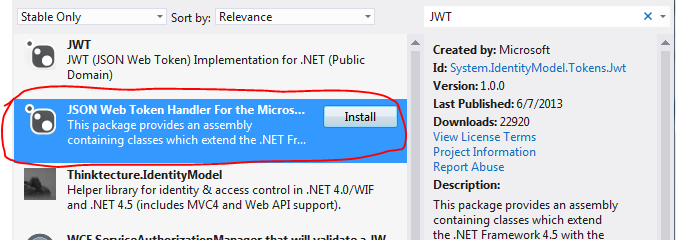
Open Visual Studio 2012 or higher, create a console application and add the below package from NuGet:

JWT package from NuGet

In addition, add a reference to the System.IdentityModel library.

There’s a number of ways to exchange JWT tokens between a sender and a receiver. In the below example I’ll use an RSACryptoServiceProvider to sign the JWT so that the receiver can validate it. If you don’t what RSA and asymmetric encryption mean then make sure to read upon it in the blog post mentioned above.

In short: the sender, i.e. the issuer of the token will have a pair of asymmetric encryption keys. The public key can be distributed to the receivers. The receiver will use the public key to validate the signature of the JWT token.

We won’t build a separate sender and receiver, that’s not the point here, but we want to simulate that the sender has access to both the private and public keys and the receiver only has the public key.

The following method will construct a valid RSA key pair:

private static RsaKeyGenerationResult GenerateRsaKeys()
{
	RSACryptoServiceProvider myRSA = new RSACryptoServiceProvider(2048);
	RSAParameters publicKey = myRSA.ExportParameters(true);
	RsaKeyGenerationResult result = new RsaKeyGenerationResult();
	result.PublicAndPrivateKey = myRSA.ToXmlString(true);
	result.PublicKeyOnly = myRSA.ToXmlString(false);
	return result;
}

…where RsaKeyGenerationResult is a DTO:

public class RsaKeyGenerationResult
{
	public string PublicKeyOnly { get; set; }
	public string PublicAndPrivateKey { get; set; }
}

In GenerateRsaKeys() we generate an RSA key and save its full set of keys and the public key only in two separate parameters of the RsaKeyGenerationResult object.

This is how to build and serialise the token:

RSACryptoServiceProvider publicAndPrivate = new RSACryptoServiceProvider();			
RsaKeyGenerationResult keyGenerationResult = GenerateRsaKeys();

publicAndPrivate.FromXmlString(keyGenerationResult.PublicAndPrivateKey);
JwtSecurityToken jwtToken = new JwtSecurityToken
	(issuer: "http://issuer.com", audience: "http://mysite.com"
	, claims: new List<Claim>() { new Claim(ClaimTypes.Name, "Andras Nemes") }
	, lifetime: new Lifetime(DateTime.UtcNow, DateTime.UtcNow.AddHours(1))
	, signingCredentials: new SigningCredentials(new RsaSecurityKey(publicAndPrivate)
		, SecurityAlgorithms.RsaSha256Signature, SecurityAlgorithms.Sha256Digest));

JwtSecurityTokenHandler tokenHandler = new JwtSecurityTokenHandler();
string tokenString = tokenHandler.WriteToken(jwtToken);

Console.WriteLine("Token string: {0}", tokenString);

You’ll recognise the parameters in the JwtSecurityToken constructor. You’ll see that we used the full RSA key to sign the token. The SecurityAlgorithms string enumeration stores the fully qualified names of the signature and digest algorithm. Those are compulsory arguments in the constructor.

Run the code up to this point and you should see a long string with the 3 segments mentioned above.

If your organisation has a valid X509 certificate then it can be used in place of the RsaSecurityKey object. Check out the X509AsymmetricSecurityKey object which accepts a 509Certificate2 object in its constructor. You’ll need to export the certificate with both the private and public keys and save it as a .pfx file. You can do that using the certmgr snap-in in Windows. Use the full file name of the .pfx file in the constructor of the X509Certificate2 constructor.

You can transmit the token in a number of different ways: in the header of an HTTP request, in the query string, in a cookie, etc. It’s now a string that you can send to the consumer.

The consumer can validate and read the claims from the token as follows:

JwtSecurityToken tokenReceived = new JwtSecurityToken(tokenString);

RSACryptoServiceProvider publicOnly = new RSACryptoServiceProvider();
publicOnly.FromXmlString(keyGenerationResult.PublicKeyOnly);
TokenValidationParameters validationParameters = new TokenValidationParameters()			
{
	ValidIssuer = "http://issuer.com"
	,AllowedAudience = "http://mysite.com"
	, SigningToken = new RsaSecurityToken(publicOnly)
};
			
JwtSecurityTokenHandler recipientTokenHandler = new JwtSecurityTokenHandler();
ClaimsPrincipal claimsPrincipal = recipientTokenHandler.ValidateToken(tokenReceived, validationParameters);

The client receives the base64 string which can be used in the constructor of the JwtSecurityToken object. We then use the public-key-only version of the RSACryptoServiceProvider to simulate that the receiver only has access to the public key of the sender. The TokenValidationParameters object can be used to build the validation logic. The JwtSecurityTokenHandler object is then used to validate the token. Upon successful validation you’ll get the ClaimsPrincipal which you’ll recognise from the posts on claims based auth mentioned above.

Set a breakpoint after the last line of code and inspect the contents of the claimsPrincipal object by hovering over it in VS.

The encoded JWT token can be decoded on this web page:
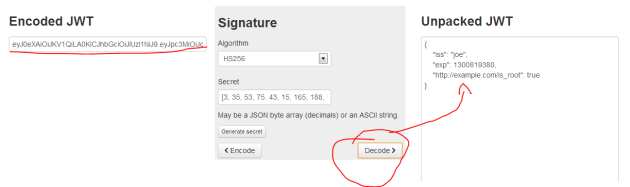
Jwt decoder page

Read the next part in this series here.

You can view the list of posts on Security and Cryptography here.
Getting a return value from a Task with C#

Sometimes you want to get a return value from a Task as opposed to letting it run in the background and forgetting about it. You’ll need to specify the return type as a type parameter to the Task object: a Task of T.

.NET 4.0

Without specifying an input parameter:

Task<int> task = new Task<int>(() => 
{
    int total = 0;
    for (int i = 0; i < 500; i++)
    {
        total += i;
    }
    return total;
});

task.Start();
int result = Convert.ToInt32(task.Result);

We count to 500 and return the sum. The return value of the Task can be retrieved using the Result property which can be converted to the desired type.

You can provide an input parameter as well:

Task<int> task = new Task<int>(obj => 
{
    int total = 0;
    int max = (int)obj;
    for (int i = 0; i < max; i++)
    {
        total += i;
    }
    return total;
}, 300);

task.Start();
int result = Convert.ToInt32(task.Result);

We specify that we want to count to 300.

.NET 4.5

The recommended way in .NET 4.5 is to use Task.FromResult, Task.Run or Task.Factory.StartNew:

FromResult:

public async Task DoWork()
{
       int res = await Task.FromResult<int>(GetSum(4, 5));	
}

private int GetSum(int a, int b)
{
	return a + b;
}

Please check out Stefan’s comments on the usage of FromResult in the comments section below the post.

Task.Run:

public async Task DoWork()
{
	Func<int> function = new Func<int>(() => GetSum(4, 5));
	int res = await Task.Run<int>(function);
}

private int GetSum(int a, int b)
{
	return a + b;
}

Task.Factory.StartNew:

public async Task DoWork()
{
	Func<int> function = new Func<int>(() => GetSum(4, 5));
	int res = await Task.Factory.StartNew<int>(function);			
}

private int GetSum(int a, int b)
{
	return a + b;
}

View the list of posts on the Task Parallel Library here.

Thread safe collections in .NET: ConcurrentDictionary

Concurrent collections in .NET work very much like their single-thread counterparts with the difference that they are thread safe. These collections can be used in scenarios where you need to share a collection between Tasks. They are typed and use a lightweight synchronisation mechanism to ensure that they are safe and fast to use in parallel programming.

Concurrent dictionaries

Concurrent dictionaries are thread-safe equivalent collections of “normal” dictionaries, i.e. key-value pair collections. Concurrent dictionaries are ideal if you would like to share a key-pair collection of types K and V among several tasks.

Important methods:

  • TryAdd(K key, V value): adds an new key-value pair to the collection. Returns true if the insertion was successful
  • TryGetValue(K key, out V value): tries to retrieve the value of the key. Returns true if the extraction was successful and the value is assigned to the out parameter
  • TryRemove(K key, out V value): tries to remove the key-value pair associated with the key. Returns true if the deletion was successful and the value is assigned to the out parameter
  • TryUpdate(K key, V new, V current): update the value of the key-value pair with the ‘new’ value if the current value is equal to ‘current’. Returns true if the update was successful
  • ContainsKey(K key): same as ContainsKey of the normal Dictionary class, i.e. returns true if the key is found in the dictionary

The ‘try’ bit in the method names imply that your code needs to prepare for the event where the element could not be retrieved. If multiple threads retrieve elements from the same collection you cannot be sure what’s in there when a specific thread tries to read from it. E.g. even if ContainsKey returns true there’s no guarantee that the key-value pair is still present when the thread tries to read from it as another thread might have already removed it.

Example

We’ll need a simple object with a single property for the example:

class Series
{
	public int CurrentValue
	{
		get;
		set;
	}
}

The following code creates 20 tasks and each task increases the value of the CurrentValue property in the shared dictionary by 1000 in loop. So we’re expecting the final value to be 20000. We fill up the task array in a loop and start the tasks individually. The key-value in the dictionary may look like the following at a certain stage:

key: 0 (the task ID represented by the taskParameter object, which is the same as ‘i’ in the main loop), value: 40
key: 1, value 46
key: 2: value 43
.
.
.
key: 19, value 45

After the loop the values of each thread are added to the CurrentValue property:

Series series = new Series();
ConcurrentDictionary<int, int> concurrentDictionary = new ConcurrentDictionary<int, int>();
Task<int>[] taskArray = new Task<int>[20];
for (int i = 0; i < taskArray.Length; i++)
{
	concurrentDictionary.TryAdd(i, series.CurrentValue);

	taskArray[i] = Task.Factory.StartNew<int>((taskParameter) =>
	{
		int current;
		bool valueRetrieved;
		int key = Convert.ToInt32(taskParameter);
		for (int j = 0; j < 1000; j++)
		{
			valueRetrieved = concurrentDictionary.TryGetValue(key, out current);
			concurrentDictionary.TryUpdate(key, current + 1, current);
		}

		int result;
		valueRetrieved = concurrentDictionary.TryGetValue(key, out result);
		if (valueRetrieved)
		{
			return result;
		}
		else
		{
			throw new Exception(String.Format("No data item available for key {0}", taskParameter));
		}
	}, i);
}

for (int i = 0; i < taskArray.Length; i++)
{
	series.CurrentValue += taskArray[i].Result;
}

Console.WriteLine("Expected value {0}, Balance: {1}", 20000, series.CurrentValue);

View the list of posts on the Task Parallel Library here.

Thread safe collections in .NET: ConcurrentStack

Concurrent collections in .NET work very much like their single-thread counterparts with the difference that they are thread safe. These collections can be used in scenarios where you need to share a collection between Tasks. They are typed and use a lightweight synchronisation mechanism to ensure that they are safe and fast to use in parallel programming.

Concurrent stacks

If you don’t know what Stacks are then you can read about them here. The Stack of T generic collection has a thread-safe counterpart called ConcurrentStack. Important methods:

  • Push(T element): adds an item of type T to the collection
  • PushRange(T[] elements) and PushRange(T[] elements, int, int): same as Push but is used for adding an array of items to the collection
  • TryPeek(out T): tries to retrieve the next element from the collection without removing it. The value is set to the out parameter if the method succeeds. Otherwise it returns false.
  • TryPop(out T): tries to get the first element. It removes the item from the collection and sets the out parameter to the retrieved element. Otherwise the method returns false
  • TryPopRange(out T[] elements) and TryPopRange(out T[], int, int): same as TryPop but is used for arrays

The ‘try’ bit in the method names imply that your code needs to prepare for the event where the element could not be retrieved. If multiple threads retrieve elements from the same stack you cannot be sure what’s in there when a specific thread tries to read from it.

Example

Declare and fill a concurrent stack:

ConcurrentStack<int> concurrentStack = new ConcurrentStack<int>();

for (int i = 0; i < 5000; i++)
{
	concurrentStack.Push(i);
}

Next we’ll try to pop every item from the stack. The stack will be accessed by several tasks at the same time. The counter variable – which is also shared – will be used to check if all items have been retrieved.

int counter = 0;

Task[] stackTasks = new Task[10];
for (int i = 0; i < stackTasks.Length; i++)
{
	stackTasks[i] = Task.Factory.StartNew(() =>
	{
		while (concurrentStack.Count > 0)
		{
			int currentElement;
			bool success = concurrentStack.TryPop(out currentElement);
			if (success)
			{
				Interlocked.Increment(ref counter);
			}
		}
	});
}

The while loop will ensure that we’ll try to pop the items as long as there’s something left in the collection.

Wait for the tasks and print the number of items processed – the counter should have the same value as the number of items in the stack:

Task.WaitAll(stackTasks);
Console.WriteLine("Counter: {0}", counter);

View the list of posts on the Task Parallel Library here.

Efficient linked lists in .NET

Sometimes you need a collection that’s modified a lot: you insert, update and remove items. A List of T is then inefficient as it needs to constantly rearrange all other items. The LinkedList class might be a better candidate.

A linked list is a doubly-linked list. Each item has a Next and Previous pointer to look at which element comes right before and after a particular object in the list. A linked list is very efficient at inserting and deleting items in particular.

Initialisation:

LinkedList<int> intList = new LinkedList<int>();

There are multiple ways to add a new item: AddAfter, AddBefore, AddFirst, AddLast.

Adding a new item on the top of the list:

intList.AddFirst(2);

Putting 3 ahead of 2:

intList.AddFirst(3);

It’s not possible to directly pull out an item with an indexer, such as [2].

You can, however, iterate through the collection:

foreach (var i in intList)
{
}

You can get a reference of the first item with the First property:

LinkedListNode<int> firstItem = intList.First;

You can then insert an item after that:

intList.AddAfter(first, 5);

This will add 5 in between 3 and 2.

Inserting before the first item is equally easy:

intList.AddBefore(first, 5);

You can get to the last item… can you guess how? Through the Last property.

The First and Last properties do not return an int, or the type that you provided in place of T. It returns a LinkedListNode of type T, which is int in this case. This object has a Previous and Next properties:

LinkedListNode<int> firstItem = intList.First;
firstItem.Previous;
firstItem.Next;

It also has a Value property which returns the actual value of the LinkedListNode object.

Another way of iterating through the list is the following:

LinkedListNode<int> item = intList.First;
while (item != null)
{
    int val = item.Value;
    item = item.Next;
}

Removing items can be done with methods such as RemoveLast(), RemoveFirst(), Remove(item).

Using HashSet in .NET to allow unique values only

Hashsets allow you to add unique values into a collection. So if you have a rule that no two identical objects are added to a collection then a Set is a good choice.

Initialisation:

HashSet<int> integerSet = new HashSet<int>();

Add new items:

integerSet.Add(2);
integerSet.Add(3);

There’s no direct access available with an index parameter, like [2]. There’s no particular order to the items inserted to a Set. You’ll never know where the items end up and which one is the first in the list.

You can simply iterate through the values like this:

foreach (int value in integerSet)
{
}

If you try to add an integer that already exists then it will ignored. The Add method has a boolean return value. It will return false if the item you’re trying to add already exists in the collection and true otherwise.

You can easily build the intersection of two sets:

HashSet<int> integerSet1 = new HashSet<int>(){1, 2, 3};
HashSet<int> integerSet2 = new HashSet<int>(){2, 3, 4};

integerSet1.IntersectWith(integerSet2);

This operation will only keep those items in integerSet1 that were available in both sets, i.e. the intersection of the two sets: 2 and 3.

Building a union is equally easy:

integerSet1.UnionWith(integerSet2);

…resulting in integerSet1 = 1,2,3,4.

SymmetricExceptWith returns those items that are found in set 1 and set 2 but not both:

integerSet1.SymmetricExceptWith(integerSet2);

Result: 1,4.

If you want to store objects, such as Customer, Product, etc. then you need to take some extra care. Sets have no idea when two object are considered equal. By default the following operation will add both objects:

HashSet<Product> productSet = new HashSet<Product>();
productSet.Add(new Product() { Name = "A" });

These are two different objects, they point to two different locations in the memory heap.

One way to solve this is that object will implement the IEquatable interface and override the GetHashCode method:

public class Product : IEquatable<Product>
{
	public string Name { get; set; }

	public override int GetHashCode()
	{
		return Name.GetHashCode();
	}

	public bool Equals(Product other)
	{
		return this.Name.Equals(other.Name);
	}
}

This will prevent adding two equal objects to be added to the Set – provided that they should be considered equal of course.

LIFO data collection in .NET: Stack of T

If you need a data collection in .NET where you are forced to handle the objects in a last-in-first-out manner then you can use the Stack of T object: the last object added will be the first to come out. A typical scenario is a deck of cards: you pick the first card from the top, i.e. the one that was added last.

To initialise:

Stack&lt;Card&gt; stackOfCards = new Stack&lt;Card&gt;();

To add items:

stackOfCards.Push(new Card(ace));
stackOfCards.Push(new Card(ten));

To get the most recently added object from the stack:

Card next = stackOfCards.Pop();

The Pop() method will also remove the item from the collection. So the next time you call Pop() you’ll get the item added before the most recently added one.

Just like with a Queue of T you cannot directly reference an object in the stack collection by some index, e.g. [3].

The Peek() method will let you view the next item on the stack but it won’t be removed from the collection:

Card next = stackOfCards.Peek();

You can test for the absence of an item with Contains:

bool contains = stackOfCards.Contains(ace);

If you absolutely need to access the items directly then convert the stack into an array:

Card[] cardArray = stackOfCards.AsArray();

This will copy the items in the stack but leave the stack itself intact.

A model SOA application in .NET Part 7: testing the client proxy

Introduction

In the previous post we finished building a thin but functional SOA web service. Now it’s time to test it. We could build just any type of consumer that’s capable of issuing HTTP requests to a service but we’ll stick to a simple Console app. The goal is to test the SOA service and not to win the next CSS contest.

The tester

Open the SOA application we’ve been working on. Set the WebProxy layer as the start up project and then press F5. Without setting the start up URL in Properties/Web you’ll most likely get a funny looking error page from IIS that says you are not authorised to view the contents of the directory. That’s fine. Extend the URI in the browser as follows:

http://localhost:xxxx/reservation

Refresh the browser and you should get a JSON message saying that there is no GET method for that resource. That’s also fine as we only implemented a POST method. The same is true for the purchase controller:

http://localhost:xxxx/purchase

Open another Visual Studio instance and create a new Console application called SoaTester. Import the Json.NET package through NuGet. Add assembly references to System.Net and System.Net.Http. Add the following private variables to Program.cs:

private static Uri _productReservationServiceUri = new Uri("http://localhost:49679/reservation");
private static Uri _productPurchaseServiceUri = new Uri("http://localhost:49679/purchase");

Recall that the Post methods require Request objects to function correctly. The easiest way to ensure that we don’t need to deal with JSON formatting and serialisation issues we can just copy the Request objects we already have the SoaIntroNet.Service layer. Insert the following two objects into the console app:

public class ReserveProductRequest
{
	public string ProductId { get; set; }
	public int ProductQuantity { get; set; }
}
public class PurchaseProductRequest
{
	public string ReservationId { get; set; }
	public string ProductId { get; set; }
}

Note that we dropped the correlation ID property from the purchase request. It’s irrelevant for the actual user and is set within the Purchase.Post() action anyway before the purchase request is passed to the Service layer.

We’ll need to read the JSON responses as well so insert the following three objects in the console app. They will all look familiar:

public abstract class ServiceResponseBase
{
	public ServiceResponseBase()
	{
		this.Exception = null;
	}

	public Exception Exception { get; set; }
}
public class PurchaseProductResponse : ServiceResponseBase
{
	public string PurchaseId { get; set; }
	public string ProductName { get; set; }
	public string ProductId { get; set; }
	public int ProductQuantity { get; set; }
}
public class ProductReservationResponse : ServiceResponseBase
{
	public string ReservationId { get; set; }
	public DateTime Expiration { get; set; }
	public string ProductId { get; set; }
	public string ProductName { get; set; }
	public int ProductQuantity { get; set; }
}

We’ll first call the Reservation operation. The below method calls the product reservation URI and returns a product reservation response:

private static ProductReservationResponse ReserveProduct(ReserveProductRequest request)
{
	ProductReservationResponse response = new ProductReservationResponse();
	try
	{
		HttpRequestMessage requestMessage = new HttpRequestMessage(HttpMethod.Post, _productReservationServiceUri);
		requestMessage.Headers.ExpectContinue = false;
		String jsonArguments = JsonConvert.SerializeObject(request);
		requestMessage.Content = new StringContent(jsonArguments, Encoding.UTF8, "application/json");
		HttpClient httpClient = new HttpClient();
		httpClient.Timeout = new TimeSpan(0, 10, 0);
		Task<HttpResponseMessage> httpRequest = httpClient.SendAsync(requestMessage,
			HttpCompletionOption.ResponseContentRead, CancellationToken.None);
		HttpResponseMessage httpResponse = httpRequest.Result;
		HttpStatusCode statusCode = httpResponse.StatusCode;
        	HttpContent responseContent = httpResponse.Content;
		Task<String> stringContentsTask = responseContent.ReadAsStringAsync();
		String stringContents = stringContentsTask.Result;
		if (statusCode == HttpStatusCode.OK && responseContent != null)
		{					
			response = JsonConvert.DeserializeObject<ProductReservationResponse>(stringContents);
		}
		else
		{
			response.Exception = new Exception(stringContents);
		}
	}
	catch (Exception ex)
	{
		response.Exception = ex;
	}
	return response;
}

We send a HTTP request to the service and read off the response. We use Json.NET to serialise and deserialise the objects. We set the HttpClient timeout to 10 minutes to make sure we don’t get any timeout exceptions as we are testing the SOA application.

The below bit of code calls this method from Main:

ReserveProductRequest reservationRequest = new ReserveProductRequest();
reservationRequest.ProductId = "13a35876-ccf1-468a-88b1-0acc04422243";
reservationRequest.ProductQuantity = 10;
ProductReservationResponse reservationResponse = ReserveProduct(reservationRequest);

Console.WriteLine("Reservation response received.");
Console.WriteLine(string.Concat("Reservation success: ", (reservationResponse.Exception == null)));
if (reservationResponse.Exception == null)
{
	Console.WriteLine("Reservation id: " + reservationResponse.ReservationId);
}
else
{
	Console.WriteLine(reservationResponse.Exception.Message);
}

Console.ReadKey();

Recall that we inserted a product with that ID in the in-memory database in the post discussing the repository layer.

Set two breakpoints in the SOA app: one within the ReservationController constructor and another within the ReservationController.Post method. Start the console application. You should see that the code execution stops within the controller constructor. Check the status of the incoming productService parameter. It is not null so StructureMap correctly resolved this dependency. The next stop is at the second breakpoint. Check the status of the reserveProductRequest parameter. It is not null and has been correctly populated by Web API and the Json serialiser. From this point on I encourage you to step through the execution by pressing F11 to see how each method is called. At the end the product should be reserved and a product reservation message will be sent back to the client. Back in the client the ProductReservationResponse object is populated by Json.NET based on the string contents from the web service. The results are then printed on the console window.

You can test the service response in the following way:

  • Send a non-existing product id
  • Send a malformatted GUID as the product id
  • Send a quantity higher than the original allocation, e.g. 10000

You’ll get the correct error messages in all three cases.

It’s now time to purchase the product. The below method will send the purchase request to the web service:

private static PurchaseProductResponse PurchaseProduct(PurchaseProductRequest request)
{
	PurchaseProductResponse response = new PurchaseProductResponse();
	try
	{
		HttpRequestMessage requestMessage = new HttpRequestMessage(HttpMethod.Post, _productPurchaseServiceUri);
		requestMessage.Headers.ExpectContinue = false;
		String jsonArguments = JsonConvert.SerializeObject(request);
		requestMessage.Content = new StringContent(jsonArguments, Encoding.UTF8, "application/json");
		HttpClient httpClient = new HttpClient();
		httpClient.Timeout = new TimeSpan(0, 10, 0);
		Task<HttpResponseMessage> httpRequest = httpClient.SendAsync(requestMessage,
			HttpCompletionOption.ResponseContentRead, CancellationToken.None);
		HttpResponseMessage httpResponse = httpRequest.Result;
		HttpStatusCode statusCode = httpResponse.StatusCode;
		HttpContent responseContent = httpResponse.Content;
		Task<String> stringContentsTask = responseContent.ReadAsStringAsync();
		String stringContents = stringContentsTask.Result;
		if (statusCode == HttpStatusCode.OK && responseContent != null)
		{
			response = JsonConvert.DeserializeObject<PurchaseProductResponse>(stringContents);
		}
		else
		{
			response.Exception = new Exception(stringContents);
		}
	}
	catch (Exception ex)
	{
		response.Exception = ex;
	}
	return response;
}

I realise that this is almost identical to PurchaseProduct and a single method probably would have sufficed – you can do this improvement as homework.

Below the code line…

Console.WriteLine("Reservation id: " + reservationResponse.ReservationId);

…add the following bit to complete the loop:

PurchaseProductRequest purchaseRequest = new PurchaseProductRequest();
purchaseRequest.ProductId = reservationResponse.ProductId;
purchaseRequest.ReservationId = reservationResponse.ReservationId;
PurchaseProductResponse purchaseResponse = PurchaseProduct(purchaseRequest);
if (purchaseResponse.Exception == null)
{
	Console.WriteLine("Purchase confirmation id: " + purchaseResponse.PurchaseId);
}
else
{
	Console.WriteLine(purchaseResponse.Exception.Message);
}

So we purchase the reserved product immediately after receiving the reservation response. Run the tester object without any break points. You should see the purchase ID in the console window.

You can test the SOA app in the following way:

  • Set a breakpoint in the Purchase controller and step through the code slowly with F11 – make sure that the purchase expiry time of 1 minute is reached
  • Alternatively use Thread.Sleep() in the tester app before the call to the Purchase controller
  • Modify the reservation id to some non-existent GUID
  • Set the reservation id to a malformed GUID

You will get the correct exception messages in all cases from the SOA app.

That’s all folks about SOA basics in this series. I hope you have learned a lot of new concepts.

View the list of posts on Architecture and Patterns here.

Elliot Balynn's Blog

A directory of wonderful thoughts

Software Engineering

Web development

Disparate Opinions

Various tidbits

chsakell's Blog

WEB APPLICATION DEVELOPMENT TUTORIALS WITH OPEN-SOURCE PROJECTS

Once Upon a Camayoc

ARCHIVED: Bite-size insight on Cyber Security for the not too technical.