Externalising dependencies with Dependency Injection in .NET part 10: hashing and digital signatures

Introduction

In the previous post of this series we looked at how to hide the implementation of asymmetric encryption operations. In this post we’ll look at abstracting away hashing and digital signatures as they often go hand in hand. Refer back to this post on hashing and this on digital signatures if you are not familiar with those concepts.

We’ll continue directly from the previous post and extend the Infrastructure layer of our demo app we’ve been working on so far. So have it ready in Visual Studio and let’s get to it.

Preparation

Add two new subfolders called Hashing and DigitalSignature to the Cryptography folder of the Infrastructure.Common library. We’ll follow the same methodology as in the case of asymmetric encryption, i.e. we’ll communicate with proper objects as parameters and return types instead of writing a large amount of overloaded methods.

Recall that we had a common abstract class to all return types in the IAsymmetricCryptographyService interface: ResponseBase. We’ll reuse it here.

Hashing

In short hashing is a one way encryption. A plain text is hashed and there’s no key to decipher the hashed value. A common application of hashing is storing passwords. Any hashing algorithm should be able to hash plain string and that’s the only expectation we have. Add the below interface to the Hashing folder:

public interface IHashingService
{
	HashResult Hash(string message);
	string HashAlgorithmCode();
}

…where HashResult will hold the readable and byte array formats of the hashed value and has the following form:

public class HashResult : ResponseBase
{
	public string HexValueOfHash { get; set; }
	public byte[] HashedBytes { get; set; }
}

What is HashAlgorithmCode() doing there? The implementation if the interface will return a short description of itself, such as “SHA1” or “SHA512”. We’ll see later that it’s required by the digital signature implementation.

This can actually be seen as a violation of ‘L‘ in SOLID as we’re specifying the type of the implementation in some form. However, I think it serves a good purpose here and it will not be misused in some funny switch statement where we check the string returned by HashAlgorithmCode() in order to direct the logic. Let’s insert two implementations of IHashingService to the Hashing folder. Here comes SHA1:

public class Sha1ManagedHashingService : IHashingService
{
	public HashResult Hash(string message)
	{
		HashResult hashResult = new HashResult();
		try
		{
			SHA1Managed sha1 = new SHA1Managed();
			byte[] hashed = sha1.ComputeHash(Encoding.UTF8.GetBytes(message));
			string hex = Convert.ToBase64String(hashed);
			hashResult.HashedBytes = hashed;
			hashResult.HexValueOfHash = hex;
		}
		catch (Exception ex)
		{
			hashResult.ExceptionMessage = ex.Message;
		}
		return hashResult;
	}

	public string HashAlgorithmCode()
	{
		return "SHA1";
	}
}

…and here’s SHA512:

public class Sha512ManagedHashingService : IHashingService
{
	public HashResult Hash(string message)
	{
		HashResult hashResult = new HashResult();
		try
		{
			SHA512Managed sha512 = new SHA512Managed();
			byte[] hashed = sha512.ComputeHash(Encoding.UTF8.GetBytes(message));
			string hex = Convert.ToBase64String(hashed);
			hashResult.HashedBytes = hashed;
			hashResult.HexValueOfHash = hex;
		}
		catch (Exception ex)
		{
			hashResult.ExceptionMessage = ex.Message;
		}
		return hashResult;
	}

	public string HashAlgorithmCode()
	{
		return "SHA512";
	}
}

That’s enough for starters.

Digital signatures

Digital signatures in a nutshell are used to electronically sign the hash of a message. The receiver of the message can then check if the message has been tampered with in any way. Also, a digital signature can prove that it was the sender who sent a particular message. E.g. a receiver may only accept signed messages so that the sender cannot claim that it was someone else who sent the message.

It is not “compulsory” to encrypt a signed message. You can sign the hash of an unencrypted message. However, for extra safety the hash is also often encrypted. The process is the following:

  • The Sender encrypts a message with the Receiver’s public key
  • The Sender then hashes the cipher text
  • The Sender signs the hashed cipher with their private key
  • The Sender transmits the cipher text, the hash and the signature to the Receiver
  • The Receiver verifies the signature with the Sender’s public key
  • If the signature is correct then the Receiver deciphers the cipher text with their full asymmetric key

The following interface will reflect what we need from a digital signature service: sign a message and then verify the signature:

public interface IEncryptedDigitalSignatureService
{
	DigitalSignatureCreationResult Sign(DigitalSignatureCreationArguments arguments);
	DigitalSignatureVerificationResult VerifySignature(DigitalSignatureVerificationArguments arguments);
}

DigitalSignatureCreationResult will hold the signature and the cipher text:

public class DigitalSignatureCreationResult : ResponseBase
{
	public byte[] Signature { get; set; }
	public string CipherText { get; set; }
}

DigitalSignatureCreationArguments will carry the message to be encrypted, hashed and signed. It will also hold the the full key set for the signature and the public key of the receiver for encryption:

public class DigitalSignatureCreationArguments
{
	public string Message { get; set; }
	public XDocument FullKeyForSignature { get; set; }
	public XDocument PublicKeyForEncryption { get; set; }
}

Then we have DigitalSignatureVerificationResult which has properties to check if the signatures match and the decoded text:

public class DigitalSignatureVerificationResult : ResponseBase
{
	public bool SignaturesMatch { get; set; }
	public string DecodedText { get; set; }
}

…and finally we have DigitalSignatureVerificationArguments which holds the properties for the Sender’s public key for signature verification, the Receiver’s full key for decryption, the cipher text and the signature:

public class DigitalSignatureVerificationArguments
{
	public XDocument PublicKeyForSignatureVerification { get; set; }
	public XDocument FullKeyForDecryption { get; set; }
	public string CipherText { get; set; }
	public byte[] Signature { get; set; }
}

RsaPkcs1 digital signature provider

We’ll use the built-in RSA-based signature provider in .NET for the implementation. It will need to hash the cipher text so it’s good that we’ve prepared IHashingService in advance. Here comes the implementation where you’ll see how the HashAlgorithmCode() method is used in specifying the hash algorithm of the signature formatter and deformatter:

public class RsaPkcs1DigitalSignatureService : IEncryptedDigitalSignatureService
{
	private readonly IHashingService _hashingService;

	public RsaPkcs1DigitalSignatureService(IHashingService hashingService)
	{
		if (hashingService == null) throw new ArgumentNullException("Hashing service");
		_hashingService = hashingService;
	}

	public DigitalSignatureCreationResult Sign(DigitalSignatureCreationArguments arguments)
	{
		DigitalSignatureCreationResult res = new DigitalSignatureCreationResult();
		try
		{				
			RSACryptoServiceProvider rsaProviderReceiver = new RSACryptoServiceProvider();
			rsaProviderReceiver.FromXmlString(arguments.PublicKeyForEncryption.ToString());
			byte[] encryptionResult = rsaProviderReceiver.Encrypt(Encoding.UTF8.GetBytes(arguments.Message), false);
			HashResult hashed = _hashingService.Hash(Convert.ToBase64String(encryptionResult));

			RSACryptoServiceProvider rsaProviderSender = new RSACryptoServiceProvider();
			rsaProviderSender.FromXmlString(arguments.FullKeyForSignature.ToString());
			RSAPKCS1SignatureFormatter signatureFormatter = new RSAPKCS1SignatureFormatter(rsaProviderSender);
			signatureFormatter.SetHashAlgorithm(_hashingService.HashAlgorithmCode());
			byte[] signature = signatureFormatter.CreateSignature(hashed.HashedBytes);

			res.Signature = signature;
			res.CipherText = Convert.ToBase64String(encryptionResult);
			res.Success = true;
		}
		catch (Exception ex)
		{
			res.ExceptionMessage = ex.Message;
		}

		return res;
	}

	public DigitalSignatureVerificationResult VerifySignature(DigitalSignatureVerificationArguments arguments)
	{
		DigitalSignatureVerificationResult res = new DigitalSignatureVerificationResult();
		try
		{
			RSACryptoServiceProvider rsaProviderSender = new RSACryptoServiceProvider();
			rsaProviderSender.FromXmlString(arguments.PublicKeyForSignatureVerification.ToString());
			RSAPKCS1SignatureDeformatter deformatter = new RSAPKCS1SignatureDeformatter(rsaProviderSender);
			deformatter.SetHashAlgorithm(_hashingService.HashAlgorithmCode());				
			HashResult hashResult = _hashingService.Hash(arguments.CipherText);
			res.SignaturesMatch = deformatter.VerifySignature(hashResult.HashedBytes, arguments.Signature);
			if (res.SignaturesMatch)
	        	{
        			RSACryptoServiceProvider rsaProviderReceiver = new RSACryptoServiceProvider();
  	        		rsaProviderReceiver.FromXmlString(arguments.FullKeyForDecryption.ToString());
		        	byte[] decryptedBytes = rsaProviderReceiver.Decrypt(Convert.FromBase64String(arguments.CipherText), false);
				res.DecodedText = Encoding.UTF8.GetString(decryptedBytes);
			}

			res.Success = true;
		}
		catch (Exception ex)
		{
			res.ExceptionMessage = ex.Message;
		}

		return res;
	}
}

The whole chain can be tested as follows:

private static void TestDigitalSignatureService()
{
	IAsymmetricCryptographyService asymmetricService = new RsaAsymmetricCryptographyService();
	AsymmetricKeyPairGenerationResult keyPairGenerationResultReceiver = asymmetricService.GenerateAsymmetricKeys(1024);
	AsymmetricKeyPairGenerationResult keyPairGenerationResultSender = asymmetricService.GenerateAsymmetricKeys(1024);

	IEncryptedDigitalSignatureService digitalSignatureService = new RsaPkcs1DigitalSignatureService(new Sha1ManagedHashingService());

	DigitalSignatureCreationArguments signatureCreationArgumentsFromSender = new DigitalSignatureCreationArguments()
	{
		Message = "Text to be encrypted and signed"
		, FullKeyForSignature = keyPairGenerationResultSender.FullKeyPairXml
		, PublicKeyForEncryption = keyPairGenerationResultReceiver.PublicKeyOnlyXml
	};
	DigitalSignatureCreationResult signatureCreationResult = digitalSignatureService.Sign(signatureCreationArgumentsFromSender);
	if (signatureCreationResult.Success)
	{
		DigitalSignatureVerificationArguments verificationArgumentsFromReceiver = new DigitalSignatureVerificationArguments();
		verificationArgumentsFromReceiver.CipherText = signatureCreationResult.CipherText;
		verificationArgumentsFromReceiver.Signature = signatureCreationResult.Signature;
		verificationArgumentsFromReceiver.PublicKeyForSignatureVerification = keyPairGenerationResultSender.PublicKeyOnlyXml;
		verificationArgumentsFromReceiver.FullKeyForDecryption = keyPairGenerationResultReceiver.FullKeyPairXml;
		DigitalSignatureVerificationResult verificationResult = digitalSignatureService.VerifySignature(verificationArgumentsFromReceiver);
		if (verificationResult.Success)
		{
			if (verificationResult.SignaturesMatch)
			{
				Console.WriteLine("Signatures match, decoded text: {0}", verificationResult.DecodedText);
			}
			else
			{
				Console.WriteLine("Signature mismatch!!");
			}
		}
		else
		{
			Console.WriteLine("Signature verification failed: {0}", verificationResult.ExceptionMessage);
		}
	}
	else
	{
		Console.WriteLine("Signature creation failed: {0}", signatureCreationResult.ExceptionMessage);
	}
}

Check how the keys of each party in the messaging conversation are used for encrypting, signing, verifying and decrypting the message.

So that’s it for digital signatures.

This was the last post in the series on object dependencies. We could take up a number of other cross cutting concerns for the infrastructure layer, such as:

  • Http calls
  • User-level security, such as a role provider, a claims provider etc.
  • Session provider
  • Random password generation

…and possibly a lot more. By now you have a better understanding how to externalise tightly coupled object dependencies in your classes to make them more flexible and testable.

View the list of posts on Architecture and Patterns here.
Examining class members with Reflection and BindingFlags in .NET C#

In this post we saw a basic example of how to read the publicly available members of a class. Here we’ll look at how to refine our search and read other types of members, such as private and static members.

Consider the following, admittedly artificial Customer class:

public class Customer
{
	private string _name;
	protected int _age;
	public bool isPreferred;
	private static int maxRetries = 3;
}

We’ll concentrate on the fields to narrow down our focus. Check out the above link to see how to read methods, constructors, properties etc. of a class.

The most basic way of finding the fields of a class is the following:

Type customerType = typeof(Customer);
FieldInfo[] fields = customerType.GetFields();
Console.WriteLine("Fields: ");
foreach (FieldInfo fi in fields)
{
	Console.WriteLine(fi.Name);
}

This will only find the isPreferred variable as it is public. What if we want to get to the private fields as well? Use the BindingFlags enumeration like this:

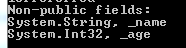
BindingFlags flags = BindingFlags.NonPublic | BindingFlags.Instance;
FieldInfo[] nonPublicFields = customerType.GetFields(flags);
Console.WriteLine("Non-public fields: ");
foreach (FieldInfo fi in nonPublicFields)
{
	Console.WriteLine(fi.Name);
}

…which results in the following:

Non-public fields with reflection

Note how the BindingFlags values can be chained together to widen your search. The NonPublic value will find the private, protected and internal variables. This value in itself is not enough to extract the non-public fields, we need to add that we’re interested in class-level fields.

The opposite of non-public is Public:

flags = BindingFlags.Public | BindingFlags.Instance;
FieldInfo[] publicFields = customerType.GetFields(flags);
Console.WriteLine("Public fields: ");
foreach (FieldInfo fi in publicFields)
{
	Console.WriteLine(string.Concat(fi.FieldType, ", ", fi.Name));
}

…which finds ‘isPreferred’ only as expected. We haven’t yet found the static field but it’s straightforward:

flags = BindingFlags.NonPublic | BindingFlags.Static;
FieldInfo[] staticFields = customerType.GetFields(flags);
Console.WriteLine("Private static fields: ");
foreach (FieldInfo fi in staticFields)
{
	Console.WriteLine(string.Concat(fi.FieldType, ", ", fi.Name));
}

…which finds ‘maxRetries’ only as it is the only non-public static field.

View all posts on Reflection here.

Examining class members through Types and Reflection in .NET C#

Here we saw different ways to get hold of a Type. You can use the Type object to extract different ingredients of a class such as methods, properties, events etc. through various methods. The name of the object that these methods return ends with “Info”, like FieldInfo, MethodInfo etc.

These Info classes all derive from the MemberInfo abstract base class. The Type object also derives from MemberInfo.

Say you have the following Customer class:

public class Customer
{
	private string _name;

	public Customer(string name)
	{
		if (string.IsNullOrEmpty(name)) throw new ArgumentNullException("Customer name!");
		_name = name;
	}

	public string Name
	{
		get
		{
			return _name;
		}
	}
	public string Address { get; set; }
	public int SomeValue { get; set; }

	public int ImportantCalculation()
	{
		return 1000;
	}

	public void ImportantVoidMethod()
	{
	}

        public enum SomeEnumeration
	{
		ValueOne = 1
		, ValueTwo = 2
	}

	public class SomeNestedClass
	{
		private string _someString;
	} 
}

Let’s see how we can find these elements:

Type customerType = typeof(Customer);

FieldInfo[] fields = customerType.GetFields();
Console.WriteLine("Fields: ");
foreach (FieldInfo fi in fields)
{
	Console.WriteLine(fi.Name);
}

Console.WriteLine("Constructors: ");
ConstructorInfo[] constructors = customerType.GetConstructors();
foreach (ConstructorInfo ci in constructors)
{
	Console.WriteLine(ci.Name);
}

Console.WriteLine("Methods: ");
MethodInfo[] methods = customerType.GetMethods();
foreach (MethodInfo mi in methods)
{
	Console.WriteLine(mi.Name);
}

Console.WriteLine("Nested types: ");
Type[] nestedTypes = customerType.GetNestedTypes();
foreach (Type t in nestedTypes)
{
	Console.WriteLine(t.Name);
}

Console.WriteLine("Properties: ");
PropertyInfo[] properties = customerType.GetProperties();
foreach (PropertyInfo pi in properties)
{
	Console.WriteLine(pi.Name);
}

Console.WriteLine("Members: ");
MemberInfo[] members = customerType.GetMembers();
foreach (MemberInfo mi in members)
{
	Console.WriteLine("Type: {0}, name: {1}", mi.Name, mi.MemberType);
}

This will produce the following output:

Inspect class members basic

You’ll notice a couple of things:

  • We have a field called _name but it wasn’t picked up by the GetFields method. That’s because it’s a private variable. If you want to extract private fields and members then the BindingFlags enumeration will come in handy – we’ll look at that in a separate post. The default behaviour is that you’ll only see the public members of a class. This is true for both static and instance members.
  • The get-set properties were translated into methods like get_Name and set_SomeValue
  • The methods inherited from Object were also included in the MethodInfo array – all public methods of the base class will be picked up by GetMethods()
  • GetMembers returns every public member of a class in a MemberInfo array. As noted above each Info class derives from MemberInfo. MemberInfo will contain some common functionality for all derived Info classes, like the Name property, but for anything specific to any derived Info class you’ll need to inspect the derived class of course

Another base class which is important to know of is MethodBase which also derives from MemberInfo. It represents any member that can contain a body: constructors and methods which in turn are represented by ConstructorInfo and MethodInfo.

View all posts on Reflection here.

Externalising dependencies with Dependency Injection in .NET part 9: cryptography part 2

Introduction

In the previous post of this series we looked at how to hide the implementation of symmetric encryption operations. In this post we’ll look at abstracting away asymmetric cryptography. Refer back to this post in case you are not familiar with asymmetric encryption in .NET.

We’ll continue directly from the previous post and extend the Infrastructure layer of our demo app we’ve been working on so far. So have it ready in Visual Studio and let’s get to it.

Preparation

Add a new subfolder called Asymmetric to the Cryptography folder of the Infrastructure.Common library. We’ll follow the same methodology as in the case of emailing and symmetric encryption, i.e. we’ll communicate with proper objects as parameters and return types instead of writing a large amount of overloaded methods.

Recall that we had a common abstract class to all return types in the ISymmetricCryptographyService interface: ResponseBase. We’ll reuse it here. There’s one more class we’ll use again here and that is CipherTextDecryptionResult.

Asymmetric encryption

In summary asymmetric encryption means that you have a pair of keys: a public and a private key. This is in contrast to symmetric encryption where there is only one key. The public key can be distributed to those who wish to send you an encrypted message. The private key will be used to decrypt the incoming cipher text. The public and private keys are in fact also symmetric: you can encrypt a message with the public key and decrypt with the private one and vice versa. As asymmetric encryption is considerably slower – but much more secure – than symmetric encryption it’s usually not used to encrypt large blocks of plain text. Instead, the sender encrypts the text with a symmetric key and then encrypts the symmetric key with the receiver’s public asymmetric key. The receiver will then decrypt the symmetric key using their asymmetric private key and decrypt the message with the decrypted symmetric key. If you want to see that in action I have a sample project which takes up this process starting here.

Our expectations from any reasonable asymmetric encryption mechanism are the same as for symmetric algorithms:

  • Create a valid key – actually a pair of keys – of a given size in bits
  • Encrypt a text
  • Decrypt a cipher text

Add the following interface to the Asymmetric folder to reflect these expectations:

public interface IAsymmetricCryptographyService
{
	AsymmetricKeyPairGenerationResult GenerateAsymmetricKeys(int keySizeInBits);
	AsymmetricEncryptionResult Encrypt(AsymmetricEncryptionArguments arguments);
	CipherTextDecryptionResult Decrypt(AsymmetricDecryptionArguments arguments);
}

We already know CipherTextDecryptionResult, here’s a reminder:

public class CipherTextDecryptionResult : ResponseBase
{
	public string DecodedText { get; set; }
}

AsymmetricKeyPairGenerationResult will represent the keys in XML format. We’ll need to represent the keys in two forms. The full representation is where the private key is included and should be kept with you. Another representation is where only the public key part of the pair is shown which can be used to distribute to your partners. Insert a class called AsymmetricKeyPairGenerationResult to the Asymmetric folder:

public class AsymmetricKeyPairGenerationResult : ResponseBase
{
	private XDocument _fullKeyPairXml;
	private XDocument _publicKeyOnlyXml;

	public AsymmetricKeyPairGenerationResult(XDocument fullKeyPairXml, XDocument publicKeyOnlyXml)
	{
		if (fullKeyPairXml == null) throw new ArgumentNullException("Full key pair XML");
		if (publicKeyOnlyXml == null) throw new ArgumentNullException("Public key only XML");
		_fullKeyPairXml = fullKeyPairXml;
		_publicKeyOnlyXml = publicKeyOnlyXml;
	}

	public XDocument FullKeyPairXml
	{
		get
		{
			return _fullKeyPairXml;
		}
	}

	public XDocument PublicKeyOnlyXml
	{
		get
		{
			return _publicKeyOnlyXml;
		}
	}
}

The keys are of type XDocument to make sure that they are in fact valid XML.

AsymmetricEncryptionResult will have two properties: the cipher text as a base64 string and as a byte array:

public class AsymmetricEncryptionResult : ResponseBase
{
	public string CipherText { get; set; }
	public byte[] CipherBytes { get; set; }
}

To encrypt a message we’ll need a plain text and the public-key-only part of the asymmetric keys:

public class AsymmetricEncryptionArguments
{
	public XDocument PublicKeyForEncryption { get; set; }
	public string PlainText { get; set; }		
}

Finally in order to decrypt a cipher text we’ll need the complete set of keys and the cipher text itself:

public class AsymmetricDecryptionArguments
{
	public XDocument FullAsymmetricKey { get; set; }
	public string CipherText { get; set; }
}

The project should compile at this stage.

The implementation: RSA

We’ll go for one of the most widely used implementation of asymmetric encryption, RSA. .NET has good support for it so the implementation if straightforward. Insert a class called RsaAsymmetricCryptographyService into the Asymmetric folder:

public class RsaAsymmetricCryptographyService : IAsymmetricCryptographyService
{
	public AsymmetricKeyPairGenerationResult GenerateAsymmetricKeys(int keySizeInBits)
	{
		try
		{
			RSACryptoServiceProvider myRSA = new RSACryptoServiceProvider(keySizeInBits);
			XDocument publicKeyXml = XDocument.Parse(myRSA.ToXmlString(false));
			XDocument fullKeyXml = XDocument.Parse(myRSA.ToXmlString(true));
			return new AsymmetricKeyPairGenerationResult(fullKeyXml, publicKeyXml) { Success = true };
		}
		catch (Exception ex)
		{
			return new AsymmetricKeyPairGenerationResult(new XDocument(), new XDocument()) { ExceptionMessage = ex.Message };
		}
	}

	public AsymmetricEncryptionResult Encrypt(AsymmetricEncryptionArguments arguments)
	{
		AsymmetricEncryptionResult encryptionResult = new AsymmetricEncryptionResult();
		try
		{
			RSACryptoServiceProvider myRSA = new RSACryptoServiceProvider();
			string rsaKeyForEncryption = arguments.PublicKeyForEncryption.ToString();
			myRSA.FromXmlString(rsaKeyForEncryption);
			byte[] data = Encoding.UTF8.GetBytes(arguments.PlainText);
			byte[] cipherText = myRSA.Encrypt(data, false);
			encryptionResult.CipherBytes = cipherText;
			encryptionResult.CipherText = Convert.ToBase64String(cipherText);
			encryptionResult.Success = true;
		}
		catch (Exception ex)
		{
			encryptionResult.ExceptionMessage = ex.Message;
		}
		return encryptionResult;
	}

	public CipherTextDecryptionResult Decrypt(AsymmetricDecryptionArguments arguments)
	{
		CipherTextDecryptionResult decryptionResult = new CipherTextDecryptionResult();
		try
		{
			RSACryptoServiceProvider cipher = new RSACryptoServiceProvider();
			cipher.FromXmlString(arguments.FullAsymmetricKey.ToString());
			byte[] original = cipher.Decrypt(Convert.FromBase64String(arguments.CipherText), false);
			decryptionResult.DecodedText = Encoding.UTF8.GetString(original);
			decryptionResult.Success = true;
		}
		catch (Exception ex)
		{
			decryptionResult.ExceptionMessage = ex.Message;
		}
		return decryptionResult;
	}
}

If you’re already familiar with asymmetric cryptography in .NET this should be straightforward. Otherwise consult the above link for the technical details, I won’t repeat them here.

The methods in the interface can be chained together in an example as follows:

private static void TestAsymmetricEncryptionService()
{
	IAsymmetricCryptographyService asymmetricSevice = new RsaAsymmetricCryptographyService();
	AsymmetricKeyPairGenerationResult keyPairGenerationResult = asymmetricSevice.GenerateAsymmetricKeys(1024);
	if (keyPairGenerationResult.Success)
	{
		AsymmetricEncryptionArguments encryptionArgs = new AsymmetricEncryptionArguments()
		{
			PlainText = "Text to be encrypted"
			, PublicKeyForEncryption = keyPairGenerationResult.PublicKeyOnlyXml
		};
		AsymmetricEncryptionResult encryptionResult = asymmetricSevice.Encrypt(encryptionArgs);
		if (encryptionResult.Success)
		{
			Console.WriteLine("Ciphertext: {0}", encryptionResult.CipherText);
			AsymmetricDecryptionArguments decryptionArguments = new AsymmetricDecryptionArguments()
			{
				CipherText = encryptionResult.CipherText
				, FullAsymmetricKey = keyPairGenerationResult.FullKeyPairXml
			};
			CipherTextDecryptionResult decryptionResult = asymmetricSevice.Decrypt(decryptionArguments);
			if (decryptionResult.Success)
			{
				Console.WriteLine("Decrypted text: {0}", decryptionResult.DecodedText);
			}
			else
			{
				Console.WriteLine("Decryption failure: {0}", decryptionResult.ExceptionMessage);
			}
		}
		else
		{
			Console.WriteLine("Encryption failure: {0}", encryptionResult.ExceptionMessage);
		}
	}
	else
	{
		Console.WriteLine("Asymmetric key generation failure: {0}", keyPairGenerationResult.ExceptionMessage);
	}
}

If you run this code you’ll see that the keys are generated, the plain text is encrypted and then decrypted again.

In the next post, which will be last post of this series on dependencies, we’ll look at two other aspects in cryptography: hashing and digital signatures.

View the list of posts on Architecture and Patterns here.

Getting the type of an object in .NET C#

You’ll probably know that every object in C# ultimately derives from the Object base class. The Object class has a GetType() method which returns the Type of an object.

Say you have the following class hierarchy:

public class Vehicle
{
}

public class Car : Vehicle
{
}

public class Truck : Vehicle
{
}

Then declare the following instances all as Vehicle objects:

Vehicle vehicle = new Vehicle();
Vehicle car = new Car();
Vehicle truck = new Truck();

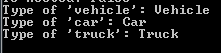
Let’s output the type names of these objects:

Examining type of derived objects

So ‘car’ and ‘truck’ are not of type Vehicle. An object can only have a single type even if it can be cast to a base type, i.e. a base class or an interface. You can still easily get to the Type from which a given object is derived:

Type truckBase = truckType.BaseType;
Console.WriteLine("Truck base: {0}", truckBase.Name);

…which of course returns ‘Vehicle’.

View all posts on Reflection here.

Examining a Type in .NET C#

You can get hold of Types in a variety of ways. You can extract the Types available in an Assembly as follows:

Assembly executingAssembly = Assembly.GetExecutingAssembly();
Type[] typesAttachedToAssembly = executingAssembly.GetTypes();

Console.WriteLine("Types attached to executing assembly: ");
foreach (Type type in typesAttachedToAssembly)
{
	Console.WriteLine(type.FullName);
}

In my case I have the following types in the executing assembly:

Getting types in an assembly

You can also extract the types within a single Module of an assembly:

Module[] modulesInCallingAssembly = executingAssembly.GetModules();
foreach (Module module in modulesInCallingAssembly)
{
	Console.WriteLine("Module {0}: ", module.Name);
	Type[] typesAttachedToModule = module.GetTypes();
	foreach (Type type in typesAttachedToModule)
	{
		Console.WriteLine(type.FullName);
	}
}

…which outputs the following:

Getting types in a module

You can construct Types without reflection using the GetType method and the typeof keyword. Say you have a simple Customer object:

public class Customer
{
	public string Name { get; set; }
}

…then you can get its type in the following ways:

Type customerType = customer.GetType();
Console.WriteLine(customerType.FullName);

Type customerTypeRevisited = typeof(Customer);
Console.WriteLine(customerTypeRevisited.FullName);

These will yield the same result:

Customer type

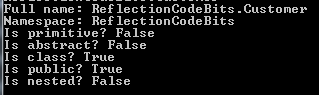
Once you have a Type you can inspect it through a myriad of properties. Here comes a short extract:

Console.WriteLine("Full name: {0}", customerType.FullName);
Console.WriteLine("Namespace: {0}", customerType.Namespace);
Console.WriteLine("Is primitive? {0}", customerType.IsPrimitive);
Console.WriteLine("Is abstract? {0}", customerType.IsAbstract);
Console.WriteLine("Is class? {0}", customerType.IsClass);
Console.WriteLine("Is public? {0}", customerType.IsPublic);
Console.WriteLine("Is nested? {0}", customerType.IsNested);

Type properties

There are methods available on the Type object to read all sorts of information that can be reflected on: interfaces, constructors, properties, methods etc. We’ll look at those separately.

View all posts on Reflection here.

Reading assembly attributes at runtime using Reflection in .NET

A lot of metadata of an assembly is stored by way of attributes in the AssemblyInfo.cs file. E.g. if you create a simple Console application then this file will be readily available in the Properties folder. Assembly-related attributes are denoted by an “assembly:” prefix and can carry a lot of customisable information. Examples:

[assembly: AssemblyTitle("ReflectionCodeBits")]
[assembly: AssemblyDescription("This is a container for Reflection related code examples")]
[assembly: AssemblyConfiguration("")]
[assembly: AssemblyCompany("Great Company Ltd.")]
[assembly: AssemblyProduct("ReflectionCodeBits")]
[assembly: AssemblyCopyright("Copyright ©  2014")]
[assembly: AssemblyTrademark("GC")]
[assembly: AssemblyCulture("sv-SE")]
[assembly: ComVisible(false)]
[assembly: Guid("8376337d-c211-4507-bc0d-bcd39bc9fb4f")]
[assembly: AssemblyVersion("1.0.0.0")]
[assembly: AssemblyFileVersion("1.0.0.0")]

Most of these are self-explanatory but others deserve more attention:

  • AssemblyConfiguration: to specify which configuration is used for the assembly. You can specify this value like “DEBUG”, “RELEASE” or some custom configuration name, like “ALPHA”
  • AssemblyCulture: normally only used for satellite assemblies, otherwise an empty string denoting neutral culture – in fact you specify an assembly culture like I have done above you’ll get a compile error saying that executables cannot be satellite assemblies; culture should always be empty.

You can read the full documentation about assembly attributes here.

In order to extract the assembly attributes you’ll first need to get a reference to that assembly. You can then list all attributes of the assembly as follows:

Assembly executingAssembly = Assembly.GetExecutingAssembly();
IEnumerable<CustomAttributeData> assemblyAttributes = executingAssembly.CustomAttributes;
foreach (CustomAttributeData assemblyAttribute in assemblyAttributes)
{
	Type attributeType = assemblyAttribute.AttributeType;
	Console.WriteLine("Attribute type: {0}", attributeType);
	IList<CustomAttributeTypedArgument> arguments = assemblyAttribute.ConstructorArguments;
	Console.WriteLine("Attribute arguments: ");
	foreach (CustomAttributeTypedArgument arg in arguments)
	{
		Console.WriteLine(arg.Value);
	}
}

In my case I got the following output:

Assembly attributes output

You can also extract a specific attribute type as follows:

AssemblyDescriptionAttribute assemblyDescriptionAttribute =     executingAssembly.GetCustomAttribute<AssemblyDescriptionAttribute>();
string assemblyDescription = assemblyDescriptionAttribute.Description;

…which returns “This is a container for Reflection related code examples” as expected.

View all posts on Reflection here.

Externalising dependencies with Dependency Injection in .NET part 7: emailing

Introduction

In the previous post of this series we looked at how to hide the implementation of file system operations. In this post we’ll look at abstracting away emailing. Emails are often sent out in professional applications to users in specific scenarios: a new user signs up, the user places an order, the order is dispatched etc.

If you don’t know who to send emails using .NET then check the out mini-series on this page.

The first couple of posts of this series went through the process of making hard dependencies to loosely coupled ones. I won’t go through that again – you can refer back to the previous parts of this series to get an idea. You’ll find a link below to view all posts of the series. Another post on the Single Responsibility Principle includes another example of breaking out an INotificationService that you can look at.

We’ll extend the Infrastructure layer of our demo app we’ve been working on so far. So have it ready in Visual Studio and let’s get to it.

The interface

As usual we’ll need an abstraction to hide the concrete emailing logic. Emailing has potentially a considerable amount of parameters: from, to, subject, body, attachments, HTML contents, embedded resources, SMTP server and possibly many more. So the interface method(s) should accommodate all these variables somehow. One approach is to create overloads of the same method, like…

void Send(string to, string from, string subject, string body, string smtpServer);
void Send(string to, string from, string subject, string body, string smtpServer, bool isHtml);
void Send(string to, string from, string subject, string body, string smtpServer, bool isHtml, List<string> attachments);
.
.
.

…and so on including all combinations, e.g. a method with and without “isHtml”. I think this is not an optimal and future-proof interface. It is probably better to give room to all those arguments in an object and use that object as the parameter to a single method in the interface.

Also, we need to read the response of the operation. Add a new folder call Email to the Infrastructure.Common library. Insert the following object into the folder:

public class EmailSendingResult
{
	public bool EmailSentSuccessfully { get; set; }
	public string EmailSendingFailureMessage { get; set; }
}

The parameters for sending the email will be contained by an object called EmailArguments:

public class EmailArguments
{
	private string _subject;
	private string _message;
	private string _to;
	private string _from;
	private string _smtpServer;
	private bool _html;
		
	public EmailArguments(string subject, string message, string to, string from, string smtpServer, bool html)
	{
		if (string.IsNullOrEmpty(subject))
			throw new ArgumentNullException("Email subject");
		if (string.IsNullOrEmpty(message))
			throw new ArgumentNullException("Email message");
		if (string.IsNullOrEmpty(to))
			throw new ArgumentNullException("Email recipient");
		if (string.IsNullOrEmpty(from))
			throw new ArgumentNullException("Email sender");
		if (string.IsNullOrEmpty(smtpServer))
			throw new ArgumentNullException("Smtp server");
		this._from = from;
		this._message = message;
		this._smtpServer = smtpServer;
		this._subject = subject;
		this._to = to;
		this._html = html;
	}

	public List EmbeddedResources { get; set; }

	public string To
	{
		get
		{
			return this._to;
		}
	}

	public string From
	{
		get
		{
			return this._from;
		}
	}

	public string Subject
	{
		get
		{
			return this._subject;
		}
	}

	public string SmtpServer
	{
		get
		{
			return this._smtpServer;
		}
	}

	public string Message
	{
		get
		{
			return this._message;
		}
	}

	public bool Html
	{
		get
		{
			return this._html;
		}
	}
}

…where EmbeddedEmailResource is a new object, we’ll show it in a second.

So 6 parameters are made compulsory: to, from, subject, smtpServer, message body and whether the message is HTML. We can probably make this list shorter by excluding the subject and isHtml parameters but it’s a good start.

Embedded email resources come in many different forms. Insert the following enum in the Email folder:

public enum EmbeddedEmailResourceType
{
	Jpg
	, Gif
	, Tiff
	, Html
	, Plain
	, RichText
	, Xml
	, OctetStream
	, Pdf
	, Rtf
	, Soap
	, Zip
}

Embedded resources will be represented by the EmbeddedEmailResource object:

public class EmbeddedEmailResource
{
	public EmbeddedEmailResource(Stream resourceStream, EmbeddedEmailResourceType resourceType
		, string embeddedResourceContentId)
	{
		if (resourceStream == null) throw new ArgumentNullException("Resource stream");
		if (String.IsNullOrEmpty(embeddedResourceContentId)) throw new ArgumentNullException("Resource content id");
		ResourceStream = resourceStream;
		ResourceType = resourceType;
		EmbeddedResourceContentId = embeddedResourceContentId;
	}

	public Stream ResourceStream { get; set; }
	public EmbeddedEmailResourceType ResourceType { get; set; }
	public string EmbeddedResourceContentId { get; set; }
}

If you’re familiar with how to add embedded resources to an email then you’ll know why we need a Stream and a content id.

The solution should compile at this stage.

We’re now ready for the great finale, i.e. the IEmailService interface:

public interface IEmailService
{
	EmailSendingResult SendEmail(EmailArguments emailArguments);
}

Both the return type and the single parameter are custom objects that can be extended without breaking the code for any existing callers. You can add new public getters and setters to EmailArguments instead of creating the 100th different version of SendEmail in the version with primitive parameters.

Implementation

We’ll of course use the default emailing techniques built into .NET to implement IEmailService. Add a new class called SystemNetEmailService to the Email folder:

public EmailSendingResult SendEmail(EmailArguments emailArguments)
{
	EmailSendingResult sendResult = new EmailSendingResult();
	sendResult.EmailSendingFailureMessage = string.Empty;
	try
	{
		MailMessage mailMessage = new MailMessage(emailArguments.From, emailArguments.To);
		mailMessage.Subject = emailArguments.Subject;
		mailMessage.Body = emailArguments.Message;
		mailMessage.IsBodyHtml = emailArguments.Html;
		SmtpClient client = new SmtpClient(emailArguments.SmtpServer);

		if (emailArguments.EmbeddedResources != null && emailArguments.EmbeddedResources.Count > 0)
		{
			AlternateView avHtml = AlternateView.CreateAlternateViewFromString(emailArguments.Message, Encoding.UTF8, MediaTypeNames.Text.Html);
			foreach (EmbeddedEmailResource resource in emailArguments.EmbeddedResources)
			{
				LinkedResource linkedResource = new LinkedResource(resource.ResourceStream, resource.ResourceType.ToSystemNetResourceType());
				linkedResource.ContentId = resource.EmbeddedResourceContentId;
				avHtml.LinkedResources.Add(linkedResource);
			}
			mailMessage.AlternateViews.Add(avHtml);
		}

		client.Send(mailMessage);
		sendResult.EmailSentSuccessfully = true;
	}
	catch (Exception ex)
	{
		sendResult.EmailSendingFailureMessage = ex.Message;
	}

	return sendResult;
}

The code won’t compile due to the extension method ToSystemNetResourceType(). The LinkedResource object cannot work with our EmbeddedEmailResourceType type directly. It needs a string instead like “text/plain” or “application/soap+xml”. Those values are in turn stored within the MediaTypeNames object.

Add the following static class to the Email folder:

public static class EmailExtensions
{
	public static string ToSystemNetResourceType(this EmbeddedEmailResourceType resourceTypeEnum)
	{
		string type = MediaTypeNames.Text.Plain;
		switch (resourceTypeEnum)
		{
			case EmbeddedEmailResourceType.Gif:
				type = MediaTypeNames.Image.Gif;
				break;
			case EmbeddedEmailResourceType.Jpg:
				type = MediaTypeNames.Image.Jpeg;
				break;
			case EmbeddedEmailResourceType.Html:
				type = MediaTypeNames.Text.Html;
				break;
			case EmbeddedEmailResourceType.OctetStream:
				type = MediaTypeNames.Application.Octet;
				break;
			case EmbeddedEmailResourceType.Pdf:
				type = MediaTypeNames.Application.Pdf;
				break;
			case EmbeddedEmailResourceType.Plain:
				type = MediaTypeNames.Text.Plain;
				break;
			case EmbeddedEmailResourceType.RichText:
				type = MediaTypeNames.Text.RichText;
				break;
			case EmbeddedEmailResourceType.Rtf:
				type = MediaTypeNames.Application.Rtf;
				break;
			case EmbeddedEmailResourceType.Soap:
				type = MediaTypeNames.Application.Soap;
				break;
			case EmbeddedEmailResourceType.Tiff:
				type = MediaTypeNames.Image.Tiff;
				break;
			case EmbeddedEmailResourceType.Xml:
				type = MediaTypeNames.Text.Xml;
				break;
			case EmbeddedEmailResourceType.Zip:
				type = MediaTypeNames.Application.Zip;
				break;
		}

		return type;
	}
}

This is a simple converter extension to transform our custom enumeration to media type strings.

There you are, this is a good starting point to cover the email purposes in your project.

In the next part of this series we’ll look at hiding the cryptography logic or our application.

View the list of posts on Architecture and Patterns here.
Examining the Modules in an Assembly using Reflection in .NET

A Module is a container for type information. If you’d like to inspect the Modules available in an assembly, you’ll first need to get a reference to the assembly in question. Once you have the reference to the assembly you can get hold of the modules as follows:

Assembly callingAssembly = Assembly.GetCallingAssembly();
Module[] modulesInCallingAssembly = callingAssembly.GetModules();

You can then iterate through the module array and read its properties:

foreach (Module module in modulesInCallingAssembly)
{
	Console.WriteLine(module.FullyQualifiedName);
	Console.WriteLine(module.Name);
}

In my case, as this is a very simple Console app I got the following output:

C:\Studies\Reflection\ReflectionCodeBits\ReflectionCodeBits\bin\Debug\ReflectionCodeBits.exe
ReflectionCodeBits.exe

Therefore the FullyQualifiedName property returns the full file path to the module. The Name property only returns the name without the file path.

The Module class has a couple of exciting methods to extract the fields and methods attached to it:

MethodInfo[] methods = module.GetMethods();
FieldInfo[] fields = module.GetFields();

We’ll take up FieldInfo and MethodInfo in later blog posts on Reflection to see what we can do with them.

View all posts on Reflection here.

Externalising dependencies with Dependency Injection in .NET part 6: file system

Introduction

In the previous post we looked at logging with log4net and saw how easy it was to switch from one logging strategy to another. By now you probably understand why it can be advantageous to remove hard dependencies from your classes: flexibility, testability, SOLID and more.

The steps to factor out your hard dependencies to abstractions usually involve the following steps:

  • Identify the hard dependencies: can the class be tested in isolation? Does the test result depend on an external object such as a web service? Can the implementation of the dependency change?
  • Identify the tasks any reasonable implementation of the dependency should be able to perform: what should a caching system do? What should any decent logging framework be able to do?
  • Build an abstraction – usually an interface – to represent those expected functions: this is so that the interface becomes as future-proof as possible. As noted before this is easier said than done as you don’t know in advance what a future implementation might need. You might need to revisit your interface and add an extra method or an extra parameter. This can be alleviated if you work with objects as parameters to the interface functions, e.g. LoggingArguments, CachingArguments – you’ll see what I mean in the next post where we’ll take up emailing
  • Inject the abstraction into the class that depends on it through one of the Dependency Injection patterns where constructor injection should be your default choice if you’re uncertain
  • The calling class will then inject a concrete implementation for the interface – alternatively you can use of the Inversion-of-control tools, like StructureMap

In this and the remaining posts of this series we won’t be dealing with the Console app in the demo anymore. The purpose of the console app was to show the goal of abstractions and dependency injection through examples. We’ve seen enough of that so we can instead concentrate on building the infrastructure layer. So open the demo solution in VS let’s add file system operations to Infrastructure.Common.

File system

.NET has an excellent built-in library for anything you’d like to do with files and directories. In the previous post on log4net we saw an example of checking if a file exists like this:

FileInfo log4netSettingsFileInfo = new FileInfo(_contextService.GetContextualFullFilePath(_log4netConfigFileName));
if (!log4netSettingsFileInfo.Exists)
{
	throw new ApplicationException(string.Concat("Log4net settings file ", _log4netConfigFileName, " not found."));
}

You can have File.WriteAllText, File.ReadAllBytes, File.Copy etc. directly in your code and you may not think that it’s a real dependency. It’s admittedly very unlikely that you don’t want to use the built-in features of .NET for file system operations and instead take some other library. So the argument of “flexibility” might not play a big role here.

However, unit testing with TDD shows that you shouldn’t make the outcome of your test depend on external elements, such as the existence of a file if the method being tested wants in fact to perform some operation on a physical file. Instead, you should be able to declare the outcome of those operations through TDD tools such as Moq which is discussed in the TDD series referred to in the previous sentence. If you see that you must create a specific file before a test is run and delete it afterwards then it’s a brittle unit test. Most real-life business applications are auto-tested by test runners in continuous integration (CI) systems such as TeamCity or Jenkins. In that case you’ll need to create the same file on the CI server(s) as well so that the unit test passes.

Therefore it still makes sense to factor out the file related stuff from your consuming classes.

The abstraction

File system operations have many facets: reading, writing, updating, deleting, copying, creating files and much more. Therefore a single file system interface is going to be relatively large. Alternatively you can break out the functions to separate interfaces such as IFileReaderService, IFileWriterService, IFileInformationService etc. You can also have a separate interface for directory-specific operations such as creating a new folder or reading the drive name.

Here we’ll start with out easy. Add a new folder called FileOperations to the Infrastructure.Common C# library. Insert an interface called IFileService:

public interface IFileService
{		
	bool FileExists(string fileFullPath);		
	long LastModifiedDateUnix(string fileFullPath);		
	string RetrieveContentsAsBase64String(string fileFullPath);		
	byte[] ReadContentsOfFile(string fileFullPath);		
	string GetFileName(string fullFilePath);		
	bool SaveFileContents(string fileFullPath, byte[] contents);		
	bool SaveFileContents(string fileFullPath, string base64Contents);			
	string GetFileExtension(string fileName);		
	bool DeleteFile(string fileFullPath);
}

That should be enough for starters.

The implementation

We’ll of course use the standard capabilities in .NET to implement the file operations. Add a new class called DefaultFileService to the FileOperations folder:

public class DefaultFileService : IFileService
{
	public bool FileExists(string fileFullPath)
	{
		FileInfo fileInfo = new FileInfo(fileFullPath);
		return fileInfo.Exists;
	}

	public long LastModifiedDateUnix(string fileFullPath)
	{
		FileInfo fileInfo = new FileInfo(fileFullPath);
		if (fileInfo.Exists)
		{
			DateTime epoch = new DateTime(1970, 1, 1, 0, 0, 0);
			TimeSpan timeSpan = fileInfo.LastWriteTimeUtc - epoch;
			return Convert.ToInt64(timeSpan.TotalMilliseconds);
		}

		return -1;
	}

	public string RetrieveContentsAsBase64String(string fileFullPath)
	{
		byte[] contents = ReadContentsOfFile(fileFullPath);
		if (contents != null)
		{
			return Convert.ToBase64String(contents);
		}
		return string.Empty;
	}

	public byte[] ReadContentsOfFile(string fileFullPath)
	{
		FileInfo fi = new FileInfo(fileFullPath);
		if (fi.Exists)
		{
			return File.ReadAllBytes(fileFullPath);
		}

		return null;
	}

	public string GetFileName(string fullFilePath)
	{
		FileInfo fi = new FileInfo(fullFilePath);
		return fi.Name;
	}

	public bool SaveFileContents(string fileFullPath, byte[] contents)
	{
		try
		{
			File.WriteAllBytes(fileFullPath, contents);
			return true;
		}
		catch
		{
			return false;
		}
	}

	public bool SaveFileContents(string fileFullPath, string base64Contents)
	{
		return SaveFileContents(fileFullPath, Convert.FromBase64String(base64Contents));
	}

	public string GetFileExtension(string fileName)
	{
		FileInfo fi = new FileInfo(fileName);
		return fi.Extension;
	}

	public bool DeleteFile(string fileFullPath)
	{
		FileInfo fi = new FileInfo(fileFullPath);
		if (fi.Exists)
		{
			File.Delete(fileFullPath);
		}

		return true;
	}
}

There you have it. Feel free to break out the file system functions to separate interfaces as suggested above.

The next post in this series will take up emailing.

View the list of posts on Architecture and Patterns here.

Elliot Balynn's Blog

A directory of wonderful thoughts

Software Engineering

Web development

Disparate Opinions

Various tidbits

chsakell's Blog

WEB APPLICATION DEVELOPMENT TUTORIALS WITH OPEN-SOURCE PROJECTS

Once Upon a Camayoc

ARCHIVED: Bite-size insight on Cyber Security for the not too technical.