Customise your list by overriding Collection of T with C# .NET

Imagine that you’d like to build a list type of collection where you want to restrict the insertion and/or deletion of items in some way. Let’s say we need an integer list with the following rules:

  • The allowed range of integers is between 0 and 10 inclusive
  • A user should not be able to remove an item at index 0
  • A user should not be able to remove all items at once

One possible solution is to derive from the Collection of T class. The generic Collection of T class in the System.Collections.ObjectModel namespace provides virtual methods that you can override in your custom collection.

The virtual InsertItem and SetItem methods are necessary to control the behaviour of the Collection.Add and the way items can be modified through an indexer:
Read more of this post

Getting a result from a parallel task in Java using CompletableFuture

In this post we saw how to start several processes on different threads using the CompletableFuture class. The example concentrated on methods with no return value. We let CompletableFuture finish the tasks in parallel before continuing with another process.

In this post we’ll see a usage of CompletableFuture for functions with a return value. We’ll reuse several elements we saw in the post that concentrated on the Future class.

Read more of this post

Time zones in Java 8 Date and Time API

Introduction

I know for a fact that all programmers love working with time zones. Chances are high that you, as a reader of this blog, are also a programmer so I bet you also just love time zones. Let’s see what Java 8 offers as far as time zones are concerned.

Time zones

So far in this series on the date and time in Java 8 we always worked with the local time zone found on your computer. All date-related classes, such as LocalTime or LocalDateTime allow you to easily set the time zone. Here’s an example with the LocalDateTime class:

Read more of this post

Finding all WMI class names within a WMI namespace with .NET C#

In this post we saw an example of using WMI objects such as ConnectionOptions, ObjectQuery and ManagementObjectSearcher to enumerate all local drives on a computer. Recall the SQL-like query we used:

ObjectQuery objectQuery = new ObjectQuery("SELECT Size, Name FROM Win32_LogicalDisk where DriveType=3");

We’ll now see a technique to list all WMI classes within a WMI namespace. First we get hold of the WMI namespaces:

Read more of this post

Getting notified by a Windows process change in C# .NET

In this post we saw an example of using the ManagementEventWatcher object and and EventQuery query. The SQL-like query was used to subscribe to a WMI – Windows Management Instrumentation – level event, namely a change in the status of a Windows service. I won’t repeat the explanation here again concerning the techniques used. So if this is new to you then consult that post, the code is very similar.

In this post we’ll see how to get notified by the creation of a new Windows process. This can be as simple as starting up Notepad. A Windows process is represented by the Win32_Process WMI class which will be used in the query. We’ll take a slightly different approach and use the WqlEventQuery object which derives from EventQuery.

Consider the following code:

Read more of this post

Finding all Windows Services using WMI in C# .NET

In this post we saw how to retrieve all logical drives using Windows Management Instrumentation – WMI -, and here how to find all network adapters.

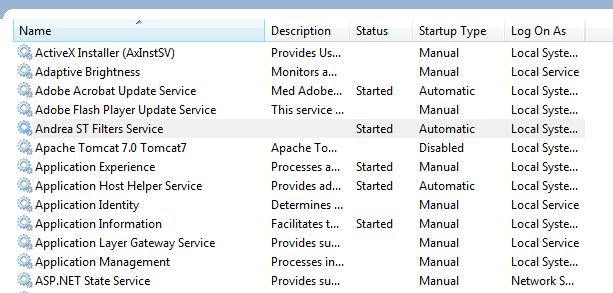
Say you’d like to get a list of all Windows Services and their properties running on the local – “root” – machine, i.e. read the services listed here:

Services window

The following code will find all non-null properties of all Windows services found:

Read more of this post

Flatten sequences with the C# LINQ SelectMany operator

Suppose that we have an object with a collection of other objects, like a customer with order items. Then we can also have a sequence of customers where each customer will have her own list of orders. It happens that we want to analyse all orders regardless of the customer, like how many of product A have been sold. There are several options to collect all orders from all customers and place them into one unified collection for further analysis.

The C# SelectMany operator has been specifically designed to extract collections of objects and flatten those collections into one. This post will provide a couple of examples to demonstrate its usage.

Read more of this post

Summary of thread-safe collections in .NET

The System.Collections.Concurrent namespace has 4 thread-safe collections that you can use in multi-threaded applications. The starting point is that you have a multi-threaded app where the same collection needs to be accessed by different threads. In that case the well-know collection types, like HashSet, List, Dictionary etc. simply won’t be enough.

If many different threads have access to the same resource then there’s no guarantee on the state of that resource in the moment a thread accesses it in some way: deletion, lookup, insertion or modification. Another thread may have accessed the same resource just milliseconds before that and the other thread will access the resource under the wrong assumptions. You’ll end up with buggy code with unpredictable results and ad-hoc fixes and patches that probably won’t solve the root of the problem.

Read more of this post

Conditionally remove elements from a List in Java 8

Java 8 introduces a new method available for Collection types: removeif(). It accepts a predicate which defines the condition on which the elements should be removed. It returns a boolean where a true response means that at least one item has been removed and false otherwise:

Collection<String> stringStack = new Stack<>();
stringStack.add("Hello");
stringStack.add("my");
stringStack.add("dear");
stringStack.add("world");
        
stringStack.removeIf(s -> s.contains("ll"));

The above example will remove “Hello” from the list stack.

Note that not all collections support item removal. In that case the method will throw an UnsupportedOperationException in case an attempt is made to remove a matching element. The ArrayList is one such collection:

Collection<String> asList = Arrays.asList("hello", "my", "dear", "world");
asList.removeIf(s -> s.contains("ll"));

This will throw an exception unfortunately as the Array.asList method returns an ArrayList of type java.util.Arrays.ArrayList (which is read only and fixed size) and not the classic java.util.ArrayList (resizable and item-removable) – based on a comment by Juanito below.

View all posts related to Java here.

Waiting for background tasks to finish using the CompletableFuture class in Java

Introduction

In this post we saw how to wait for a number background tasks to finish using the CountDownLatch class. The starting point for the discussion was the following situation:

Imagine that you execute a number of long running methods. Also, let’s say that the very last time consuming process depends on the previous processes, let’s call them prerequisites. The dependence is “sequential” meaning that the final stage should only run if the prerequisites have all completed and returned. The first implementation may very well be sequential where the long running methods are called one after the other and each of them blocks the main thread.

However, in case the prerequisites can be executed independently then there’s a much better solution: we can execute them in parallel instead. Independence in this case means that prerequisite A doesn’t need any return value from prerequisite B in which case parallel execution of A and B is not an option.

In this post we’ll look at an alternative solution using the CompletableFuture class. It is way more versatile than CountDownLatch which is really only sort of like a simple lock object. CompletableFuture offers a wide range of possibilities to organise your threads with a fluent API. Here we’ll start off easy with a simple application of this class.

Read more of this post

Elliot Balynn's Blog

A directory of wonderful thoughts

Software Engineering

Web development

Disparate Opinions

Various tidbits

chsakell's Blog

WEB APPLICATION DEVELOPMENT TUTORIALS WITH OPEN-SOURCE PROJECTS

Once Upon a Camayoc

ARCHIVED: Bite-size insight on Cyber Security for the not too technical.