Counting the number of elements in a sequence with LINQ C#

Say you have the following sequence of strings:

string[] bands = { "ACDC", "Queen", "Aerosmith", "Iron Maiden", "Megadeth", "Metallica", "Cream", "Oasis", "Abba", "Blur", "Chic", "Eurythmics", "Genesis", "INXS", "Midnight Oil", "Kent", "Madness", "Manic Street Preachers"
, "Noir Desir", "The Offspring", "Pink Floyd", "Rammstein", "Red Hot Chili Peppers", "Tears for Fears"
, "Deep Purple", "KISS"};

You can use the Count() extension method of IEnumerable to get the number of elements in the array:

Console.WriteLine(bands.Count());

…which returns 26. Count has an overload where you can specify a lambda filter. The following function returns the number of string elements which consist of at least 5 characters:

Console.WriteLine(bands.Count(s => s.Length >= 5));

…which returns 19.

IEnumerable has a LongCount method which has the same function and overloads as Count. It is used for collections whose size doesn’t fit into int.MaxValue and returns a long instead of an int. You can of course use it with small sequences as well but the returned value will be a long.

View the list of posts on LINQ here.

Selecting a subset of elements in LINQ C# with the SkipWhile operator

The SkipWhile operator is similar to Skip. With Skip we omit the first n elements where n is an integer. With SkipWhile you can define a boolean condition. The elements will be skipped until the condition is true.

Example data source:

string[] bands = { "ACDC", "Queen", "Aerosmith", "Iron Maiden", "Megadeth", "Metallica", "Cream", "Oasis", "Abba", "Blur", "Chic", "Eurythmics", "Genesis", "INXS", "Midnight Oil", "Kent", "Madness", "Manic Street Preachers"
, "Noir Desir", "The Offspring", "Pink Floyd", "Rammstein", "Red Hot Chili Peppers", "Tears for Fears"
, "Deep Purple", "KISS"};

The following query will keep skipping the items until it finds one which is at least 10 characters long:

IEnumerable<string> res = bands.SkipWhile(s => s.Length < 10);
foreach (string item in res)
{
	Console.WriteLine(item);
}

The first item to be selected and printed on the Console window is “Iron Maiden” as it is exactly 10 characters long. The remaining elements in the array will be selected as the initial condition has been fulfilled.

SkipWhile has an overload where you can specify the loop parameter. The following query will keep skipping items until it finds one which is at least 10 characters long OR the tenth element has been reached:

IEnumerable<string> res2 = bands.SkipWhile((s, i) => s.Length < 10 && i < 10);
foreach (string item in res2)
{
	Console.WriteLine(item);
}

This query yields the same result as the one above as “Iron Maiden” is the 4th element so the “s.Length less than 10” condition has been reached first.

View the list of posts on LINQ here.

MongoDB in .NET part 1: foundations

Introduction

There has been a strong increase in the usage of document based NoSql databases in the previous years. One prominent example is MongoDb. The default choice for storing data in a .NET project has most often been SQL Server. While SQL Server is probably still the most popular choice .NET developers can choose from other well-tested alternatives depending on their project needs. There is a whole suite of NoSQL databases out there besides MongoDb. Some examples:

At the time of writing this post MongoDb was the most popular NoSQL database according to db-engines. Even if you’re a staunch relational DBMS advocate and think you’ll never use anything else for your data storage solution it’s still beneficial to know that there are other tools out there. Also, you can have have a mixed data storage strategy where you store some objects in a relational DBMS and some others in a document store depending on the objects’ nature and the advantages and disadvantages of each storage mechanism.

You know that “we’ve always done it this way” is a dangerous mindset. Studying MongoDb can widen your skills set and offer a different point of view to solving data storage challenges.

In this series we’ll explore MongoDb in more details and how it can used in a .NET project.

MongoDb terms

As hinted at above MongoDb is a document-based database. In SQL Server the records are stored in rows where each column usually represents a property of the object that the table describes. In MongoDb however, information is stored in JSON documents – or to be exact, in Binary JSON, i.e. BSON. Here’s an example from the MongoDb homepage:

{
"_id": 1,
"name": {
"first": "John",
"last": "Backus"
},
"contribs": ["Fortran",
"ALGOL",
"Backus-Naur Form",
"FP"],
"awards": [{
"award": "W.W. McDowell Award",
"year": 1967,
"by": "IEEE Computer Society"
},
{
"award": "Draper Prize",
"year": 1993,
"by": "National Academy of Engineering"
}]
}

You’ll immediately notice that the properties such as “awards” can be arrays where each element in turn has their own properties. If you’re familiar with JSON then this is no surprise to you. As the documents are stored in binary format you cannot just open a BSON document in a text editor however.

The above JSON/BSON string is an example of a document. It consists of a set of key-value pairs such as _id = 1. Each key-value pair is an element or a field. You can see that “name” itself is a document within the larger document, also called an embedded document. A group of related documents is called a collection. A collection is similar to a table in SQL Server.

Each document has a unique ID field denoted by “_id”. It has the same function as a unique primary key in an SQL Server table. It can be of any type really but it’s customary to make it of type ObjectId which looks similar to a GUID. No matter which type you use, the ID must be unique across the collection of documents.

Advantages

There are some key advantages of MongoDb compared to traditional “table-based” databases:

  • Dynamic data structure with flexible schemas: you don’t need to define columns and tables. You can in fact store pretty much anything within the same collection
  • Due to the lack of strict schemas data migrations become a lot easier too: if you change your domain structure, i.e. you business objects in code, the document will store the objects correspondingly. You can force a change in the schema through changing your custom objects automatically
  • You don’t need separate tables to show relationships: the above JSON structure shows you that there’s no need for a separate “awards” collection, you can show the relationship directly within the document – there’s no need for foreign keys and constraints. If you extract a single item from a collection then you’ll immediately get its associated objects: order with all order items, rock band with all concerts, making it a breeze to perform operations on those linked objects
  • MongoDb documents therefore allow storing your objects in an object oriented fashion which is sometimes difficult and awkward to solve in SQL Server with separate tables and keys
  • Due to the lack of constraints such as secondary keys updating and deleting items will be easier: there’s no cascade delete, no orphans
  • Speed: MongoDb is very fast and efficient in querying and inserting items in a collection

Disadvantages

All of the above is very well and good but there are couple of things that you need to be aware of if you’re coming from an SQL Server environment – which probably at least 95% of .NET developers do.

  • Lack of professional tools: with SQL Server you can use SSMS for some very advanced GUI-based database operations, such as database profiling, SQL jobs, a query editor, IntelliSense and a whole lot more. There’s no equivalent in MongoDb. If you want to work directly with collections without one of the drivers – C#, Java, Php etc – then you’ll need to write your code in a console window or develop a custom solution yourself. There’s one visual tool though that you can use to improve the administration of your MongoDb database: RoboMongo
  • As of writing this post MongoDb doesn’t support transactions
  • Many developers will say that the lack of a schema is actually a disadvantage: you cannot associate objects through keys, you cannot force a compulsory data structure like “NOT NULL”
  • No stored procedures
  • Difficult to retrieve lost data

You can read more about the advantages and disadvantages of MongoDb here.

Drivers

While you can interact with MongoDb directly in a command window you’ll most certainly prefer to do that in code through a client library, a.k.a a driver. There are drivers available for most mainstream languages, like C#, Java or PHP. You can check out the full list of language-specific drivers here.

In the next post we’ll look at how to set up MongoDb and how to connect to it from code.

You can view all posts related to data storage on this blog here.

Ordering a .NET data sequence with various LINQ operators

A sequence of any object can be easily ordered with the following LINQ operators in .NET:

  • OrderBy
  • ThenBy
  • OrderByDescending
  • ThenByDescending

Consider the following sequence:

string[] bands = { "ACDC", "Queen", "Aerosmith", "Iron Maiden", "Megadeth", "Metallica", "Cream", "Oasis", "Abba", "Blur", "Chic", "Eurythmics", "Genesis", "INXS", "Midnight Oil", "Kent", "Madness", "Manic Street Preachers", "Noir Desir", "The Offspring", "Pink Floyd", "Rammstein", "Red Hot Chili Peppers", "Tears for Fears"					 , "Deep Purple", "KISS"};

The first overload of OrderBy lets you specify the property by which to order the elements and they will be sorted by a default comparer. This is how to order the list of bands by the string length:

IEnumerable<string> ordered = bands.OrderBy(band => band.Length);
foreach (string item in ordered)
{
	Console.WriteLine(item);
}
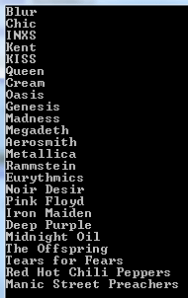
Order by string length

The second overload of OrderBy lets you specify a comparer which will determine the order of elements. The comparer must implement the IComparer of T interface. Say you’d like to order the bands by the number of consonants in their names. The following comparer would do:

public class ConsonantNumberComparer : IComparer<string>
{
	public int Compare(string x, string y)
	{
		int consonantCountStringOne = GetConsonantCount(x);
		int consonantCountStringTwo = GetConsonantCount(y);

		if (consonantCountStringOne < consonantCountStringTwo) return -1;
		if (consonantCountStringOne > consonantCountStringTwo) return 1;
		return 0;
	}

	private int GetConsonantCount(string input)
	{
		char[] consonants = new char[] { 'b', 'c', 'd', 'f', 'g', 'h','k', 'l', 'm', 'n', 'p', 'q', 'r', 's', 't', 'v', 'w', 'z', 'x', 'y' };
		int count = 0;
		foreach (char c in input.ToLower())
		{
			if (consonants.Contains(c))
			{
				count++;
			}
		}

		return count;
	}
}

You can use this comparer as follows:

IEnumerable<string> ordered = bands.OrderBy(band => band, new ConsonantNumberComparer());
foreach (string item in ordered)
{
	Console.WriteLine(item);
}
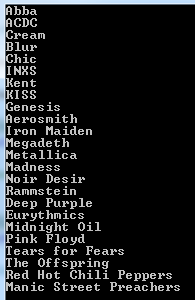
Order by number of consonants

You can specify additional ordering rules using the ThenBy operator. The following query will order the items by the comparer we’ve just constructed and then in alphabetical order:

IEnumerable<string> ordered = bands.OrderBy(band => band, new ConsonantNumberComparer()).ThenBy(band => band);
foreach (string item in ordered)
{
	Console.WriteLine(item);
}

Order by string length and alphabetical

Don’t use the OrderBy() operator multiple times like this in order to fulfil what ThenBy is doing:

IEnumerable<string> ordered = bands.OrderBy(band => band, new ConsonantNumberComparer()).OrderBy(band => band);

This will first order the items according to the ConsonantNumberComparer and then completely re-order the items in alphabetical order. Therefore the first order by is cancelled out in the final sequence.

The OrderByDescending and ThenByDescending operators do exactly what OrderBy and ThenBy but in reverse order as the names suggest:

IEnumerable<string> ordered = bands.OrderByDescending(band => band, new ConsonantNumberComparer()).ThenByDescending(band => band);
foreach (string item in ordered)
{
	Console.WriteLine(item);
}
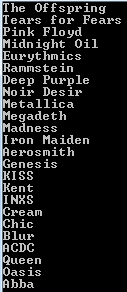
Order by string length and alphabetical descending

ThenBy, OrderByDescending and ThenByDescending can also accept an IComparer object just like OrderBy.

View the list of posts on LINQ here.

Introduction to EntityFramework 6 Part 5: updating schemas

Introduction

In the previous part of this series we looked at asynchronous DB calls and logging in EF 6. In this finishing post we’ll take a look at schemas.

If you create a database through code-first in EntityFramework then the new tables will be automatically put into the dbo schema: dbo.Customers, dbo.Orders etc. That is the case with our demo application where all tables, i.e. Cars and the ones related to identity belong to the dbo schema.

However, there are times that you’d like group your tables into different schemas depending on their purpose, domain or some other criteria.

Migrating from one schema to another in EF code-first is quite easy. We’ll apply it to our demo Cars application so have it ready in Visual Studio.

Demo

The goal is to move the domain related tables to the ‘domain’ schema and the identity related tables to the ‘identity’ schema. The solution is that we need to override the OnModelCreating method in the Db context class(es). Open CarsDbContext and add the following method just above the Cars property:

protected override void OnModelCreating(DbModelBuilder modelBuilder)
{
       modelBuilder.HasDefaultSchema("domain");
       base.OnModelCreating(modelBuilder);
}

Similarly, add the following method to UserManagementDbContext:

protected override void OnModelCreating(DbModelBuilder modelBuilder)
{
       modelBuilder.HasDefaultSchema("identity");
       base.OnModelCreating(modelBuilder);
}

Save and build the solution so that the changes are properly registered.

Our domain and identity models have just got extended so the underlying database and the model are out of sync. That means we’ll need to perform a migration like in part 2 of this series. Open the Package Manager Console – View, Other Windows, Package Manager Console – and run the following command:

Add-Migration -ConfigurationTypeName Cars.Web.Database.DomainMigrations.Configuration “SettingNewSchema”

This creates a new migration file called somedatestamp_SettingNewSchema.cs with the following contents:

public partial class SettingNewSchema : DbMigration
{
        public override void Up()
        {
            MoveTable(name: "dbo.Cars", newSchema: "domain");
        }
        
        public override void Down()
        {
            MoveTable(name: "domain.Cars", newSchema: "dbo");
        }
}

So we’re simply moving the table(s) from the dbo schema to domain.

Let’s do the same for out identity tables. Run the following command in the package manager:

Add-Migration -ConfigurationTypeName Cars.Web.Database.UserManagementMigrations.Configuration “SettingNewSchema”

You’ll get a file similar to the one above but with a MoveTable statement for each identity table. Next we need to run the SettingNewSchema scripts. Run the following commands in the package manager:

Update-Database -ConfigurationTypeName Cars.Web.Database.UserManagementMigrations.Configuration
Update-Database -ConfigurationTypeName Cars.Web.Database.DomainMigrations.Configuration

Open the DB table structure in Server Explorer and you’ll see the new schema names:

Updated schemas through update database entity framework

Run the application and test viewing, adding and updating the car objects. It should all work like it did before.

This post finishes the introductory series on EF 6. You can view all posts related to data storage on this blog here.

Summing the elements of a sequence with LINQ C#

Say you have the following numeric sequence:

IEnumerable<int> integers = Enumerable.Range(1, 100);

If you don’t know what the Range operator does, then start here.

You can find the sum of the elements in the sequence using the Sum LINQ operator:

int sum = integers.Sum();

…which gives 5050. The Sum operator obviously only works with numeric elements such as int, long, decimal and double. You can sum specific elements of an object using the overloaded Sum operator.

Take the following objects:

public class Concert
{
	public int SingerId { get; set; }
	public int ConcertCount { get; set; }
	public int Year { get; set; }
}

IEnumerable<Concert> concerts = new List<Concert>()
			{
				new Concert(){SingerId = 1, ConcertCount = 53, Year = 1979}
				, new Concert(){SingerId = 1, ConcertCount = 74, Year = 1980}
				, new Concert(){SingerId = 1, ConcertCount = 38, Year = 1981}
				, new Concert(){SingerId = 2, ConcertCount = 43, Year = 1970}
				, new Concert(){SingerId = 2, ConcertCount = 64, Year = 1968}
				, new Concert(){SingerId = 3, ConcertCount = 32, Year = 1960}
				, new Concert(){SingerId = 3, ConcertCount = 51, Year = 1961}
				, new Concert(){SingerId = 3, ConcertCount = 95, Year = 1962}
				, new Concert(){SingerId = 4, ConcertCount = 42, Year = 1950}
				, new Concert(){SingerId = 4, ConcertCount = 12, Year = 1951}
				, new Concert(){SingerId = 5, ConcertCount = 53, Year = 1983}
			};

You can get the total number of concerts in the collection by specifying the property selector in a lambda expression as follows:

int allConcerts = concerts.Sum(c => c.ConcertCount);

…which yields 557.

View the list of posts on LINQ here.

Selecting a subset of elements in LINQ C# with the Skip operator

The Skip operator is the opposite of Take: it skips the given number of elements in a sequence and selects the rest.

Example data source:

string[] bands = { "ACDC", "Queen", "Aerosmith", "Iron Maiden", "Megadeth", "Metallica", "Cream", "Oasis", "Abba", "Blur", "Chic", "Eurythmics", "Genesis", "INXS", "Midnight Oil", "Kent", "Madness", "Manic Street Preachers"
, "Noir Desir", "The Offspring", "Pink Floyd", "Rammstein", "Red Hot Chili Peppers", "Tears for Fears"
, "Deep Purple", "KISS"};

We’ll omit the first 10 elements and select the rest:

IEnumerable<string> res = bands.Skip(10);
foreach (string item in res)
{
	Console.WriteLine(item);
}

Skip output

The first element to be selected will be “Chic” as that is the 11th items in the array.

The Skip operator is often used together with Take to allow paging in a data collection. Imagine we have a HTML table where we have 10 items on each page. When the user selects page 2 then we want to show items 11 to 20 in the table. The LINQ query looks like this:

IEnumerable<string> res = bands.Skip(10).Take(10);
foreach (string item in res)
{
	Console.WriteLine(item);
}

Skip operator output

View the list of posts on LINQ here.

Introduction to EntityFramework 6 Part 4: asynchronous operations and logging

Introduction

In the previous post we looked at CRUD operations in EntityFramework 6. In this post we’ll look at the async coding features of EF.

Asynchronous code execution in .NET has been greatly enhanced by the await-async keywords. If you are not sure what they are about you can start here. They can help keeping the available threads busy thereby utilising the CPU resources better. You have probably seen a lot of methods built-into .NET4.5+ whose names end with “Async”, e.g HttpClient.SendAsync or StreamWriter.WriteAsync.

These awaitable asynchronous methods all return a Task or a Task of T. EntityFramework is no exception to the new trend of making the code more responsive and scalable. The async version of some well-known operators such as ToList() are usually available on methods that return something immediately, i.e. the non-deferred LINQ operators.

Demo

Open the Cars demo application we’ve been working on so far in this series. We have the following Index action in CarController.cs at present:

public ActionResult Index()
{
      return View(db.Cars.ToList());
}

As you type “db.Cars.” in the editor you’ll see that there’s a ToListAsync method. You cannot just use that method like…

public ActionResult Index()
{
      return View(db.Cars.ToListAsync());
}

…since it returns a Task of List of Cars and the view is expecting an IEnumerable of Cars. To make the Index method asynchronous we need to transform it as follows:

public async Task<ActionResult> Index()
{
      return View(await db.Cars.ToListAsync());
}

…where Task resides in the System.Threading.Tasks namespace. If you run the application now you should get the list of cars from the database as before. However, the following is happening behind the scenes:

  • Some thread enters the Index action
  • The thread sees the await keyword and lets another thread take over the processing of the awaitable method, i.e. the collection of cars from the database
  • When the awaitable method is finished by another thread then either the original thread or a new thread finishes the Index method

Check out the above link for a more detailed treatment of the async-await keywords.

Similarly the Details method can be rewritten as follows:

public async Task<ActionResult> Details(int? id)
{
          if (id == null)
          {
              return new HttpStatusCodeResult(HttpStatusCode.BadRequest);
          }
          Car car = await db.Cars.FindAsync(id);
          if (car == null)
          {
              return HttpNotFound();
          }
          return View(car);
}

Note the FindAsync method which as the asynchronous version of Find in EF and returns a Task of Car.

The POST Create method can be made asynchronous by calling the async version of SaveChanges, i.e. SaveChangesAsync:

[HttpPost]
[ValidateAntiForgeryToken]
public async Task<ActionResult> Create([Bind(Include="Id,Make,Category")] Car car)
{
          if (ModelState.IsValid)
          {
              db.Cars.Add(car);
              await db.SaveChangesAsync();
              return RedirectToAction("Index");
          }

          return View(car);
}

In case you’d like to generate asynchronous action methods when inserting a new controller then you can check the following option:

Create async action methods in scaffolding

The templating engine will generate code similar to how our existing code was transformed above.

Logging

The DbContext object has a property called Database which in turn has a property called Log. The Log property is of type Action of String, i.e. you can assign a void method to it that accepts a string. The string parameter includes the actual SQL statements sent to the database.

In CarsDbContext.cs we have an empty constructor at present:

public CarsDbContext() : base("DefaultConnection")
{
            
}

Add the following code to the body of the constructor:

Database.Log = statements => Debug.WriteLine(statements);

Run the application and navigate to /cars. You should see a couple of SQL statements in the Output window related to the retrieval of Cars from the data store:

EntityFramework logging to output window

The first time a query is run you’ll see one or more statements related to data migration, but they won’t be run on subsequent queries.

You can of course assign a more complicated logging delegate to the Log property: log to the database, a file, GrayLog etc.

In the next post, which will end this introductory series on EF, we’ll look at how to update schemas.

You can view all posts related to data storage on this blog here.

WordPress – If it ain’t broke, don’t fix it

Linda G. Hill's avatar

It seems every week WordPress is changing something else. I’m still flabbergasted over clicking on my “posts” button and seeing them all in a reader-type list instead of a list where I can easily find twenty of them and edit them quickly in one click.

Then, was it last week? we had to start going into our dashboard to open a full screen with all the options (including being able to preview our post) in order to write something – instead of this “beep beep boop” crap I keep seeing.

Today, it seems, they’ve changed something else. The “Freshly Pressed” button is gone. Not that I often check the page, but where do I find it now?

Is there anyone out there who has found these changes an improvement? Or am I the only one who thinks they’re more of a pain in the ass?

Edit: My notifications box isn’t…

View original post 16 more words

Dear WordPress Staff

Elliot Balynn's Blog

A directory of wonderful thoughts

Software Engineering

Web development

Disparate Opinions

Various tidbits

chsakell's Blog

WEB APPLICATION DEVELOPMENT TUTORIALS WITH OPEN-SOURCE PROJECTS

Once Upon a Camayoc

ARCHIVED: Bite-size insight on Cyber Security for the not too technical.