Handling exceptions in parallel loops in .NET C#

If a thread in a parallel loop throws an exception then no new iterations will be started. However, iterations already in progress are allowed to run to completion.

You can check if some other iteration has thrown an exception using the the ParallelLoopState class. This class has an IsExceptional property:

Parallel.For(0, 10, (int index, ParallelLoopState state) =>
{
	if (state.IsExceptional)
	{
		//do something
	}
});

All exceptions throw within the parallel loop are collected within an AggregateException object:

List<int> integers = new List<int>();

for (int i = 0; i <= 100; i++)
{
	integers.Add(i);
}

try
{
	Parallel.ForEach(integers, (int item, ParallelLoopState state) =>
	{
		if (item > 50)
		{
			throw new ArgumentNullException("Something has happened");
		}
		else
		{
			Console.WriteLine("Less than 50: {0}", item);
		}

		if (state.IsExceptional)
		{
			Console.WriteLine("Exception!");
		}

	});
}
catch (AggregateException ae)
{
	ae.Handle((inner) =>
	{
		Console.WriteLine(inner.Message);
		return true;
	});
}

You can read more about handling exceptions throw by tasks here, here and here.

Please view the comment section for a link with another example.

View the list of posts on the Task Parallel Library here.

Supply loop options to parallel loops in .NET C#

It’s possible to supply additional options to parallel for and foreach loops. The ParallelOptions class has the following properties:

  • CancellationToken: sets the cancellation to break a parallel loop
  • MaxDegreeOfParallelism: sets the max concurrency for a parallel loop. A value of -1 means no limit
  • TaskScheduler: this is normally null as the default task scheduler is very efficient. However, if you have a custom task scheduler then you can supply it here

We won’t go into building a custom task scheduler as it is a heavy topic and probably 98% of all .NET programmers are unlikely to ever need one.

So let’s see what MaxDegreeOfParallelism can do for us. It cannot do much directly other than setting a limit to the number of tasks created during a parallel loop. Note the word ‘limit’: setting a high number won’t guarantee that this many Tasks will be started. It is only an upper limit that the task scheduler will take into account. A value of 0, i.e. no concurrency at all, will cause an exception to be thrown in Parallel.For and Parallel.ForEach. A value of 1 is practically equal to sequential execution.

Declare the options object as follows:

ParallelOptions parallelOptions	= new ParallelOptions() { MaxDegreeOfParallelism = 1 };

You can supply the options to the Parallel.For and ForEach methods as input parameters:

Parallel.For(0, 10, parallelOptions, index =>
{
	Console.WriteLine("For Index {0} started", index);
	Thread.Sleep(100);
	Console.WriteLine("For Index {0} finished", index);
});

int[] integers = new int[] { 0, 2, 4, 6, 8 };

Parallel.ForEach(integers, parallelOptions, index =>
{
	Console.WriteLine("ForEach Index {0} started", index);
	Thread.Sleep(100);
	Console.WriteLine("ForEach Index {0} finished", index);
});

Run the code an you should see that the index values are processed in a sequential manner. Then set MaxDegreeOfParallelism to e.g. 5 and you should see something different.

View the list of posts on the Task Parallel Library here.

Breaking parallel loops in .NET C# using the Stop method

It’s not uncommon to break the execution of a for/foreach loop using the ‘break’ keyword. A for loop can look through a list of integers and if the loop body finds some matching value then the loop can be exited. It’s another discussion that ‘while’ and ‘do until’ loops might be a better alternative, but there you go.

You cannot simply break out from a parallel loop using the break keyword. However, we can achieve this effect with the ParallelLoopState class. Let’s say we have the following integer array…:

List<int> integers = new List<int>() { 0, 1, 2, 3, 4, 5, 6, 7, 8, 9 };

…and we want to break the loop as soon as we’ve found a number higher than 5. Both Parallel.For() and Parallel.ForEach() accepts an Action of T parameter as we saw before. This Action object has an overloaded version: Action of T and ParallelLoopState. The loop state is created automatically by the Parallel class. The loop state object has a Stop() method which stops the loop execution. Or more specifically it requests the loop to be stopped and the task scheduler will go about doing that. Keep in mind that some iterations may be continued even after the call to Stop was made:

Parallel.ForEach(integers, (int item, ParallelLoopState state) =>
{
	if (item > 5)
	{
		Console.WriteLine("Higher than 5: {0}, exiting loop.", item);
		state.Stop();
	}
	else
	{
		Console.WriteLine("Less than 5: {0}", item);
	}
});

So parallel loops can be exited but not with the same precision as in the case of synchronous loops.

View the list of posts on the Task Parallel Library here.

Parallel stepped for loops in .NET C#

We saw in this post how to create a parallel for loop using the Parallel object in .NET. One drawback of that method is the we cannot create the parallel equivalent of a synchronous stepped for loop:

for (int i = 0; i < 20; i += 2)

Parallel.For accepts the start index and the end index but not the step value. Parallel.ForEach comes to the rescue: we create an integer list with only those values that should be processed. Create the stepped integer list as follows:

public IEnumerable<int> SteppedIntegerList(int startIndex,
			int endEndex, int stepSize)
{
        for (int i = startIndex; i < endEndex; i += stepSize)
	{
		yield return i;
	}
}

Then call Parallel.ForEach:

Parallel.ForEach(SteppedIntegerList(0, 20, 2), index =>
{
	Console.WriteLine("Index value: {0}", index);
});

View the list of posts on the Task Parallel Library here.

Parallel for-each loops in .NET C#

It’s trivial to create parallel for-each loops in .NET using the built-in Parallel class. It has a ForEach() method with a wide range of overloaded varieties. One of the easier ones accepts 2 parameters:

  • An IEnumerable object
  • An Action of T which is used to process each item in the list

The parallel ForEach loop will process any type of object in an IEnumerable enumeration. Example:

List<string> dataList = new List<string> 
{
         "this", "is", "random", "sentence", "hello", "goodbye"
};

Parallel.ForEach(dataList, item =>
{
	Console.WriteLine("Item {0} has {1} characters",
		item, item.Length);
});

Run the code and you’ll see that the items in the string list are not processed sequentially.

View the list of posts on the Task Parallel Library here.

Parallel for loops in .NET C#

It’s trivial to start parallel loops in .NET using the built-in Parallel class. The class has a For() method with a wide variety of overloads. One of the easier ones accepts 3 parameters:

  • The start index: this is inclusive, i.e. this will be the first index value in the loop
  • The end index: this is exclusive, so it won’t be processed in the loop
  • An Action of int which represents the method that should be executed in each loop, where int is the actual index value

Example:

Parallel.For(0, 10, index =>
{
	Console.WriteLine("Task Id {0} processing index: {1}",
		Task.CurrentId, index);
});

If you run this code then you’ll see that the index values are indeed processed in a parallel fashion. The printout on the console windows may show that index 5 is processed a bit before 4 or that thread id 1 processed index 2 and thread #2 processed index 7. This all depends on the task scheduler so use parallel loops only in case you don’t care about the actual processing order.

View the list of posts on the Task Parallel Library here.

Parallel LINQ in .NET C#: the ForAll() extension

The ForAll() extension is part of the Linq to Objects library. It allows to execute an Action on each item in the query. It can be used in conjunction with parallel queries as well to perform actions such as filtering on each item of a ParallelQuery.

The following example takes each item in an integer array, selects only the even numbers and then prints each item and it square root:

int[] integerArray = new int[50];
for (int i = 0; i < integerArray.Length; i++)
{
	integerArray[i] = i;
}

integerArray.AsParallel()
	.Where(item => item % 2 == 0)
	.ForAll(item => Console.WriteLine("Item {0} Result {1}",
		item, Math.Sqrt(item)));

View the list of posts on the Task Parallel Library here.

Introduction to .NET Web API 2 with C# Part 2

Introduction

We finished the first part of this series with creating an in-memory data source and a Get() API method. The Get method returned the full list of Rockband records in the data repository.

We’re ready to move on to other aspects of this technology. So open the demo project we started previously. We’re going to look at the following elements:

  • Action method: get element by ID
  • Routing by attributes
  • Returning IHttpActionResult from controller action
  • Cross origin resource sharing

Get an element by id

Now we can retrieve all elements in from the API in an XML string. We also want to be able to get a single item by its ID. Open RockbandsController.cs and add the following stub:

public RockBand Get(int id)
{

}

We’ll be able to reach this action by the URL /api/rockbands/{id}. It couldn’t be easier. The most obvious way is to add the following method to InMemoryDatabaseObjectContext.cs:

public RockBand GetById(int id)
{
            return (from r in _rockBands where r.Id == id select r).FirstOrDefault();
}

The body of the Get(id) method will be as follows:

return _objectContextFactory.Create().GetById(id);

Run the application and navigate to /api/rockbands/1. You should get the XML representation of the rockband whose ID is 1:
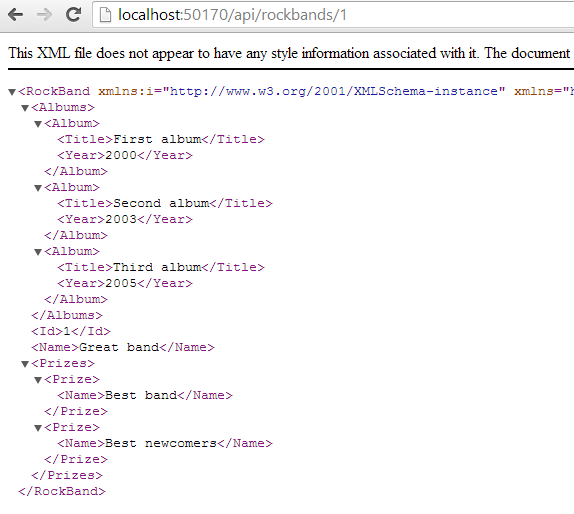
Get by id XML

What happens if you type an ID of a nonexistent rockband, such as 7? You’ll get a null XML back:

Null XML of non-existent ID

Let’s make this a bit more obvious to the caller. Change the signature of the Get(id) method to return an HttpResponseMessage instead of a rockband:

public HttpResponseMessage Get(int id)

This object allows us to control the response message we return to the caller of the Get(id) method: the response code, the headers, the message content, i.e. all elements of a standard HTTP response. It is customary to let Web API actions return this object. In the body of the action we can return a 404 if the item wasn’t found. Otherwise we return a 200 OK with the Rockband object. Here’s one way to solve this:

public HttpResponseMessage Get(int id)
{
            RockBand rockband = _objectContextFactory.Create().GetById(id);
            if (rockband == null)
            {
                return Request.CreateErrorResponse(HttpStatusCode.NotFound, "No such rockband");
            }
            return Request.CreateResponse<RockBand>(HttpStatusCode.OK, rockband);
}

Re-run the demo app, try to get a rockband with an ID of 7 and you should get a XML formatted error message:
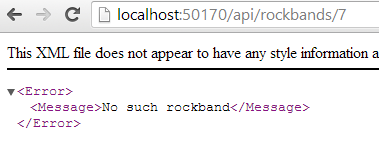
Xml formatted error message

The next operation that would be nice to implement is to retrieve the albums of a rockband by the URL api/rockbands/3/albums. Routing of such URLs in the previous version of the Web API was a bit tricky. You could set up your custom routes in WebApiConfig.cs, but it could get messy if you wanted to support extended urls beyond the basic /api/{controller}/{id} format. However, in Web API 2 there’s a different way.

Routing by attributes

There’s a new built-in feature in web api which lets you declare the routing rules by standard C# attributes. It started its life as a NuGet package but now it’s readily available in .NET. The attributes can be applied on the controller level as well. Examples:

[Route("rockbands/{id}/albums")] //nested route
[Route("rockbands/{id:int:min(1)}"] //constraint on the incoming ID: must be an integer and has a minimum value of 1
[Route("rockbands/{id?}"] //apply to entire controller. The default rules will apply to every method in the controller
[RoutePrefix("api/patients")] //prefix for all routes in controller

You can even declare multiple routes for a single action:

[Route("rockbands/{id:int}")]
[Route("rockbands/{name:hello}"]

Let’s see if can get the api/rockbands/{id}/albums url to work.

Add the following action to RockbandsController:

public HttpResponseMessage GetAlbums(int id)
{
            RockBand rockband = _objectContextFactory.Create().GetById(id);
            if (rockband == null)
            {
                return Request.CreateErrorResponse(HttpStatusCode.NotFound, "No such rockband");
            }
            return Request.CreateResponse<IEnumerable<Album>>(HttpStatusCode.OK, rockband.Albums);
}

Re-run the app and see if the api/rockbands/1 URL still works. It doesn’t. The problem is that we have two methods in the Controller whose name starts with “get” and accept a parameter of type int. The routing engine doesn’t know which one to call.

Inspect the WebApiConfig.cs file. Note the following call:

config.MapHttpAttributeRoutes();

This call comes before the standard…

config.Routes.MapHttpRoute(
                name: "DefaultApi",
                routeTemplate: "api/{controller}/{id}",
                defaults: new { id = RouteParameter.Optional }

…declaration. This will ensure that the routes defined in the attributes will take precedence: if the request URL matches one of the attribute URLs then the routing engine will not search any longer.

Add the following attribute over the GetAlbums action:

[Route("api/rockbands/{id:int:min(1)}/albums")]

Run the app again. First check if api/rockbands/1 works and it should. Now go to api/rockbands/1/albums and you should be presented with the XML representation of the albums of rockband 1. Also, try with an invalid ID, such as api/rockbands/0/albums. You should get a 404.0 error which tells you that the URL wasn’t found. This is because of the constraint we added to the attribute.

Returning IHttpActionResult

We mentioned above that the HttpResponseMessage object is a standard object to return from Web API actions. Web Api 2 introduces another type of object that you can return from an API action: IHttpActionResult. It is similar to ActionResult in standard ASP.NET MVC. In MVC you can return JsonResult, ContentResult and View objects. With this new return type in the Web API you can return similar objects that are specific to HTTP traffic:

  • OkResult
  • NotFoundResult
  • ExceptionResult
  • UnauthorizedResult
  • BadRequestResult
  • ConflictResult
  • RedirectResult
  • InvalidModelStateResult

…and many more. You can even create your custom Result object by deriving from an existing concrete object that implements the IHttpActionResult interface or by implementing the interface directly. Let’s see how we can transform our current code.

Let change…

public HttpResponseMessage Get(int id)

…to…

public IHttpActionResult Get(int id)

The code will not compile any more of course as the HttpResponseMessage object doesn’t implement this interface. It’s incredibly easy to send a NotFount and Ok response. Change the body of Get(id) to the following:

public IHttpActionResult Get(int id)
{
            RockBand rockband = _objectContextFactory.Create().GetById(id);
            if (rockband == null)
            {
                return NotFound();
            }
            return Ok<RockBand>(rockband);
}

We can change GetAlbums to the following:

public IHttpActionResult GetAlbums(int id)
{
            RockBand rockband = _objectContextFactory.Create().GetById(id);
            if (rockband == null)
            {
                return NotFound();
            }
            return Ok<IEnumerable<Album>>(rockband.Albums);
}

CORS: cross origin resource sharing

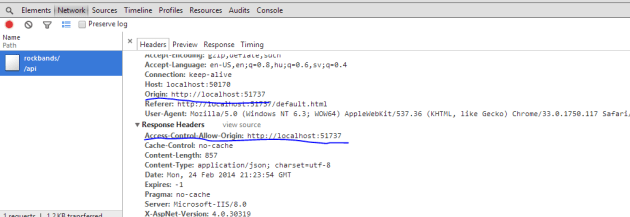
CORS allows JavaScript to call an API on a domain different from its origin. Normally this has been forbidden as it is considered a security risk. Nowadays the browser can let such a call go through as long as the target server allows the access. The server will let the browser know in a HTTP header if it accepts the HTTP request. The HTTP request must include an Origin header specifying the value where it’s coming from. If the server allows the access then the HTTP response will include an Access-Control-Allow-Origin header which will have the same value as the Origin header in the request, such as http://www.microsoft.com or some other URL. This header tells the browser that it’s OK to access the requested resource from the specified origin. If this header is missing then the browser will not allow JavaScript to receive the response.

Open up another instance of Visual Studio and create a new ASP.NET Web application in called CorsDemo. In the New ASP.NET Project window select the Empty template as we won’t do much with this project. We’ll only use it as a dummy web site on a different origin. Right click this new project and add a new HTML Page called Default.html. Right-click the References tab and click Manage NuGet Packages. Search for the jQuery package and install it.

Open Default.html and add the following code in between the body tags:

<h1>CORS demo</h1>

    <button id="getRockbands">Get rockbands</button>

    <pre id="rockbands">

    </pre>

    <script src="Scripts/jquery-2.1.0.js"></script>
    <script>

    </script>

I hope this is not too complex. We’ll fill in the contents of our own JS within the script tags:

$(function ()
        {
            var rockbandSourceUrl = "http://localhost:50170/api/rockbands/";

            var getRockbands = function ()
            {
                $.get(rockbandSourceUrl).always(showRockbands);
                return false;
            };

            var showRockbands = function (obj)
            {
                $("#rockbands").text(JSON.stringify(obj, null, 3));
            };

            $("#getRockbands").click(getRockbands);
        });

Make sure to enter the correct port number for the rockbandSourceUrl URL. We simply want to retrieve the list of rockbands from the API and show the output in the “rockbands” element. Note that this simple web page will run on a different port so it is considered a different site from the browser’s point of view. This setup is a good candidate to test CORS. I’m going to run this demo in Chrome and use its developer tools but FireFox and IE have similar tools as well.

Start both the web api and the simple html app.

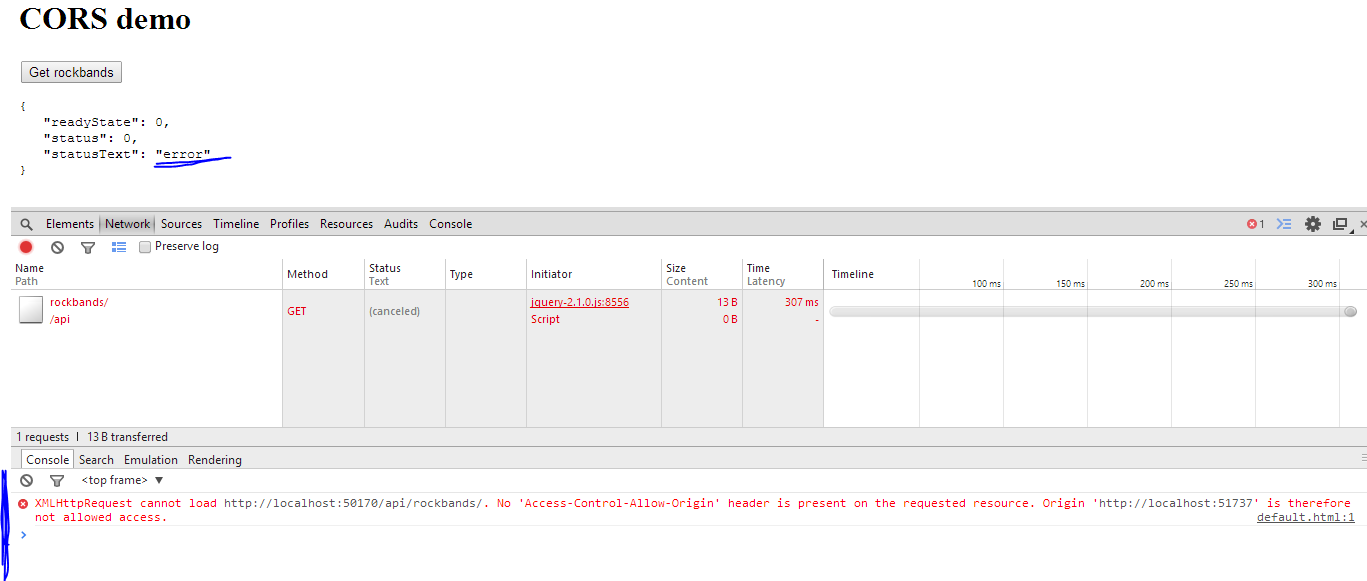
When the HTML page with the “get rockbands” button loads, press F12 to open the Chrome developer tools. Select the Network tab and press the button. You should see that the request was refused:
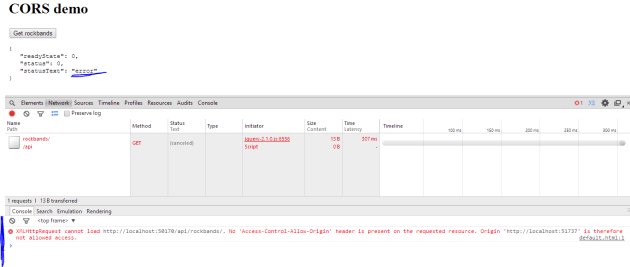
Connection refused

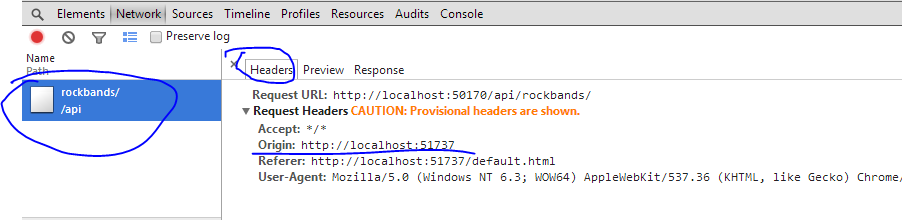
The Origin header was included in the headers collection but as the request came from a different domain and the api didn’t include the necessary Access-Control-Allow-Origin header the connection was refused:
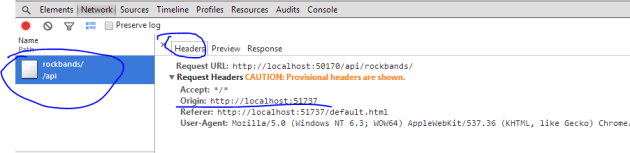
Origin header

Let’s fix this.

Back in the API project right click References, Manage NuGet Packages. Make a search for “cors” and install the following package:
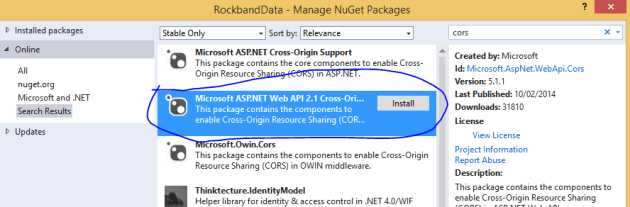
Web API Cors package

Next open the WebApiConfig.cs file and add the following before ‘config.MapHttpAttributeRoutes();’:

var cors = new EnableCorsAttribute("http://localhost:51737", "*", "GET");
config.EnableCors(cors);

This means that we want to enable CORS from http://localhost:51737 – which is the URL of the Html app – with any headers and only GET methods.

You can apply this attribute on a controller level like this:

[EnableCors("http://localhost:51737", "*", "GET")]
public class RockbandsController : ApiController

If you want to allow all origins then put a ‘ “*” ‘ as the first parameter in the constructor. You can allow multiple HTTP verbs by separating them with a comma: “GET,POST,PUT”.

Re-run the API and… …I don’t know about you but I got an exception:

System web exception

It’s great when an update from NuGet messes up other dependencies… I entered the following redirect in web.config and it worked again:

<dependentAssembly>
        <assemblyIdentity name="System.Web.Http" publicKeyToken="31bf3856ad364e35" />
        <bindingRedirect oldVersion="1.0.0.0-5.0.0.0" newVersion="5.1.0.0" />
</dependentAssembly>

The version of System.Web.Http in my project was 5.1 instead of 5.0. This entry redirects all calls to 5.1. I in fact had to do the same for the System.Net.Http.Formatting package:

<dependentAssembly>
        <assemblyIdentity name="System.Net.Http.Formatting" publicKeyToken="31bf3856ad364e35" />
        <bindingRedirect oldVersion="1.0.0.0-5.0.0.0" newVersion="5.1.0.0" />
</dependentAssembly>

Run the web API app and navigate to /api/rockbands/ just to make sure you get the correct XML.

Refresh the CorsDemo HTML page, leave the developer tools open and press the Get rockbands button. It should go through:
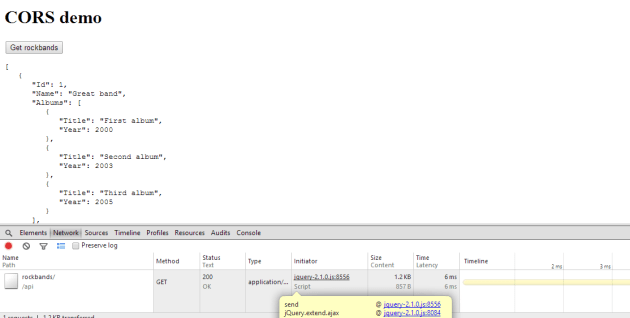
CORS ok

Locate the response header and you’ll see that it includes what we needed:
Header OK

Read the last post of this series here.

View the list of MVC and Web API related posts here.

Parallel LINQ in .NET C#: a basic example

Parallel LINQ – PLINQ – can be applied to LINQ to Objects. This type of LINQ which works with the IEnumerable and IEnumerable of T data types. There are extension methods in the PLINQ library that make parallel processing of the result from queries available. The result is that multiple data items are processed concurrently.

In fact it is not difficult to transform a “normal” LINQ statement to PLINQ.

Set up the data source:

int[] sourceData = new int[1000];
for (int i = 0; i < sourceData.Length; i++)
{
	sourceData[i] = i;
}

We want to extract all even numbers. We also want the items to be processed in a parallel fashion. The following query will do just that:

IEnumerable<int> parallelResults =
	from item in sourceData.AsParallel()
	where item % 2 == 0
	select item;

Note the AsParallel() extension method. Behind the scenes it creates an instance of the ParallelQuery class. Without the AsParallel extension you’d be using standard LINQ features hidden in the Enumerable class. This little extension makes sure that the parallel features are used instead.

Print the results:

foreach (int item in parallelResults)
{
	Console.WriteLine("Item {0}", item);
}

Run the code and you’ll see that the integers do not follow any particular order. This is the result of the parallel execution of the query. Remove the AsParallel extension from the query and integers will be presented in an ascending order. The method hides a lot of complexity from the programmer. It is up to PLINQ to decide how the query will be parallelised, we only indicate the request through the extension. PLINQ will try to optimise the query execution based on a range of parameters. If sequential execution seems to be a better fit then the items may still be processed sequentially despite your wish.

View the list of posts on the Task Parallel Library here.

Lazy task execution in .NET C#

Tasks in .NET can be executed lazily, i.e. only at the time when the result is needed. This may never come in certain situations. You can build tasks that are not executed until a lazy variable is required. The lazy variable is not initialised until it is read.

You can construct a lazy task in two separate steps:

Func<string> functionBody = new Func<string>(() =>
{
	Console.WriteLine("Function initialiser starting...");
	return "Some return value from the function initialiser";
});

Lazy<Task<string>> lazyInitialiser = new Lazy<Task<string>>
	(() =>
		Task<string>.Factory.StartNew(functionBody)
	);

Here we first create a function which we then pass to the Lazy constructor. You can specify the type of object that will be lazily initialised. One of the overloaded constructors of Lazy accepts a Func of Task of T which will be the initialisation function. Task.Factory.StartNew comes in handy here as we can supply our function.

You can achieve the same initialisation in one step as follows:¨

Lazy<Task<string>> inlineLazyInitialiser = new Lazy<Task<string>>(
	() => Task<string>.Factory.StartNew(() =>
	{
		Console.WriteLine("Inline initialiser starting...");
		return "Some return value from the inline lazy initialiser.";
	}));

We read the results as follows:

Console.WriteLine("Calling function initialiser within Lazy...");
Console.WriteLine(string.Concat("Result from task: ", lazyInitialiser.Value.Result));

Console.WriteLine("Calling inline lazy initialiser...");
Console.WriteLine(string.Concat("Result from task: ", inlineLazyInitialiser.Value.Result));

View the list of posts on the Task Parallel Library here.

Elliot Balynn's Blog

A directory of wonderful thoughts

Software Engineering

Web development

Disparate Opinions

Various tidbits

chsakell's Blog

WEB APPLICATION DEVELOPMENT TUTORIALS WITH OPEN-SOURCE PROJECTS

Once Upon a Camayoc

ARCHIVED: Bite-size insight on Cyber Security for the not too technical.