How to send emails in .NET part 10: handling exceptions

In this mini series on emailing in .NET we saw how to compose and send emails.

There are many things that can go wrong when you send an email: the SMTP server is down, your credentials are invalid, the recipient is invalid etc. When sending an email in .NET you should always catch and handle any SmtpExceptions and SmtpFailedRecipientExceptions. Examples:

SmtpClient client = new SmtpClient(null);
try
{
	client.Send(mailMessage);
}
catch (InvalidOperationException invalid)
{
	Console.WriteLine("Server hostname is missing: " + invalid.Message);
}

InvalidOperationException is thrown in case the host is missing.

string smtpServer = "mail.blahblah.com";
SmtpClient client = new SmtpClient(smtpServer);
try
{
	client.Send(mailMessage);
}
catch (SmtpException smtpNotFound)
{
	Console.WriteLine("Server hostname is invalid: " + smtpNotFound.Message);
}

SmtpClient will try to contact mail.blahblah.com but fails of course. If you run this code then be patient as the default timeout of SmtpClient is 100 seconds, so you won’t see the exception message immediately.

In the above case SmtpException will have an inner exception of type WebException. smtpNotFound.Message like above will only show a generic message: “Failure sending mail”. If you want to dig deeper you’ll need to check if there’s any inner exception:

string smtpServer = "mail.blahblah.com";
SmtpClient client = new SmtpClient(smtpServer);
try
{
	client.Send(mailMessage);
}
catch (SmtpException smtpNotFound)
{
	Console.WriteLine("Server hostname is invalid: " + smtpNotFound.Message);
        if (smtpNotFound.InnerException != null)
	{
		Console.WriteLine(smtpNotFound.InnerException.Message);
	}
}

The inner exception message will be “Unable to connect to the remote server”.

SmtpException can also be thrown if the operation times out, but in that case there will be no inner exceptions:

SmtpClient client = new SmtpClient(smtpServer);
client.Timeout = 10;
try
{
	client.Send(mailMessage);
}
catch (SmtpException smtpNotFound)
{
	Console.WriteLine("Server hostname is invalid: " + smtpNotFound.Message);
}

We set the timeout to 10 seconds which is reached before SmtpClient determines that the SMTP server cannot be reached. Hence the exception message will say “The operation has timed out.”

SmtpException can also be thrown for a variety of other reasons like message transmission problems, so don’t forget to check the inner exception as well, it may contain a more detailed description of the problems.

There’s also an exception of type SmtpFailedRecipientException. If you work at GreatCompany Ltd. and your mail server is mail.greatcompany.com and you want to send an email to john@greatcompany.com then your mail server will be able to determine if the recipient exists and return an error if it doesn’t. If however, you’re sending an email to a recipient on another mail server then mail.greatcompany.com won’t of course see whether the recipient is valid or not. So you can only rely on this exception type if you’re sending an email within your network.

In this post we saw how to send an email asynchronously through SendAsync. The event arguments to the SendCompleted event handler includes a property called Error. If you send your email in this manner than the InvalidOperationException and SmtpException error caught will be set to this property so you can check the result.

Read all posts related to emailing in .NET here.

Externalising dependencies with Dependency Injection in .NET part 3: configuration

Introduction

In the previous post of this series we looked at how to remove the caching logic from a class and hide it behind an interface. We’ll follow in a similar fashion in this post which takes up reading settings from a configuration source.

We’ll build upon the demo we’ve been working on so far so have it ready in Visual Studio.

Configuration and settings

Probably every even vaguely serious application out there has some configuration store. The configuration values contain the settings that are necessary so that the app can function normally. A good example from .NET is the web.config or app.config file with their appSettings section:

<appSettings>
    <add key="Environment" value="Alpha" />
    <add key="MinimumLimit" value="1000" />
    <add key="Storage" value="mongo" />
</appSettings>

In Java you’d put these settings into a .properties file. The configuration files will allow you to change the behaviour of your app without recompiling and redeploying them.

You can of course store your settings in other sources: a database, a web service or some other mechanism. Hence the motivations for hiding the concrete technology behind an abstraction are similar to those listed in the post on caching: testability, flexibility, SOLID.

The abstraction

Application settings are generally key-value pairs so constructing an interface for a settings storage is fairly simple and the below example is one option. The key is almost always a string and the value can be any primitive or a string. Add a new folder called Configuration to the infrastructure layer. Add the following interface to it:

public interface IConfigurationRepository
{
	T GetConfigurationValue<T>(string key);
	T GetConfigurationValue<T>(string key, T defaultValue);
}

The implementation

One obvious implementation is to read the values from app.config/web.config using the ConfigurationManager class in the System.Configuration library. Add this dll to the references list of the infrastructure layer.

Then insert the following implementation of the interface to the Configuration folder:

public class ConfigFileConfigurationRepository : IConfigurationRepository
{
	public T GetConfigurationValue<T>(string key)
	{
		string value = ConfigurationManager.AppSettings[key];
		if (value == null)
		{
			throw new KeyNotFoundException("Key " + key + " not found.");
		}
		try
		{
			if (typeof(Enum).IsAssignableFrom(typeof(T)))
				return (T)Enum.Parse(typeof(T), value);
			return (T)Convert.ChangeType(value, typeof(T));
		}
		catch (Exception ex)
		{
			throw ex;
		}
	}

	public T GetConfigurationValue<T>(string key, T defaultValue)
	{
		string value = ConfigurationManager.AppSettings[key];
		if (value == null)
		{
			return defaultValue;
		}
		try
		{
			if (typeof(Enum).IsAssignableFrom(typeof(T)))
				return (T)Enum.Parse(typeof(T), value);
			return (T)Convert.ChangeType(value, typeof(T));
		}
		catch (Exception ex)
		{
			return defaultValue;
        	}
	}
}

The console app has an app.config file by default. If not then you’ll need to add an Application Configuration File as it’s called in the Add New Item dialog. We’ll simulate a test scenario where it’s possible to return a default product instead of consulting the data store. Add the following appSettings section with the configuration tags of app.config:

<appSettings>
	<add key="returnDefaultProduct" value="true"/>
	<add key="defaultProductId" value="99"/>
	<add key="defaultProductName" value="DEFAULT"/>
	<add key="defaultProductQuantity" value="1000"/>
</appSettings>

Next we’ll inject the dependency through the constructor of ProductService. Modify the ProductService private fields and constructor as follows:

private readonly IProductRepository _productRepository;
private readonly IConfigurationRepository _configurationRepository;

public ProductService(IProductRepository productRepository, IConfigurationRepository configurationRepository)
{
	if (productRepository == null) throw new ArgumentNullException("ProductRepository");
	if (configurationRepository == null) throw new ArgumentNullException("ConfigurationRepository");
	_productRepository = productRepository;
	_configurationRepository = configurationRepository;
}

This breaks of course the existing code which constructs a ProductService. Modify it as follows:

IProductService productService = new ProductService(new ProductRepository(), new ConfigFileConfigurationRepository());

The modify ProductService.GetProduct as follows to use the configuration repository:

public GetProductResponse GetProduct(GetProductRequest getProductRequest)
{
	GetProductResponse response = new GetProductResponse();
	try
	{
		bool returnDefault = _configurationRepository.GetConfigurationValue<bool>("returnDefaultProduct", false);
		Product p = returnDefault ? BuildDefaultProduct() : _productRepository.FindBy(getProductRequest.Id);
		response.Product = p;
		if (p != null)
		{
			response.Success = true;
		}
		else
		{
			response.Exception = "No such product.";
		}
	}
	catch (Exception ex)
	{
		response.Exception = ex.Message;
	}
	return response;
}

private Product BuildDefaultProduct()
{
	Product defaultProduct = new Product();
	defaultProduct.Id = _configurationRepository.GetConfigurationValue<int>("defaultProductId");
	defaultProduct.Name = _configurationRepository.GetConfigurationValue<string>("defaultProductName");
	defaultProduct.OnStock = _configurationRepository.GetConfigurationValue<int>("defaultProductQuantity");
	return defaultProduct;
}

Run Main and you’ll see that the configuration values are indeed correctly retrieved from app.config. A possible improvement here is to put all configuration keys into a separate container class or a resource file instead of putting them here directly. Then you could retrieve them by writing something like this:

defaultProduct.Id = _configurationRepository.GetConfigurationValue<int>(ConfigurationKeys.DefaultProductId);

In the next post we’ll look at logging.

View the list of posts on Architecture and Patterns here.

How to send emails in .NET part 9: sending emails

Up to now in this mini series we’ve looked at how to compose email messages. The next step is to actually send them to the recipient(s).

We saw that the easiest way to send a message is using the SmtpClient.Send method:

string from = "andras.nemes@company.com";
string to = "john.smith@company.com";
string subject = "This is the subject";
string plainTextBody = "This is a great message.";
MailMessage mailMessage = new MailMessage(from, to, subject, plainTextBody);
string smtpServer = "mail.company.com";
SmtpClient client = new SmtpClient(smtpServer);
client.Send(mailMessage);

The Send method is a “normal” synchronous method, i.e. it will block the code execution until the email has been sent.

In case you’d like to send the message asynchronously you have at least 2 options. If you have a .NET 4.5 project then you can use the awaitable version of Send, which is SendMailAsync. You don’t know what await-async means? Start here.

The updated code looks like this then:

public async Task SendMessageAsync()
{
	string from = "andras.nemes@company.com";
        string to = "john.smith@company.com";
        string subject = "This is the subject";
        string plainTextBody = "This is a great message.";
        MailMessage mailMessage = new MailMessage(from, to, subject, plainTextBody);
        string smtpServer = "mail.company.com";
        SmtpClient client = new SmtpClient(smtpServer);
	await client.SendMailAsync(mailMessage);
}

You’d then call the method as follows:

await SendMessageAsync();

Another option is to use the SendAsync method of SmtpClient and hook up to its SendCompleted event:

SmtpClient client = new SmtpClient(smtpServer);
client.SendCompleted += client_SendCompleted;
client.SendAsync(mailMessage, "Hello world");	

…where client_SendCompleted is an event handler:

void client_SendCompleted(object sender, AsyncCompletedEventArgs e)
{
	Console.WriteLine("Cancelled? " + e.Cancelled);
	Console.WriteLine("Error? " + (e.Error == null));
	Console.WriteLine("User specified arg " + (e.UserState == null ? "none" : e.UserState.ToString()));
}

…which is called when the sending operation has completed. You can then read if the sending operation has been cancelled, if there are any exceptions and if there are any custom arguments in the UserState object. You can supply your own object here, any object, through the SendAsync method. In the above example I simply put “Hello world” as the custom argument which can be retrieved as e.UserState.ToString().

The sending can be cancelled by the SmtpClient.SendAsyncCancel() method which can be triggered if e.g. the user clicks a button if it takes too long to send the email.

In case your SMTP server supports SSL then make sure you take advantage of it and send the email in an encrypted form:

client.EnableSsl = true;

Read all posts related to emailing in .NET here.

Externalising dependencies with Dependency Injection in .NET part 2: caching

Introduction

In the previous post we set up the startup project for our real discussion. In this post we’ll take a look at caching as a dependency.

Adding caching

Our glorious application is a success and grows by an incredible rate every month. It starts getting slow and the users keep complaining about the performance. The team decides to add caching to the service layer: cache the result of the “product by id” query to the repository for some time. The team decides to make this quick and modifies the GetProduct method as follows:

public GetProductResponse GetProduct(GetProductRequest getProductRequest)
{
	GetProductResponse response = new GetProductResponse();
	try
	{
		string storageKey = "GetProductById";
		ObjectCache cache = MemoryCache.Default;
		Product p = cache.Contains(storageKey) ? (Product)cache[storageKey] : null;
		if (p == null)
		{
			p = _productRepository.FindBy(getProductRequest.Id);
			CacheItemPolicy policy = new CacheItemPolicy() { AbsoluteExpiration = DateTime.Now.AddMinutes(5) };
			cache.Add(storageKey, p, policy);
		}
		response.Product = p;
		if (p != null)
		{
			response.Success = true;
		}
		else
		{
			response.Exception = "No such product.";
		}
	}
	catch (Exception ex)
	{
		response.Exception = ex.Message;
	}
	return response;
}

You’ll need to set a reference to the System.Runtime.Caching dll to find the ObjectCache object.

So we cache the product search result for 5 minutes. In order to see this in action add a second call to the the product service just above Console.ReadKey() in Main:

getProductResponse = productService.GetProduct(new GetProductRequest() { Id = 2 });

I encourage you to step through the code with F11. You’ll see that the first productService.GetProduct retrieves the product from the repository and adds the item to the cache. The second call fetches the product from the cache.

What’s wrong with this?

The code works, so where’s the problem?

Testability

The method is difficult to test in isolation because of the dependency on the ObjectCache class. The actual purpose of the method is to get a product by ID. However, if the code also caches the result then it’s difficult to test the result from GetProduct. If you want to get any reliable result from the test that tests the behaviour of this method you’ll need to somehow flush the cache before every test so that you know that got a fresh result, not a cached one. Otherwise if the test fails, then why did it fail? Was it a genuine failure, meaning that the product was not retrieved? Or was it because the caching mechanism failed? It’s the wrong approach making the test outcome dependent on such a dependency.

Flexibility

With this implementation we’re stuck with the ObjectContext as our caching solution. What if we want to change over to a different one, such as Memcached or HttpContext? In that case we’d need to go in and manually replace the ObjectCache solution to a new one. Even worse, let’s say all your service classes use ObjectCache for caching and you want to make the transition to another caching solution for all of them. You probably see how tedious, time consuming and error-prone this could be.

Single responsibility

The method also violates the Single Responsibility Principle as it performs caching in its method body. Strictly speaking it should not be doing this as it then introduces a hidden side effect. The caller of the method doesn’t know that the result is cached and may be surprised to see an outdated product if it’s e.g. updated directly in the database.

The solution will involve 2 patterns:

  • Adapter: to factor out the caching strategy behind an abstraction. We used caching to demonstrate the Adapter pattern and much of it will be re-used here.
  • Decorator: to completely break out the caching code from ProductService and put it in an encasing class

Step 1: hide caching

This is where we need to consider the operations expected from any caching engine. We should be able to store, retrieve and delete objects using any cache engine, right? Those operations should be common to all caching implementations.

As caching is a cross-cutting concern we’ll start building our infrastructure layer. Add a new C# class library called MyCompany.Infrastructure.Common to the solution and insert a new folder called Caching. Add the following interface to the Caching folder:

public interface ICacheStorage
{
	void Remove(string key);
	void Store(string key, object data);
	void Store(string key, object data, DateTime absoluteExpiration, TimeSpan slidingExpiration);
	T Retrieve<T>(string key);
}

Any decent caching engine should be able to fulfil this interface. Add the following implementation to the same folder. The implementation uses ObjectCache:

public class SystemRuntimeCacheStorage : ICacheStorage
{
	public void Remove(string key)
	{
		ObjectCache cache = MemoryCache.Default;
		cache.Remove(key);
	}

	public void Store(string key, object data)
	{
		ObjectCache cache = MemoryCache.Default;
		cache.Add(key, data, null);
	}

	public void Store(string key, object data, DateTime absoluteExpiration, TimeSpan slidingExpiration)
	{
		ObjectCache cache = MemoryCache.Default;
		var policy = new CacheItemPolicy
		{
			AbsoluteExpiration = absoluteExpiration,
			SlidingExpiration = slidingExpiration
		};

		if (cache.Contains(key))
		{
			cache.Remove(key);
		}

		cache.Add(key, data, policy);
	}
		
	public T Retrieve<T>(string key)
	{
		ObjectCache cache = MemoryCache.Default;
		return cache.Contains(key) ? (T) cache[key] : default(T);
	}
}

You’ll need to add a reference to the System.Runtime.Caching dll in the infrastructure layer as well. ObjectCache is an all-purpose cache which works with pretty much any .NET project type. However, say you’d like to go for an HttpContext cache then you can have the following implementation:

public class HttpContextCacheStorage : ICacheStorage
{
	public void Remove(string key)
	{
		HttpContext.Current.Cache.Remove(key);
	}

	public void Store(string key, object data)
	{
		HttpContext.Current.Cache.Insert(key, data);
	}

	public void Store(string key, object data, DateTime absoluteExpiration, TimeSpan slidingExpiration)
	{
		HttpContext.Current.Cache.Insert(key, data, null, absoluteExpiration, slidingExpiration);
	}

	public T Retrieve<T>(string key)
	{
		T itemStored = (T)HttpContext.Current.Cache.Get(key);
		if (itemStored == null)
			itemStored = default(T);

		return itemStored;
	}
}

We’ll need to be able to inject our caching implementation to the product service and not let the product service determine which strategy to take. In that case the implementation is still hidden to the caller and we still have a hard dependency on one of the concrete implementations. The revised ProductService looks as follows:

public class ProductService : IProductService
{
	private readonly IProductRepository _productRepository;
	private readonly ICacheStorage _cacheStorage;

	public ProductService(IProductRepository productRepository, ICacheStorage cacheStorage)
	{
		if (productRepository == null) throw new ArgumentNullException("ProductRepository");
		if (cacheStorage == null) throw new ArgumentNullException("CacheStorage");
		_productRepository = productRepository;
		_cacheStorage = cacheStorage;
	}

	public GetProductResponse GetProduct(GetProductRequest getProductRequest)
	{
		GetProductResponse response = new GetProductResponse();
		try
		{
			string storageKey = "GetProductById";
			Product p = _cacheStorage.Retrieve<Product>(storageKey);
			if (p == null)
			{
				p = _productRepository.FindBy(getProductRequest.Id);
				_cacheStorage.Store(storageKey, p, DateTime.Now.AddMinutes(5), TimeSpan.Zero);
					
			}
			response.Product = p;
			if (p != null)
			{
				response.Success = true;
			}
			else
			{
				response.Exception = "No such product.";
			}
		}
		catch (Exception ex)
		{
			response.Exception = ex.Message;
		}
		return response;
	}
}

You’ll need to add a reference to the infrastructure layer from the console.

We’ve successfully got rid of the ObjectCache dependency. You can even remove the System.Runtime.Caching dll from the references list in the Console layer. The ProductService creation code in Main is modified as follows:

IProductService productService = new ProductService(new ProductRepository(), new SystemRuntimeCacheStorage());

Run the code and you’ll see that it still works. Now ProductService is oblivious of the concrete implementation of ICacheStorage and you’re free to change it in the caller. You can then change the caching mechanism for all your caching needs by changing the concrete implementation of ICacheStorage.

Step 2: removing caching altogether

As it currently stands the GetProduct method still violates ‘S‘ in SOLID, i.e. the Single Responsibility Principle. The purpose of GetProduct is to retrieve a product from the injected repository, it has nothing to do with caching. The constructor signature at least indicates to the caller that there’s caching going on – the caller must send an ICacheStorage implementation – but testing the true purpose of GetProduct is still not straightforward.

Luckily we have the Decorator pattern hinted at above to solve the problem. I’ll not go into the details of the pattern here, you can read about it in great detail under the link provided. In short it helps to augment the functionality of a class in an object-oriented manner by building an encasing, “enriched” version of the class. That’s exactly what we’d like to build: augment the plain ProductService class with caching. Let’s see what this could look like.

The Decorator pattern has a couple of different implementations, here’s one variant. Add the following implementation of IProductService into the Services folder:

public class CachedProductService : IProductService
{
	private readonly IProductService _productService;
	private readonly ICacheStorage _cacheStorage;

	public CachedProductService(IProductService productService, ICacheStorage cacheStorage)
	{
		if (productService == null) throw new ArgumentNullException("ProductService");
		if (cacheStorage == null) throw new ArgumentNullException("CacheStorage");
		_cacheStorage = cacheStorage;
		_productService = productService;
	}

	public GetProductResponse GetProduct(GetProductRequest getProductRequest)
	{
		GetProductResponse response = new GetProductResponse();
		try
		{
			string storageKey = "GetProductById";
			Product p = _cacheStorage.Retrieve<Product>(storageKey);
			if (p == null)
			{
				response = _productService.GetProduct(getProductRequest);
				_cacheStorage.Store(storageKey, response.Product, DateTime.Now.AddMinutes(5), TimeSpan.Zero);
			}
                        else
			{
				response.Success = true;
				response.Product = p;
			}
		}
		catch (Exception ex)
		{
			response.Exception = ex.Message;
		}
		return response;
	}
}

We delegate both the product retrieval and the caching to the injected implementations of the abstractions.

ProductService.cs can be changed back to its original form:

public class ProductService : IProductService
{
	private readonly IProductRepository _productRepository;

	public ProductService(IProductRepository productRepository)
	{
		if (productRepository == null) throw new ArgumentNullException("ProductRepository");
		_productRepository = productRepository;
	}

	public GetProductResponse GetProduct(GetProductRequest getProductRequest)
	{
		GetProductResponse response = new GetProductResponse();
		try
		{
			Product p = _productRepository.FindBy(getProductRequest.Id);
			response.Product = p;
			if (p != null)
			{
				response.Success = true;
			}
			else
			{
				response.Exception = "No such product.";
			}
		}
		catch (Exception ex)
		{
			response.Exception = ex.Message;
		}
		return response;
	}
}

The calling code in Main will look as follows:

static void Main(string[] args)
{
	IProductService productService = new ProductService(new ProductRepository());
	IProductService cachedProductService = new CachedProductService(productService, new SystemRuntimeCacheStorage());
	GetProductResponse getProductResponse = cachedProductService.GetProduct(new GetProductRequest() { Id = 2 });
	if (getProductResponse.Success)
	{
		Console.WriteLine(string.Concat("Product name: ", getProductResponse.Product.Name));
	}
	else
	{
		Console.WriteLine(getProductResponse.Exception);
	}

	getProductResponse = cachedProductService.GetProduct(new GetProductRequest() { Id = 2 });

	Console.ReadKey();
}

Note how we first create a ProductService which is then injected into the CachedProductService along with the selected caching strategy.

So now ProductService can be tested in isolation.

Plan B: Null object caching

You are not always in control of all parts of the source code. In other cases changing ProductService like that may cause a long delay in development time due to tightly coupled code. So imagine that you have to use a product service like we had after step 1:

public ProductService(IProductRepository productRepository, ICacheStorage cacheStorage)

So you have to inject a caching strategy but still want to test the true purpose of GetMessage, i.e. bypass caching altogether. The Null Object pattern comes to the rescue. So we create a dummy implementation of ICacheStorage that doesn’t do anything. Add the following implementation into the Caching folder of the infrastructure layer:

public class NoCacheStorage : ICacheStorage
{
	public void Remove(string key)
	{}

	public void Store(string key, object data)
	{}

	public void Store(string key, object data, DateTime absoluteExpiration, TimeSpan slidingExpiration)
	{}

	public T Retrieve<T>(string key)
	{
		return default(T);
	}
}

You can inject this dummy implementation to ProductService to eliminate all caching:

IProductService productService = new ProductService(new ProductRepository(), new NoCacheStorage());

In the next post we’ll look at how to hide reading from a configuration file.

View the list of posts on Architecture and Patterns here.
How to send emails in .NET part 8: adding images to HTML contents

In this and this post we saw how to the build a HTML message and style it up. Let’s now see how to add images, such as a company logo or a photo.

The standard img tag is used to fulfil this need but in a special way. In standard HTML you can use the src attribute to refer to a file on the local drive or on another server, like http://mysite.com/images/hello.jpg. Pointing to a local file in an email is of course futile as you never know what’s on the recipient’s local machine. Referring to external files in HTML emails is problematic. They will be ignored by many email clients. At best the recipient will need to confirm that the images can be downloaded upon opening the email.

Instead the image will need to be added to the MailMessage object as a LinkedResource in an AlternateView. The LinkedResource must be assigned a unique content ID – unique among all linked resources in the message. You’ll need to refer to this content ID in the src attribute of the img tag in the HTML email body.

Consider the following example:

string from = "andras.nemes@company.com";
string to = "john.smith@company.com";
string subject = "Testing html body with image";
string htmlBody = @"
<html lang=""en"">	
	<body>
		<p>This is an image</p>
		<img src=""cid:WinLogo"" />
	</body>
</html>
";
AlternateView alternateViewHtml = AlternateView.CreateAlternateViewFromString(htmlBody, Encoding.UTF8, MediaTypeNames.Text.Html);
LinkedResource windowsLogo = new LinkedResource(@"c:\windows_logo.png", MediaTypeNames.Image.Jpeg);
windowsLogo.ContentId = "WinLogo";
alternateViewHtml.LinkedResources.Add(windowsLogo);
			
string plainTextVersionBody = "You should see a Windows logo here.";
AlternateView alternateViewText = AlternateView.CreateAlternateViewFromString(plainTextVersionBody, Encoding.UTF8, MediaTypeNames.Text.Plain);
			
MailMessage mailMessage = new MailMessage(from, to, subject, htmlBody);
mailMessage.AlternateViews.Add(alternateViewHtml);
mailMessage.AlternateViews.Add(alternateViewText);
string smtpServer = "mail.company.com";
SmtpClient client = new SmtpClient(smtpServer);
client.Send(mailMessage);

Note the following:

  • We create two alternate views: one HTML and one simple text. This is to ensure that the user will see at least a plain text version if the mail client cannot render HTML
  • The content ID of the LinkedResource is set to “WinLogo”
  • The same ID is referred to trough the src attribute om the image tag. Note the “cid:” bit within the contents of the src attribute.

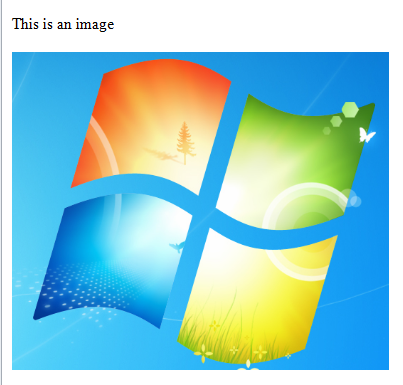
The above code generates the following email in my Outlook client:

Simple HTML body in email with embedded picture

Read all posts related to emailing in .NET here.

How to send emails in .NET part 7: adding style to HTML contents

In this post we saw how to build a simple HTML email with no styling. It looked a bit bleak so we’ll “dress it up” a little.

You cannot simply add a reference to an external CSS file like you would on a normal HTML web page. External references are ignored in the email body as they can can contain malicious material and code.

You can place CSS code directly in the HTML code in the following ways:

  • Using the style tag within the head section
  • Using the style attribute on individual elements
  • Using old-style attributes, such as cellspacing, border, width etc. on individual elements

All of these should be familiar from general web UI programming. Here’s an example of an embedded style tag in the head section:

string from = "andras.nemes@company.com";
string to = "john.smith@company.com";
string subject = "Testing html body";
string htmlBody = @"
<html lang=""en"">
	<head>	
		<meta content=""text/html; charset=utf-8"" http-equiv=""Content-Type"">
		<title>
			Upcoming topics
		</title>
		<style type=""text/css"">
			HTML{background-color: #e8e8e8;}
			.courses-table{font-size: 12px; padding: 3px; border-collapse: collapse; border-spacing: 0;}
			.courses-table .description{color: #505050;}
			.courses-table td{border: 1px solid #D1D1D1; background-color: #F3F3F3; padding: 0 10px;}
			.courses-table th{border: 1px solid #424242; color: #FFFFFF;text-align: left; padding: 0 10px;}
			.green{background-color: #6B9852;}
		</style>
	</head>
	<body>
		<table class=""courses-table"">
			<thead>
				<tr>
					<th class=""green"">Topic</th>
					<th class=""green"">Est. # of posts</th>
				</tr>
			</thead>
			<tbody>
				<tr>
					<td class=""description"">Using a Windows service in your project</td>
					<td>5</td>
				</tr>
				<tr>
					<td class=""description"">More RabbitMQ in .NET</td>
					<td>5</td>
				</tr>
			</tbody>
		</table>
	</body>
</html>
";
MailMessage mailMessage = new MailMessage(from, to, subject, htmlBody);
mailMessage.IsBodyHtml = true;
string smtpServer = "mail.company.com";
SmtpClient client = new SmtpClient(smtpServer);
client.Send(mailMessage);

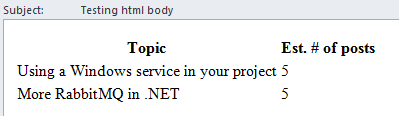
The above message is rendered as follows in my MS outlook client:

Styled HTML body in email

It’s still not very corporate looking but now you at least know how to add styles to a HTML message in .NET.

Keep in mind that email clients are not as up-to-date with CSS code as modern web browsers, so not everything will work in an email.

Read all posts related to emailing in .NET here.

Externalising dependencies with Dependency Injection in .NET part 1: setup

Introduction

Earlier on this blog we talked a lot about concepts like SOLID, patterns and layered software architecture using Domain Driven Design.

This new series of 10 posts will draw a lot on those ideas. Here are the main goals:

  • Show how hard dependencies of an object can be made external by hiding them behind abstractions
  • Show the reasons why you should care about those dependencies
  • Build a common infrastructure layer that you can use in your own projects

What is an infrastructure layer? We saw an example of that in this post. It is a special layer in the software architecture that holds the code which is common to all other layers in the project. This is a collection of cross-cutting concerns, like caching, security, emailing, logging etc. Logging is seldom part of any company domain but you may want to log trace messages from the “main” layers of the project: the service, the UI and the repository layer. It’s not too clever to replicate the logging code in each layer. Instead, break it out to a separate infrastructure layer which is typically a C# library project.

Furthermore, it’s possible that you’ll want to follow the same logging technique and strategy across all projects of your company. Then you can have one central infrastructure layer which all projects refer to from within Visual Studio. Then if the developers decide to change the logging, caching or other strategy then it will change across all projects by modifying this one central infrastructure layer.

In this post we’ll set up a very simple starting point that lays the foundations for the upcoming parts in the series.

Starting point

Open Visual Studio 2012/2013 and create a new Blank Solution, call it CommonInfrastructureDemo. Add a new Console Application to it called MyCompany.ProductConsole. Add 3 new folders to the ProductConsole app called Domains, Services, Repositories.

Normally we’d put these elements into separate C# libraries but it’s not the main focus of this series. If you’re interested in layered software architecture then you can find a proposed way of achieving it in the DDD series referred to above.

We’ll have only one domain: Product. Add a C# class called Product to the Domains folder:

public class Product
{
	public int Id { get; set; }
	public string Name { get; set; }
	public int OnStock { get; set; }
}

Also, add the following repository interface to the Domains folder:

public interface IProductRepository
{
	Product FindBy(int id);
}

Add the following implementation of the repository to the Repositories folder:

public class ProductRepository : IProductRepository
{
	public Product FindBy(int id)
	{
		return (from p in AllProducts() where p.Id == id select p).FirstOrDefault();
	}

	private IEnumerable<Product> AllProducts()
	{
		return new List<Product>()
		{
			new Product(){Id = 1, Name = "Chair", OnStock = 10}
			, new Product(){Id = 2, Name = "Desk", OnStock = 20}
			, new Product(){Id = 3, Name = "Cupboard", OnStock = 15}
		};
	}
}

There’s nothing really magical here I guess.

Normally the ultimate consumer layer, such as an MVC or Web API layer with a number of controllers, will not talk directly to the repositories. It will only consult the services for any data retrieval. Add the following interface to the Services folder:

public interface IProductService
{
	GetProductResponse GetProduct(GetProductRequest getProductRequest);
}

…where GetProductResponse and GetProductRequest also reside in the Services folder and look as follows:

public class GetProductRequest
{
	public int Id { get; set; }
}

public class GetProductResponse
{
	public bool Success { get; set; }
	public string Exception { get; set; }
	public Product Product { get; set; }
}

The implementation of IProductService will need an IProductRepository. We’ll let this dependency to be injected into the product service using constructor injection. Insert the following ProductService class into the Services folder:

public class ProductService : IProductService
{
	private readonly IProductRepository _productRepository;

	public ProductService(IProductRepository productRepository)
	{
		if (productRepository == null) throw new ArgumentNullException("ProductRepository");
		_productRepository = productRepository;
	}

	public GetProductResponse GetProduct(GetProductRequest getProductRequest)
	{
		GetProductResponse response = new GetProductResponse();
		try
		{
			Product p = _productRepository.FindBy(getProductRequest.Id);
			response.Product = p;
			if (p != null)
			{
				response.Success = true;
			}
			else
			{
				response.Exception = "No such product.";
			}
		}
		catch (Exception ex)
		{
			response.Exception = ex.Message;
		}
		return response;
	}
}

In the implemented GetProduct method we ask the repository to return a Product. If none’s found or if the operation throws an exception then we let the Success property be false and populate the exception message accordingly.

We can now tie together all elements in the consumer, i.e. the Main method. We won’t employ any Inversion of Control containers to inject our dependencies so that we don’t get distracted by technical details. Instead we’ll do it the old way, i.e. by poor man’s dependency injection. We define the concrete implementations in Main ourselves. However, it’s an acceptable solution as this definition happens right at the entry point of the application. If you don’t know what I mean I suggest you go through the series on SOLID referred to above with special attention to the letter ‘D‘.

With the above remarks in mind add the following code into Main in Program.cs:

static void Main(string[] args)
{
	IProductService productService = new ProductService(new ProductRepository());
	GetProductResponse getProductResponse = productService.GetProduct(new GetProductRequest() { Id = 2 });
	if (getProductResponse.Success)
	{
		Console.WriteLine(string.Concat("Product name: ", getProductResponse.Product.Name));
	}
	else
	{
		Console.WriteLine(getProductResponse.Exception);
	}

	Console.ReadKey();
}

Run the app and you’ll see that the Console prints “Desk” for us. Test the code with Id = 4 and you’ll see the appropriate exception message: “No such product”.

This finishes the project setup phase. In the next post we’ll start discussing the true purpose of this series with a look at caching in the service layer.

View the list of posts on Architecture and Patterns here.

How to send emails in .NET part 6: HTML contents basics

In previous posts regarding emails – see the link below – we looked at how to send plain text emails. However, professional company emails, such as user sign-up confirmations, have almost exclusively HTML body formats for styling and layout.

Let’s start with the basics and send out a HTML-based email with no styling. You can freely add HTML tags to the body of the email and set the IsBodyHtml property as true:

string from = "andras.nemes@company.com";
string to = "john.smith@company.com";
string subject = "Testing html body";
string htmlBody = @"
<html lang=""en"">
	<head>	
		<meta content=""text/html; charset=utf-8"" http-equiv=""Content-Type"">
		<title>
			Upcoming topics
		</title>
	</head>
	<body>
		<table>
			<thead>
				<tr>
					<th>Topic</th>
					<th>Est. # of posts</th>
				</tr>
			</thead>
			<tbody>
				<tr>
					  <td>Using a Windows service in your project</td>
					  <td>5</td>
				  </tr>
				  <tr>
					  <td>More RabbitMQ in .NET</td>
					  <td>5</td>
				  </tr>
			</tbody>
		</table>
	</body>
</html>
";
MailMessage mailMessage = new MailMessage(from, to, subject, htmlBody);
mailMessage.IsBodyHtml = true;
string smtpServer = "mail.company.com";
SmtpClient client = new SmtpClient(smtpServer);
client.Send(mailMessage);

The email client will then render the HTML as best as it can. You cannot however just send any HTML that you may be used to from web programming. Most email clients will ignore external files, like JS, images, CSS files etc. Also, inline JavaScript code won’t be executed.

The above message was rendered in my MS Outlook client as follows:

Simple HTML body in email

Read all posts related to emailing in .NET here.

MongoDB in .NET part 10: other file operations

Introduction

In the previous post on MongoDb we talked about inserting files to GridFS and linking them to a Car object. In this post we’ll look at how to read, delete and update a file.

We’ll build on the CarRental demo project we’ve been working on, so have it ready in Visual Studio.

Reading a file

The primary way of reading a file with the C# driver of MongoDb is the Download method of MongoGridFS and its numerous overloads. With Download you can extract the contents of a file to a stream or to the local file system. With the MongoGridFS.Open method you can put the contents of a file to a Stream but you can only locate the file by file name. There are also the MongoGridFS.Find methods – Find, FindOne, FindAll, FindOneById which allows you to find metadata on a file and indirectly open the contents of the file through the MongoGridFSFileInfo object that the Find methods return. MongoGridFSFileInfo has methods to open a file: Open, OpenRead and OpenText. The Find method lets you search for a specific file using an IMongoQuery object. These Find methods are very much the same as what we saw in the post on querying documents.

Deleting and updating a file

Deletes and updates are handled under the same section as there’s no separate update method. An update means first removing a file and then inserting a new one instead.

Demo

Let’s show the image associated with the Car object on Image.cshtml if one exists. We’ll need a helper method on the CarViewModel object to determine whether it has an image. Add the following property to CarViewModel.cs:

public bool HasImage
{
	get
	{
		return !string.IsNullOrEmpty(ImageId);
	}
}

We’ll retrieve the Image from a controller action. Add a new Controller to the Controllers folder called ImagesController. Select the Empty MVC Controller template type. Make it derive from BaseController and insert an Image action method:

public class ImagesController : BaseController
{        
        public ActionResult Image(string imageId)
        {
		MongoGridFSFileInfo imageFileInfo = CarRentalContext.CarRentalDatabase.GridFS.FindOneById(new ObjectId(imageId));
		return File(imageFileInfo.OpenRead(), imageFileInfo.ContentType);
        }
}

The last missing piece is to extend Image.cshtml to show the image. Add the following markup just below the closing brace of the Html.BeginForm statement:

@if (Model.HasImage)
{
	<img src="@Url.Action("Image", "Images", new { imageId = @Model.ImageId})" />
}

Run the application, navigate to /cars and click on the Image link of a Car which has a valid image file. If everything’s gone fine then you should see the associated image:

Show car image from GridFS

In case you’re wondering: that’s right, I uploaded the Windows logo from the background of my computer as the car image. It doesn’t make any difference what image you’ve associated with the Car, the main thing is that it’s shown correctly.

Deleting and updating a file

As hinted above, there’s no separate update function for files. Therefore files are updated in two steps: delete the existing one and insert a new one instead. We’ve already seen how to insert a file and link it to an object, so we only need to consider deletions in this section.

Deletions are performed with the Delete function and its overloads: delete by a query, delete by file name and delete by id. You can also delete a file by its MongoGridFSFileInfo wrapper, an instance of which we’ve seen above.

If you use the Delete(IMongoQuery) overload then all files will be deleted one by one that match the search criteria, i.e. the matching files are not deleted in an atomic operation.

We’ll extend our demo app as follows: when an image is uploaded then we check if the Car already has one. If so, then the image is replaced. Otherwise we’ll upload the file like we saw in the previous post.

Insert the following method to CarsController:

private void DeleteCarImage(Car car)
{
	CarRentalContext.CarRentalDatabase.GridFS.DeleteById(car.ImageId);
	car.ImageId = string.Empty;
	CarRentalContext.Cars.Save(car);
}

We first delete the image by its ID. Then we need to set the ImageID property of the car to an empty string as there’s no automatic mechanism that can determine that the image of a Car has been deleted and update the ImageId property. Lastly we save the Car object.

We can call this function in an extended version of POST Image:

[HttpPost]
public ActionResult Image(string id, HttpPostedFileBase file)
{
	Car car = CarRentalContext.Cars.FindOneById(new ObjectId(id));
	if (!string.IsNullOrEmpty(car.ImageId))
	{
		DeleteCarImage(car);
	}
	AttachImageToCar(file, car);
	return RedirectToAction("Index");
}

That’s it. Run the app as usual and try to replace an image attached to a Car, it should go fine.

Other interesting operations

The MongoGridFS and MongoGridFSFileInfo objects have a MoveTo function. They don’t actually move anything, they set the file name metadata field to a different value. If you want to duplicate a file, then call the CopyTo method that’s available on each object.

You can also modify the metadata of a file through the SetMetada method of MongoGridFS.

The end

This was the last post in the series on MongoDb in .NET. There’s of course loads more to look at but we’d need a book to cover all aspects. However, this should be enough for you to start coding and explore MongoDb in further detail on your own.

View the posts related to data storage here.

How to send emails in .NET part 5: attachments

Adding an attachment to a MailMessage object can be as simple as inserting an Attachment object to the Attachments collection:

string from = "andras.nemes@company.com";
string to = "john.smith@company.com";
string subject = "Testing email attachment";
string plainTextBody = "This is a great message.";
MailMessage mailMessage = new MailMessage(from, to, subject, plainTextBody);

mailMessage.Attachments.Add(new Attachment(@"C:\logfile.txt"));

string smtpServer = "mail.apicasystem.com";
SmtpClient client = new SmtpClient(smtpServer);
client.Send(mailMessage);

You can also specify the MIME type – Multipurpose Internet Mail Extensions – using the MediaTypeNames enumeration. E.g. you can add an attachment as a Stream in the following way:

Stream attachmentStream = new FileStream(@"C:\logfile.txt", FileMode.Open, FileAccess.Read);
mailMessage.Attachments.Add(new Attachment(attachmentStream, "recent_log.txt", MediaTypeNames.Text.Plain));

Note that you can specify a different file name in the Attachment constructor. It can differ from the name of the original source. You can even change its extension if you want, such as “myfile.html”. If you’re not sure of the MIME type you can use MediaTypeNames.Application.Octet which indicates a binary file.

Read all posts related to emailing in .NET here.

Elliot Balynn's Blog

A directory of wonderful thoughts

Software Engineering

Web development

Disparate Opinions

Various tidbits

chsakell's Blog

WEB APPLICATION DEVELOPMENT TUTORIALS WITH OPEN-SOURCE PROJECTS

Once Upon a Camayoc

ARCHIVED: Bite-size insight on Cyber Security for the not too technical.