Examining a .NET assembly through Reflection
October 3, 2014 Leave a comment
We’ve gone through a couple of points about Reflection in .NET on this blog:
- Inspecting assemblies
- Inspecting types
- Examining the members of a class
To recap we’ll see how to inspect the members of a .NET dll library built into the framework. The .NET 4 or 4.5 libraries are usually stored in the following location:
C:\Windows\Microsoft.NET\Framework64\v4.0.30319
Have a look into that folder and you’ll find the familiar libraries such as mscorlib, System.IO, System.Net etc. The following code will load the System.Net.Http assembly and print some basic information about those members which…
- …are public
- …are instance level, i.e. non-static
- …are declared directly on the specific type
This last point means that we’ll ignore the inherited members of a Type. Without this flag we’d get all inherited members, such as ToString and GetType from Object:
string pathToAssembly = @"C:\Windows\Microsoft.NET\Framework64\v4.0.30319\System.Net.Http.dll";
BindingFlags bindingFlags = BindingFlags.DeclaredOnly | BindingFlags.Public | BindingFlags.Instance;
Assembly assembly = Assembly.LoadFrom(pathToAssembly);

Console.WriteLine("Assembly full name: {0}", assembly.FullName);
Type[] typesInAssembly = assembly.GetTypes();

foreach (Type type in typesInAssembly)
{
	Console.WriteLine("Type name: {0}", type.Name);
	MemberInfo[] members = type.GetMembers(bindingFlags);
	foreach (MemberInfo mi in members)
	{
		Console.WriteLine("Member type: {0}, member name: {1}.", mi.MemberType, mi.Name);
	}
}
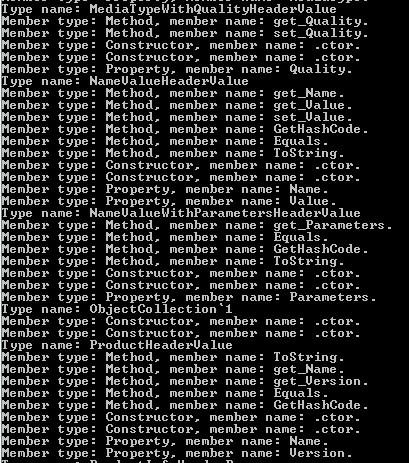
The assembly is quite large but here comes an excerpt:
View all posts on Reflection here.
 About Andras Nemes
 Exercises in .NET with Andras Nemes