Retrieving an element from a sequence with an index in LINQ C#

Say you have the following Singer object and sequence of Singers:

public class Singer
{
	public int Id { get; set; }
	public string FirstName { get; set; }
	public string LastName { get; set; }
	public int BirthYear { get; set; }
}

IEnumerable<Singer> singers = new List<Singer>() 
		{
			new Singer(){Id = 1, FirstName = "Freddie", LastName = "Mercury", BirthYear=1964}
			, new Singer(){Id = 2, FirstName = "Elvis", LastName = "Presley", BirthYear = 1954}
			, new Singer(){Id = 3, FirstName = "Chuck", LastName = "Berry", BirthYear = 1954}
			, new Singer(){Id = 4, FirstName = "Ray", LastName = "Charles", BirthYear = 1950}
			, new Singer(){Id = 5, FirstName = "David", LastName = "Bowie", BirthYear = 1964}
		};

Say you want to get to the second element of the singers sequence. You can use the ElementAt operator to achieve that. As all arrays and lists are 0 based, then the second element has index = 1:

Singer singer = singers.ElementAt(1);
Console.WriteLine(singer.LastName);

The operator has found Elvis Presley. If there’s no element at the specified index then an ArgumentOutOfRangeException is thrown. To avoid that you can use the ElementAtOrDefault operator instead:

Singer singer = singers.ElementAtOrDefault(100);
Console.WriteLine(singer == null ? "No such singer" : singer.LastName);

…which prints “No such singer”.

View the list of posts on LINQ here.

Building a uniform sequence using the Repeat operator in LINQ C#

Using the Repeat operator you can create sequences where the same input object is repeated a number of times.

Its usage is very simple. Say you need a list of integers with number 1 repeated 10 times:

IEnumerable<int> integers = Enumerable.Repeat<int>(1, 10);
foreach (int i in integers)
{
	Console.WriteLine(i);
}

…which simply prints “1” 10 times.

Be careful with reference types. If you want identical objects in the sequence that can be modified separately then use the new keyword directly in the Repeat method:

IEnumerable<Band> bands = Enumerable.Repeat<Band>(new Band() { Name = "Band" }, 10);

Otherwise all objects will have the same reference:

Band band = new Band() { Name = "Band" };
IEnumerable<Band> bands2 = Enumerable.Repeat<Band>(band, 10);

…and modifying one will modify all references.

View the list of posts on LINQ here.

Getting the last element from a sequence with LINQ C#

Say you have the following object sequence:

public class Singer
{
	public int Id { get; set; }
	public string FirstName { get; set; }
	public string LastName { get; set; }
	public int BirthYear { get; set; }
}

IEnumerable<Singer> singers = new List<Singer>() 
			{
				new Singer(){Id = 1, FirstName = "Freddie", LastName = "Mercury", BirthYear=1964}
				, new Singer(){Id = 2, FirstName = "Elvis", LastName = "Presley", BirthYear = 1954}
				, new Singer(){Id = 3, FirstName = "Chuck", LastName = "Berry", BirthYear = 1954}
				, new Singer(){Id = 4, FirstName = "Ray", LastName = "Charles", BirthYear = 1950}
				, new Singer(){Id = 5, FirstName = "David", LastName = "Bowie", BirthYear = 1964}
			};

If you just want to get the very last element from this sequence with no query then you can use the Last operator:

Singer singer = singers.Last();
Console.WriteLine(singer.LastName);

This will select David Bowie from the list. You can also send an item selector to get the last element which matches the query:

Singer singer = singers.Last(s => s.BirthYear == 1954);
Console.WriteLine(singer.LastName);

…which returns Chuck Berry.

A caveat is that the Last operator throws an InvalidOperationException if there’s no single matching record:

Singer singer = singers.Last(s => s.BirthYear == 2000);

To avoid this scenario you can use the LastOrDefault operator which returns the default value of the required object if there’s no matching one. Therefore “singer” in the above example will be null:

Singer singer = singers.LastOrDefault(s => s.BirthYear == 2000);
Console.WriteLine(singer == null ? "No such singer" : singer.LastName);

…which yields “No such singer”.

You can view all LINQ-related posts on this blog here.

Convert a sequence of objects to a sequence of specific type in LINQ .NET

In the posts on LINQ on this blog we’ve seen some ways to convert a sequence of type A to a sequence of type B. This particular post deals with converting a sequence of objects to a sequence of some specific type.

Say that you have some old style collection such as this:

ArrayList stringList = new ArrayList() { "this", "is", "a", "string", "list" };

You can easily turn this into a proper string list using the Cast operator:

IEnumerable<string> stringListProper = stringList.Cast<string>();
foreach (string s in stringListProper)
{
	Console.WriteLine(s);
}

…which results in…

this
is
a
string
list

It works of course for any object type, even for your custom objects.

However, what if you have the following starting point?

ArrayList stringList = new ArrayList() { "this", "is", "a", "string", "list", 1, 3, new Band() };

The integers and the Band object are not of type string so the Cast operator will throw an InvalidCastException. This is where the OfType extension enters the picture. It does the same job as Cast but it ignores all objects that cannot be converted:

IEnumerable<string> stringListProper = stringList.OfType<string>();
foreach (string s in stringListProper)
{
	Console.WriteLine(s);
}

…which yields the same output as above without throwing any exception.

So in case you need to deal with sequences you don’t control and whose content type you cannot be sure of then you should probably use the OfType extension.

You can view all LINQ-related posts on this blog here.

Determine the presence of an element in a sequence with LINQ C#

Say we have the following string list:

string[] bands = { "ACDC", "Queen", "Aerosmith", "Iron Maiden", "Megadeth", "Metallica", "Cream", "Oasis", "Abba", "Blur", "Chic", "Eurythmics", "Genesis", "INXS", "Midnight Oil", "Kent", "Madness", "Manic Street Preachers"
, "Noir Desir", "The Offspring", "Pink Floyd", "Rammstein", "Red Hot Chili Peppers", "Tears for Fears"
, "Deep Purple", "KISS"};

The Any operator in LINQ has two versions. The paramaterless one simply returns true if the sequence contains at least one element:

bool exists = bands.Any();
Console.WriteLine(exists);

This yields true. The more exciting version of Any is where you can specify a filter in form of an element selector lambda:

bool exists = bands.Any(b => b.Length == 4);
Console.WriteLine(exists);

This gives true as we have at least one element which consists of 4 characters. The below query returns false:

bool exists = bands.Any(b => b.EndsWith("hkhkj"));
Console.WriteLine(exists);

You can view all LINQ-related posts on this blog here.

Converting a sequence to a dictionary using the ToDictionary LINQ operator

Say you have a sequence of objects that you’d like to convert into a Dictionary for efficient access by key. Ideally the objects have some kind of “natural” key for the dictionary such as an ID:

public class Singer
{
	public int Id { get; set; }
	public string FirstName { get; set; }
	public string LastName { get; set; }
}

IEnumerable<Singer> singers = new List<Singer>() 
		{
			new Singer(){Id = 1, FirstName = "Freddie", LastName = "Mercury"} 
			, new Singer(){Id = 2, FirstName = "Elvis", LastName = "Presley"}
			, new Singer(){Id = 3, FirstName = "Chuck", LastName = "Berry"}
			, new Singer(){Id = 4, FirstName = "Ray", LastName = "Charles"}
			, new Singer(){Id = 5, FirstName = "David", LastName = "Bowie"}
		};

It’s easy to create a singers dictionary from this sequence:

Dictionary<int, Singer> singersDictionary = singers.ToDictionary(s => s.Id);
Console.WriteLine(singersDictionary[2].FirstName);

Basic ToDictionarty operator

You supply the key selector as the argument to the operator, which will be the key of the dictionary. The operator will throw an ArgumentException if you’re trying to add two objects with the same key. Example:

return new List<Singer>() 
		{
			new Singer(){Id = 1, FirstName = "Freddie", LastName = "Mercury"} 
			, new Singer(){Id = 1, FirstName = "Elvis", LastName = "Presley"}
			, new Singer(){Id = 3, FirstName = "Chuck", LastName = "Berry"}
			, new Singer(){Id = 4, FirstName = "Ray", LastName = "Charles"}
			, new Singer(){Id = 5, FirstName = "David", LastName = "Bowie"}
		};

There are two singers with id = 1 which will cause an exception when it’s Elvis’ turn to be inserted into the dictionary.

The ToDictionary operator has an overload which allows you to change the elements inserted into the dictionary. Say you’d like to have the id as the key but only the last name as the value. You can do like this:

Dictionary<int, string> singersDictionaryNames = 
        singers.ToDictionary(s => s.Id, si => string.Format("Last name: {0}", si.LastName));
Console.WriteLine(singersDictionaryNames[2]);

Overloaded ToDictionary operator

You can view all LINQ-related posts on this blog here.

Finding unique values using the LINQ Distinct operator

Extracting unique values from a sequence of objects in LINQ is very easy using the Distinct operator. It comes in two versions: one with a default equality comparer and another which lets you provide a custom comparer.

We’ll use the following collection for the first demo:

string[] bands = { "ACDC", "Queen", "Aerosmith", "Iron Maiden", "Megadeth", "Metallica", "Cream", "Oasis", "Abba", "Blur", "Chic", "Eurythmics", "Genesis", "INXS", "Midnight Oil", "Kent", "Madness", "Manic Street Preachers"
, "Noir Desir", "The Offspring", "Pink Floyd", "Rammstein", "Red Hot Chili Peppers", "Tears for Fears"
, "Deep Purple", "KISS"};

These are all unique values so let’s create some duplicates:

IEnumerable<string> bandsDuplicated = bands.Concat(bands);

The first prototype of Distinct will compare the string values using the standard default string comparer as all elements in the array are strings. The following bit of code will find the unique values and print them on the console:

IEnumerable<string> uniqueBands = bandsDuplicated.Distinct();
foreach (String unique in uniqueBands)
{
	Console.WriteLine(unique);
}

Distinct operator with default comparer

In case you have a sequence of custom objects then it’s a good idea to let the Distinct operator know how to define if two objects are equal. Consider the following object:

public class Singer
{
	public int Id { get; set; }
	public string FirstName { get; set; }
	public string LastName { get; set; }
}

…and the following collection:

IEnumerable<Singer> singers = new List<Singer>() 
			{
				new Singer(){Id = 1, FirstName = "Freddie", LastName = "Mercury"} 
				, new Singer(){Id = 2, FirstName = "Elvis", LastName = "Presley"}
				, new Singer(){Id = 3, FirstName = "Chuck", LastName = "Berry"}
				, new Singer(){Id = 4, FirstName = "Ray", LastName = "Charles"}
				, new Singer(){Id = 5, FirstName = "David", LastName = "Bowie"}
			};

The following comparer will compare the Singer objects by their IDs:

public class DefaultSingerComparer : IEqualityComparer<Singer>
{
	public bool Equals(Singer x, Singer y)
	{
		return x.Id == y.Id;
	}

	public int GetHashCode(Singer obj)
	{
		return obj.Id.GetHashCode();
	}
}

We create some duplicates:

IEnumerable<Singer> singersDuplicates = singers.Concat(singers);

…and then select the unique values:

IEnumerable<Singer> uniqueSingers = singersDuplicates.Distinct(new DefaultSingerComparer());
foreach (Singer singer in uniqueSingers)
{
	Console.WriteLine(singer.Id);
}

Distinct operator with custom comparer

You can view all LINQ-related posts on this blog here.

Grouping elements in LINQ .NET using GroupBy and an EqualityComparer

The GroupBy operator has the same function as GROUP BY in SQL: group elements in a sequence by a common key. The GroupBy operator comes with 8 different signatures. Each returns a sequence consisting of objects that implement the IGrouping interface of type K – the key type – and T – the type of the objects in the sequence. IGrouping implements IEnumerable of T. So when we iterate through the result the we can first look at the outer sequence of keys and then the inner sequence of each object with that key.

The simplest version of GroupBy accepts a Func delegate of T and K, which acts as the key selector. It will compare the objects in the sequence using a default comparer. E.g. if you want to group the objects by their integer IDs then you can let the default comparer do its job. Another version of GroupBy lets you supply your own comparer to define a custom grouping or if the Key is an object where you want to define your own rules for equality.

We’ll need an example sequence which has an ID. In the posts on LINQ we often take the following collections for the demos:

IEnumerable<Singer> singers = new List<Singer>() 
	{
		new Singer(){Id = 1, FirstName = "Freddie", LastName = "Mercury"} 
		, new Singer(){Id = 2, FirstName = "Elvis", LastName = "Presley"}
		, new Singer(){Id = 3, FirstName = "Chuck", LastName = "Berry"}
		, new Singer(){Id = 4, FirstName = "Ray", LastName = "Charles"}
		, new Singer(){Id = 5, FirstName = "David", LastName = "Bowie"}
	};
IEnumerable<Concert> concerts = new List<Concert>()
	{
		new Concert(){SingerId = 1, ConcertCount = 53, Year = 1979}
		, new Concert(){SingerId = 1, ConcertCount = 74, Year = 1980}
		, new Concert(){SingerId = 1, ConcertCount = 38, Year = 1981}
		, new Concert(){SingerId = 2, ConcertCount = 43, Year = 1970}
		, new Concert(){SingerId = 2, ConcertCount = 64, Year = 1968}
		, new Concert(){SingerId = 3, ConcertCount = 32, Year = 1960}
		, new Concert(){SingerId = 3, ConcertCount = 51, Year = 1961}
		, new Concert(){SingerId = 3, ConcertCount = 95, Year = 1962}
		, new Concert(){SingerId = 4, ConcertCount = 42, Year = 1950}
		, new Concert(){SingerId = 4, ConcertCount = 12, Year = 1951}
		, new Concert(){SingerId = 5, ConcertCount = 53, Year = 1983}
	};

The singers collection won’t actually be needed for the code example, it simply shows the purpose of the concerts collection. Let’s imagine that our Singers collection includes both male and female singers and that ids below 3 are female singers and the others are all male singers. Our goal is to group the concerts based on gender using this information. We can have the following custom equality comparer:

public class SingerGenderComparer : IEqualityComparer<int>
{
	private int _femaleSingerIdLimit = 3;
		
	public bool Equals(int x, int y)
	{
		return IsPerformedByFemaleSinger(x) == IsPerformedByFemaleSinger(y);
	}

	public int GetHashCode(int obj)
	{
		return IsPerformedByFemaleSinger(obj) ? 1 : 2;
	}

	public bool IsPerformedByFemaleSinger(int singerId)
	{
		return singerId < _femaleSingerIdLimit;
	}
}

Here’s the grouping of the Concerts collection using the custom comparer:

SingerGenderComparer comparer = new SingerGenderComparer();

IEnumerable<IGrouping<int, Concert>> concertGroups = concerts.GroupBy(c => c.SingerId, comparer);
foreach (IGrouping<int, Concert> concertGroup in concertGroups)
{
	Console.WriteLine("Concerts of {0} singers: ", comparer.IsPerformedByFemaleSinger(concertGroup.Key) ? "female" : "male");
	foreach (Concert concert in concertGroup)
	{
		Console.WriteLine("Number of concerts: {0}, in the year of {1} by singer {2}.", concert.ConcertCount, concert.Year, concert.SingerId);
	}
}

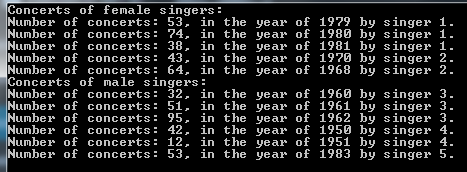
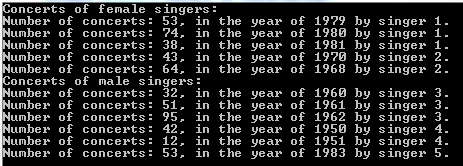
This yields the following output:

GroupBy output with custom comparer and default selector

You can define the type of object that will be selected from the base sequence using another version of GroupBy which allows you to provide a key selector:

IEnumerable<IGrouping<int, int>> concertGroupsFiltered = concerts.GroupBy(c => c.SingerId, c => c.ConcertCount, comparer);
foreach (IGrouping<int, int> concertGroup in concertGroupsFiltered)
{
	Console.WriteLine("Concerts of {0} singers: ", comparer.IsPerformedByFemaleSinger(concertGroup.Key) ? "female" : "male");
	foreach (int concertCount in concertGroup)
	{
		Console.WriteLine("Number of concerts: {0}.", concertCount);
	}
}

…which gives the following output:

GroupBy output with custom comparer and custom selector

You can view all LINQ-related posts on this blog here.

Converting a sequence of objects into a Lookup with LINQ C#

A Lookup in .NET is one of the lesser known data structures. It is similar to a Dictionary but the keys are not unique. You can insert multiple elements for the same key.

Say you have the following object and collection:

public class Singer
{
	public int Id { get; set; }
	public string FirstName { get; set; }
	public string LastName { get; set; }
	public int BirthYear { get; set; }
}
IEnumerable<Singer> singers = new List<Singer>() 
	{
		new Singer(){Id = 1, FirstName = "Freddie", LastName = "Mercury", BirthYear=1964}
		, new Singer(){Id = 2, FirstName = "Elvis", LastName = "Presley", BirthYear = 1954}
		, new Singer(){Id = 3, FirstName = "Chuck", LastName = "Berry", BirthYear = 1954}
		, new Singer(){Id = 4, FirstName = "Ray", LastName = "Charles", BirthYear = 1950}
		, new Singer(){Id = 5, FirstName = "David", LastName = "Bowie", BirthYear = 1964}
	};

You can group the singers into an ILookup as follows:

ILookup<int, Singer> singersByBirthYear = singers.ToLookup(s => s.BirthYear);
IEnumerable<Singer> filtered = singersByBirthYear[1964];
foreach (Singer s in filtered)
{
	Console.WriteLine(s.LastName);
}

…which outputs “Mercury” and “Bowie”.

You can also set the elements inserted into the ILookup using an overloaded variant where you specify the element selector:

ILookup<int, string> singerNamesByBirthYear = singers.ToLookup(s => s.BirthYear, si => string.Concat(si.LastName, ", ", si.FirstName));
IEnumerable<string> filtered2 = singerNamesByBirthYear[1964];
foreach (string s in filtered2)
{
	Console.WriteLine(s);
}

…which prints “Mercury, Freddie” and “Bowie, David”.

You can view all LINQ-related posts on this blog here.

Grouping elements in LINQ .NET using GroupBy

The GroupBy operator has the same function as GROUP BY in SQL: group elements in a sequence by a common key. The GroupBy operator comes with 8 different signatures. Each returns a sequence consisting of objects that implement the IGrouping interface of type K – the key – and T – the type of the objects in the sequence. IGrouping implements IEnumerable of T. So when we iterate through the result the we can first look at the outer sequence of keys and then the inner sequence of each object with that key.

The simplest version of GroupBy accepts a Func delegate of T and K, which acts as the key selector. We’ll need an example sequence which has an ID. In the posts on LINQ we often take the following collections for the demos:

IEnumerable<Singer> singers = new List<Singer>() 
	{
		new Singer(){Id = 1, FirstName = "Freddie", LastName = "Mercury"} 
		, new Singer(){Id = 2, FirstName = "Elvis", LastName = "Presley"}
		, new Singer(){Id = 3, FirstName = "Chuck", LastName = "Berry"}
		, new Singer(){Id = 4, FirstName = "Ray", LastName = "Charles"}
		, new Singer(){Id = 5, FirstName = "David", LastName = "Bowie"}
	};
IEnumerable<Concert> concerts = new List<Concert>()
	{
		new Concert(){SingerId = 1, ConcertCount = 53, Year = 1979}
		, new Concert(){SingerId = 1, ConcertCount = 74, Year = 1980}
		, new Concert(){SingerId = 1, ConcertCount = 38, Year = 1981}
		, new Concert(){SingerId = 2, ConcertCount = 43, Year = 1970}
		, new Concert(){SingerId = 2, ConcertCount = 64, Year = 1968}
		, new Concert(){SingerId = 3, ConcertCount = 32, Year = 1960}
		, new Concert(){SingerId = 3, ConcertCount = 51, Year = 1961}
		, new Concert(){SingerId = 3, ConcertCount = 95, Year = 1962}
		, new Concert(){SingerId = 4, ConcertCount = 42, Year = 1950}
		, new Concert(){SingerId = 4, ConcertCount = 12, Year = 1951}
		, new Concert(){SingerId = 5, ConcertCount = 53, Year = 1983}
	};

The singers collection won’t actually be needed for the code example, it simply shows the purpose of the concerts collection. Here’s the grouping of the Concerts collection by singer ID:

IEnumerable<IGrouping<int, Concert>> concertGroups = concerts.GroupBy(c => c.SingerId);
foreach (IGrouping<int, Concert> concertGroup in concertGroups)
{
	Console.WriteLine("Concerts for singer of ID {0}:", concertGroup.Key);
	foreach (Concert concert in concertGroup)
	{
		Console.WriteLine("Number of concerts: {0}, in the year of {1}.", concert.ConcertCount, concert.Year);
	}
}

GroupBy operator basic output

You can define the type of object that will be selected from the base sequence using another version of GroupBy which allows you to provide a key selector:

IEnumerable<IGrouping<int, int>> concertGroupsFiltered = concerts.GroupBy(c => c.SingerId, c => c.ConcertCount);
foreach (IGrouping<int, int> concertGroup in concertGroupsFiltered)
{
	Console.WriteLine("Concerts for singer of ID {0}:", concertGroup.Key);
	foreach (int concertCount in concertGroup)
	{
		Console.WriteLine("Number of concerts: {0}.", concertCount);
	}
}

GroupBy operator key selector output

View the list of posts on LINQ here.

Elliot Balynn's Blog

A directory of wonderful thoughts

Software Engineering

Web development

Disparate Opinions

Various tidbits

chsakell's Blog

WEB APPLICATION DEVELOPMENT TUTORIALS WITH OPEN-SOURCE PROJECTS

Once Upon a Camayoc

ARCHIVED: Bite-size insight on Cyber Security for the not too technical.