Domain Driven Design with Web API revisited Part 3: shared kernel, bounded context and some initial code

Introduction

In the previous post we discussed 3 fundamental concepts in DDD: entities, value objects and aggregates with aggregate roots. We said that an entity is an object whose identity is defined by its ID key for the purpose of tracking its state through time. Its properties can change but its ID – whether a simple integer or a composite – should never be modified after the object has been created. Value objects on the other hand are defined by their properties and are immutable. We can say that a value object is also a type of entity but its ID is a composite of all its constituent properties. As the IDs are immutable per se, value objects are consequently also immutable. Finally, aggregates are groups of objects that are treated as a unit for purposes of data persistence. The “boss” of the group is the aggregate root and it’s through the aggregate root that other aggregates communicate with other aggregates.

In this post we’ll look at a concept called the shared kernel and how the above mentioned concepts can be represented in code.

Read more of this post

Domain Driven Design with Web API revisited Part 2: the problem domain and DDD basics refreshed

Introduction

In the previous post we went through DDD at a very high level. We discussed the cases when DDD can be a good solution and when it could rather be overkill. We saw that a complex domain model with lots of behaviour and logic could well justify the usage of DDD. On the other hand a project with more simple use cases such as CRUD could be made lighter with just plain classes filled with public getters and setters. It’s also an option to just pick certain ideas from DDD in your project. DDD is full of useful guidelines and patterns that are beneficial to software projects of all sizes.

In this post we’ll describe the problem domain of our demo application. We’ll also refresh our knowledge of some basic DDD concepts.

Read more of this post

Domain Driven Design with Web API revisited Part 1: introduction

Introduction

Domain driven design (DDD) has been around since 2003 when Eric Evans published his groundbreaking book on the subject. It is quite a large and complex topic with a steep learning curve. Chances are that it will take years of training and hands-on experience before you can get fluent with all its parts. Also, it takes truly large projects, like SAP with all its modules, to utilise all ideas presented by DDD. I have to admit that I’ve only come to work with a subset of DDD, such as aggregate roots, value objects, entities, repositories etc., and haven’t worked with e.g. an anti-corruption layer. That’s fine, applying DDD to a software project doesn’t necessitate using every single field from DDD. You could then easily bloat your project unnecessarily.

Read more of this post

Various topics from software architecture part 5: aggregate roots

Introduction

In the previous post we looked at the second installment of the unit of work pattern. We designed a mock implementation of the unit of work and unit of work repository interfaces.

In this post we’ll look at a key concept from Domain Driven Design, the aggregate root. This topic was discussed in detail as part of the DDD series but it deserves a dedicated post.

Read more of this post

Extension to the DDD skeleton project: per session object context in Repository layer

Introduction

If you followed through the DDD skeleton project blog series then you’ll recall that the following interface was used to get hold of the DB object context in the concrete repositories:

public interface IObjectContextFactory
{
	InMemoryDatabaseObjectContext Create();
}

You’ll also recall that we pulled a valid InMemoryDatabaseObjectContext instance using the singleton pattern:

public class LazySingletonObjectContextFactory : IObjectContextFactory
{
	public InMemoryDatabaseObjectContext Create()
	{
		return InMemoryDatabaseObjectContext.Instance;
	}
}

In retrospect I think I should have gone through another implementation of the IObjectContextFactory interface, one that better suits a real life scenario with an ORM platform such as Entity Framework or NHibernate.

If you’d like to take on the singleton pattern to construct and retrieve an EF object context then you’ll likely run into some difficulties. The singleton pattern was OK for this in-memory solution so that we could demonstrate insertions, deletions and updates in the repository. As the singleton always returns the same InMemoryDatabaseObjectContext instance we won’t lose the new data from request to request as we saw in the demo.

However, this is not desirable if you’re working with an EF object context. If you always return the same object context for every request then even the data retrieved by that object context will be the same upon subsequent requests. If you make a change to an object then it won’t be visible in another session as that new session retrieves the same object context that was present when it was created by the singleton, i.e. when it was first called:

public static InMemoryDatabaseObjectContext Instance
{
	get
	{
		return Nested.instance;
	}
}

private class Nested
{
	static Nested()
	{
	}
	internal static readonly InMemoryDatabaseObjectContext instance = new InMemoryDatabaseObjectContext();
}

If you update a Customer object in one session then the next session won’t see the updates as it still retrieves the original, “unchanged” Customer that was present in the original instance of InMemoryDatabaseObjectContext. You’ll need to call the Refresh method of the EF object context manually to make sure that you get the latest state of the retrieved object like this:

Customer c = some query;
if (c != null)
{
	EfObjectContextInstance.Refresh(RefreshMode.StoreWins, c);
}

In short: my recommendation is that you don’t use the singleton pattern to retrieve the EF object context.

An EntityFramework friendly solution

A better solution is to get an instance of the object context per HTTP session. This requires a different implementation of the IObjectContextFactory interface. The following implementation can do the job:

public class HttpAwareOrmDataContextFactory : IObjectContextFactory
{
	private string _dataContextKey = "EfObjectContext";

	public InMemoryDatabaseObjectContext Create()
	{
		InMemoryDatabaseObjectContext objectContext = null;
		if (HttpContext.Current.Items.Contains(_dataContextKey))
		{
			objectContext = HttpContext.Current.Items[_dataContextKey] as InMemoryDatabaseObjectContext;
		}
		else
		{
			objectContext = new InMemoryDatabaseObjectContext();
			Store(objectContext);
		}
		return objectContext;
	}

	private void Store(InMemoryDatabaseObjectContext objectContext)
	{
		if (HttpContext.Current.Items.Contains(_dataContextKey))
		{
			HttpContext.Current.Items[_dataContextKey] = objectContext;
		}
		else
		{
			HttpContext.Current.Items.Add(_dataContextKey, objectContext);
		}
	}
}

We use the IDictionary object of HttpContext.Current.Items to store the InMemoryDatabaseObjectContext instance. We first check if an instance is available by the key _dataContextKey. If that’s the case then we return that instance. Otherwise we create a new instance of the object context and store it in the dictionary. HttpContext.Current will of course always be different with each new HTTP request to the API which ensures that we get the fresh data from the data store as well. In case the InMemoryDatabaseObjectContext is requested more than once during the same session then we hand out the same instance.

You might ask why we don’t construct a new InMemoryDatabaseObjectContext every single time one is needed like this:

public InMemoryDatabaseObjectContext Create()
{
     return new InMemoryDatabaseObjectContext();
}

That wouldn’t be a good idea as the object context will be called when making some changes to the underlying DB objects and then it’s called again when the changes are to be persisted using two separate calls to the Unit of Work:

void RegisterUpdate(IAggregateRoot aggregateRoot, IUnitOfWorkRepository repository);
.
.
.
void Commit();

The two calls will be very likely made during the same session otherwise the changes are lost. If you construct an InMemoryDatabaseObjectContext to register the changes and then construct another one to commit them then the second instance won’t automatically track the same updates of course so it won’t persist anything. That’s logical as we’re talking about two different instances: how would object context instance #2 know about the changes tracked by object context instance #1?

So now we have two implementations of the IObjectContextFactory interface. The beauty with our loosely coupled solution is that all it takes to change the concrete implementation injected into all Repository classes is to comment out the following line of code in IoC.cs:

x.For<IObjectContextFactory>().Use<LazySingletonObjectContextFactory>();

…and insert the following instead:

x.For<IObjectContextFactory>().Use<HttpAwareOrmDataContextFactory>();

You can run the project as it is now. Navigate to /customers and you should get the same dummy 3 customers we saw in the original demo.

View the list of posts on Architecture and Patterns here.

Extension to the DDD skeleton project: using an external settings source

Introduction

In this post we saw a way how to introduce caching in the DDD project. We also mentioned that hardcoding the caching duration directly in code may not be desirable for testing and maintenance purposes.

One way to externalise the caching duration is the following setup:

  • We can have a settings file where we set up the caching profiles, such as LongCache = 1 minute, MediumCache = 30sec, ShortCache = 10sec.
  • These profiles can be saved in different places: web.config or app.config, database, customised XML/JSON file, even an external service
  • This is telling us that retrieving the correct setting should be abstracted away

Infrastructure

Open the Infrastructure.Common layer and insert a new folder called Configuration. Insert the following interface:

public interface IConfigurationRepository
{        	
        T GetConfigurationValue<T>(string key);
        string GetConfigurationValue(string key);
        T GetConfigurationValue<T>(string key, T defaultValue);
        string GetConfigurationValue(string key, string defaultValue);
}

We’ll go for the most obvious implementation: the appSettings section in web.config. Insert the following class into the folder:

public class AppSettingsConfigurationRepository : IConfigurationRepository
{        
        public T GetConfigurationValue<T>(string key)
        {
            return GetConfigurationValue(key, default(T), true);
        }

        public string GetConfigurationValue(string key)
        {
            return GetConfigurationValue<string>(key);
        }

        public T GetConfigurationValue<T>(string key, T defaultValue)
        {
            return GetConfigurationValue(key, defaultValue, false);
        }
        
        public string GetConfigurationValue(string key, string defaultValue)
        {
            return GetConfigurationValue<string>(key, defaultValue);
        }

        private T GetConfigurationValue<T>(string key, T defaultValue, bool throwException)
        {
            var value = ConfigurationManager.AppSettings[key];
            if (value == null)
            {
                if(throwException)
                    throw new KeyNotFoundException("Key "+key+ " not found.");
                return defaultValue;
            }
            try
            {
                if (typeof(Enum).IsAssignableFrom(typeof(T)))
                    return (T)Enum.Parse(typeof(T), value);
                return (T)Convert.ChangeType(value, typeof(T));
            }
            catch (Exception ex)
            {
                if (throwException)
                    throw ex;
                return defaultValue;
            }
        }
}

You’ll need to set a reference to the System.Configuration library otherwise ConfigurationManager will not be found.

This is an application of the Adapter pattern which we used in the previous post.

Application service

Locate the EnrichedCustomerService class from the previous post on Service layer caching. Add the following private field:

private readonly IConfigurationRepository _configurationRepository;

Modify the constructor as follows:

public EnrichedCustomerService(ICustomerService innerCustomerService, ICacheStorage cacheStorage, IConfigurationRepository configurationRepository)
{
	if (innerCustomerService == null) throw new ArgumentNullException("CustomerService");
	if (cacheStorage == null) throw new ArgumentNullException("CacheStorage");
	if (configurationRepository == null) throw new ArgumentNullException("ConfigurationRepository");
	_innerCustomerService = innerCustomerService;
	_cacheStorage = cacheStorage;
	_configurationRepository = configurationRepository;
}

We want to read the cache duration setting in GetAllCustomers. Modify the method as follows:

public GetCustomersResponse GetAllCustomers()
{
	string key = "GetAllCustomers";
	GetCustomersResponse response = _cacheStorage.Retrieve<GetCustomersResponse>(key);
	if (response == null)
	{
		int cacheDurationSeconds = _configurationRepository.GetConfigurationValue<int>("ShortCacheDuration");
		response = _innerCustomerService.GetAllCustomers();
		_cacheStorage.Store(key, response, TimeSpan.FromSeconds(cacheDurationSeconds));
	}
	return response;
}

It would be better to have some external container for string values such as ShortCacheDuration, but this will be enough for now.

Web layer

Open the web.config file and enter the following appSetting:

<add key="ShortCacheDuration" value="60"/>

We also need to instruct StructureMap to select AppSettingsConfigurationRepository for any IConfigurationRepository it encounters. Enter the following line into the ObjectFactory.Initialize block of IoC.cs:

x.For<IConfigurationRepository>().Use<AppSettingsConfigurationRepository>();

Set a breakpoint within GetAllCustomers() of EnrichedCustomerService.cs. Set the start page to “customers”: open the Properties of the WebService layer, select Web, Specific Page, “customers”. Start the application.

Code execution will stop at the break point. Step through the code by pressing F11. You’ll see how the settings are extracted from the config file and used with the cache storage mechanism.

Now every time you want to change the cache duration you just update the appropriate settings value. There’s nothing stopping you from inserting different cache duration profiles in your configuration source as mentioned above: ShortCache, LongCache, MediumCache etc. Also, we solved yet another dependency problem in an OOP and SOLID way.

Read the next extension to the DDD project here.

View the list of posts on Architecture and Patterns here.

Extension to the DDD skeleton project: caching in the service layer

Introduction

This post is a direct continuation of the DDD skeleton project. In this extension we’ll investigate how to incorporate caching into the solution.

Caching can mean several things in an application. It can be introduced at different levels: you can cache database call results, MVC views, service call results, etc. You can save just about any object in one of the cache engines built into .NET.

In this post we’ll concentrate on caching in the Service layer. We’ll try to solve the requirement to cache the result of the following service call of ICustomerService for a period of time:

GetCustomersResponse GetAllCustomers();

A naive but quick solution would be to cache the results directly in the implementing CustomerService class:

public GetCustomersResponse GetAllCustomers()
{
        if (cacheEngine.IncludesObject<GetCustomersResponse>())
        {
              return cacheEngine.RetrieveObject<GetCustomersResponse>();
        }
        else
        {
	     GetCustomersResponse getCustomersResponse = new GetCustomersResponse();
	     IEnumerable<Customer> allCustomers = null;

	     try
	     {
		    allCustomers = _customerRepository.FindAll();
		    getCustomersResponse.Customers = allCustomers.ConvertToViewModels();
                    cacheEngine.SaveObject<GetCustomersResponse>(getCustomersResponse);
	     }
	     catch (Exception ex)
	     {
		    getCustomersResponse.Exception = ex;
	     }
	     return getCustomersResponse;
       }
}

There are a couple of problems with this solution:

  • The method violates the Single Responsibility Principle: it doesn’t only look up all customers but caches them as well
  • The method doesn’t indicate to its consumers what’s going in its method body. The signature states that it will retrieve all customers but there’s nothing about caching. If it returns stale data then the programmer must inspect the method body to find the reason – and will get a surprise: hey, you never told me about caching!
  • It’s difficult to test the service call in isolation: the cache is empty on the first test run but then as the method returns the cached data you cannot test the actual customer retrieval easily. You’d need to clear the cache before every test run. So if the test fails then you won’t know really why it fails: was it because the customer retrieval threw an exception or because the caching engine misbehaved?

Therefore a more thorough solution requires a different way of thinking.

If you are familiar with SOLID and especially the letter ‘D‘ then you’ll know that all this is pointing towards injecting the caching strategy into CustomerService without having to add the caching operations directly within the GetAllCustomers() method body.

There are different ways to solve this problem that we discussed in this post on Interception with their pros and cons:

  • The Decorator pattern
  • AOP
  • Dynamic interception with a DI container

In this post we’ll go for the “purist” Decorator pattern: it is very object oriented and is probably the easiest to follow for a newcomer to this topic. I’m not a fan of AOP – for reasons read the reference above – and dynamic interception is too technical at this level. I don’t want to make a very technical post concentrating on a specific DI container. We’ll learn a lot of new things with the Decorator pattern. In case you’re not at all familiar with the decorator pattern make sure to check out this reference. We’ll also see the Adapter pattern in action to hide the concrete implementation of the caching engine.

The solution we’re going to go through can be applied to a wide range of cross-cutting concerns, such as logging. I’ll present a decorator that adds caching to a service. By the same token you can build a decorator for logging as well. You can then decorate the service class with a logger AND a caching mechanism as well.

Infrastructure

Caching is an example of a cross-cutting concern. Caching can be introduced in many places within a solution and the same caching strategy can be re-used across several applications. This is pointing us towards the Infrastructure layer of the DDD skeleton project.

Also, the technology you choose for caching can vary: use one of the built-in objects in .NET, such as the System.Runtime.Cache, you can use a third part component or write your own custom solution. The point is that the caching engine may change and you’ll want to be able to easily change the concrete implementation. So it sounds like we have a variable dependency that may change over time, and therefore it needs to be hidden behind an abstraction.

Open the Infrastructure.Common layer of the DDD solution and add a new folder called Caching. Add the following interface:

public interface ICacheStorage
{
	void Remove(string key);
	void Store(string key, object data);
        void Store(string key, object data, TimeSpan slidingExpiration);
	void Store(string key, object data, DateTime absoluteExpiration, TimeSpan slidingExpiration);
	T Retrieve<T>(string key);
}

All cache storage mechanisms will need to implement this interface. We’ll go for the highly efficient, general-purpose caching engine of System.Runtime.Caching in the first implementation. Add the following class to the Caching folder:

public class SystemRuntimeCacheStorage : ICacheStorage
{
	public void Remove(string key)
	{
		ObjectCache cache = MemoryCache.Default;
		cache.Remove(key);
	}

	public void Store(string key, object data)
	{
		ObjectCache cache = MemoryCache.Default;
		cache.Add(key, data, null);
	}

	public void Store(string key, object data, DateTime absoluteExpiration, TimeSpan slidingExpiration)
	{
		ObjectCache cache = MemoryCache.Default;
		var policy = new CacheItemPolicy
		{
			AbsoluteExpiration = absoluteExpiration,
			SlidingExpiration = slidingExpiration
		};

		if (cache.Contains(key))
		{
			cache.Remove(key);
		}

		cache.Add(key, data, policy);
	}

	public T Retrieve<T>(string key)
	{
		ObjectCache cache = MemoryCache.Default;
		return cache.Contains(key) ? (T)cache[key] : default(T);
	}

        public void Store(string key, object data, TimeSpan slidingExpiration)
	{
		ObjectCache cache = MemoryCache.Default;
		var policy = new CacheItemPolicy
		{
			SlidingExpiration = slidingExpiration
		};

		if (cache.Contains(key))
		{
			cache.Remove(key);
		}

		cache.Add(key, data, policy);
	}
}

The code may not compile at first as ObjectCache is located in an unreferenced library. Add a reference to the System.Runtime.Caching dll in the Infrastructure project.

Decorator pattern in the ApplicationServices layer

OK, now we have the caching elements in place using the Adapter pattern. Next we want to enrich the existing CustomerService implementation of the ICustomerService interface to include caching. In the following stub we’ll delegate most of the methods to the inner customer service, which will be our “normal” CustomerService class – we’ll look at the GetAllCustomers() method in a sec. Insert the following class into the Implementations folder:

public class EnrichedCustomerService : ICustomerService
{
	private readonly ICustomerService _innerCustomerService;
	private readonly ICacheStorage _cacheStorage;

	public EnrichedCustomerService(ICustomerService innerCustomerService, ICacheStorage cacheStorage)		
	{
		if (innerCustomerService == null) throw new ArgumentNullException("CustomerService");
		if (cacheStorage == null) throw new ArgumentNullException("CacheStorage");
		_innerCustomerService = innerCustomerService;
		_cacheStorage = cacheStorage;
	}

	public GetCustomerResponse GetCustomer(GetCustomerRequest getCustomerRequest)
	{
		return _innerCustomerService.GetCustomer(getCustomerRequest);
	}

	public GetCustomersResponse GetAllCustomers()
	{
		throw new NotImplementedException();
	}

	public InsertCustomerResponse InsertCustomer(InsertCustomerRequest insertCustomerRequest)
	{
		return _innerCustomerService.InsertCustomer(insertCustomerRequest);
	}

	public UpdateCustomerResponse UpdateCustomer(UpdateCustomerRequest updateCustomerRequest)
	{
		return _innerCustomerService.UpdateCustomer(updateCustomerRequest);
	}

	public DeleteCustomerResponse DeleteCustomer(DeleteCustomerRequest deleteCustomerRequest)
	{
		return _innerCustomerService.DeleteCustomer(deleteCustomerRequest);
	}
}

Again, if you don’t understand the structure of this class check out the post on the Decorator pattern. Here’s the implementation of the GetAllCustomers() method:

public GetCustomersResponse GetAllCustomers()
{
	string key = "GetAllCustomers";
	GetCustomersResponse response = _cacheStorage.Retrieve<GetCustomersResponse>(key);
	if (response == null)
	{
		response = _innerCustomerService.GetAllCustomers();
		_cacheStorage.Store(key, response, TimeSpan.FromMinutes(1));
	}
	return response;
}

We check in the cache if a GetCustomersResponse object is present and return it. Otherwise we ask the inner customer service to fetch all customers and put the result into the cache for 1 minute – we’ll come back to this point at the end of the post.

We are done with the decorated CustomerService class. Now we’d like to make sure that the CustomerController receives the EnrichedCustomerService instead of CustomerService.

StructureMap

Recall that we’re using StructureMap as our DI container. At present it follows the convention that whenever it sees an interface dependency whose name starts with “I” it will look for a concrete implementation with the same name without the “I”: IProductService == ProcuctService, ICustomerRepository == CustomerRepository. We also saw examples of specifying a concrete class that StructureMap will insert:

x.For<IUnitOfWork>().Use<InMemoryUnitOfWork>();
x.For<IObjectContextFactory>().Use<LazySingletonObjectContextFactory>();

So we should be able to add the following code, right?

x.For<ICustomerService>().Use<EnhancedCustomerService>();

Keep in mind that EnhancedCustomerService also has a dependency on ICustomerService so this code would inject another EnhancedCustomerService into EnhancedCustomerService which is not what we want. The goal is the following:

  • The CustomerController class should get EnhancedCustomerService from StructureMap
  • EnhancedCustomerService should get CustomerService from StructureMap

In fact this is such a common problem that it has been solved multiple times in StructureMap. All decent DI containers provide a solution for the Decorator pattern. It can be solved in at least 3 ways in StructureMap:

  • Decorating with instance references
  • Decorating with named instances
  • Decorating with delegates

This is not a technical post about StructureMap so I won’t go into any detail. We’ll go for the first option. Locate the IoC.cs class in the WebService layer and add the the following piece of code the the ObjectFactory.Initialize block:

x.For<ICacheStorage>().Use<SystemRuntimeCacheStorage>();
var customerService = x.For<ICustomerService>().Use<CustomerService>();
x.For<ICustomerService>().Use<EnrichedCustomerService>().Ctor<ICustomerService>().Is(customerService);

The first row is quite clear: we want to use the SystemRuntimeCacheStorage implementation of the ICacheStorage interface. The second row indicates that we want to use CustomerService where ICustomerService is used and retain a reference to the object returned by the Use method: a SmartInstance of T which is a StructureMap object. In the third row we modify this statement by saying that for ICustomerService we want an EnrichedCustomerService object and inject the retained customerService in its constructor. The other elements in the EnrichedCustomerService constructor will be resolved automatically by StructureMap. This looks a bit cryptic at first but that’s how it’s done, period.

Open the Properties window of the WebService layer, select the Web tag, click “Specific Page” and enter “customers” as the start-up page. Set a couple of breakpoints:

  • One withing the Get() method of CustomersController
  • Another one within GetAllCustomers() of EnrichedCustomerService

Start the web service and the start up URL in the browser should be something like http://localhost:9985/customers. The port number will probably be different in your case. Code execution should stop at the first breakpoint in the Get() method. Inspect the type of the injected ICustomerService in CustomersController.cs, it should be of type EnrichedCustomerService. Let the code continue and execution will stop again at GetAllCustomers in EnrichedCustomerService. Inspect the type of the inner customer service in that class: it should be of CustomerService. From here on I encourage you to step through the code with F11 to see how caching is used. Then refresh the page in the browser and you’ll see that the GetCustomersResponse is fetched from the cache instead of asking the CustomerService instance.

That’s about it. We have solved the caching problem in an object oriented, testable and SOLID way.

Further enhancement

There’s still room for improvement in our cache solution. Right now the cache duration is hard coded here:

_cacheStorage.Store(key, response, TimeSpan.FromMinutes(1));

It would be better with a more configurable solution where you can change the duration without coming back to this class every time. Imagine that you have caching in hundreds of classes – changing the duration in every single one will not make a happy programmer.

There are several ways to solve this problem. The next post will present a possible solution.

View the list of posts on Architecture and Patterns here.

Extension to the DDD skeleton project: domain specific rules Part 1

Introduction

This post is a direct continuation of the series of posts on Domain Driven Design. Johannes asked in this post how to include rules in the domain that may vary from instance to instance. The idea is that the Validate() method may need to check different types of rules for a domain. I provided a simplified answer with code examples in my answer but I’d like to formalise the solution within the DDD skeleton project.

The scenario is the following:

  • We have an international e-commerce site where customers can order goods
  • The data required from a customer on the order form can vary depending on the country they are ordering from
  • We need to make sure that the country specific rules are enforced when a customer is created

There are potentially many countries the customers can order from. Let’s see some possible solutions that can come to one’s mind:

  • Extend the abstract Validate method in the EntityBase class so that it accepts some context parameter where we can send in some country identifier. The implemented method can check the context parameter and validate the Customer object in a series of if-else statements: if (country == “GER”) then. etc. That would result in a potentially very long if-else statement if we have a large number of countries on our commercial map. That is clearly not maintainable and does not properly reflect the importance of the rule. We would end up with a bloated and hard-to-test Customer class. Also, all other domain objects would have to implement the overloaded Validate method and send in some parameter that may not even be used. Therefore we can quickly rule out this option.
  • Make Customer abstract and create country specific concrete classes, such as GermanCustomer, FrenchCustomer etc. That would result in a very messy class structure and the importance of the country rule would still be hidden.
  • Continue with the current Customer class and let some external service do an extra validation on its behalf. One of the lessons we’ve learned from the DDD project is that each domain object should contain its own logic and should be able to validate itself. Domain logic should not be spread out in the solution, especially not in assemblies outside the domain

After dismissing the above proposals we come to the conclusion that we need a more object oriented solution and we need to elevate the country specific rule to an “objectified” form.

New components in the Domain layer

We’ll introduce a new domain: Country. This object won’t need an ID: we don’t need to differentiate between two Country objects with the same country code and country name. Therefore it will be a value object. Add the following class to the ValueObjects folder of the Domain layer:

public abstract class Country : ValueObjectBase
{
	public abstract string CountryCode { get; }
	public abstract string CountryName { get; }

	protected override void Validate()
	{
		if (string.IsNullOrEmpty(CountryCode)) AddBrokenRule(ValueObjectBusinessRule.CountryCodeRequired);
		if (string.IsNullOrEmpty(CountryName)) AddBrokenRule(ValueObjectBusinessRule.CountryNameRequired);
	}
}

The 2 new business rules in the ValueObjectBusinessRule container are as follows:

public static readonly BusinessRule CountryCodeRequired = new BusinessRule("Country must have a country code");
public static readonly BusinessRule CountryNameRequired = new BusinessRule("Country must have a name");

We won’t be adding new countries through some service call so the Validate method implementation is not strictly required. However it’s good to have the Validate method ready for the future.

Create 3 specific countries:

public class Germany : Country
{
	public override string CountryCode
	{
		get { return CountryCodes.Germany; }
	}

	public override string CountryName
	{
		get { return "Germany"; }
	}
}

public class Hungary : Country
{
	public override string CountryCode
	{
		get { return CountryCodes.Hungary; }
	}

	public override string CountryName
	{
		get { return "Hungary"; }
	}
}

public class Sweden : Country
{
	public override string CountryCode
	{
		get { return CountryCodes.Sweden; }
	}

        public override string CountryName
	{
		get { return "Sweden"; }
	}
}

The country codes are maintained in a separate container class:

public class CountryCodes
{
	public readonly static string Germany = "GER";
	public readonly static string Hungary = "HUN";
	public readonly static string Sweden = "SWE";
}

In reality the codes will probably be maintained and retrieved from a data store, but this quick solution will do for the time being.

We’ll let a factory return the specific country implementations:

public class CountryFactory
{
	private static IEnumerable<Country> AllCountries()
	{
		return new List<Country>() { new Hungary(), new Germany(), new Sweden() };
	}

	public static Country Create(string countryCode)
	{
		return (from c in AllCountries() where c.CountryCode.ToLower() == countryCode.ToLower() select c).FirstOrDefault();
	}
}

Let’s say we have the following country-related Customer rules:

  • All customers must have a first name
  • Swedish customers must be over 18
  • Hungarian customers must have a nickname
  • German customers must have an email address

The country specific rules will derive from the following base class:

public abstract class CountrySpecificCustomerRule
{
	public abstract Country Country { get; }
	public abstract List<BusinessRule> GetBrokenRules(CountrySpecificCustomer customer);
}

I’ve decided not to touch the Customer object that we created earlier in this series. We can have it for reference. Instead we have a new domain object: CountrySpecificCustomer. We’ll add that new class in a second. Before that let’s create the country specific implementations of the abstract rule:

public class GermanCustomerRule : CountrySpecificCustomerRule
{
	public override Country Country
	{
		get { return CountryFactory.Create(CountryCodes.Germany); }
	}

	public override List<BusinessRule> GetBrokenRules(CountrySpecificCustomer customer)
	{
		List<BusinessRule> brokenRules = new List<BusinessRule>();
		if (string.IsNullOrEmpty(customer.Email))
		{
			brokenRules.Add(new BusinessRule("German customers must have an email"));
		}
		return brokenRules;
	}
}

public class HungarianCustomerRule : CountrySpecificCustomerRule
{
	public override Country Country
	{
		get { return CountryFactory.Create(CountryCodes.Hungary); }
	}

	public override List<BusinessRule> GetBrokenRules(CountrySpecificCustomer customer)
	{
		List<BusinessRule> brokenRules = new List<BusinessRule>();
		if (string.IsNullOrEmpty(customer.NickName))
		{
			brokenRules.Add(new BusinessRule("Hungarian customers must have a nickname"));
		}
		return brokenRules;
	}
}

public class SwedishCustomerRule : CountrySpecificCustomerRule
{
	public override Country Country
	{
		get { return CountryFactory.Create(CountryCodes.Sweden); }
	}

	public override List<BusinessRule> GetBrokenRules(CountrySpecificCustomer customer)
	{
		List<BusinessRule> brokenRules = new List<BusinessRule>();
		if (customer.Age < 18)
		{
			brokenRules.Add(new BusinessRule("Swedish customers must be at least 18."));
		}
		return brokenRules;
	}
}

You’ll see that the implemented GetBrokenRules() methods reflect the country-specific requirements listed above.

The creation of the correct rule implementation will come from another factory:

public class CountrySpecificCustomerRuleFactory
{
	private static IEnumerable<CountrySpecificCustomerRule> GetAllCountryRules()
	{
		List<CountrySpecificCustomerRule> implementingRules = new List<CountrySpecificCustomerRule>()
		{
			new HungarianCustomerRule()
			, new SwedishCustomerRule()
			, new GermanCustomerRule()
		};
		return implementingRules;
	}

	public static CountrySpecificCustomerRule Create(Country country)
	{
		return (from c in GetAllCountryRules() where c.Country.CountryCode == country.CountryCode select c).FirstOrDefault();
	}
}

We’re now ready to insert the new domain:

public class CountrySpecificCustomer : EntityBase<int>, IAggregateRoot
{
	private Country _country;

	public CountrySpecificCustomer(Country country)
	{
		_country = country;
	}

	public string FirstName { get; set; }
	public int Age { get; set; }
	public string NickName { get; set; }
	public string Email { get; set; }

	protected override void Validate()
	{
		//overall rule
		if (string.IsNullOrEmpty(FirstName))
		{
			AddBrokenRule(new BusinessRule("All customers must have a first name"));
		}
		List<BusinessRule> brokenRules = new List<BusinessRule>();
		brokenRules.AddRange(CountrySpecificCustomerRuleFactory.Create(_country).GetBrokenRules(this));
		foreach (BusinessRule brokenRule in brokenRules)
		{
			AddBrokenRule(brokenRule);
		}
	}
}

We’ll also need an abstract repository:

public interface ICountrySpecificCustomerRepository : IRepository<CountrySpecificCustomer, int>
{
}

This completes the extension to the Domain layer.

New elements in the Repository.Memory layer

We’ll add a couple of stub implementations and objects related to the ICountrySpecificCustomerRepository interface. The goal is to demonstrate how the specific rules can be enforced across different CountrySpecificCustomer instances. We’ll not waste time around building a dummy repository around CountrySpecificCustomer like we did with the Customer object in the series. The implementations would be very similar anyway.

Enter the following empty database representation of the CountrySpecificCustomer object in the Database folder of the Repository layer:

public class DatabaseCountrySpecificCustomer
{
	//leave it empty
}

Enter the following stub implementation of the ICountrySpecificCustomerRepository interface:

public class CountrySpecificCustomerRepository : Repository<CountrySpecificCustomer, int, DatabaseCountrySpecificCustomer>
	, ICountrySpecificCustomerRepository
{
	public CountrySpecificCustomerRepository(IUnitOfWork unitOfWork, IObjectContextFactory objectContextFactory)
		: base(unitOfWork, objectContextFactory)
	{}

	public override CountrySpecificCustomer FindBy(int id)
	{
		return null;
	}

	public override DatabaseCountrySpecificCustomer ConvertToDatabaseType(CountrySpecificCustomer domainType)
	{
		return null;
	}

	public IEnumerable<CountrySpecificCustomer> FindAll()
	{
		return null;
	}
}

Again, we don’t care about the implementation of the Find methods. You can check the CustomerRepository for reference if you’d like to practice.

We’ll continue with the Service and Web layers and the tests in the next post.

View the list of posts on Architecture and Patterns here.

A model .NET web service based on Domain Driven Design Part 10: tests and conclusions

Introduction

In the previous post we’ve come as far as implementing all Get, Post, Put and Delete methods. We also tested the Get methods as the results could be viewed in the browser alone. In order to test the Post, Put and Delete methods we’ll need to do some more work.

Demo

There are various tools out there that can generate any type of HTTP calls for you where you can specify the JSON inputs, HTTP headers etc. However, we’re programmers, right? We don’t need no tools, we can write a simple one ourselves! Don’t worry, I only mean a GUI-less throw-away application that consists of a few lines of code, not a complete Fiddler.

Fire up Visual Studio and create a new Console application. Add a reference to the System.Net.Http library. Also, add a NuGet package reference to Json.NET:

Newtonsoft Json.NET in NuGet

System.Net.Http includes all objects necessary for creating Http messages. Json.NET will help us package the input parameters in the message body.

POST

Let’s start with testing the insertion method. Recall from the previous post that the Post method in CustomersController is expecting an InsertCustomerRequest object:

public HttpResponseMessage Post(CustomerPropertiesViewModel insertCustomerViewModel)

We’ll make this easy for us and create an identical CustomerPropertiesViewModel in the tester app so that the Json translation will be as easy as possible. So insert a class called CustomerPropertiesViewModel into the tester app with the following properties:

public string Name { get; set; }
public string AddressLine1 { get; set; }
public string AddressLine2 { get; set; }
public string City { get; set; }
public string PostalCode { get; set; }

Insert the following method in order to test the addition of a new customer:

private static void RunPostOperation()
{
	HttpRequestMessage requestMessage = new HttpRequestMessage(HttpMethod.Post, _serviceUri);
	requestMessage.Headers.ExpectContinue = false;
	CustomerPropertiesViewModel newCustomer = new CustomerPropertiesViewModel()
	{
		AddressLine1 = "New address"
		, AddressLine2 = string.Empty
		, City = "Moscow"
		, Name = "Awesome customer"
		, PostalCode = "123987"
	};
	string jsonInputs = JsonConvert.SerializeObject(newCustomer);
	requestMessage.Content = new StringContent(jsonInputs, Encoding.UTF8, "application/json");
	HttpClient httpClient = new HttpClient();
	httpClient.Timeout = new TimeSpan(0, 10, 0);
	Task<HttpResponseMessage> httpRequest = httpClient.SendAsync(requestMessage,
			HttpCompletionOption.ResponseContentRead, CancellationToken.None);
	HttpResponseMessage httpResponse = httpRequest.Result;
	HttpStatusCode statusCode = httpResponse.StatusCode;
	HttpContent responseContent = httpResponse.Content;
	if (responseContent != null)
	{
		Task<String> stringContentsTask = responseContent.ReadAsStringAsync();
		String stringContents = stringContentsTask.Result;
		Console.WriteLine("Response from service: " + stringContents);
	}
	Console.ReadKey();
}

…where _serviceUri is a private Uri:

private static Uri _serviceUri = new Uri("http://localhost:9985/customers");

This is the URL that’s displayed in the browser when you start the web API project. The port number may of course differ from yours, so adjust it accordingly.

This is of course not a very optimal method as it carries out a lot of things, but that’s beside the point right now. We only a need a simple tester, that’s all.

If you don’t know the HttpClient and the related objects in this method, then don’t worry, you’ve just learned something new. We set the web method to POST and assign the string contents to the JSONified version of the CustomerPropertiesViewModel object. We also set the request timeout to 10 minutes so that you don’t get a timeout exception as you slowly jump through the code in the web service in a bit. The application type is set to JSON so that the web service understands which media type converter to take. We then send the request to the web service using the SendAsynch method and wait for a reply.

Make sure to insert a call to this method from within Main.

Open CustomersController in the DDD skeleton project and set a breakpoint within the Post method here:

InsertCustomerResponse insertCustomerResponse = _customerService.InsertCustomer(new InsertCustomerRequest() { CustomerProperties = insertCustomerViewModel });

Start the skeleton project. Then run the tester. If everything went well then execution should stop at the breakpoint. Inspect the contents of the incoming insertCustomerViewModel parameter. You’ll see that the parameter properties have been correctly assigned by the JSON formatter.

From this point on I encourage you to step through the web service call with F11. You’ll see how the domain object is created and validated – including the Address property, how it is converted into the corresponding database type, how the IUnitOfWork implementation – InMemoryUnitOfWork – registers the insertion and how it is persisted. You’ll also see that all abstract dependencies have been correctly instantiated by StructureMap, we haven’t got any exceptions along the way which may point to some null dependency problem.

When the web service call returns the you should see that it returned an Exception == null property to the caller, i.e. the tester app. Now refresh the browser and you’ll see the new customer just inserted into memory.

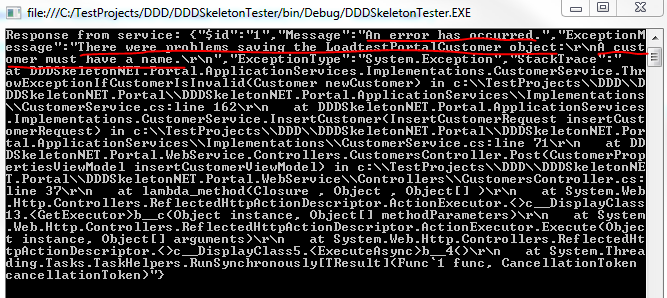
Let’s try something else: assign an empty string to the Name property of the CustomerPropertiesViewModel object in the tester app. We know that a customer must have a name so we’re expecting some trouble. Run the tester app and you should see an exception being thrown at this code line:

throw new Exception(brokenRulesBuilder.ToString());

…within CustomerService.cs. This is because the BrokenRules list of the Customer domain contains one broken rule. Let the code execute and you’ll see in the tester app that we received the correct exception message:

Validation exception from web service

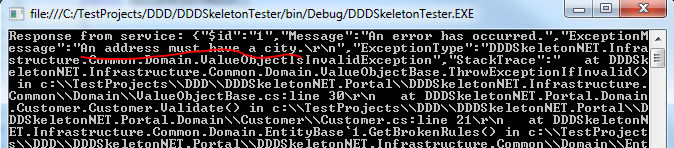
Now assign an empty string to the City property as we know that an Address must have a city. You’ll see a similar response:

Address must have a city validation exception

PUT

We’ll follow the same analogy as above in order to update a customer. Insert the following object into the tester app:

public class UpdateCustomerViewModel : CustomerPropertiesViewModel
{
	public int Id { get; set; }
}

Insert the following method into Program.cs:

private static void RunPutOperation()
{
	HttpRequestMessage requestMessage = new HttpRequestMessage(HttpMethod.Put, _serviceUri);
	requestMessage.Headers.ExpectContinue = false;
	UpdateCustomerViewModel updatedCustomer = new UpdateCustomerViewModel()
	{
		Id = 2
		, AddressLine1 = "Updated address line 1"
		, AddressLine2 = string.Empty
		, City = "Updated city"
		, Name = "Updated customer name"
		, PostalCode = "0988765"
	};

	string jsonInputs = JsonConvert.SerializeObject(updatedCustomer);
	requestMessage.Content = new StringContent(jsonInputs, Encoding.UTF8, "application/json");
	HttpClient httpClient = new HttpClient();
	httpClient.Timeout = new TimeSpan(0, 10, 0);
	Task<HttpResponseMessage> httpRequest = httpClient.SendAsync(requestMessage,
			HttpCompletionOption.ResponseContentRead, CancellationToken.None);
	HttpResponseMessage httpResponse = httpRequest.Result;
	HttpStatusCode statusCode = httpResponse.StatusCode;
	HttpContent responseContent = httpResponse.Content;
	if (responseContent != null)
	{
		Task<String> stringContentsTask = responseContent.ReadAsStringAsync();
		String stringContents = stringContentsTask.Result;
		Console.WriteLine("Response from service: " + stringContents);
	}
	Console.ReadKey();
}

This is almost identical to the Post operation method except that we set the http verb to PUT and we send a JSONified UpdateCustomerViewModel object to the service. You’ll notice that we want to update the customer with id = 2. Comment out the call to RunPostOperation() in Main and add a new call to RunPutOperation() instead. Set a breakpoint within the Put method in CustomersController of the skeleton web service. Jump through the code execution with F11 as before and follow along how the customer is found and updated. Refresh the browser to see the updated values of Customer with id = 2. Run the same test as above: set the customer name to an empty string and try to update the resource. The request should fail in the validation phase.

DELETE

The delete method is a lot simpler as we only need to send an id to the web Delete method of the web service:

private static void RunDeleteOperation()
{
	HttpRequestMessage requestMessage = new HttpRequestMessage(HttpMethod.Delete, string.Concat(_serviceUri, "/3"));
	requestMessage.Headers.ExpectContinue = false;
	HttpClient httpClient = new HttpClient();
	httpClient.Timeout = new TimeSpan(0, 10, 0);
	Task<HttpResponseMessage> httpRequest = httpClient.SendAsync(requestMessage,
			HttpCompletionOption.ResponseContentRead, CancellationToken.None);
	HttpResponseMessage httpResponse = httpRequest.Result;
	HttpStatusCode statusCode = httpResponse.StatusCode;
	HttpContent responseContent = httpResponse.Content;
	if (responseContent != null)
	{
		Task<String> stringContentsTask = responseContent.ReadAsStringAsync();
		String stringContents = stringContentsTask.Result;
		Console.WriteLine("Response from service: " + stringContents);
	}
	Console.ReadKey();
}

You’ll see that we set the http method to DELETE and extended to service Uri to show that we’re talking about customer #3.

Set a breakpoint within the Delete method in CustomersController.cs and as before step through the code execution line by line to see how the deletion is registered and persisted by IUnitOfWork.

Analysis and conclusions

That actually completes the first version of the skeleton project. Let’s see if we’re doing any better than the tightly coupled solution of the first installment of this series.

Dependency graph

If you recall from the first part of this series then the greatest criticism against the technology-driven layered application was that all layers depended on the repository layer and that EF-related objects permeated the rest of the application.

We’ll now look at an updated dependency graph. Before we do that there’s a special group of dependency in the skeleton app that slightly distorts the picture: the web layer references all other layers for the sake of StructureMap. StructureMap needs some hints as to where to look for implementations so we had to set a library reference to all other layers. This is not part of any business logic so a true dependency graph should, I think, not consider this set of links. If you don’t like this coupling then it’s perfectly reasonable to create a separate very thin layer for StructureMap and let that layer reference infra, repo, domains and services.

If we start from the top then we see that the web layer talks to the service layer through the ICustomerService interface. The ICustomerService interface uses RequestResponse objects to communicate with the outside world. Any implementation of ICustomerService will communicate through those objects so their use within CustomersController is acceptable as well. The Service doesn’t spit out Customer domain objects directly. Instead it wraps CustomerViewModels that are wrapped within the corresponding GetCustomersResponse object. Therefore I think we can conclude that the Web layer only depends on the service layer and that this coupling is fairly loose.

The application service layer has a reference to the Infrastructure layer – through the IUnitOfWork interface – and the Domain layer. In a full-blown project there will be more links to the Infrastructure layer – logging, caching, authentication etc. – but as longs as you hide those concerns behind abstractions you’ll be fine. The Customer repository is only propagated in the form of an interface – ICustomerRepository. Otherwise the domain objects are allowed to bubble up to the Service layer as they are the central elements of the application.

The Domain layer has a dependency on the Infrastructure layer through abstractions such as EntityBase, IAggregateRoot and IRepository. That’s all fine and good. The only coupling that’s tighter than these is the BusinessRule object where we construct a new BusinessRule in the CustomerBusinessRule class. In retrospect it may have been a better idea to have an abstract BusinessRule class in the infrastructure layer with concrete implementations of it in the domain layer.

The repository layer has a reference to the Infrastructure layer – again through abstractions such as IAggregateRoot and IUnitOfWorkRepository – and the Domain layer. Notice that we changed the direction of the dependency compared to the how-not-to-do mini-project of the first post in this series: the domain layer does not depend on the repository but the repository depends on the domain layer.

Here’s the updated dependency graph:

DDD improved dependency graph

I think the most significant change compared to where we started is that no single layer is directly or indirectly dependent on the concrete repository layer. You can test and unload the project from the solution – right-click, select Unload Project. There will be a broken reference in the Web layer that only exists for the sake of StructureMap, but otherwise the solution survives this “amputation”. We have successfully hidden the most technology-driven layer behind an abstraction that can be replaced at ease. You need to implement the IUnitOfWork and IUnitOfWorkRepository interfaces and you should be fine. You can then instruct StructureMap to use the new implementation instead. You can even switch between two or more different implementations to test how the different technologies work before you go for a specific one in your project. Of course writing those implementations may not be a trivial task but switching from one technology to another will certainly be.

Another important change is that the domain layer is now truly the central one in the solution. The services and data access layers directly reference it. The UI layer depends on it indirectly through the service layer.

That’s all folks. I hope you have learned new things and can use this skeleton solution in some way in your own project.

The project has been extended. Read the first extension here.

View the list of posts on Architecture and Patterns here.

A model .NET web service based on Domain Driven Design Part 9: the Web layer

Introduction

We’re now ready to build the ultimate consumer of the application, the web layer. As we said before this layer can be any type of presentation layer: MVC, a web service interface, WPF, a console app, you name it. The backend design that we’ve built up so far should be flexible enough to support either a relatively simple switch of UI type or the addition of new types. You may want to have several multiple entry points into your business app so it’s good if they can rely on the same foundations. Otherwise you may need to build different apps just to support different presentation methods, which is far from optimal.

Here we’ll build a web service layer powered by Web API. If you don’t know what it is you can read about it on its official homepage. Here comes a summary:

In short the Web API is a technology by Microsoft to build HTTP-based web services. Web Api uses the standard RESTful way of building a web service with no SOAP overhead; only plain old HTTP messages are exchanged between the client and the server. The client sends a normal HTTP request to a web service with some URI and receives a HTTP response in return.

The technology builds heavily on MVC: it has models and controllers just like a normal MVC web site. It lacks any views of course as a web service provides responses in JSON, XML, plain text etc., not HTML. There are some other important differences:

  • The actions in the controllers do not return Action Results: they can return any string based values and HttpResponse objects
  • The controllers derive from the ApiController class, not the Controller class as in standard MVC

The routing is somewhat different:

  • In standard MS MVC the default routing may look as follows: controller/action/parameters
  • In Web API the ‘action’ is omitted by default: Actions will be routed based on the HTTP verb of the incoming HTTP message: GET, POST, PUT, DELETE, HEAD, OPTIONS
  • The action method signatures follow this convention: Get(), Get(int id), Post(), Put(), Delete(int id)
  • As long as you keep to this basic convention the routing will work without changing the routing in WebApiConfig.cs in the App_Start folder

Routing example: say that the client wants to get data on a customer with id 23. They will send a GET request to our web service with the following URI: http://www.api.com/customers/21. The Web API routing engine will translate this into a Get(int id) method within the controller called CustomersController. If however they want to delete this customer then he will send a DELETE request to the same URI and the routing engine will try to find a Delete(int id) method in CustomersController.

In other words: the supported HTTP verbs have a corresponding method in the correct controller. If a resource does not support a specific verb, e.g. a Customer cannot be deleted, then just omit the Delete(int id) method in the CustomersController and Web API will return a HTTP exception message saying that there’s no suitable method.

The basic convention allows some freedom of naming your action methods. Get, Post etc. can be named Get[resource], Post[resource], e.g. GetCustomer, PostCustomer, DeleteCustomer and the routing will still work. If for any reason you don’t like the default naming conventions you can still use the standard HttpGet, HttpPost type of attributes known from MS MVC.

I won’t concentrate on the details of Web API in this post. If there’s something you don’t understand along the way then make sure to check out the link provided above.

We’ll also see how the different dependencies can be injected into the services, repositories and other items that are dependent upon abstractions. So far we have diligently given room for injecting dependencies according to the letter ‘D‘ in SOLID, like here:

public CustomerService(ICustomerRepository customerRepository, IUnitOfWork unitOfWork)

However, at some point we’ll need to inject these dependencies, right? We could follow poor man’s DI by constructing a new CustomerRepository and a new InMemoryUnitOfWork object as they implement the necessary ICustomerRepository and IUnitOfWork interfaces. However, modern applications use one of the many available Inversion-of-Control containers to take care of these plumbing tasks. In our case we’ll use StructureMap which is quite common to and works very well with .NET projects. IoCs can be difficult to grasp at first as they seem to do a lot of magic, but don’t worry much about them. StructureMap can do a lot for you without having to dig deep into the details on how it works as it’s easy to install and get started with using NuGet.

The web layer

Add a new Web API project by taking the following steps.

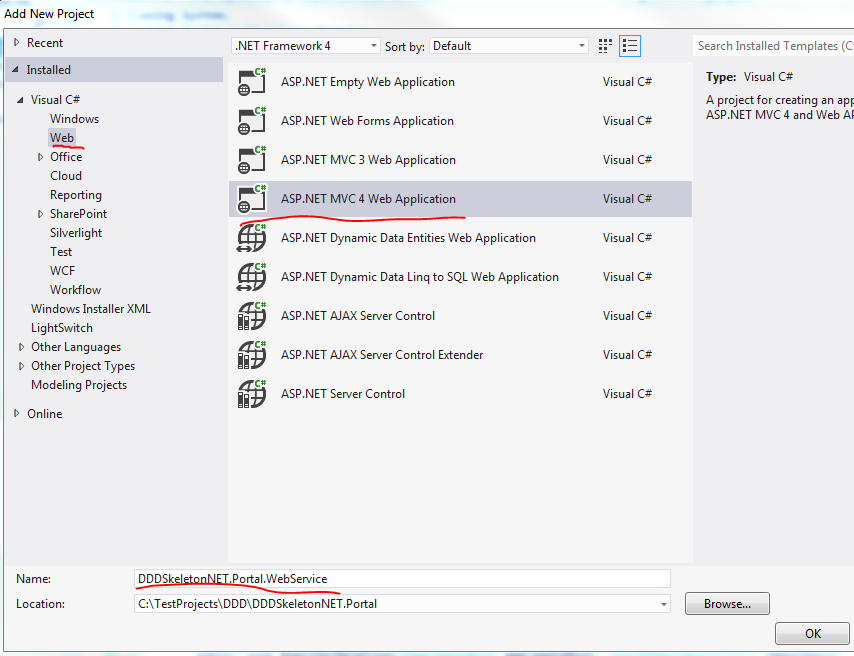
1. Add new project

2. Select Web/MVC 4 web application:

Add new MVC project

Call it DDDSkeletonNET.Portal.WebService.

3. Select Web API in the Project template:
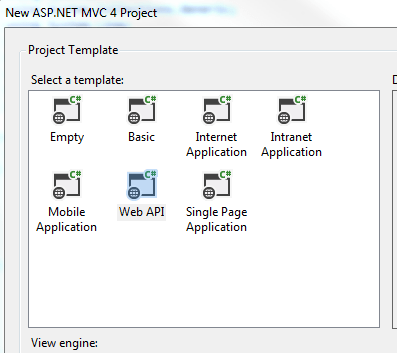
Web API in project template

The result is actually a mix between an MVC and a Web API project. Take a look into the Controllers folder. It includes a HomeController which derives from the MVC Controller class and a ValuesController which derives from the Web API ApiController. The project also includes images, views and routing related to MVC. The idea is that MVC views can also consume Web API controllers. Ajax calls can also be directed towards Web API controllers. However, our goal is to have a pure web service layer so let’s clean this up a little:

  • Delete the Content folder
  • Delete the Images folder
  • Delete the Views folder
  • Delete the Scripts folder
  • Delete both controllers from the Controllers folder
  • Delete favicon.ico
  • Delete BundleConfig.cs from the App_Start folder
  • Delete RouteConfig.cs from the App_Start folder
  • Delete the Models folder
  • Delete the Areas folder
  • In WebApiConfig.Register locate the routeTemplate parameter. It says “api/…” by default. Remove the “api/” bit so that it says {controller}/{id}
  • Locate Global.asax.cs. It is trying to call RouteConfig and BundleConfig – remove those calls

The WebService layer should be very slim at this point with only a handful of folders and files. Right-click the Controllers folder and add a new empty API controller called CustomersController:

Add api controller to web api layer

We’ll need to have an ICustomerService object in the CustomersController so add a reference to the ApplicationServices layer.

Add the following private backing field and constructor to CustomersController:

private readonly ICustomerService _customerService;

public CustomersController(ICustomerService customerService)
{
	if (customerService == null) throw new ArgumentNullException("CustomerService in CustomersController");
	_customerService = customerService;
}

We’ll want to return Http messages only. Http responses are represented by the HttpResponseMessage object. As all our contoller methods will return a HttpResponseMessage we can assign an extension method to build these messages. Insert a folder called Helpers in the web layer. Add the following extension method to it:

public static class HttpResponseBuilder
{
	public static HttpResponseMessage BuildResponse(this HttpRequestMessage requestMessage, ServiceResponseBase baseResponse)
	{
		HttpStatusCode statusCode = HttpStatusCode.OK;
		if (baseResponse.Exception != null)
		{
			statusCode = baseResponse.Exception.ConvertToHttpStatusCode();
			HttpResponseMessage message = new HttpResponseMessage(statusCode);
			message.Content = new StringContent(baseResponse.Exception.Message);
			throw new HttpResponseException(message);
		}
		return requestMessage.CreateResponse<ServiceResponseBase>(statusCode, baseResponse);
	}
}

We’re extending the HttpRequestMessage object which represents the http request coming to our web service. We build a response based on the Response we received from the service layer. We assume that the http status is OK (200) but if there’s been any exception then we adjust that status and throw a HttpResponseException exception. Make sure to set the namespace to DDDSkeletonNET.Portal so that the extension is visible anywhere in the project without having to add using statements.

ConvertToHttpStatusCode() is also an extension method. Add another class called ExceptionDictionary to the Helpers folder:

public static class ExceptionDictionary
{
	public static HttpStatusCode ConvertToHttpStatusCode(this Exception exception)
	{
		Dictionary<Type, HttpStatusCode> dict = GetExceptionDictionary();
		if (dict.ContainsKey(exception.GetType()))
		{
			return dict[exception.GetType()];
		}
		return dict[typeof(Exception)];
	}

	private static Dictionary<Type, HttpStatusCode> GetExceptionDictionary()
	{
		Dictionary<Type, HttpStatusCode> dict = new Dictionary<Type, HttpStatusCode>();
		dict[typeof(ResourceNotFoundException)] = HttpStatusCode.NotFound;
		dict[typeof(Exception)] = HttpStatusCode.InternalServerError;
		return dict;
	}
}

Here we maintain a dictionary of Exception/HttpStatusCode pairs. It would be nicer of course to read this directly from the Exception object possibly through an Adapter but this solution is OK for now.

Let’s implement the get-all-customers method in CustomersController. So we’ll need a Get method without any parameters that corresponds to the /customers route. That should be as easy as the following:

public HttpResponseMessage Get()
{
	ServiceResponseBase resp = _customerService.GetAllCustomers();
	return Request.BuildResponse(resp);
}

We ask the service to retrieve all customers and convert that response into a HttpResponseMessage object.

We cannot yet use this controller as ICustomerService is null, there’s no concrete type behind it yet within the controller. This is where StructureMap enters the scene. Open the Manage NuGet Packages window and install the following package:
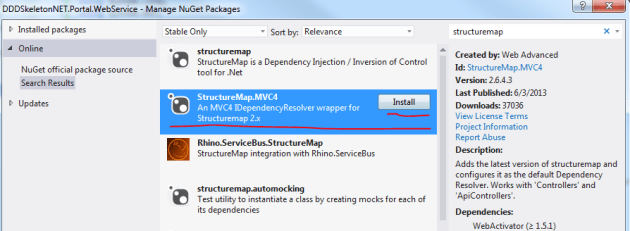
Install StructureMap IoC in web api layer

The installer adds a couple of new files to the web service layer:

  • 3 files in the DependencyResolution folder
  • StructuremapMvc.cs in the App_Start folder

The only file we’ll consider in any detail is IoC.cs in the DependencyResolution folder. Don’t worry about the rest, they are not important to our main discussion. Here’s a short summary:

StructuremapMvc was auto-generated by the StructureMap NuGet package and it can safely be ignored, it simply works.

DependencyResolution folder: IoC.cs is important to understand, the other auto-generated classes can be ignored. In IoC.cs we declare which concrete types we want StructureMap to inject in place of the abstractions. If you are not familiar with IoC containers then you may wonder how ICustomerService is injected in CustomerController and how ICustomerRepository is injected in CustomerService. This is achieved automagically through StructureMap and IoC.cs is where we instruct it where to look for concrete types and in special cases tell it explicitly which concrete type to take.

StructureMap follows a simple built-in naming convention: if it encounters an interface starting with an ‘I’ it will look for a concrete type with the same name without the ‘I’ in front. Example: if it sees that an ICustomerService interface is needed then it will try to fetch a CustomerService object. This is expressed by the scan.WithDefaultConventions() call. It is easy to register new naming conventions for StructureMap if necessary – let me know in the comment section if you need any code sample.

We also need to tell StructureMap where to look for concrete types. It won’t automatically find the implementations of our abstractions, we need to give it some hints. We can declare this in the calls to scan.AssemblyContainingType of type T. Example: scan.AssemblyContainingType() of type CustomerRepository means that StructureMap should go and look in the assembly which contains the CustomerRepository object. Note that this does not mean that CustomerRepository must be injected at all times. It simply says that StructureMap will look in that assembly for concrete implementations of an abstraction. I could have picked any object from that assembly, it doesn’t matter. So these calls tell StructureMap to look in each assembly that belong to the same solution.

There are cases where the standard naming convention is not enough. Then you can explicitly tell StructureMap which concrete type to inject. Example: x.For()[abstraction].Use()[implementation]; means that if StructureMap sees a dependency on ‘abstraction’ then it should inject a new ‘implementation’ type.

ObjectFactory.AssertConfigurationIsValid() will make sure that an exception is thrown during project start-up if StructureMap sees a dependency for which it cannot find any suitable implementation.

Update the Initialize() method in IoC.cs to the following:

public static IContainer Initialize()
{
	ObjectFactory.Initialize(x =>
	{
        	x.Scan(scan =>
		{
	        	scan.TheCallingAssembly();
			scan.AssemblyContainingType<ICustomerRepository>();
		        scan.AssemblyContainingType<CustomerRepository>();
			scan.AssemblyContainingType<ICustomerService>();
			scan.AssemblyContainingType<BusinessRule>();
			scan.WithDefaultConventions();
		});
		x.For<IUnitOfWork>().Use<InMemoryUnitOfWork>();
		x.For<IObjectContextFactory>().Use<LazySingletonObjectContextFactory>();
	});
	ObjectFactory.AssertConfigurationIsValid();
	return ObjectFactory.Container;
}

You’ll need to reference all other layers from the Web layer for this to work. We’re telling StructureMap to scan all other assemblies by declaring all types that are contained in those assemblies – again, I could have picked ANY type from the other projects, so don’t get hung up on questions like “Why did he choose BusinessRule?”. These calls will make sure that the correct implementations will be found based on the default naming convention mentioned above. There are two cases where this convention is not enough: IUnitOfWork and IObjectContextFactory. Here we use the For and Use extension methods to declare exactly what we need. Finally we want to assert that all implementations have been found. You can test it for yourself: comment out the line on IUnitOfWork, start the application – make sure to set the web layer as the startup project – and you should get a long exception message, here’s the gist of it:

StructureMap.Exceptions.StructureMapConfigurationException was unhandled by user code
No Default Instance defined for PluginFamily DDDSkeletonNET.Infrastructure.Common.UnitOfWork.IUnitOfWork

StructureMap couldn’t resolve the IUnitOfWork dependency so it threw an error.

Open the properties window of the web project and specify the route to customers:

Specify starting route in properties window

Set a breakpoint at this line in CustomersController:

ServiceResponseBase resp = _customerService.GetAllCustomers();

…and press F5. Execution should stop at the break point. Hover over _customerService with the mouse to check the status of the dependency. You’ll see it is not null, so StructureMap has correctly found and constructed a CustomerService object for us. Step through the code with F11 to see how it is all connected. You’ll see that all dependencies have been resolved correctly.

However, at the end of the loop, when the 3 customers that were retrieved from memory should be presented, we get the following exception:

The ‘ObjectContent`1’ type failed to serialize the response body for content type ‘application/xml; charset=utf-8’.

Open WebApiConfig and add the following lines of code to the Register method:

var json = config.Formatters.JsonFormatter;
json.SerializerSettings.PreserveReferencesHandling = Newtonsoft.Json.PreserveReferencesHandling.Objects;
config.Formatters.Remove(config.Formatters.XmlFormatter);

This will make sure that we return our responses in JSON format.

Re-run the app and you should see some JSON on your browser:

Json response from get all customers

Yaaay, after much hard work we’re getting somewhere at last! How can we retrieve a customer by id? Add the following overloaded Get method to the Customers controller:

public HttpResponseMessage Get(int id)
{
	ServiceResponseBase resp = _customerService.GetCustomer(new GetCustomerRequest(id));
	return Request.BuildResponse(resp);
}

Run the application and enter the following route in the URL window: customers/1. You should see that the customer with id 1 is returned:

Get one customer JSON response

Now try this with an ID that you know does not exist, such as customers/5. An exception will be thrown in the application. Let the execution continue and you should see the following exception message in your web browser:
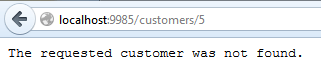
Resource not found JSON

This is the message we set in the code if you recall.

What if we want to format the data slightly differently? It’s good that we have a customer view model and request-response objects where we are free to change what we want without modifying the corresponding domain object. Open the application services layer and add a reference to the System.Runtime.Serialization library. Modify the CustomerViewModel object as follows:

[DataContract]
public class CustomerViewModel
{
	[DataMember(Name="Customer name")]
	public string Name { get; set; }
	[DataMember(Name="Address")]
	public string AddressLine1 { get; set; }
	public string AddressLine2 { get; set; }
	[DataMember(Name="City")]
	public string City { get; set; }
	[DataMember(Name="Postal code")]
	public string PostalCode { get; set; }
	[DataMember(Name="Customer id")]
	public int Id { get; set; }
}

Re-run the application and navigate to customers/1. You should see the updated property names:

Data member and data contract attribute

You can decorate the Response objects as well with these attributes.

This was a little change in the property names only but feel free to add extra formats to the view model, it’s perfectly fine.

We’re missing the insert, update and delete methods. Let’s implement them here and we’ll test them in the next post.

As far as I’ve seen there’s a bit of confusion over how the web methods PUT and POST are supposed to be used in web requests. DELETE is clear, we want to delete a resource. GET is also straightforward. However, PUT and POST are still heavily debated. This post is not the time and place to decide once and for all what their roles are, so I’ll take the following approach:

  • POST: insert a resource
  • PUT: update a resource

Here come the implementations:

public HttpResponseMessage Post(CustomerPropertiesViewModel insertCustomerViewModel)
		{
			InsertCustomerResponse insertCustomerResponse = _customerService.InsertCustomer(new InsertCustomerRequest() { CustomerProperties = insertCustomerViewModel });
			return Request.BuildResponse(insertCustomerResponse);
		}

public HttpResponseMessage Put(UpdateCustomerViewModel updateCustomerViewModel)
{
	UpdateCustomerRequest req =
		new UpdateCustomerRequest(updateCustomerViewModel.Id)
		{
			CustomerProperties = new CustomerPropertiesViewModel()
			{
				AddressLine1 = updateCustomerViewModel.AddressLine1
				,AddressLine2 = updateCustomerViewModel.AddressLine2
				,City = updateCustomerViewModel.City
				,Name = updateCustomerViewModel.Name
				,PostalCode = updateCustomerViewModel.PostalCode
			}
		};
	UpdateCustomerResponse updateCustomerResponse =	_customerService.UpdateCustomer(req);
	return Request.BuildResponse(updateCustomerResponse);
}

public HttpResponseMessage Delete(int id)
{
	DeleteCustomerResponse deleteCustomerResponse = _customerService.DeleteCustomer(new DeleteCustomerRequest(id));
	return Request.BuildResponse(deleteCustomerResponse);
}

…where UpdateCustomerViewModel derives from CustomerPropertiesViewModel:

public class UpdateCustomerViewModel : CustomerPropertiesViewModel
{
	public int Id { get; set; }
}

We’ll test these in the next post where we’ll also draw the conclusions of what we have achieved to finish up the series.

View the list of posts on Architecture and Patterns here.

Elliot Balynn's Blog

A directory of wonderful thoughts

Software Engineering

Web development

Disparate Opinions

Various tidbits

chsakell's Blog

WEB APPLICATION DEVELOPMENT TUTORIALS WITH OPEN-SOURCE PROJECTS

Once Upon a Camayoc

ARCHIVED: Bite-size insight on Cyber Security for the not too technical.