A model SOA application in .NET Part 6: the client proxy

Introduction

In the previous post we got as far as creating a service layer. Now it’s time to build a client proxy on that, i.e. a layer that the external clients of the service can send their requests to. We’ll use the the Web API technology to build this layer. If you’ve read through the other software architecture series on this blog you’ll see that Web API is very dear to me as it’s very simple to set up and use.

The client proxy

In this section I’ll refer a lot to this post in the series on the DDD skeleton project. Make sure you get familiar with it as it contains a lot of information that’s relevant to this post. In that post I show you how to add a web API project and transform it so that it only contains the web service relevant parts. We don’t want to deal with views, JS files, images etc. in a web service project. I also go through the basics of how to install and use the IoC called StructureMap in an MVC-based project. It will be responsible for resolving dependencies such as the ones in this constructor:

public ProductService(IMessageRepositoryFactory messageRepositoryFactory, IProductRepositoryFactory              productRepositoryFactory)

Add a new MVC4 web application called SoaIntroNet.WebProxy to the solution. Make sure to select the Web API template in the MVC4 Project Template window. Add a reference to all other layers – this is necessary for the StructureMap IoC container as we’ll see in a bit.

Next get rid of the standard MVC4 web application components. Again, consult the above link to see how it can be done. Install StructureMap from NuGet. You should have the following simplified structure of the web client project:
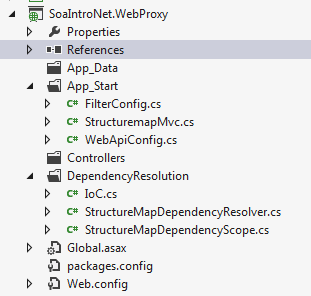
Web project structure after changes

Add the following section to the Register method of WebApiConfig.cs in the App_Start folder to make sure that we respond with JSON:

var json = config.Formatters.JsonFormatter;
json.SerializerSettings.PreserveReferencesHandling = Newtonsoft.Json.PreserveReferencesHandling.Objects;			
config.Formatters.Remove(config.Formatters.XmlFormatter);

In the same method you’ll see that the API calls are routed to api/controller/id by default. Remove the ‘api’ bit as follows:

config.Routes.MapHttpRoute(
	name: "DefaultApi",
	routeTemplate: "{controller}/{id}",
	defaults: new { id = RouteParameter.Optional }
	);	

Add a folder called Helpers to the web layer. Add the following two classes with extension methods:

public static class ExceptionDictionary
{
	public static HttpStatusCode ConvertToHttpStatusCode(this Exception exception)
	{
		Dictionary<Type, HttpStatusCode> dict = GetExceptionDictionary();
		if (dict.ContainsKey(exception.GetType()))
		{
			return dict[exception.GetType()];
		}
		return dict[typeof(Exception)];
	}

	private static Dictionary<Type, HttpStatusCode> GetExceptionDictionary()
	{
		Dictionary<Type, HttpStatusCode> dict = new Dictionary<Type, HttpStatusCode>();
		dict[typeof(ResourceNotFoundException)] = HttpStatusCode.NotFound;
                dict[typeof(LimitedAvailabilityException)] = HttpStatusCode.InternalServerError;
		dict[typeof(Exception)] = HttpStatusCode.InternalServerError;
		return dict;
	}
}	
public static class HttpResponseBuilder
{	
	public static HttpResponseMessage BuildResponse(this HttpRequestMessage requestMessage, ServiceResponseBase baseResponse)
	{
		HttpStatusCode statusCode = HttpStatusCode.OK;
		if (baseResponse.Exception != null)
		{
			statusCode = baseResponse.Exception.ConvertToHttpStatusCode();
			HttpResponseMessage message = new HttpResponseMessage(statusCode);
			message.Content = new StringContent(baseResponse.Exception.Message);
			throw new HttpResponseException(message);
		}
		return requestMessage.CreateResponse<ServiceResponseBase>(statusCode, baseResponse);
	}
}

Set the namespace of both classes to SoaIntroNet.WebProxy so that they are available from everywhere in the Web project without having to set using statements.

Add a new Web API controller in the Controllers folder. Name it ReservationController and make sure to select the Empty Api controller template in the Add Controller window. You’ll see that the controller derives from ApiController. The controller will need the services of the IProductService interface so add the following private field and controller:

private readonly IProductService _productService;

public ReservationController(IProductService productService)
{
	if (productService == null) throw new ArgumentNullException("IProductService");
	_productService = productService;
}

If you are familiar with the SOLID principles then you’ll understand why it’s important to inject an abstract dependency through the constructor this way. If not, then start here.

The client will need to send a POST request with the parameters needed to build a ReserveProductRequest object. This is as simple as inserting a Post() method in the controller which accepts a ReserveProductRequest object. The implementation is equally simple: we delegate the actual work to the product service:

ServiceResponseBase response = _productService.ReserveProduct(reserveProductRequest);
return Request.BuildResponse(response);

Insert another controller in the Controllers folder called PurchaseController. It too will depend on the product service so insert the following private field and constructor:

private readonly IProductService _productService;

public PurchaseController(IProductService productService)
{
	if (productService == null) throw new ArgumentNullException("IProductService");
	_productService = productService;
}

The product purchase will also be a POST operation:

public HttpResponseMessage Post(PurchaseProductRequest purchaseProductRequest)
{
	purchaseProductRequest.CorrelationId = purchaseProductRequest.ReservationId;
	ServiceResponseBase response = _productService.PurchaseProduct(purchaseProductRequest);
	return Request.BuildResponse(response);
}

The only major difference between the the two Post method structures is that here we set the correlation ID ourselves. It is set to the reservation ID which is unique and it makes sense to use as the message correlation ID to check if we have fulfilled the request. Otherwise the client could provide just any correlation ID so we cannot trust that input.

Finally we need to instruct StructureMap to fetch the correct dependencies. Locate IoC.cs in the DependencyResolution folder. Make sure it looks as follows:

public static IContainer Initialize()
{
	ObjectFactory.Initialize(x =>
				{
					x.Scan(scan =>
							{
								scan.TheCallingAssembly();
								scan.AssemblyContainingType<IProductService>();
								scan.AssemblyContainingType<IMessageRepository>();
								scan.WithDefaultConventions();
							});
					x.For<IMessageRepositoryFactory>().Use<LazySingletonMessageRepositoryFactory>();
					x.For<IProductRepositoryFactory>().Use<LazySingletonProductRepositoryFactory>();
				});
	ObjectFactory.AssertConfigurationIsValid();
	return ObjectFactory.Container;
}

We tell IoC where to look for concrete implementations and which concrete types to take in those cases where the standard ‘I’ naming convention doesn’t apply: (I)Service => Service. For more details consult the post I hinted at in the beginning of this post.

This actually completes the client proxy layer. In the next post we’ll test the proxy by building a console application client.

View the list of posts on Architecture and Patterns here.
7 ways to start a Task in .NET C#

New threads can be started using the Task Programming Library in .NET in – at last – 5 different ways.

You’ll first need to add the following using statement:

using System.Threading.Tasks;

The most direct way

Task.Factory.StartNew(() => {Console.WriteLine("Hello Task library!"); });

Using Action

Task task = new Task(new Action(PrintMessage));
task.Start();

…where PrintMessage is a method:

private void PrintMessage()
{
    Console.WriteLine("Hello Task library!");
}

Using a delegate

Task task = new Task(delegate { PrintMessage(); });
task.Start();

Lambda and named method

Task task = new Task( () => PrintMessage() );
task.Start();

Lambda and anonymous method

Task task = new Task( () => { PrintMessage(); } );
task.Start();

Using Task.Run in .NET4.5

public async Task DoWork()
{
	await Task.Run(() => PrintMessage());
}

Using Task.FromResult in .NET4.5 to return a result from a Task

public async Task DoWork()
{
	int res = await Task.FromResult<int>(GetSum(4, 5));	
}

private int GetSum(int a, int b)
{
	return a + b;
}

You cannot start a task that has already completed. If you need to run the same task you’ll need to initialise it again.

View the list of posts on the Task Parallel Library here.

A model SOA application in .NET Part 5: the service layer continued

Introduction

In the previous post we started implementing the IProductService interface. We got as far as declaring a couple of private fields and a constructor. Here we’ll implement the ReserveProduct and PurchaseProduct methods.

The concrete service continued

Open the project we’ve been working on in this series and locate ProductService.cs. The implemented ReserveProduct method looks as follows:

public ProductReservationResponse ReserveProduct(ReserveProductRequest productReservationRequest)
{
	ProductReservationResponse reserveProductResponse = new ProductReservationResponse();
	try
	{
		Product product = _productRepository.FindBy(Guid.Parse(productReservationRequest.ProductId));
		if (product != null)
		{
			ProductReservation productReservation = null;
			if (product.CanReserveProduct(productReservationRequest.ProductQuantity))
			{
				productReservation = product.Reserve(productReservationRequest.ProductQuantity);
				_productRepository.Save(product);
				reserveProductResponse.ProductId = productReservation.Product.ID.ToString();
				reserveProductResponse.Expiration = productReservation.Expiry;
				reserveProductResponse.ProductName = productReservation.Product.Name;
				reserveProductResponse.ProductQuantity = productReservation.Quantity;
				reserveProductResponse.ReservationId = productReservation.Id.ToString();
			}
			else
			{
				int availableAllocation = product.Available();
				reserveProductResponse.Exception = new LimitedAvailabilityException(string.Concat(&quot;There are only &quot;, availableAllocation, &quot; pieces of this product left.&quot;));
			}
		}
		else
		{
			throw new ResourceNotFoundException(string.Concat(&quot;No product with id &quot;, productReservationRequest.ProductId, &quot;, was found.&quot;));
		}
	}
	catch (Exception ex)
	{
		reserveProductResponse.Exception = ex;
	}
	return reserveProductResponse;
}

First we let the product repository locate the requested product for us. If it doesn’t exist then we throw an exception with an appropriate message. We check using the CanReserveProduct method whether there are enough products left. If not then we let the client know in an exception message. Otherwise we reserve the product, save the current reservation status and populate the reservation response using the product reservation returned by the Save method. We wrap the entire code in a try-catch block to make sure that we catch any exception thrown during the process.

Here’s the implemented PurchaseProduct method:

public PurchaseProductResponse PurchaseProduct(PurchaseProductRequest productPurchaseRequest)
{
	PurchaseProductResponse purchaseProductResponse = new PurchaseProductResponse();
	try
	{
		if (_messageRepository.IsUniqueRequest(productPurchaseRequest.CorrelationId))
		{					
			Product product = _productRepository.FindBy(Guid.Parse(productPurchaseRequest.ProductId));
			if (product != null)
			{
				ProductPurchase productPurchase = null;
				if (product.ReservationIdValid(Guid.Parse(productPurchaseRequest.ReservationId)))
				{
					productPurchase = product.ConfirmPurchaseWith(Guid.Parse(productPurchaseRequest.ReservationId));
					_productRepository.Save(product);
					purchaseProductResponse.ProductId = productPurchase.Product.ID.ToString();
					purchaseProductResponse.PurchaseId = productPurchase.Id.ToString();
					purchaseProductResponse.ProductQuantity = productPurchase.ProductQuantity;
					purchaseProductResponse.ProductName = productPurchase.Product.Name;
				}
				else
				{
					throw new ResourceNotFoundException(string.Concat(&quot;Invalid or expired reservation id: &quot;, productPurchaseRequest.ReservationId));
				}
				_messageRepository.SaveResponse&lt;PurchaseProductResponse&gt;(productPurchaseRequest.CorrelationId, purchaseProductResponse);
			}
			else
			{
				throw new ResourceNotFoundException(string.Concat(&quot;No product with id &quot;, productPurchaseRequest.ProductId, &quot;, was found.&quot;));
			}
		}
		else
		{
			purchaseProductResponse = _messageRepository.RetrieveResponseFor&lt;PurchaseProductResponse&gt;(productPurchaseRequest.CorrelationId);
		}
	}
	catch (Exception ex)
	{
		purchaseProductResponse.Exception = ex;
	}
	return purchaseProductResponse;
}

If you recall from the first part of this series we talked about the Idempotent pattern. The IsUniqueRequest is an application of the pattern. We check in the message repository if a message with that correlation ID has been processed before. If yes, then we return the response stored in the repository to avoid making the same purchase again. This is not the only possible solution of the pattern, but only one of the viable ones. Probably the domain layer could have a similar logic as well, but I think this is more robust.

If this is a new request then we locate the product just like in the ReserveProduct method and throw an exception if the product is not found. If the product exists then we need to check if the reservation can be made using the reservation ID of the incoming message. If not, then the reservation either doesn’t exist or has expired and a corresponding exception is thrown. Otherwise we confirm the purchase, save the product and dress up the product purchase response using the product purchase object returned by the ConfirmPurchaseWith method. Just like above, we wrap the code within a try-catch block.

This completes the service layer of the SOA project. We’ll look at the web client in the next post. The web client will be a web service client based on the Web API technology so that we don’t need to waste time and energy on presentation stuff such as HTML and CSS.

View the list of posts on Architecture and Patterns here.
A model SOA application in .NET Part 4: the service layer part 1

Introduction

Now that we’re done with the domain and repository layers it’s time to build the service layer. If you are not familiar with the purposes of the service layer then make sure to read this post. I’ll employ the same Request-Response pattern here.

The service layer

Open the application we’ve been working on and add a new C# class library called SoaIntroNet.Service. Remove Class1.cs and make a reference to both the Domain and the Repository layers. Insert a new folder called Responses and in it a base class for all service responses:

public abstract class ServiceResponseBase
{
	public ServiceResponseBase()
	{
		this.Exception = null;
	}

        public Exception Exception { get; set; }
}

The clients will be able to purchase and reserve products. We put the result of the purchasing and reservation processes into the following two Response objects:

public class PurchaseProductResponse : ServiceResponseBase
{
	public string PurchaseId { get; set; }
	public string ProductName { get; set; }
	public string ProductId { get; set; }
	public int ProductQuantity { get; set; }
}
public class ProductReservationResponse : ServiceResponseBase
{
	public string ReservationId { get; set; }
	public DateTime Expiration { get; set; }
	public string ProductId { get; set; }
	public string ProductName { get; set; }
	public int ProductQuantity { get; set; }
}

Nothing really fancy up to this point I hope. In order to make a purchase or reservation the corresponding Request objects must be provided by the client. Add a new folder called Requests and in it the following two requests:

public class PurchaseProductRequest
{
	public string CorrelationId { get; set; }
	public string ReservationId { get; set; }
	public string ProductId { get; set; }
}
public class ReserveProductRequest
{
	public string ProductId { get; set; }
	public int ProductQuantity { get; set; }
}

The only somewhat unexpected property is the correlation id. Recall its purpose from the opening post in this series: ensure that a state-changing operation is not carried out more than once, e.g. purchasing the same tickets twice.

Add a folder called Exceptions and insert the following two custom exceptions:

public class ResourceNotFoundException : Exception
{
	public ResourceNotFoundException(string message)
		: base(message)
	{ }

	public ResourceNotFoundException()
		: base(&quot;The requested resource was not found.&quot;)
	{ }
}
public class LimitedAvailabilityException : Exception
{
	public LimitedAvailabilityException(string message)
		: base(message)
	{}

	public LimitedAvailabilityException()
		: base(&quot;There are not enough products left to fulfil your request.&quot;)
	{}
}

As the names imply we’ll throw these exception if some requested resource could not be located or that the required amount in the request could not be fulfilled.

Add the following service interface to the Service layer:

public interface IProductService
{
	ProductReservationResponse ReserveProduct(ReserveProductRequest productReservationRequest);
	PurchaseProductResponse PurchaseProduct(PurchaseProductRequest productPurchaseRequest);
}

This represents our service contract. We state that our service will be able to handle product purchases and reservations and they need the necessary Request objects in order to fulfil their functions. The concrete implementation – which we’ll look at in a bit – is an unimportant implementation detail from the client’s point of view.

However, before we do that we’ll need to revisit the repository layer and make room for saving and retrieving the messaging history based on the correlation ID. These messages are not part of our domain so we won’t bother with setting up a separate Message object.

Open SoaIntroNet.Repository and add a new folder called MessagingHistory. Insert the following interface which describes the operations a message repository must be able to handle:

public interface IMessageRepository
{
	bool IsUniqueRequest(string correlationId);
	void SaveResponse&lt;T&gt;(string correlationId, T response);
	T RetrieveResponseFor&lt;T&gt;(string correlationId);
}

The purpose of IsUniqueRequest is to show whether the message with that correlation ID has been saved before. You can probably guess the purpose of the other two methods.

Here comes an implementation of the repository with the same lazy loading static initialiser we saw in the ProductRepository example:

public class MessageRepository : IMessageRepository
{
	private Dictionary&lt;string, object&gt; _responseHistory;

	public MessageRepository()
	{
		_responseHistory = new Dictionary&lt;string, object&gt;();
	}

	public bool IsUniqueRequest(string correlationId)
	{
		return !_responseHistory.ContainsKey(correlationId);
	}

	public void SaveResponse&lt;T&gt;(string correlationId, T response)
	{
		_responseHistory[correlationId] = response;
	}

	public T RetrieveResponseFor&lt;T&gt;(string correlationId)
	{
		if (_responseHistory.ContainsKey(correlationId))
		{
			return (T)_responseHistory[correlationId];
		};
		return default(T);
	}

	public static MessageRepository Instance
	{
		get
		{
			return Nested.instance;
		}
	}

	private class Nested
	{
		static Nested()
		{
		}
		internal static readonly MessageRepository instance = new MessageRepository();
	}
}

We store the responses in a Dictionary. In a real case scenario we can store these in any type of storage mechanism: a database, a web service, cache, you name it. An in-memory solution is the easiest in this case.

A side note: it’s not necessary to go with the lazy singleton pattern for all repositories. However, in this example the pattern will make sure that a single object is created every time one is required and the in-memory objects won’t be re-instantiated. We don’t want to lose the Dictionary object every time somebody sends a new purchase request. In the series on DDD, especially in this post and the one after that, I show how it suffices to lazily instantiate a Unit of Work instead of all implemented repositories.

Just like for the ProductRepository we’ll need the corresponding factory:

public interface IMessageRepositoryFactory
{
	MessageRepository Create();
}
public class LazySingletonMessageRepositoryFactory : IMessageRepositoryFactory
{
	public MessageRepository Create()
	{
		return MessageRepository.Instance;
	}
}

We can now turn our attention to the Service layer again. Add a class called ProductService with the following stub:

public class ProductService : IProductService
{
	public ProductReservationResponse ReserveProduct(ReserveProductRequest productReservationRequest)
	{
		throw new NotImplementedException();
	}

	public PurchaseProductResponse PurchaseProduct(PurchaseProductRequest productPurchaseRequest)
	{
		throw new NotImplementedException();
	}
}

The ProductService will need some help from the Repository layer to complete these tasks. It will need a product repository and a message repository. These objects are created by our lazy singleton factories. We know from the discussion on SOLID and especially the Dependency inversion principle that an object – in this case the ProductService – should not create its own dependencies. Instead, the caller should inject the proper dependencies.

The most obvious technique is constructor injection. Add the following private fields and a constructor to ProductService:

private readonly IMessageRepositoryFactory _messageRepositoryFactory;
private readonly IProductRepositoryFactory _productRepositoryFactory;
private readonly IMessageRepository _messageRepository;
private readonly IProductRepository _productRepository;

public ProductService(IMessageRepositoryFactory messageRepositoryFactory, IProductRepositoryFactory productRepositoryFactory)
{
	if (messageRepositoryFactory == null) throw new ArgumentNullException(&quot;MessageRepositoryFactory&quot;);
	if (productRepositoryFactory == null) throw new ArgumentNullException(&quot;ProductRepositoryFactory&quot;);
	_messageRepositoryFactory = messageRepositoryFactory;
	_productRepositoryFactory = productRepositoryFactory;
	_messageRepository = _messageRepositoryFactory.Create();
	_productRepository = _productRepositoryFactory.Create();
}

We let the factories be injected through the constructor. This follows the good habit of programming against abstractions. We then ask the factories to create the repositories for us – note that they are abstractions as well.

In a real application you wouldn’t rely on the memory to store objects for you. A more “normal” constructor would look like this:

private readonly IMessageRepository _messageRepository;
private readonly IProductRepository _productRepository;

public ProductService(IMessageRepository messageRepository, IProductRepository productRepository)
{
	if (messageRepository == null) throw new ArgumentNullException(&quot;MessageRepository&quot;);
	if (productRepository == null) throw new ArgumentNullException(&quot;ProductRepository&quot;);
	_messageRepository = messageRepository;
	_productRepository = productRepository;
}

However, for the reasons outlined above we go with the factory solution in this demo. If we followed this simplified version then our in-memory data would be re-instantiated after every subsequent request making a demo meaningless.

We’ll see in the next post how the reserve ticket and purchase ticket methods are implemented.

View the list of posts on Architecture and Patterns here.

A model SOA application in .NET Part 3: the repository

In the previous post we built the thin domain layer of the model application. Now it’s time to build the repository.

The abstract repository

Open the SoaIntroNet application we started building previously. Add a new interface in the SoaIntroNet.Domain.ProductDomain folder:

public interface IProductRepository
{
	Product FindBy(Guid productId);
	void Save(Product product);
}

This is a very simplified repository interface but it suffices for our demo purposes. In case you’re wondering what the purpose of this interface is and what it is doing in the domain layer then make sure to at least skim through the series on Domain-Driven-Design here. Alternatively you can go through the solution structure of the series about the cryptography project starting here. This latter project follows a simplified repository pattern that we’ll employ here.

The concrete repository

The repository will be a simple in-memory repository so that we don’t need to spend our time on installing external storage mechanisms.

Let’s build the infrastructure around the concrete repository. Add a new C# library project called SoaIntroNet.Repository to the solution. Add a new folder called ProductRepository. Add the following stub to the class:

public class InMemoryProductRepository : IProductRepository
{
	public Product FindBy(Guid productId)
	{
		throw new NotImplementedException();
	}

	public void Save(Product product)
	{
		throw new NotImplementedException();
	}		
}

We’ll use the thread-safe singleton design pattern to build an instance of this object. Add the following code to the class:

public static InMemoryProductRepository Instance
{
	get
	{
		return Nested.instance;
	}
}

private class Nested
{
	static Nested()
	{
	}
	internal static readonly InMemoryProductRepository instance = new InMemoryProductRepository();
}

If you don’t understand what this means then make sure to check out the post on the singleton pattern. It ensures that we always return the same instance of the concrete repository.

Before we get rid of the NotImplementException bits we’ll take care of the rest of the initialisation elements. Add the following interface to the folder:

public interface IProductRepositoryFactory
{
	InMemoryProductRepository Create();
}

The following class implements the above interface:

public class LazySingletonProductRepositoryFactory : IProductRepositoryFactory
{
	public InMemoryProductRepository Create()
	{
		return InMemoryProductRepository.Instance;
	}
}

We don’t want to start with an empty “database” so add the following fields, properties, a constructor and an initialisation method to the class:

private int standardReservationTimeoutMinutes = 1;
public List&lt;Product&gt; DatabaseProducts { get; set; }
public List&lt;ProductPurchase&gt; DatabaseProductPurchases { get; set; }
public List&lt;ProductReservation&gt; DatabaseProductReservations { get; set; }

public InMemoryProductRepository()
{
	InitialiseDatabase();
}

private void InitialiseDatabase()
{
	DatabaseProducts = new List&lt;Product&gt;();
	Product firstProduct = new Product()
	{
		Allocation = 200,
		Description = &quot;Product A&quot;,
		ID = Guid.Parse(&quot;13a35876-ccf1-468a-88b1-0acc04422243&quot;),
		Name = &quot;A&quot;
	};
	Product secondProduct = new Product()
	{
		Allocation = 500,
		Description = &quot;Product B&quot;,
		ID = Guid.Parse(&quot;f5efdfe0-7933-4efc-a290-03d20014703e&quot;),
		Name = &quot;B&quot;
	};
        DatabaseProducts.Add(firstProduct);
	DatabaseProducts.Add(secondProduct);

	DatabaseProductPurchases = new List&lt;ProductPurchase&gt;();
	DatabaseProductPurchases.Add(new ProductPurchase(firstProduct, 10) { Id = Guid.Parse(&quot;0ede40e0-5a52-48b1-8578-de1891c5a7f0&quot;) });
	DatabaseProductPurchases.Add(new ProductPurchase(firstProduct, 20) { Id = Guid.Parse(&quot;5868144e-e04d-4c1f-81d7-fc671bfc52dd&quot;) });
	DatabaseProductPurchases.Add(new ProductPurchase(secondProduct, 12) { Id = Guid.Parse(&quot;8e6195ac-d448-4e28-9064-b3b1b792895e&quot;) });
	DatabaseProductPurchases.Add(new ProductPurchase(secondProduct, 32) { Id = Guid.Parse(&quot;f66844e5-594b-44b8-a0ef-2a2064ec2f43&quot;) });
	DatabaseProductPurchases.Add(new ProductPurchase(secondProduct, 1) { Id = Guid.Parse(&quot;0e73c8b3-f7fa-455d-ba7f-7d3f1bc2e469&quot;) });
	DatabaseProductPurchases.Add(new ProductPurchase(secondProduct, 4) { Id = Guid.Parse(&quot;e28a3cb5-1d3e-40a1-be7e-e0fa12b0c763&quot;) });

	DatabaseProductReservations = new List&lt;ProductReservation&gt;();
	DatabaseProductReservations.Add(new ProductReservation(firstProduct, standardReservationTimeoutMinutes, 10) { HasBeenConfirmed = true, Id = Guid.Parse(&quot;a2c2a6db-763c-4492-9974-62ab192201fe&quot;) });
	DatabaseProductReservations.Add(new ProductReservation(firstProduct, standardReservationTimeoutMinutes, 5) { HasBeenConfirmed = false, Id = Guid.Parse(&quot;37f2e5ac-bbe0-48b0-a3cd-9c0b47842fa1&quot;) });
	DatabaseProductReservations.Add(new ProductReservation(firstProduct, standardReservationTimeoutMinutes, 13) { HasBeenConfirmed = true, Id = Guid.Parse(&quot;b9393ea4-6257-4dea-a8cb-b78a0c040255&quot;) });
	DatabaseProductReservations.Add(new ProductReservation(firstProduct, standardReservationTimeoutMinutes, 3) { HasBeenConfirmed = false, Id = Guid.Parse(&quot;a70ef898-5da9-4ac1-953c-a6420d37b295&quot;) });
	DatabaseProductReservations.Add(new ProductReservation(secondProduct, standardReservationTimeoutMinutes, 17) { Id = Guid.Parse(&quot;85eaebfa-4be4-407b-87cc-9a9ea46d547b&quot;) });
	DatabaseProductReservations.Add(new ProductReservation(secondProduct, standardReservationTimeoutMinutes, 3) { Id = Guid.Parse(&quot;39d4278e-5643-4c43-841c-214c1c3892b0&quot;) });
	DatabaseProductReservations.Add(new ProductReservation(secondProduct, standardReservationTimeoutMinutes, 9) { Id = Guid.Parse(&quot;86fff675-e5e3-4e0e-bcce-36332c4de165&quot;) });

	firstProduct.PurchasedProducts = (from p in DatabaseProductPurchases where p.Product.ID == firstProduct.ID select p).ToList();
	firstProduct.ReservedProducts = (from p in DatabaseProductReservations where p.Product.ID == firstProduct.ID select p).ToList();

	secondProduct.PurchasedProducts = (from p in DatabaseProductPurchases where p.Product.ID == secondProduct.ID select p).ToList();
	secondProduct.ReservedProducts = (from p in DatabaseProductReservations where p.Product.ID == secondProduct.ID select p).ToList();
}

We have 2 products with a couple of product purchases and reservations in our data store.

The lazy singleton implementation will make sure that the initialisation code only runs once so we’ll have access to the initial set of data every time we need a concrete repository.

The implementation of FindBy is very simple:

public Product FindBy(Guid productId)
{
	return (from p in DatabaseProducts where p.ID == productId select p).FirstOrDefault();
}

The implementation of Save is not much harder either:

public void Save(Product product)
{
	ClearPurchasedAndReservedProducts(product);
	InsertPurchasedProducts(product);
	InsertReservedProducts(product);
}

…which calls the following three private methods:

private void ClearPurchasedAndReservedProducts(Product product)
{
	DatabaseProductPurchases.RemoveAll(p =&gt; p.Id == product.ID);
	DatabaseProductReservations.RemoveAll(p =&gt; p.Id == product.ID);
}

private void InsertReservedProducts(Product product)
{
	DatabaseProductReservations.AddRange(product.ReservedProducts);
}

private void InsertPurchasedProducts(Product product)
{
	DatabaseProductPurchases.AddRange(product.PurchasedProducts);
}

In the Save method we want to concentrate on updating the product reservations and purchases and ignore the changes in the Product domain itself. Updating product reservations and purchases line by line is a cumbersome task. It’s easier to remove all existing purchases and reservations first and insert the old ones along with the new ones. The existing product purchases and reservations are always populated correctly in the InitialiseDatabase() method. Therefore a call to FindBy will product a product with the existing purchases and reservations.

So we now have the Domain and the Repository layer ready – we’ll build the service layer in the next solution.

View the list of posts on Architecture and Patterns here.

A model SOA application in .NET Part 2: the domain

Introduction

The SOA model application will simulate a Product purchase system. The Product must be reserved first and the purchase must be then confirmed. So this is a scenario familiar from e-commerce sites, although in reality the flow may be more complicated. The point here is that the purchase is not a one-step process and the web service must be able to track the registration somehow. So the Product can be anything you can think of: tickets, books, whatever, that’s a detail we don’t care about.

We’ll continue from the previous post which set the theoretical basis for the model we’re about to build.

If you have followed along the series on DDD then you’ll notice that the Domain structure I’m going to present is a lot simpler: there’s no aggregate root and entity base etc., and that’s for a good reason. Those belong to the DDD-specific discussion whereas here we want to concentrate on SOA. Therefore I decided to remove those elements that might distract us from the main path and keep the Domain layer simple. Otherwise if you are not familiar with DDD but still want to learn about SOA you may find the code hard to follow.

Demo

Open Visual Studio and insert a new blank solution called SoaIntroNet. Add a C# class library called SoaIntroNet.Domain to it and remove Class1.cs. Add a folder called ProductDomain and a class called Product in it. Here’s the Product domain code with some explanation to follow. The code will not compile at first as we need to implement some other objects as well in a bit.

public class Product
{
	public Product()
	{
		ReservedProducts = new List<ProductReservation>();
		PurchasedProducts = new List<ProductPurchase>();
	}

	public Guid ID { get; set; }
	public string Name { get; set; }
	public string Description { get; set; }
	public int Allocation { get; set; }
	public List<ProductReservation> ReservedProducts { get; set; }
	public List<ProductPurchase> PurchasedProducts { get; set; }

	public int Available()
	{
		int soldAndReserved = 0;
		PurchasedProducts.ForEach(p => soldAndReserved += p.ProductQuantity);
		ReservedProducts.FindAll(p => p.IsActive()).ForEach(p => soldAndReserved += p.Quantity);

		return Allocation - soldAndReserved;
	}

	public bool ReservationIdValid(Guid reservationId)
	{
		if (HasReservation(reservationId))
		{
			return GetReservationWith(reservationId).IsActive();
		}
		return false;
	}

	public ProductPurchase ConfirmPurchaseWith(Guid reservationId)
	{
		if (!ReservationIdValid(reservationId))
		{
			throw new Exception(string.Format("Cannot confirm the purchase with this Id: {0}", reservationId));
		}

		ProductReservation reservation = GetReservationWith(reservationId);
		ProductPurchase purchase = new ProductPurchase(this, reservation.Quantity);
		reservation.HasBeenConfirmed = true;
		PurchasedProducts.Add(purchase);
		return purchase;
	}

	public ProductReservation GetReservationWith(Guid reservationId)
	{
		if (!HasReservation(reservationId))
		{
			throw new Exception(string.Concat("No reservation found with id {0}", reservationId.ToString()));
		}
		return (from r in ReservedProducts where r.Id == reservationId select r).FirstOrDefault();
	}

	private bool HasReservation(Guid reservationId)
	{
		return ReservedProducts.Exists(p => p.Id == reservationId);
	}

	public bool CanReserveProduct(int quantity)
	{
		return Available() >= quantity;
	}

	public ProductReservation Reserve(int quantity)
	{
		if (!CanReserveProduct(quantity))
		{
			throw new Exception("Can not reserve this many tickets.");
		}

		ProductReservation reservation = new ProductReservation(this, 1, quantity);
		ReservedProducts.Add(reservation);
		return reservation;
	}
}

We maintain a list of purchased and reserved products in the corresponding List objects. The Allocation property means the initial number of products available for sale.

  • In Available() we check what’s left based on Allocation and the reserved and purchased tickets.
  • CanReserveProduct: we check if there are at least as many products available as the ‘quantity’ value
  • Reserve: we reserve a product and add it to the reservation list. We set the expiry date of the reservation to 1 minute. In reality this value should be higher of course but in the demo we don’t want to wait 30 minutes to test for the reservation being too old
  • HasReservation: check if the reservation exists in the reservation list using the reservation id
  • GetReservationWith: we retrieve the reservation based on its GUID
  • ReservationIdValid: check if a product can be purchased with the reservation id
  • ConfirmPurchaseWith: confirm the reservation by adding the constructed product to the purchase list

Here comes the ProductReservation class:

public class ProductReservation
{
	public ProductReservation(Product product, int expiryInMinutes, int quantity)
	{
		if (product == null) throw new ArgumentNullException("Product cannot be null.");
		if (quantity < 1) throw new ArgumentException("The quantity should be at least 1.");
		Product = product;
		Id = Guid.NewGuid();
		Expiry = DateTime.Now.AddMinutes(expiryInMinutes);
                Quantity = quantity;
	}

	public Guid Id { get; set; }
	public Product Product { get; set; }
	public DateTime Expiry { get; set; }
	public int Quantity { get; set; }
	public bool HasBeenConfirmed { get; set; }

	public bool Expired()
	{
		return DateTime.Now > Expiry;
	}

	public bool IsActive()
	{
		return !HasBeenConfirmed && !Expired();
	}
}

Note the expiry date property which fits in well with our discussion in the previous post: the client needs to reserve the product first and then confirm the purchase within the expiry date.

The ProductPurchase class is equally straightforward:

public class ProductPurchase
{
	public ProductPurchase(Product product, int quantity)
	{
		Id = Guid.NewGuid();
		if (product == null) throw new ArgumentNullException("Product cannot be null.");
		if (quantity < 1) throw new ArgumentException("The quantity should be at least 1.");
		Product = product;
		ProductQuantity = quantity;
	}

	public Guid Id { get; set; }
	public Product Product { get; set; }
	public int ProductQuantity { get; set; }
}

That’s all the domain logic we have in the model application. In the next post we’ll implement the repository.

View the list of posts on Architecture and Patterns here.

A model SOA application in .NET Part 1: the fundamentals

Introduction

SOA – Service Oriented Architecture – is an important buzzword in distributed software architecture. This term has been misused a lot to mean just any kind of API that spits out responses to the incoming requests regardless of the rules and patterns common to SOA applications.

We looked at the role of the Service layer in this post and the one after that. In short a service represents the connecting tissue between the back-end layers – typically the domain logic, infrastructure and repository – and the ultimate consumer of the application: an MVC controller, a Console app, a Web Forms aspx page etc., so any caller that is interested in the operation your system can provide. To avoid the situation where your callers have to dig around in your backend code to find the operations relevant to them you can put up a service which encapsulates the possible operations to the clients. Such a service – an application service – is usually void of any business logic and performs co-ordination tasks.

The goals of this series are the following:

  • Provide an understanding of SOA, the rules and patterns associated with it
  • Provide a down-to-earth example SOA project in .NET
  • Concentrate on the fundamentals of SOA without going into complex architectures such as CQRS

The target audience is developers getting started with SOA.

The sample application will follow a layered structure similar to this application although in a simplified form. I won’t concentrate on the Domain as much as in that project. We’ll put most of our focus on service-related issues instead. However, I encourage you to at least skim through that series on Domain Driven Design to get an understanding of layered projects in .NET.

Rules and patterns

SOA is quite generic and can be applied in several different ways depending on the starting point of the – often legacy – application you’re trying to transform. There are however a couple of rules and practices to keep in mind when building a SOA app.

The 4 tenets of SOA

  • Boundaries are explicit: a service interface needs to be clean and simple. Note the term ‘interface’: it is what the clients see from the outside that must be clear and concise. Your code in the background can be as complex as you wish, but your clients should not be aware of it.
  • Services are autonomous: service methods should be independent. The caller should not have to call certain methods in some order to achieve a goal. You should strive to let the client get the relevant response in one atomic operation. Service methods should be stateless: the client calls a service and “that’s the end of the story”, meaning there shouldn’t be any part of the system left in a partially done state.
  • Interoperability: a service should only expose an interface, not an entire implementation. Communication should happen with standard message types such as JSON or XML for complex objects or simple inputs like integers and strings for primitive inputs so that clients of very disparate types can reach your services.
  • Policy exposure: a service interface should be well documented for clients so that they know what operations are supported, how they can be called and what type of response they can expect.

Facade design pattern

We discussed the Facade design pattern in this post. In short it helps to hide a complex backend system in form of a simplified, clear and concise interface. The main goal of this pattern is that your clients shouldn’t be concerned with a complex API.

The RequestResponse messaging pattern

We discussed the RequestReponse pattern in this post. In short the main purpose of this pattern is to simplify the communication by encapsulating all the necessary parameters to perform a job in a single object. Make sure to read the referenced post as we’ll see this pattern a lot in the model application.

The Reservation pattern

As stated above operations of a SOA service should be autonomous. It is not always guaranteed that this is possible though. At times it is necessary to break up a complex unit of operation into 2 or more steps and maintain the state between them. A typical example is e-commerce sites where you can order products. The complete check-out process might look like this:

  1. Put items in a shopping cart
  2. Provide payment information
  3. Provide delivery information
  4. Confirm the purchase

It would be difficult to put all these steps into a single interface method, such as ReserveAndBuyGoodsAndConfirmAddress(params). Instead, a reservation ID is provided when the items are reserved in the shopping cart. The reservation ID can be used in all subsequent messages to complete the purchase. Typically an expiration date is attached to the reservation ID so that the purchase must be completed within a specified time range otherwise your reservation is lost. This is very often applied when buying tickets to the concert of a popular band: you must complete the purchase within some minutes otherwise the tickets you’ve requested will be put up for sale again.

Here’s a flow diagram of the pattern:

Reservation pattern flow

The client, very likely a web interface sends a reservation request to the service. This request includes the product ID and the quantity. The reservation response includes a reservation ID and en expiry date. The reservation must be completed with a purchase until that date. The client then asks for payment and delivery details – not shown in the flow chart, this happens within the client. When all the details are known then the purchase order is sent to the service with the reservation ID. The service checks the validity of the reservation ID and rejects the call if necessary. If it’s validated then a confirmation ID is sent by the service.

The Idempotent pattern

An operation is idempotent in case it has no additional effects if it is called more than once with the same parameters. You cannot control how your public API is called by your clients so you should make sure it does not lead to any undesired effects if they repeat their calls over and over again.

A common solution is to provide a correlation ID to any potentially state-altering operations. The service checks in some repository whether the request has been processed. If yes then the previously stored response should be provided.

Here’s a flow chart showing the communication with a correlation ID:

Idempotent pattern flow

The client sends a request to the API along with a unique correlation ID. The service checks in its cache whether it has already processed the request. If yes, then it sends the same answer as before other it asks the backend logic to perform some action and then put the response into the cache.

Duplex

Most often the communication with a web service is such that you send a HTTP, TCP etc. message to it and receive some type of acknowledgement. This kind of message exchange pattern (MEP) is well represented with the RequestResponse pattern mentioned above. You send off the payload in the query string or the HTTP message body and receive at least an “OK” or “Error” back. The service then “let’s you go”, i.e. it won’t just remember your previous request, you’ll need to send a reference to any previous communication, if it’s available.

The Duplex MEP on the other hand is a two-way message channel. It is used in the following situations:

  • The caller needs to be notified of the result of a long running request when it’s complete – a classic “callback” situation. The caller sends a request and instead of waiting for the service to respond it provides a callback address where the service can notify the caller
  • The caller wants ad-hoc messages from the service. Say that the service pushes periodic data on stock prices. The caller could provide a channel where the service can send the updates

We discussed the service contracts above. These are the interfaces of the service which the caller can call upon without worrying about the exact implementation details. In a Duplex scenario we have another contract, namely the Callback contract. The caller sends a one-way request – i.e. a request with no immediate response whatsoever – to the service and the service responds back after some time using the callback contract.

WCF has built-in attributes to support Duplex MEP. Here’s a simple scenario with an addition service:

[ServiceContract]
interface IAdditionHandler
{
    [OperationContract(IsOneWay = true)]
    void AdditionCompleted(int sum);
}

[ServiceContract(CallbackContract = typeof(IAdditionHandler))]
interface IAdditionService
{
    [OperationContract(IsOneWay = true)]
    void AddTwoNumbers(int numberOne, int numberTwo);
}

[ServiceBehavior(InstanceContextMode = InstanceContextMode.PerSession)]
class AdditionService : IAdditionService
{
    public void AddTwoNumbers(int numberOne, int numberTwo)
    {
        IAdditionHandler additionCallback = OperationContext.Current.GetCallbackChannel<IAdditionHandler>();
        additionCallback.AdditionCompleted(numberOne + numberTwo);
    }
}

There are several difficulties with Duplex channels:

  • The service needs a channel to the client which is problematic for security reasons. It might not even be possible to keep the channel open due to firewalls and Network Address Translation problems.
  • Scaling the service becomes difficult due to the long running sessions between the client and the service. SOA scales best with the RequestResponse pattern where each request is independent
  • Diminished interoperability: Duplex implemented with WCF cannot be consumed with from other client types such as Java. RequestResponse operates with primitives which are found in virtually every popular platform: Java, PHP, Objective C, you name it

In case the client request triggers a long-running process in the service then do it as follows:

  1. Send a Request with the service with the necessary parameters
  2. The service starts the long process on a separate thread and responds with a reservation ID or tracking ID etc. as mentioned above
  3. The long running process updates the state of the job in some repository periodically: started, ongoing, about to finish, finished, exited with error, etc.
  4. The service has an interface where the client can ask about the state of the job using the reservation ID
  5. The client periodically checks the status of the job using the reservation ID and when its complete then it requests a result – or the result is sent automatically in the response in case the job is completed

In the next post we’ll start building the model application using these patterns – with the exception of the Duplex MEP as it’s too complex and rarely used nowadays.

View the list of posts on Architecture and Patterns here.

An encrypted messaging project in .NET with C# part 5: processing the encrypted message

We finished off the previous post with the Sender sending the ingredients of the secret message to the Receiver:

  • The unique message ID
  • The encrypted AES public key
  • The AES cipher text
  • The AES initialisation vector

Now it’s up to the Receiver to decrypt the message. In case you don’t understand some code specific to encryption in .NET please refer to my previous blog posts on the topic.

Demo

Open the Receiver project we’ve been working on. Add the following interface to the Interfaces folder of the ApplicationService layer:

public interface ISecretMessageProcessingService
{
	ProcessSecretMessageResponse ProcessSecretMessage(ProcessSecretMessageRequest processSecretMessageRequest);
}

We constructed the Request-Response objects in the previous post.

Add the following implementation stub to the Implementations folder:

public class SecretMessageProcessingService : ISecretMessageProcessingService
{
	public ProcessSecretMessageResponse ProcessSecretMessage(ProcessSecretMessageRequest processSecretMessageRequest)
	{
		throw new NotImplementedException();
	}
}

The first step in the process will be to retrieve the AsymmetricKeyPairGenerationResult object based on the incoming message id. If you recall we have an interface called IAsymmetricKeyRepository for exactly that purpose. Add the following private field and public constructor to the service:

private readonly IAsymmetricKeyRepositoryFactory _asymmetricKeyRepositoryFactory;

public SecretMessageProcessingService(IAsymmetricKeyRepositoryFactory asymmetricKeyRepositoryFactory)
{
	if (asymmetricKeyRepositoryFactory == null) throw new ArgumentNullException("Asymmetric key repository factory.");
	_asymmetricKeyRepositoryFactory = asymmetricKeyRepositoryFactory;
}

Add the following stub to the ProcessSecretMessage method:

ProcessSecretMessageResponse response = new ProcessSecretMessageResponse();
try
{
	AsymmetricKeyPairGenerationResult asymmetricKeyInStore = _asymmetricKeyRepositoryFactory.Create().FindBy(processSecretMessageRequest.MessageId);				           _asymmetricKeyRepositoryFactory.Create().Remove(processSecretMessageRequest.MessageId);
}
catch (Exception ex)
{
        response.SecretMessageProcessResult = string.Concat("Exception during the message decryption process: ", ex.Message);
	response.Exception = ex;
}
return response;

Nothing awfully complicated up to now I hope: we retrieve the asymmetric key pair stored in the repository and remove it immediately. Recall that our implementation, i.e. InMemoryAsymmetricKeyRepository.cs throws an exception if the key is not found.

The next step is to decrypt the sender’s public key. We need to extend the IAsymmetricCryptographyService interface in the Infrastructure layer. Open IAsymmetricCryptographyService.cs and add the following method:

string DecryptCipherText(string cipherText, AsymmetricKeyPairGenerationResult keyPair);

Open RsaCryptographyService.cs and implement the new method as follows:

public string DecryptCipherText(string cipherText, XDocument keyXml)
{
	RSACryptoServiceProvider rsa = new RSACryptoServiceProvider();
	rsa.FromXmlString(keyPair.FullKeyPairXml.ToString());
	byte[] original = rsa.Decrypt(Convert.FromBase64String(cipherText), false);
	return Encoding.UTF8.GetString(original);
}

Add the following private field to SecretMessageProcessingService.cs:

private readonly IAsymmetricCryptographyService _asymmetricCryptoService;

Modify its constructor as follows:

public SecretMessageProcessingService(IAsymmetricKeyRepositoryFactory asymmetricKeyRepositoryFactory
	, IAsymmetricCryptographyService asymmetricCryptoService)
{
	if (asymmetricKeyRepositoryFactory == null) throw new ArgumentNullException("Asymmetric key repository factory.");
	if (asymmetricCryptoService == null) throw new ArgumentNullException("Asymmetric crypto service.");
	_asymmetricKeyRepositoryFactory = asymmetricKeyRepositoryFactory;
	_asymmetricCryptoService = asymmetricCryptoService;
}

Add the following line within the try-statement of the ProcessSecretMessage method:

String decryptedPublicKey = _asymmetricCryptoService.DecryptCipherText(processSecretMessageRequest.EncryptedPublicKey
	, asymmetricKeyInStore);

Now that we have the decrypted public key from the Sender we can build in the symmetric encryption service into the Receiver. Add the following interface into the Cryptography folder of the Infrastructure layer:

public interface ISymmetricEncryptionService
{
	string Decrypt(string initialisationVector, string publicKey, string cipherText);
}

Add the following private variable to SecretMessageProcessingService.cs:

private readonly ISymmetricEncryptionService _symmetricCryptoService;

…and modify its constructor as follows:

public SecretMessageProcessingService(IAsymmetricKeyRepositoryFactory asymmetricKeyRepositoryFactory
	, IAsymmetricCryptographyService asymmetricCryptoService, ISymmetricEncryptionService symmetricCryptoService)
{
	if (asymmetricKeyRepositoryFactory == null) throw new ArgumentNullException("Asymmetric key repository factory.");
	if (asymmetricCryptoService == null) throw new ArgumentNullException("Asymmetric crypto service.");
	if (symmetricCryptoService == null) throw new ArgumentException("Symmetric crypto service.");
	_asymmetricKeyRepositoryFactory = asymmetricKeyRepositoryFactory;
	_asymmetricCryptoService = asymmetricCryptoService;
	_symmetricCryptoService = symmetricCryptoService;
}

Add the following statements to the try-block of ProcessSecretMessage:

String decryptedMessage = _symmetricCryptoService.Decrypt(processSecretMessageRequest.SymmetricEncryptionArgs.InitialisationVector
	, decryptedPublicKey, processSecretMessageRequest.SymmetricEncryptionArgs.CipherText);
response.SecretMessageProcessResult = string.Concat("Message received and deciphered: ", decryptedMessage);

We let the symmetric crypto service decrypt the message using the ingredients that came from the Sender. We finally assign some message to the response. Normally you shouldn’t of course send back the decrypted message in the receipt, but in this case we want to test on the sender’s side if everything has gone well.

We’ll use the built-in RijndaelManaged class to do the symmetric encryption bit. Add the following implementation to the Cryptography folder of the Infrastructure layer:

public class RijndaelSymmetricCryptographyService : ISymmetricEncryptionService
{
	public string Decrypt(string initialisationVector, string publicKey, string cipherText)
	{
		RijndaelManaged cipherForDecryption = CreateCipherForDecryption(initialisationVector, publicKey);
		ICryptoTransform cryptoTransform = cipherForDecryption.CreateDecryptor();
		byte[] cipherTextBytes = Convert.FromBase64String(cipherText);
		byte[] plainText = cryptoTransform.TransformFinalBlock(cipherTextBytes, 0, cipherTextBytes.Length);
		return Encoding.UTF8.GetString(plainText);
	}

	private RijndaelManaged CreateCipherForDecryption(string initialisationVector, string publicKey)
	{
		RijndaelManaged cipher = new RijndaelManaged();
		cipher.KeySize = CalculateKeySize(publicKey);
		cipher.IV = RecreateInitialisationVector(initialisationVector);
		cipher.BlockSize = 128;
		cipher.Padding = PaddingMode.ISO10126;
		cipher.Mode = CipherMode.CBC;
		byte[] key = HexToByteArray(publicKey);
		cipher.Key = key;
		return cipher;
	}

	private int CalculateKeySize(string publicKey)
	{
		return (publicKey.Length / 2) * 8;
	}

	private byte[] RecreateInitialisationVector(string initialisationVector)
	{
		return Convert.FromBase64String(initialisationVector);
	}

	private byte[] HexToByteArray(string hexString)
	{
		if (0 != (hexString.Length % 2))
		{
			throw new ApplicationException("Hex string must be multiple of 2 in length");
		}
		int byteCount = hexString.Length / 2;
		byte[] byteValues = new byte[byteCount];
		for (int i = 0; i < byteCount; i++)
        	{
			byteValues[i] = Convert.ToByte(hexString.Substring(i * 2, 2), 16);
		}
		return byteValues;
	}
}

Most of this code should look familiar from the posts on symmetric encryption so I won’t go into the details here.

We need to declare in IoC.cs in the Web layer that we want to use RijndaelSymmetricCryptographyService when StructureMap stumbles upon an ISymmetricEncryptionService interface dependency. Add the following line to the Initialize block:

x.For<ISymmetricEncryptionService>().Use<RijndaelSymmetricCryptographyService>();

Start the Receiver and the Sender. Enter your message to be sent to the Receiver. I encourage you to step through the Receiver project with F11 to see how the bits and pieces are connected. If everything goes well then the Sender should get a JSON response similar to this:

{"$id":"1","SecretMessageProcessResult":"Message received and deciphered: your message","Exception":null}

That’s it really as far as a basic implementation is concerned. The system can be extended in a number of ways, e.g.:

  • Add an expiry date to the message ID from the Receiver so that the temporary RSA key pair must be consumed within a certain time limit
  • Add digital signatures so that the Sender can check the authenticity of the message from the Receiver
  • Use a one-time AES public key for the Sender as well. Even if an attacker manages to somehow figure out the public key of the Sender, it will be different when the next message is sent.

I’ll be covering SOA in a number of posts soon which will show an example of adding expiry date checking to the message chain. Regarding digital signatures you can consult this post, there should be enough to get you started. The third point is straightforward to implement: just generate a new valid AES public key when the Sender sends out the message instead of reading it from the config file.

You can view the list of posts on Security and Cryptography here.

An encrypted messaging project in .NET with C# part 4: encrypting and sending the message

Introduction

In the previous post we got as far as retrieving an RSA public key and a message ID from the Receiver. It is now time for the Sender to do the following:

  • Encrypt the message using his symmetric encryption key
  • Encrypt his symmetric encryption key using the RSA public key of the receiver
  • Send a message to the Receiver which includes all this information

If you are not familiar with the basics of symmetric and asymmetric encryption algorithms then I highly recommend to read my blog posts: here, here and here. I won’t explain those concepts here in detail again. The sender will use the Rijndael managed AES algorithm as was introduced in the post on symmetric encryption.

Demo

Open the Sender console app we started building in the previous post. Add an app.config file to it where we’ll store the AES public key. Add the following app setting:

<configuration>
	<appSettings>
		<add key="RijndaelManagedKey" value="8B50BB68A8162E3D1E102556D2853291"/>
	</appSettings>
</configuration>

This is a 128bit key. It consists of 32 characters where each section comes in pairs according to the hexadecimal notation of a byte: 8B-50-BB etc. So there are 16 bytes stored in this string which is equal to 16 * 8 = 128 bits.

Note that the public key is included in the config file for convenience. In reality it should be stored in a more secure place, check out this post.

Insert a new class called SymmetricAlgorithmService to the project. Add the following private string to it:

private readonly string _mySymmetricPublicKey = ConfigurationManager.AppSettings["RijndaelManagedKey"];

You’ll need to add a reference to the System.Configuration library.

Let’s first create our Rijndael managed cipher. Add the following method to the service:

private RijndaelManaged CreateCipher()
{
	RijndaelManaged cipher = new RijndaelManaged();
	cipher.KeySize = 128;
	cipher.BlockSize = 128;
	cipher.Padding = PaddingMode.ISO10126;
	cipher.Mode = CipherMode.CBC;
	byte[] key = HexToByteArray(_mySymmetricPublicKey);
	cipher.Key = key;
	return cipher;
}

Consult the above links if you don’t know what Mode, PaddingMode etc. mean. HexToByteArray is another private method that does what the method name suggests: convert a hexadecimal string to a byte array.

private byte[] HexToByteArray(string hexString)
{
	if (0 != (hexString.Length % 2))
	{
		throw new ApplicationException("Hex string must be multiple of 2 in length");
	}

	int byteCount = hexString.Length / 2;
	byte[] byteValues = new byte[byteCount];
	for (int i = 0; i < byteCount; i++)
	{				
		byteValues[i] = Convert.ToByte(hexString.Substring(i * 2, 2), 16);
	}

	return byteValues;
}

We’re now ready to encrypt the message to be sent to the Receiver. Add the following method to the service:

public SymmetricEncryptionResult Encrypt(string plainText)
{
	SymmetricEncryptionResult res = new SymmetricEncryptionResult();
	RijndaelManaged rijndael = CreateCipher();
	res.InitialisationVector = Convert.ToBase64String(rijndael.IV);
	ICryptoTransform cryptoTransform = rijndael.CreateEncryptor();
	byte[] plain = Encoding.UTF8.GetBytes(plainText);
	byte[] cipherText = cryptoTransform.TransformFinalBlock(plain, 0, plain.Length);
	res.CipherText = Convert.ToBase64String(cipherText);
	return res;
}

…where SymmetricEncryptionResult is a DTO to include the parameters that the Receiver will need later on:

public class SymmetricEncryptionResult
{
	public string CipherText { get; set; }
	public string InitialisationVector { get; set; }
}

The symmetric encryption portion of the Sender is ready. Now insert a class called AsymmetricEncryptionService. It is very slim:

public class AsymmetricEncryptionService
{
	private RSACryptoServiceProvider _rsaPublicKeyForEncryption;

	public AsymmetricEncryptionService(RSACryptoServiceProvider rsaPublicKeyForEncryption)
	{
		_rsaPublicKeyForEncryption = rsaPublicKeyForEncryption;
	}

	public string GetCipherText(string plainText)
	{
		byte[] data = Encoding.UTF8.GetBytes(plainText);
		byte[] cipherText = _rsaPublicKeyForEncryption.Encrypt(data, false);
		return Convert.ToBase64String(cipherText);
	}
}

The RSACryptoServiceProvider object will be extracted from the PublicKeyResponse we got from the Receiver.

Locate the Main method. The last bit of code we entered in the previous post was the one that read the message to be sent from the console:

Console.Write("Public key request successful. Enter your message: ");
string message = Console.ReadLine();

Add the next two lines underneath:

SymmetricAlgorithmService symmetricService = new SymmetricAlgorithmService();
SymmetricEncryptionResult symmetricEncryptionResult = symmetricService.Encrypt(message);

Now we have the cipher text ready at this point. We’ll now encrypt the AES public key. Add the following lines immediately after:

AsymmetricEncryptionService asymmetricService = new AsymmetricEncryptionService(publicKeyResponse.RsaPublicKey);
string encryptedAesPublicKey =  asymmetricService.GetCipherText(ConfigurationManager.AppSettings["RijndaelManagedKey"]);

We now have all the necessary ingredients. We’ll wrap all these in a JSON message:

SendMessageArguments sendMessageArgs = new SendMessageArguments() { EncryptedPublicKey = encryptedAesPublicKey, 
	SymmetricEncryptionArgs = symmetricEncryptionResult, MessageId = publicKeyResponse.MessageId };
string jsonifiedArgs = JsonConvert.SerializeObject(sendMessageArgs);

…where SendMessageArguments is a wrapper DTO:

public class SendMessageArguments
{
	public SymmetricEncryptionResult SymmetricEncryptionArgs { get; set; }
	public string EncryptedPublicKey { get; set; }
	public Guid MessageId { get; set; }
}

We use Json.Net to build a JSON string out of this object.

Let’s see if it works up to now. Open and start the Receiver object. Then start the Sender. After it received the public key from the Receiver it will prompt the user for a message. Enter something and follow the code execution using F11. If everything goes well then you should have a JSON string ready to be sent to the Receiver. The structure of the JSON string should look like the following:

{"SymmetricEncryptionArgs":{"CipherText":"QPELLoPSNj9EsjnXNoK6ow==","InitialisationVector":"pq4reDIUEI3uNloYlwc06Q=="},"EncryptedPublicKey":"a jungle of characters","MessageId":"0509dc4e-3766-4308-afe7-2ecbe6504e81"}

The exact values will of course differ from what you got.

We’re now ready to send this message to the Receiver. If you haven’t done so yet then open the Receiver project. We’ll need to create a Controller for the incoming message. Right-click the Controllers folder in the Web layer and add an empty API controller called MessageController. We’re going to POST the message from the Sender and send along the JSON which should be translated into an object.

We’ll make the JSON translation as easy as possible so that we don’t need to be sidetracked by serialisation issues. If you haven’t done so yet add a folder called Requests to the ApplicationService layer and in it an object called ProcessSecretMessageRequest. It will have the same structure as SendMessageArguments on the Sender’s side.

Add the following objects to the Requests folder:

public class SymmetricEncryptionArguments
{
	public string CipherText { get; set; }
	public string InitialisationVector { get; set; }
}

ProcessSecretMessageRequest takes the following form:

public class ProcessSecretMessageRequest
{
	public SymmetricEncryptionArguments SymmetricEncryptionArgs { get; set; }
	public string EncryptedPublicKey { get; set; }
	public Guid MessageId { get; set; }
}

We’ll also want to notify the sender of the success/failure of the message transfer so add the following object to the Responses folder of the ApplicationService layer:

public class ProcessSecretMessageResponse : ServiceResponseBase
{
	public string SecretMessageProcessResult { get; set; }
}

Put the following Post method into MessageController:

public HttpResponseMessage Post(ProcessSecretMessageRequest secretMessageRequest)
{
	throw new NotImplementedException();
}

Let’s set up the Sender’s message-sending function. Add the following method to Program.cs:

private static void SendSecretMessageToReceiver(string jsonArguments)
{
	try
	{
        	HttpRequestMessage requestMessage = new HttpRequestMessage(HttpMethod.Post, _secretMessageServiceUri);
		requestMessage.Headers.ExpectContinue = false;
		requestMessage.Content = new StringContent(jsonArguments, Encoding.UTF8, "application/json");
		HttpClient httpClient = new HttpClient();
		Task<HttpResponseMessage> httpRequest = httpClient.SendAsync(requestMessage,
		HttpCompletionOption.ResponseContentRead, CancellationToken.None);
        	HttpResponseMessage httpResponse = httpRequest.Result;
		HttpStatusCode statusCode = httpResponse.StatusCode;
		HttpContent responseContent = httpResponse.Content;
		if (responseContent != null)
		{
			Task<String> stringContentsTask = responseContent.ReadAsStringAsync();
			String stringContents = stringContentsTask.Result;
                        Console.Write(stringContents);
		}
	}
	catch (Exception ex)
	{
		Console.WriteLine("Exception caught while sending the secret message to the Receiver: "
			+ ex.Message);
	}
}

…where _secretMessageServiceUri holds the URI to the MessageController:

private static Uri _secretMessageServiceUri = new Uri("http://localhost:7695/Message");

Modify the port as necessary. So we simply send a POST message to the web service and await a string response. Put a break point within the – yet unimplemented – Post() method of the MessageController. Start the web service application and then run the Sender app as well. Enter your secret message in the console and then you should see that the ingredients of the secret message have been translated by the JSON formatter:

Secret message values translated in web service

We’ll see in the next post how the Receiver processes and decrypts this message.

You can view the list of posts on Security and Cryptography here.

An encrypted messaging project in .NET with C# part 3: client proxy with web API

Introduction

In the previous post we finished building the backend part for the first step in the conversation between the sender and the receiver. The sender needs to get a valid one-time public key and a message ID from the receiver. The receiver will communicate with the receiver through a web API based web service.

The Web layer

In this section I’ll refer a lot to this post in the series on the DDD skeleton project. Make sure to get familiar with it as it contains a lot of information that’s relevant to this post. In that post I show you how to add a web API project and transform it so that it only contains the web service relevant parts. We don’t want to deal with views, JS files, images etc. in a web service project. I also go through the basics of how to install and use the IoC called StructureMap in an MVC-based project. It will be responsible for resolving dependencies such as the ones in this constructor:

public AsymmetricCryptographyApplicationService(IAsymmetricCryptographyService cryptographyInfrastructureService
			, IAsymmetricKeyRepositoryFactory asymmetricKeyRepositoryFactory)

Add a new MVC4 web application called Receiver.Web to the solution. Make sure to select the Web API template in the MVC4 Project Template window. Add a reference to all other layers – this is necessary for StructureMap as we’ll see in a bit.

Next get rid of the standard MVC4 web application components. Again, consult the above link to see how it can be done. Install StructureMap from NuGet. Locate the generated IoC.cs file in the DependencyResolution folder. Make sure it looks as follows:

public static IContainer Initialize()
{
	ObjectFactory.Initialize(x =>
		{
			x.Scan(scan =>
			{
				scan.TheCallingAssembly();
				scan.AssemblyContainingType<IAsymmetricCryptographyApplicationService>();
				scan.AssemblyContainingType<IAsymmetricCryptographyService>();
				scan.AssemblyContainingType<IAsymmetricKeyRepository>();
				scan.WithDefaultConventions();
			});
			x.For<IAsymmetricCryptographyService>().Use<RsaCryptographyService>();
			x.For<IAsymmetricKeyRepositoryFactory>().Use<LazySingletonAsymmetricKeyRepositoryFactory>();
                        x.For<ISymmetricEncryptionService>().Use<RijndaelSymmetricCryptographyService>();
		});
	ObjectFactory.AssertConfigurationIsValid();
        return ObjectFactory.Container;
}

Again, consult the above link if you don’t know what this code means. We tell StructureMap to look for concrete implementations of abstractions in the other layers of the application. We also tell it to pick the RSA implementation of the IAsymmetricCryptographyService interface and the InMemoryAsymmetricKeyRepositoryFactory implementation of the IAsymmetricKeyRepositoryFactory interface.

Add the following section to the Register method of WebApiConfig.cs in the App_Start folder to make sure that we respond with JSON. Web API seems to have an issue with serialising XML:

var json = config.Formatters.JsonFormatter;
json.SerializerSettings.PreserveReferencesHandling = Newtonsoft.Json.PreserveReferencesHandling.Objects;			
config.Formatters.Remove(config.Formatters.XmlFormatter);

In the same method you’ll see that the API calls are routed to api/controller/id by default. Remove the ‘api’ bit as follows:

config.Routes.MapHttpRoute(
	name: "DefaultApi",
	routeTemplate: "{controller}/{id}",
	defaults: new { id = RouteParameter.Optional }
	);	

Add a folder called Helpers to the web layer. Add the following two classes with extension methods:

public static class ExceptionDictionary
{
	public static HttpStatusCode ConvertToHttpStatusCode(this Exception exception)
	{
		Dictionary<Type, HttpStatusCode> dict = GetExceptionDictionary();
		if (dict.ContainsKey(exception.GetType()))
		{
			return dict[exception.GetType()];
		}
		return dict[typeof(Exception)];
	}

	private static Dictionary<Type, HttpStatusCode> GetExceptionDictionary()
	{
		Dictionary<Type, HttpStatusCode> dict = new Dictionary<Type, HttpStatusCode>();
		dict[typeof(ResourceNotFoundException)] = HttpStatusCode.NotFound;
		dict[typeof(Exception)] = HttpStatusCode.InternalServerError;
		return dict;
	}
}	
public static class HttpResponseBuilder
{	
	public static HttpResponseMessage BuildResponse(this HttpRequestMessage requestMessage, ServiceResponseBase baseResponse)
	{
		HttpStatusCode statusCode = HttpStatusCode.OK;
		if (baseResponse.Exception != null)
		{
			statusCode = baseResponse.Exception.ConvertToHttpStatusCode();
			HttpResponseMessage message = new HttpResponseMessage(statusCode);
			message.Content = new StringContent(baseResponse.Exception.Message);
			throw new HttpResponseException(message);
		}
		return requestMessage.CreateResponse<ServiceResponseBase>(statusCode, baseResponse);
	}
}

Set the namespace of both classes to Receiver.Web so that they are available from everywhere in the Web project without having to set using statements.

Add a new Web API controller in the Controllers folder. Name it PublicKeyController and make sure to select the Empty Api controller template in the Add Controller window. You’ll see that the controller derives from ApiController. The public key controller will depend on the IAsymmetricCryptographyApplicationService interface, so insert the following private field and constructor:

private readonly IAsymmetricCryptographyApplicationService _asymmetricCryptoApplicationService;

public PublicKeyController(IAsymmetricCryptographyApplicationService asymmetricCryptoApplicationService)
{
	if (asymmetricCryptoApplicationService == null) throw new ArgumentNullException("IAsymmetricCryptographyApplicationService");
	_asymmetricCryptoApplicationService = asymmetricCryptoApplicationService;
}

The client will call this controller to get a new public key and a message ID. Therefore we need a GET method that returns just these elements. The implementation is very simple:

public HttpResponseMessage Get()
{
	ServiceResponseBase response = _asymmetricCryptoApplicationService.GetAsymmetricPublicKey();
	return Request.BuildResponse(response);
}

We ask the application service to create the necessary elements and build a JSON response out of them. Set a breakpoint within AsymmetricCryptographyApplicationService.GetAsymmetricPublicKey(). Set the start page to PublicKey in properties of the web layer:

Set PublicKey as start page in web properties

Press F5 to start the application. Execution should stop at the breakpoint you set previously. Follow the code execution with F11 and see how the parts are connected. The new asymmetric key pair is generated and saved in the dictionary of the repository. At the end of the process the message ID and the public key should appear in the web browser:

RSA key printed in web browser

Take note of the URL, it will be the web service URL the sender will communicate with in the next step.

Now let’s see how this value can be read by a sender.

The sender

The sender will be a Console application that sends and receives HTTP messages to and from the web service. I won’t care too much about software practices here in order to save time.

Create a new Console application in Visual Studio and call it Sender. Add the following library references:

  • System.Net
  • System.Net.Http

Add a reference to Json.NET – previously known as NewtonSoft – through NuGet. We have contacted the Receiver before and we know that they now employ a standard RSA asymmetric algorithm for their encryption purposes. Synchronisation is vital in encryption scenarios otherwise the two parties will not be able to read each other’s messages.

Add the following service URI to Program.cs:

private static Uri _publicKeyServiceUri = new Uri("http://localhost:7695/PublicKey");

The port will almost certainly differ in your case so please modify it.

We’ll process the Json coming from the Receiver in the following object:

public class PublicKeyResponse
{
	public Guid MessageId { get; set; }
	public RSACryptoServiceProvider RsaPublicKey { get; set; }
}

From this post you’ll know that RSACryptoServiceProvider is the .NET implementation of the RSA asymmetric encryption.

Enter the following method to Program.cs:

private static PublicKeyResponse GetPublicKeyMessageId()
{
	PublicKeyResponse resp = new PublicKeyResponse();
	try
	{
		HttpRequestMessage requestMessage = new HttpRequestMessage(HttpMethod.Get, _publicKeyServiceUri);
		requestMessage.Headers.ExpectContinue = false;
		HttpClient httpClient = new HttpClient();
		httpClient.Timeout = new TimeSpan(0, 10, 0);
		Task<HttpResponseMessage> httpRequest = httpClient.SendAsync(requestMessage,
				HttpCompletionOption.ResponseContentRead, CancellationToken.None);
		HttpResponseMessage httpResponse = httpRequest.Result;
		HttpStatusCode statusCode = httpResponse.StatusCode;
		HttpContent responseContent = httpResponse.Content;
		if (responseContent != null)
		{
			Task<String> stringContentsTask = responseContent.ReadAsStringAsync();
			String stringContents = stringContentsTask.Result.Replace("$", string.Empty);
			XmlDocument doc = (XmlDocument)JsonConvert.DeserializeXmlNode(stringContents, "root");
			XmlElement root = doc.DocumentElement;
			XmlNode messageIdNode = root.SelectSingleNode("MessageId");
			resp.MessageId = Guid.Parse(doc.DocumentElement.SelectSingleNode("MessageId").InnerText);
					RSACryptoServiceProvider rsaProvider = new RSACryptoServiceProvider();
			rsaProvider.FromXmlString(doc.DocumentElement.SelectSingleNode("PublicKeyXml").InnerXml);
			resp.RsaPublicKey = rsaProvider;
		}
	}
	catch (Exception ex)
	{
		Console.WriteLine(ex.Message);
	}
	return resp;
}

Let’s see what’s going on here. We want to return a PublicKeyResponse object. We initiate a Http GET request using the HttpClient and HttpRequestMessage objects which are built-in components of the System.Net library. We send the request by calling the SendAsync method. We read the Http status code and the response content. We then extract the string message coming from the service, which is the JSON you saw in the web browser.

We want to transform the JSON into XML to take advantage of the FromXmlString method of the RSACryptoServiceProvider object. However, the JSON response includes an element ‘$id’ which invalidates the XML, the ‘$’ character is illegal. Hence we need to get rid of it. The JSON now looks as follows:

"id": "1",
"MessageId": "157a0890-be7d-4a25-bcf8-78829c99f13a",
"PublicKeyXml": {
"RSAKeyValue": {
"Modulus": "uB6pzihs7A70Su2J33SegPMkMXdWayRoqE57X94eyOPAeiPW+lMhy+pFxHNZ6+1+l35vRzcGZ8xL6AFKFiiriq1Dgu5WSqluBylkkWGTZfA+k7cpAh4CEEy0jg4BvPlxg/f7ufzLhy9iAGKARISKLBbCLIEeBpjqgyXEcW0tzrk=",
"Exponent": "AQAB"
}
},
"Exception": null

The exact values will certainly differ from what you see but the format should be the same.

There’s a very handy method in the Json.NET library which allows to transform a JSON string into an XmlDocument in the System.Xml namespace. This is done by the DeserializeXmlNode method. You’ll notice the “root” parameter. The things is that the current JSON format makes it difficult for the JSON converter to know what the root node is. As you know there’s no valid XML without a root node. Without this parameter you’ll get an exception:

JSON root object has multiple properties. The root object must have a single property in order to create a valid XML document. Consider specifying a DeserializeRootElementName.

After the conversion our XML should look like this:

<root>
	<id>1</id>
	<MessageId>4d38ee45-8c8a-4531-9513-765c5569c942</MessageId>
	<PublicKeyXml>
		<RSAKeyValue>
			<Modulus>kdl1gUhLj6RNk6Ppm5LC6mol1CcIXKft9O34naJLbAOy2720a1HshFfhjkvW4A6ibqhLJCo2N2IGfIBGNDaOeQfyzxvltC6Mvw3Zykxe4Jkmbv7cbzxpnZ20GMW1wCzmfGoqB36movrDqAn1c2ftiznhu0IbDY8GJf3bkB0SwFc=</Modulus>
			<Exponent>AQAB</Exponent>
		</RSAKeyValue>
	</PublicKeyXml>
	<Exception />
</root>

Then it’s only a matter of reading out the relevant nodes from the XML and populate the PublicKeyResponse object.

You can call this method from Main as follows:

PublicKeyResponse publicKeyResponse = GetPublicKeyMessageId();
if (publicKeyResponse.MessageId != null &amp;&amp; publicKeyResponse.RsaPublicKey != null)
{
	Console.Write("Public key request successful. Enter your message: ");
	string message = Console.ReadLine();
}
else
{
	Console.WriteLine("Public key request failed.");
}
Console.ReadKey();

We check if the public key request was successful and then ask the user to enter a message.

Make sure that the web API project is running and then start the Sender app. You can set a breakpoint within the Get method of the PublicKeyController of the Receiver to see the request come in. The Receiver will respond and the Sender will process the Json message. If everything goes well then you should have a populated PublicKeyResponse with a message id and an RSA public key.

So what happens with the message entered by the user? We’ll find out in the next post.

You can view the list of posts on Security and Cryptography here.

Elliot Balynn's Blog

A directory of wonderful thoughts

Software Engineering

Web development

Disparate Opinions

Various tidbits

chsakell's Blog

WEB APPLICATION DEVELOPMENT TUTORIALS WITH OPEN-SOURCE PROJECTS

Once Upon a Camayoc

ARCHIVED: Bite-size insight on Cyber Security for the not too technical.