Examining class members through Types and Reflection in .NET C#

Here we saw different ways to get hold of a Type. You can use the Type object to extract different ingredients of a class such as methods, properties, events etc. through various methods. The name of the object that these methods return ends with “Info”, like FieldInfo, MethodInfo etc.

These Info classes all derive from the MemberInfo abstract base class. The Type object also derives from MemberInfo.

Say you have the following Customer class:

public class Customer
{
	private string _name;

	public Customer(string name)
	{
		if (string.IsNullOrEmpty(name)) throw new ArgumentNullException("Customer name!");
		_name = name;
	}

	public string Name
	{
		get
		{
			return _name;
		}
	}
	public string Address { get; set; }
	public int SomeValue { get; set; }

	public int ImportantCalculation()
	{
		return 1000;
	}

	public void ImportantVoidMethod()
	{
	}

        public enum SomeEnumeration
	{
		ValueOne = 1
		, ValueTwo = 2
	}

	public class SomeNestedClass
	{
		private string _someString;
	} 
}

Let’s see how we can find these elements:

Type customerType = typeof(Customer);

FieldInfo[] fields = customerType.GetFields();
Console.WriteLine("Fields: ");
foreach (FieldInfo fi in fields)
{
	Console.WriteLine(fi.Name);
}

Console.WriteLine("Constructors: ");
ConstructorInfo[] constructors = customerType.GetConstructors();
foreach (ConstructorInfo ci in constructors)
{
	Console.WriteLine(ci.Name);
}

Console.WriteLine("Methods: ");
MethodInfo[] methods = customerType.GetMethods();
foreach (MethodInfo mi in methods)
{
	Console.WriteLine(mi.Name);
}

Console.WriteLine("Nested types: ");
Type[] nestedTypes = customerType.GetNestedTypes();
foreach (Type t in nestedTypes)
{
	Console.WriteLine(t.Name);
}

Console.WriteLine("Properties: ");
PropertyInfo[] properties = customerType.GetProperties();
foreach (PropertyInfo pi in properties)
{
	Console.WriteLine(pi.Name);
}

Console.WriteLine("Members: ");
MemberInfo[] members = customerType.GetMembers();
foreach (MemberInfo mi in members)
{
	Console.WriteLine("Type: {0}, name: {1}", mi.Name, mi.MemberType);
}

This will produce the following output:

Inspect class members basic

You’ll notice a couple of things:

  • We have a field called _name but it wasn’t picked up by the GetFields method. That’s because it’s a private variable. If you want to extract private fields and members then the BindingFlags enumeration will come in handy – we’ll look at that in a separate post. The default behaviour is that you’ll only see the public members of a class. This is true for both static and instance members.
  • The get-set properties were translated into methods like get_Name and set_SomeValue
  • The methods inherited from Object were also included in the MethodInfo array – all public methods of the base class will be picked up by GetMethods()
  • GetMembers returns every public member of a class in a MemberInfo array. As noted above each Info class derives from MemberInfo. MemberInfo will contain some common functionality for all derived Info classes, like the Name property, but for anything specific to any derived Info class you’ll need to inspect the derived class of course

Another base class which is important to know of is MethodBase which also derives from MemberInfo. It represents any member that can contain a body: constructors and methods which in turn are represented by ConstructorInfo and MethodInfo.

View all posts on Reflection here.
Getting the type of an object in .NET C#

You’ll probably know that every object in C# ultimately derives from the Object base class. The Object class has a GetType() method which returns the Type of an object.

Say you have the following class hierarchy:

public class Vehicle
{
}

public class Car : Vehicle
{
}

public class Truck : Vehicle
{
}

Then declare the following instances all as Vehicle objects:

Vehicle vehicle = new Vehicle();
Vehicle car = new Car();
Vehicle truck = new Truck();

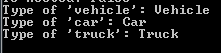
Let’s output the type names of these objects:

Examining type of derived objects

So ‘car’ and ‘truck’ are not of type Vehicle. An object can only have a single type even if it can be cast to a base type, i.e. a base class or an interface. You can still easily get to the Type from which a given object is derived:

Type truckBase = truckType.BaseType;
Console.WriteLine("Truck base: {0}", truckBase.Name);

…which of course returns ‘Vehicle’.

View all posts on Reflection here.

Examining a Type in .NET C#

You can get hold of Types in a variety of ways. You can extract the Types available in an Assembly as follows:

Assembly executingAssembly = Assembly.GetExecutingAssembly();
Type[] typesAttachedToAssembly = executingAssembly.GetTypes();

Console.WriteLine("Types attached to executing assembly: ");
foreach (Type type in typesAttachedToAssembly)
{
	Console.WriteLine(type.FullName);
}

In my case I have the following types in the executing assembly:

Getting types in an assembly

You can also extract the types within a single Module of an assembly:

Module[] modulesInCallingAssembly = executingAssembly.GetModules();
foreach (Module module in modulesInCallingAssembly)
{
	Console.WriteLine("Module {0}: ", module.Name);
	Type[] typesAttachedToModule = module.GetTypes();
	foreach (Type type in typesAttachedToModule)
	{
		Console.WriteLine(type.FullName);
	}
}

…which outputs the following:

Getting types in a module

You can construct Types without reflection using the GetType method and the typeof keyword. Say you have a simple Customer object:

public class Customer
{
	public string Name { get; set; }
}

…then you can get its type in the following ways:

Type customerType = customer.GetType();
Console.WriteLine(customerType.FullName);

Type customerTypeRevisited = typeof(Customer);
Console.WriteLine(customerTypeRevisited.FullName);

These will yield the same result:

Customer type

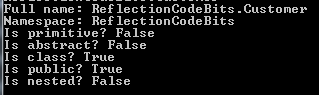
Once you have a Type you can inspect it through a myriad of properties. Here comes a short extract:

Console.WriteLine("Full name: {0}", customerType.FullName);
Console.WriteLine("Namespace: {0}", customerType.Namespace);
Console.WriteLine("Is primitive? {0}", customerType.IsPrimitive);
Console.WriteLine("Is abstract? {0}", customerType.IsAbstract);
Console.WriteLine("Is class? {0}", customerType.IsClass);
Console.WriteLine("Is public? {0}", customerType.IsPublic);
Console.WriteLine("Is nested? {0}", customerType.IsNested);

Type properties

There are methods available on the Type object to read all sorts of information that can be reflected on: interfaces, constructors, properties, methods etc. We’ll look at those separately.

View all posts on Reflection here.
Reading assembly attributes at runtime using Reflection in .NET

A lot of metadata of an assembly is stored by way of attributes in the AssemblyInfo.cs file. E.g. if you create a simple Console application then this file will be readily available in the Properties folder. Assembly-related attributes are denoted by an “assembly:” prefix and can carry a lot of customisable information. Examples:

[assembly: AssemblyTitle("ReflectionCodeBits")]
[assembly: AssemblyDescription("This is a container for Reflection related code examples")]
[assembly: AssemblyConfiguration("")]
[assembly: AssemblyCompany("Great Company Ltd.")]
[assembly: AssemblyProduct("ReflectionCodeBits")]
[assembly: AssemblyCopyright("Copyright ©  2014")]
[assembly: AssemblyTrademark("GC")]
[assembly: AssemblyCulture("sv-SE")]
[assembly: ComVisible(false)]
[assembly: Guid("8376337d-c211-4507-bc0d-bcd39bc9fb4f")]
[assembly: AssemblyVersion("1.0.0.0")]
[assembly: AssemblyFileVersion("1.0.0.0")]

Most of these are self-explanatory but others deserve more attention:

  • AssemblyConfiguration: to specify which configuration is used for the assembly. You can specify this value like “DEBUG”, “RELEASE” or some custom configuration name, like “ALPHA”
  • AssemblyCulture: normally only used for satellite assemblies, otherwise an empty string denoting neutral culture – in fact you specify an assembly culture like I have done above you’ll get a compile error saying that executables cannot be satellite assemblies; culture should always be empty.

You can read the full documentation about assembly attributes here.

In order to extract the assembly attributes you’ll first need to get a reference to that assembly. You can then list all attributes of the assembly as follows:

Assembly executingAssembly = Assembly.GetExecutingAssembly();
IEnumerable<CustomAttributeData> assemblyAttributes = executingAssembly.CustomAttributes;
foreach (CustomAttributeData assemblyAttribute in assemblyAttributes)
{
	Type attributeType = assemblyAttribute.AttributeType;
	Console.WriteLine("Attribute type: {0}", attributeType);
	IList<CustomAttributeTypedArgument> arguments = assemblyAttribute.ConstructorArguments;
	Console.WriteLine("Attribute arguments: ");
	foreach (CustomAttributeTypedArgument arg in arguments)
	{
		Console.WriteLine(arg.Value);
	}
}

In my case I got the following output:

Assembly attributes output

You can also extract a specific attribute type as follows:

AssemblyDescriptionAttribute assemblyDescriptionAttribute =     executingAssembly.GetCustomAttribute<AssemblyDescriptionAttribute>();
string assemblyDescription = assemblyDescriptionAttribute.Description;

…which returns “This is a container for Reflection related code examples” as expected.

View all posts on Reflection here.

Examining the Modules in an Assembly using Reflection in .NET

A Module is a container for type information. If you’d like to inspect the Modules available in an assembly, you’ll first need to get a reference to the assembly in question. Once you have the reference to the assembly you can get hold of the modules as follows:

Assembly callingAssembly = Assembly.GetCallingAssembly();
Module[] modulesInCallingAssembly = callingAssembly.GetModules();

You can then iterate through the module array and read its properties:

foreach (Module module in modulesInCallingAssembly)
{
	Console.WriteLine(module.FullyQualifiedName);
	Console.WriteLine(module.Name);
}

In my case, as this is a very simple Console app I got the following output:

C:\Studies\Reflection\ReflectionCodeBits\ReflectionCodeBits\bin\Debug\ReflectionCodeBits.exe
ReflectionCodeBits.exe

Therefore the FullyQualifiedName property returns the full file path to the module. The Name property only returns the name without the file path.

The Module class has a couple of exciting methods to extract the fields and methods attached to it:

MethodInfo[] methods = module.GetMethods();
FieldInfo[] fields = module.GetFields();

We’ll take up FieldInfo and MethodInfo in later blog posts on Reflection to see what we can do with them.

View all posts on Reflection here.

Examining the Assembly using Reflection in .NET

The CLR code of a project is packaged into an assembly. We can inspect a range of metadata from an assembly that also the CLR uses to load and execute runnable code: classes, methods, interfaces, enumerations etc.

In order to inspect an Assembly in a .NET project we’ll first need to get a reference to the assembly in question. There are various ways to retrieve an assembly, including:

Assembly callingAssembly = Assembly.GetCallingAssembly();
Assembly entryAssembly = Assembly.GetEntryAssembly();
Assembly executingAssembly = Assembly.GetExecutingAssembly();

…where Assembly is located in the System.Reflection namespace.

The static methods above represent the following:

  • GetCallingAssembly: to get the assembly one level up the call stack, i.e. which contains the method the current executing code
  • GetEntryAssembly: to get the assembly which contains the entry point to the application, e.g. the Main method in a Console app
  • GetExecutingAssembly: to get the assembly of the currently running code

There’s also a way to load a specific assembly using the GetAssembly(Type type) method. E.g. if you have a Customer class then you can load the assembly that contains the Customer class as follows:

Assembly specificAssembly = Assembly.GetAssembly(typeof(Customer));

Once you have the assembly you can read various metadata from it, examples:

Console.WriteLine("Full name: {0}", callingAssembly.FullName);
Console.WriteLine("Location: {0}", callingAssembly.Location);
Console.WriteLine("Loaded for reflection only? {0}", callingAssembly.ReflectionOnly);
Console.WriteLine("Loaded from GAC? {0}", callingAssembly.GlobalAssemblyCache);
Console.WriteLine(".NET Version: {0}", callingAssembly.ImageRuntimeVersion);

…which in my case outputs the following:

Basic assembly information

You may wonder what “loaded for reflection” means. You can get hold of an assembly in order to inspect its metadata without the possibility to execute any action on it. This is how we can load the assembly containing the “string” class in .NET:

Assembly reflectionOnlyAssembly = Assembly.ReflectionOnlyLoad("mscorlib, Version=4.0.0.0, Culture=neutral, PublicKeyToken=b77a5c561934e089");

You can execute an assembly by creating an instance of it using the CreateInstance method. However, if the assembly was only loaded for reflection then CreateInstance will throw an exception. If you know that you only want to read some metadata from an assembly but not execute it then you can use the ReflectionOnlyLoad method to save time loading it fully into the AppDomain.

View all posts on Reflection here.

Elliot Balynn's Blog

A directory of wonderful thoughts

Software Engineering

Web development

Disparate Opinions

Various tidbits

chsakell's Blog

WEB APPLICATION DEVELOPMENT TUTORIALS WITH OPEN-SOURCE PROJECTS

Once Upon a Camayoc

ARCHIVED: Bite-size insight on Cyber Security for the not too technical.

