Create code at runtime with Reflection in .NET C#: Type

In the previous post we looked at how to create an Assembly and a Module in code. We ended up with a ModuleBuilder object as follows:

ModuleBuilder moduleBuilder = assemblyBuilder.DefineDynamicModule("MyPluginModule", assemblyFileName);

We can use the ModuleBuilder to define a Type. Example:

TypeBuilder simpleType = moduleBuilder.DefineType("PluginSimpleType", TypeAttributes.Class | TypeAttributes.Public);

“PluginSimpleType” will be the name of the type. We also declare that it will be a public class. The TypeAttributes enumeration allows you to define the properties of the Type such as abstract, interface, sealed, private etc.

It is also possible to indicate that the Type derives from a base class and/or it implements one or more interfaces:

TypeBuilder extendedType = moduleBuilder.DefineType("PluginExtendedType", TypeAttributes.Class | TypeAttributes.Public, typeof(Customer), new Type[] {typeof(IEqualityComparer), typeof(IEquatable<int>) });

extendedType derives from a class called Customer and implements IEqualityComparer and IEquatable of int.

View all posts on Reflection here.

Create code at runtime with Reflection in .NET C#: Assembly

We’ve looked at how to inspect assemblies, types and similar elements in other posts on Reflection – see link below. With Reflection you cannot only inspect assemblies but create new ones on the fly.

Why would you create a new .NET assembly programmatically? A typical scenario is when you have an application which allows users to create their plugins that your application can use in some way. Normally programmers can create such plugins and compile them into libraries based on some instructions on your website. However, what to do if you want to allow non-programmers to create their plugins? Or if the rules for creating the plugin are so complex that you don’t even trust programmers with the task? Then you can have a GUI where people can make their choices and you create the plugin for them based on the options they have selected.

The entry point to creating assemblies in code is found in the System.Reflection.Emit namespace. It contains Builder classes to build the elements of an assembly: AssemblyBuilder, EnumBuilder, EventBuilder, MethodBuilder etc. Most builders are quite descriptive of their function where the string before ‘Builder’ shows what can be built with it:

  • AssemblyBuilder
  • ConstructorBuilder
  • EnumBuilder
  • EventBuilder
  • FieldBuilder
  • LocalBuilder: to build local variables for methods and constructors
  • MethodBuilder
  • ModuleBuilder
  • ParameterBuilder: to build method parameters
  • PropertyBuilder
  • TypeBuilder

The first step towards creating an assembly with types and methods is creating an assembly and a module:

string assemblySimpleName = "MyGreatPlugin";
string assemblyFileName = string.Concat(assemblySimpleName, ".dll");
AssemblyName assemblyName = new AssemblyName(assemblySimpleName);			
AssemblyBuilder assemblyBuilder = AppDomain.CurrentDomain.DefineDynamicAssembly(assemblyName, AssemblyBuilderAccess.RunAndSave);

ModuleBuilder moduleBuilder = assemblyBuilder.DefineDynamicModule("MyPluginModule", assemblyFileName);

We first set up some basic information about the assembly simple name and the library name. We use the simple assembly name to construct an AssemblyName object. This is in turn used to create an AssemblyBuilder with the DefineDynamicAssembly method of the AppDomain class. The AssemblyBuilderAccess enumeration defines what the users can do with the assembly. Possible values:

  • RunAndSave: to save and execute an assembly which is probably what you want in a plugin scenario
  • Run: can be executed but not saved
  • RunAndCollect: can be executed and reclaimed from memory, read more here
  • Save: can be saved but not executed
  • ReflectionOnly: can be loaded into memory to inspect its element with Reflection but cannot be executed

Next we use the assembly builder to get a ModuleBuilder. The parameters into the DefineDynamicModule are the module name and the DLL file name where the module will be stored.

We’ll create a Type in the module in the next part.

View all posts on Reflection here.

Dynamically finding the value of a static field with Reflection in .NET C#

Say you do not have access to a .NET assembly at compile time but you want to execute code in it or read programmatic data from it.

One such scenario is when you’d like to extract some important field information from a class. Why would you ever need that?

Imagine that you have an application where people can upload their own plugins in the form of DLL’s. However, users do not programmatically build their own libraries in Visual Studio but rather use a GUI which will dynamically build a class file and compile it into a DLL based on the user’s selections on the GUI. This is possible if your users are not programmers or if the rules for the plugins are so complex that you wouldn’t want people to write their own solutions.

In such a scenario the class builder could write some important metadata in the form of static fields in the class, such as Version. E.g. if your app has multiple versions then the code generator would put the current version into the class so that your app can verify it. Then you can disallow plugins that were created with an older version of the app if the current version is not backward compatible.

Open Visual Studio 2012/2013 and create a new C# class library project called Domain. Add the following Customer class to it:

public class Customer
{
	private string _name;

	public Customer() : this("N/A")
	{}

	public Customer(string name)
	{
		_name = name;
	}

        public static readonly int VERSION = 2;
}

Build the solution and locate the compiled Domain.dll library. It should be located in either the Debug or Release folder within the bin folder depending on the compilation configuration in VS. Copy the .dll and put it somewhere else on your main drive where you can easily find it. We’re pretending that you got the library from another source but you for whatever reason cannot reference it at compile time.

Let’s see how we can dynamically extract the version number:

string pathToDomain = @"C:\Studies\Reflection\Domain.dll";
Assembly domainAssembly = Assembly.LoadFrom(pathToDomain);
Type customerType = domainAssembly.GetType("Domain.Customer");
FieldInfo versionInfo = customerType.GetField("VERSION");
int version = Convert.ToInt32(versionInfo.GetValue(null));

You should obviously adjust the path to Domain.dll.

Most of this code looks familiar from the posts on Reflection. We load the DLL and find the field called VERSION on the Customer type. We then extract the value of the field and pass in null as the instance parameter on which the field value should be found. It is null since the field is static, i.e. there’s no need for an instance. This is very similar to what we saw when calling a static method here.

Dynamically invoking a static method with Reflection in .NET C#

Say you do not have access to a .NET assembly at compile time but you want to run code in it. It’s possible to dynamically load an assembly and run code in it without early access.

Here we’ll see how to invoke a static method of a type in a referenced assembly. It is very similar to how you would invoke an instance-level method. Check out the following post for related topics:

Open Visual Studio 2012/2013 and create a new C# class library project called Domain. Add the following Customer class to it:

public class Customer
{
	private string _name;

	public Customer() : this("N/A")
	{}

	public Customer(string name)
	{
		_name = name;
	}

        public static int CallStaticMethod(int inputOne, int inputTwo)
	{
		return inputOne + inputTwo;
	}
}

Build the solution and locate the compiled Domain.dll library. It should be located in either the Debug or Release folder within the bin folder depending on the compilation configuration in VS. Copy the .dll and put it somewhere else on your main drive where you can easily find it. We’re pretending that you got the library from another source but you for whatever reason cannot reference it at compile time. E.g. the source is loaded into your app as a plugin which follows some naming conventions so that your code can unwrap it and invoke its code.

Let’s see how we can dynamically call the CallStaticMethod method and read its result:

string pathToDomain = @"C:\Studies\Reflection\Domain.dll";
Assembly domainAssembly = Assembly.LoadFrom(pathToDomain);
Type customerType = domainAssembly.GetType("Domain.Customer");
MethodInfo staticMethodInfo = customerType.GetMethod("CallStaticMethod");
int returnValue = Convert.ToInt32(staticMethodInfo.Invoke(null, new object[] { 3,5 }));

You should obviously adjust the path to Domain.dll.

The code to call a static method is almost the same as calling an instance-level one. The key difference is that we pass in null as the first parameter to Invoke. That parameter specifies which instance the method should be invoked on. As there’s no instance here, we can skip the step of first invoking the constructor of Customer.

‘returnValue’ will be 8 as expected.

View all posts on Reflection here.

Dynamically invoking a property with Reflection in .NET C#

Say you do not have access to a .NET assembly at compile time but you want to run code in it. It’s possible to dynamically load an assembly and run code in it without early access.

Here we’ll see how to invoke a property of a type in a referenced assembly.

In this post we saw how to invoke a constructor and here how to invoke a method of a Type.

Open Visual Studio 2012/2013 and create a new C# class library project called Domain. Add the following Customer class to it:

public class Customer
{
	private string _name;

	public Customer() : this("N/A")
	{}

	public Customer(string name)
	{
		_name = name;
	}

        public int AccountValue { get; set; }
}

Build the solution and locate the compiled Domain.dll library. It should be located in either the Debug or Release folder within the bin folder depending on the compilation configuration in VS. Copy the .dll and put it somewhere else on your main drive where you can easily find it. We’re pretending that you got the library from another source but you for whatever reason cannot reference it at compile time. E.g. the source is loaded into your app as a plugin which follows some naming conventions so that your code can unwrap it and invoke its code.

Let’s see how we can get hold of the AccountValue property. First we’ll invoke the overloaded constructor:

string pathToDomain = @"C:\Studies\Reflection\Domain.dll";
Assembly domainAssembly = Assembly.LoadFrom(pathToDomain);
Type customerType = domainAssembly.GetType("Domain.Customer");
Type[] stringArgumentTypes = new Type[] { typeof(string) };
ConstructorInfo stringConstructor = customerType.GetConstructor(stringArgumentTypes);
object newStringCustomer = stringConstructor.Invoke(new object[] { "Elvis" });

Then we locate the AccountValue method and set its value. We also provide an object to represent the integer argument to the property. Keep in mind that properties are “normal” methods as we saw in this post so we need to supply an argument to the Set method:

PropertyInfo accountProperty = customerType.GetProperty("AccountValue");
accountProperty.SetValue(newStringCustomer, 1200);

Next we read the property value using the Get version:

int accountPropertyValue = Convert.ToInt32(accountProperty.GetValue(newStringCustomer));

‘accountPropertyValue’ will be 1200 as expected.

View all posts on Reflection here.

Dynamically invoking a method with Reflection in .NET C#

Say you do not have access to a .NET assembly at compile time but you want to run code in it. It’s possible to dynamically load an assembly and run code in it without early access.

Here we’ll see how to invoke a method of a type in a referenced assembly.

Open Visual Studio 2012/2013 and create a new C# class library project called Domain. Add the following Customer class to it:

public class Customer
{
	private string _name;

	public Customer() : this("N/A")
	{}

	public Customer(string name)
	{
		_name = name;
	}

        public void DoVoidMethod(int intParameter, string stringParameter)
	{
		Console.WriteLine("Within Customer.DoVoidMethod. Parameters: {0}, {1}", intParameter, stringParameter);
	}

	public int DoRetMethod(int intParameter)
	{
		return intParameter + 1;
	}
}

Build the solution and locate the compiled Domain.dll library. It should be located in either the Debug or Release folder within the bin folder depending on the compilation configuration in VS. Copy the .dll and put it somewhere else on your main drive where you can easily find it. We’re pretending that you got the library from another source but you for whatever reason cannot reference it at compile time. E.g. the source is loaded into your app as a plugin which follows some naming conventions so that your code can unwrap it and invoke its code.

In this post we saw how to invoke a constructor so we won’t go into that again. Once you have an instance of the object then you can use the Type object to find the available methods, properties, events etc. of that type: MethodInfo, EventInfo, PropertyInfo etc.

Let’s see how we can get hold of the void method. First we’ll invoke the overloaded constructor:

string pathToDomain = @"C:\Studies\Reflection\Domain.dll";
Assembly domainAssembly = Assembly.LoadFrom(pathToDomain);
Type customerType = domainAssembly.GetType("Domain.Customer");
Type[] stringArgumentTypes = new Type[] { typeof(string) };
ConstructorInfo stringConstructor = customerType.GetConstructor(stringArgumentTypes);
object newStringCustomer = stringConstructor.Invoke(new object[] { "Elvis" });

Then we locate the DoVoidMethod method and invoke it on the newStringCustomer object. We also provide an object array to represent the arguments to the method.

MethodInfo voidMethodInfo = customerType.GetMethod("DoVoidMethod");
voidMethodInfo.Invoke(newStringCustomer, new object[] { 3, "hello" });

If you run this code then a Console window should pop up with the message “Within Customer.DoVoidMethod. Parameters: 3, hello” on it.

Next we’ll invoke the DoRetMethod method and read its return value:

MethodInfo retMethodInfo = customerType.GetMethod("DoRetMethod");
int returnValue = Convert.ToInt32(retMethodInfo.Invoke(newStringCustomer, new object[] { 4 }));

The returnValue variable will be 5 as expected.

View all posts on Reflection here.

Dynamically invoking a constructor with Reflection in .NET C#

Say you do not have access to a .NET assembly at compile time but you want to run code in it. It’s possible to dynamically load an assembly and run code in it without early access.

Here we’ll see how to invoke a constructor of a type in a referenced assembly.

Normally, if you have a direct reference to an assembly then you can simply initialise new objects using the ‘new’ keyword. In the absence of a direct reference this is not possible.

Open Visual Studio 2012/2013 and create a new C# class library project called Domain. Add the following Customer class to it:

public class Customer
{
	private string _name;

	public Customer() : this("N/A")
	{}

	public Customer(string name)
	{
		_name = name;
	}
}

Build the solution and locate the compiled Domain.dll library. It should be located in either the Debug or Release folder within the bin folder depending on the compilation configuration in VS. Copy the .dll and put it somewhere else on your main drive where you can easily find it. We’re pretending that you got the library from another source but you for whatever reason cannot reference it at compile time. E.g. the source is loaded into your app as a plugin which follows some naming conventions so that your code can unwrap it and invoke its code.

Create a separate project in VS and make it a console app. Here’s how you load the assembly:

string pathToDomain = @"C:\pathToLib\Domain.dll";
Assembly domainAssembly = Assembly.LoadFrom(pathToDomain);

Next we get hold of the Customer type using its full name as follows:

Type customerType = domainAssembly.GetType("Domain.Customer");

We can locate the empty constructor of Customer in the following way:

Type[] emptyArgumentTypes = Type.EmptyTypes;
ConstructorInfo emptyConstructor = customerType.GetConstructor(emptyArgumentTypes);

You can learn more about ConstructorInfo here. In short it derives from MethodBase and it represents a Constructor which is a special type of method that returns an instance of a type. In the above code we specified that we wanted an empty constructor using an array of empty types. We can also locate the overloaded constructor by providing the type of the arguments list:

Type[] stringArgumentTypes = new Type[] { typeof(string) };
ConstructorInfo stringConstructor = customerType.GetConstructor(stringArgumentTypes);

You can invoke these constructors as follows:

object newEmptyCustomer = emptyConstructor.Invoke(new object[] { });
object newStringCustomer = stringConstructor.Invoke(new object[] { "Elvis" });

If step through this example with F11 then you’ll see that the Customer class appears in VS as the code reaches the constructor invocation examples.

View all posts on Reflection here.

Examining the method body using Reflection in .NET C#

In this short post we saw how to extract the members of a class: constructors, properties, methods etc. Even more exciting is the fact that you can peek into the body of a method. Well, not the plain text C# or VB code, but the Intermediate Language – MSIL version of it.

The MethodBody object represents, as the name suggests, the body of a method including the local variables and the MSIL instructions. MethodBody is available on classes that derive from the MethodBase class, which are methods and constructors – MethodInfo and ConstructorInfo.

Consider the following Customer class:

public class Customer
{
	private string _name;

	public Customer(string name)
	{
		if (string.IsNullOrEmpty(name)) throw new ArgumentNullException("Customer name!");
		_name = name;
	}

	public string Name
	{
		get
		{
			return _name;
		}
	}
	public string Address { get; set; }
	public int SomeValue { get; set; }

	public int ImportantCalculation()
	{
		int variable = 2;
		string stringVar = string.Empty;
		if (variable == 2)
		{
			stringVar = "two";
		}
		else
		{
			stringVar = "hello";
		}

		ImportantVoidMethod();
		return 1000;
	}

	public void ImportantVoidMethod()
	{
		bool ok = false;
		SomeEnumeration enumeration = SomeEnumeration.ValueOne;
		switch (enumeration)
		{
			case SomeEnumeration.ValueOne:
				ok = true;
				break;
			case SomeEnumeration.ValueTwo:
				ok = false;
				break;
			default:
				ok = false;
				break;
		}
	}

	public enum SomeEnumeration
	{
		ValueOne = 1
		, ValueTwo = 2
	}

	public class SomeNestedClass
	{
		private string _someString;
	}
}

The following code shows you how you can extract the methods and inspect them:

Type customerType = typeof(Customer);

Console.WriteLine("Customer methods: ");
MethodInfo[] methods = customerType.GetMethods();

foreach (MethodInfo mi in methods)
{
	Console.WriteLine(mi.Name);
	MethodBody methodBody = mi.GetMethodBody();
	if (methodBody != null)
	{
		byte[] ilCode = methodBody.GetILAsByteArray();
		int maxStackSize = methodBody.MaxStackSize;
		IList<LocalVariableInfo> localVariables = methodBody.LocalVariables;
		Console.WriteLine("Max stack size: {0}", maxStackSize);

		Console.WriteLine("Local variables if any:");
		foreach (LocalVariableInfo lvi in localVariables)
		{
			Console.WriteLine("Type: {0}, index: {1}.", lvi.LocalType, lvi.LocalIndex);
		}

		Console.WriteLine("IL code:");
		StringBuilder stringifiedIlCode = new StringBuilder();
		foreach (byte b in ilCode)
		{
			stringifiedIlCode.Append(string.Format("{0:x2} ", b));
		}

		Console.WriteLine(stringifiedIlCode);
	}
}

The MethodInfo array will include the properties that are turned into methods, e.g. Name will become get_Name, and also the methods inherited from Object such as ToString(). Here’s the output for ImportantVoidMethod and ImportantCalculation:

MethodBody example code output

The LocalVariableInfo doesn’t contain the name of the variable because the metadata about a type doesn’t keep the variable name, only its order.

View all posts on Reflection here.

Examining a .NET assembly through Reflection

We’ve gone through a couple of points about Reflection in .NET on this blog:

  • Inspecting assemblies
  • Inspecting types
  • Examining the members of a class

To recap we’ll see how to inspect the members of a .NET dll library built into the framework. The .NET 4 or 4.5 libraries are usually stored in the following location:

C:\Windows\Microsoft.NET\Framework64\v4.0.30319

Have a look into that folder and you’ll find the familiar libraries such as mscorlib, System.IO, System.Net etc. The following code will load the System.Net.Http assembly and print some basic information about those members which…

  • …are public
  • …are instance level, i.e. non-static
  • …are declared directly on the specific type

This last point means that we’ll ignore the inherited members of a Type. Without this flag we’d get all inherited members, such as ToString and GetType from Object:

string pathToAssembly = @"C:\Windows\Microsoft.NET\Framework64\v4.0.30319\System.Net.Http.dll";
BindingFlags bindingFlags = BindingFlags.DeclaredOnly | BindingFlags.Public | BindingFlags.Instance;
Assembly assembly = Assembly.LoadFrom(pathToAssembly);

Console.WriteLine("Assembly full name: {0}", assembly.FullName);
Type[] typesInAssembly = assembly.GetTypes();

foreach (Type type in typesInAssembly)
{
	Console.WriteLine("Type name: {0}", type.Name);
	MemberInfo[] members = type.GetMembers(bindingFlags);
	foreach (MemberInfo mi in members)
	{
		Console.WriteLine("Member type: {0}, member name: {1}.", mi.MemberType, mi.Name);
	}
}

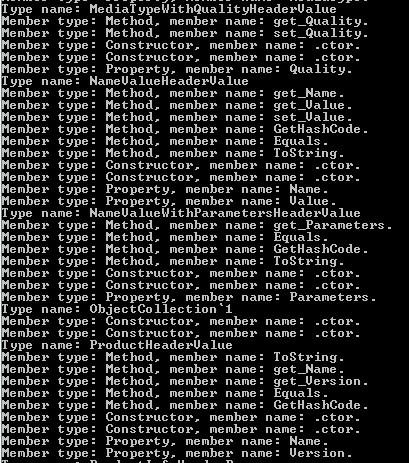
The assembly is quite large but here comes an excerpt:

Examining system.net.http through reflection

View all posts on Reflection here.

Examining class members with Reflection and BindingFlags in .NET C#

In this post we saw a basic example of how to read the publicly available members of a class. Here we’ll look at how to refine our search and read other types of members, such as private and static members.

Consider the following, admittedly artificial Customer class:

public class Customer
{
	private string _name;
	protected int _age;
	public bool isPreferred;
	private static int maxRetries = 3;
}

We’ll concentrate on the fields to narrow down our focus. Check out the above link to see how to read methods, constructors, properties etc. of a class.

The most basic way of finding the fields of a class is the following:

Type customerType = typeof(Customer);
FieldInfo[] fields = customerType.GetFields();
Console.WriteLine("Fields: ");
foreach (FieldInfo fi in fields)
{
	Console.WriteLine(fi.Name);
}

This will only find the isPreferred variable as it is public. What if we want to get to the private fields as well? Use the BindingFlags enumeration like this:

BindingFlags flags = BindingFlags.NonPublic | BindingFlags.Instance;
FieldInfo[] nonPublicFields = customerType.GetFields(flags);
Console.WriteLine("Non-public fields: ");
foreach (FieldInfo fi in nonPublicFields)
{
	Console.WriteLine(fi.Name);
}

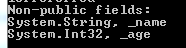
…which results in the following:

Non-public fields with reflection

Note how the BindingFlags values can be chained together to widen your search. The NonPublic value will find the private, protected and internal variables. This value in itself is not enough to extract the non-public fields, we need to add that we’re interested in class-level fields.

The opposite of non-public is Public:

flags = BindingFlags.Public | BindingFlags.Instance;
FieldInfo[] publicFields = customerType.GetFields(flags);
Console.WriteLine("Public fields: ");
foreach (FieldInfo fi in publicFields)
{
	Console.WriteLine(string.Concat(fi.FieldType, ", ", fi.Name));
}

…which finds ‘isPreferred’ only as expected. We haven’t yet found the static field but it’s straightforward:

flags = BindingFlags.NonPublic | BindingFlags.Static;
FieldInfo[] staticFields = customerType.GetFields(flags);
Console.WriteLine("Private static fields: ");
foreach (FieldInfo fi in staticFields)
{
	Console.WriteLine(string.Concat(fi.FieldType, ", ", fi.Name));
}

…which finds ‘maxRetries’ only as it is the only non-public static field.

View all posts on Reflection here.
Elliot Balynn's Blog

A directory of wonderful thoughts

Software Engineering

Web development

Disparate Opinions

Various tidbits

chsakell's Blog

WEB APPLICATION DEVELOPMENT TUTORIALS WITH OPEN-SOURCE PROJECTS

Once Upon a Camayoc

ARCHIVED: Bite-size insight on Cyber Security for the not too technical.