Importing static methods from a namespace in C# 6

You’ll probably know that if you’d like to use the simple class names in a C# file you have to import its namespace in a using directive. If you want to use the Task class without referring to its fully qualified name including the namespace you have to put…

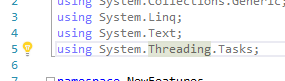
using System.Threading.Tasks;

…in the top section of the file. Then you can write something like…

Task t = Task.Run<ReturnType>(() => ...);

Similarly the using statement…

using System;

Read more of this post

A new way to format strings in C# 6

In C# 5 we often format strings with the string.Format function. It requires a format string and then a number of parameters that are passed into the format string. C# 6 has a nice addition which simplifies that syntax.

Let’s start with the following Rockband object:

public class Rockband
{
	public string Name { get; }
	public int NumberOfMembers { get; }
	public decimal ConcertFee { get; }

	public Rockband(string name, int numberOfMembers, decimal concertFee)
	{
		Name = name;
		NumberOfMembers = numberOfMembers;
		ConcertFee = concertFee;
	}

	public string GetFancyName()
	{
		return Name.ToUpper();
	}
}

The fancy name is not too fancy but that’s not important now.

Read more of this post

Getting rid of unnecessary using statements in Visual Studio 2015

Here comes a quick tip for all of you who are bothered by unnecessary using statements in a class file. You know when you have the automatic “using System.Linq” statement and you never use Linq in that class? It’s a breeze to get rid of those in Visual Studio 2015 using the light bulb icon:

Images

Expand the icon and select “Remove Unnecessary Usings”.

This feature has been available for a long time in NetBeans for Java developers. Visual Studio has finally caught up without having to resort to tools like ReSharper.

Add items to a list using an extension method in C# 6

C# 6 introduces a new way of filling up collections with objects.

Consider the following Rockband class:

public class Rockband
{
	public string Name { get; }
	public int NumberOfMembers { get; }

	public Rockband(string name, int numberOfMembers)
	{
		Name = name;
		NumberOfMembers = numberOfMembers;
	}
}

Read more of this post

A new way of checking for nulls in C# 6

In this post we explored a couple of ways to handle null values in C# 5.

Obviously you can just test whether an object is equal to null:

private static string Resolve(string input)
{
	if (input == null) throw new ArgumentNullException("Input");
.
.
.
}

Read more of this post

Getting the name of a variable in C# 6 using nameof

C# 6 makes it easy to retrieve the name of a parameter using the nameof keyword. Here comes a situation where it can come handy.

Consider the following Person class with C# 6:

public class Person
{
	public int Age { get; }
	public string FirstName { get;}
	public string LastName { get; }

	public Person(string firstName, string lastName, int age)
	{
		FirstName = firstName;
		LastName = lastName;
		Age = age;
	}
}

Simple, right? Now let’s say you’d like to add some parameter validation to the constructor:

Read more of this post

How to assign an expression to a method in C#6

In this post we saw how to assign expressions to class properties in C# 6 using the lambda operator “=>”:

public string FullName => string.Format("{0} {1}", FirstName, LastName);

This property getter was part of a Person class:

public class Person
{
	public int Age { get; }
	public string FirstName { get;}
	public string LastName { get; }
        public string FullName => string.Format("{0} {1}", FirstName, LastName);

	public Person(string firstName, string lastName, int age)
	{
		FirstName = firstName;
		LastName = lastName;
		Age = age;
	}
}

The same type of syntax exists for one-liner functions. It’s really just syntactic sugar which saves you a return statement and the brackets.

Read more of this post

How to assign an expression to a class property in C#6

Consider the following Person class written using the new immutable property syntax of C# 6:

public class Person
{
	public int Age { get; }
	public string FirstName { get;}
	public string LastName { get; }

	public Person(string firstName, string lastName, int age)
	{
		FirstName = firstName;
		LastName = lastName;
		Age = age;
	}
}

Then let’s say you’d like to add a new property that returns the full name of the person. In C# 5 you’d write something like this:

public string FullName
{
	get
	{
		return string.Format("{0} {1}", FirstName, LastName);
	}
}

Note that the “get” body is very simple, it’s only one line.

In C# 6 we can assign expressions to properties using the familiar “=>” operator as follows:

public string FullName => string.Format("{0} {1}", FirstName, LastName);

How neat is that? You can call this property on the Person object as you would in any other case:

Person p = new Person("John", "Smith", 28);
Console.WriteLine(p.FullName);

…which prints John Smith as expected.

Let’s add one more example. We’ll add an Old property with a simple logic. Anyone over and above the age of 35 will be old. That includes me as well, don’t worry:

public bool Old => Age > 35;

Calling p.Old on the above example will return false.

View all various C# language feature related posts here.

How to create immutable objects in C# 6

In C#5 you would write a Person class with immutable properties with getters as follows:

public class Person
{
    private readonly string _name;
    private readonly int _age;

    public Person(string name, int age)
    {
        _name = name;
        _age = age;
    }

    public string Name
    {
        get
        {
            return _name;
        }
    }

    public int Age
    {
        get
        {
            return _age;
        }
    }
}

The readonly keyword will make sure that the private properties can only be assigned from the constructor. If try the following…

public int Age
{
    get
    {
        return _age;
    }
	set
	{
		_age = value;
	}
}

…you’ll get a compiler error:

“A readonly field cannot be assigned to (except in a constructor or a variable initializer)”

A more simple way to achieve the same might be the “private set” construction:

public class Person
{
	public int Age { get; private set; }
	public string Name { get; private set; }

	public Person(string name, int age)
        {
           Name = name;
           Age = age;
        }		
}

However, the Age and Name fields can still be modified within the Person class:

public string Greet()
{
	Name = "Jill";
	return string.Format("Hello from {0}", Name);
}

You’ll probably guess what the following will output:

static void Main(string[] args)
{
	Person p = new Person("John", 28);
	Console.WriteLine(p.Greet());

	Console.ReadKey();
}

That’s right, “Hello from Jill” which is a bit unexpected from the caller’s point of view.

C#6 comes to the rescue in the following form:

public class Person
{
	public int Age { get; }
	public string Name { get;}

	public Person(string name, int age)
	{
		Name = name;
		Age = age;
	}
}

The Age and Name fields can be set in the constructor but not anywhere else. The Greet() method will fail with the following compiler error:

“Property indexer ‘Person.Name’ cannot be assigned to — it is read only”

View all various C# language feature related posts here.
Joining unique values from two sequences with the LINQ Union operator

Say you have two sequences of the same object type:

string[] first = new string[] {"hello", "hi", "good evening", "good day", "good morning", "goodbye" };
string[] second = new string[] {"whatsup", "how are you", "hello", "bye", "hi"};

You’d then like to join the two sequences containing the values from both but filtering out duplicates. Here’s how to achieve that with the first prototype of the LINQ Union operator:

Read more of this post

Elliot Balynn's Blog

A directory of wonderful thoughts

Software Engineering

Web development

Disparate Opinions

Various tidbits

chsakell's Blog

WEB APPLICATION DEVELOPMENT TUTORIALS WITH OPEN-SOURCE PROJECTS

Once Upon a Camayoc

ARCHIVED: Bite-size insight on Cyber Security for the not too technical.