Finding all WMI class names within a WMI namespace with .NET C#

In this post we saw an example of using WMI objects such as ConnectionOptions, ObjectQuery and ManagementObjectSearcher to enumerate all local drives on a computer. Recall the SQL-like query we used:

ObjectQuery objectQuery = new ObjectQuery("SELECT Size, Name FROM Win32_LogicalDisk where DriveType=3");

We’ll now see a technique to list all WMI classes within a WMI namespace. First we get hold of the WMI namespaces:
Read more of this post

Getting notified by a Windows process change in C# .NET

In this post we saw an example of using the ManagementEventWatcher object and and EventQuery query. The SQL-like query was used to subscribe to a WMI – Windows Management Instrumentation – level event, namely a change in the status of a Windows service. I won’t repeat the explanation here again concerning the techniques used. So if this is new to you then consult that post, the code is very similar.

In this post we’ll see how to get notified by the creation of a new Windows process. This can be as simple as starting up Notepad. A Windows process is represented by the Win32_Process WMI class which will be used in the query. We’ll take a slightly different approach and use the WqlEventQuery object which derives from EventQuery.

Consider the following code:

Read more of this post

Finding all Windows Services using WMI in C# .NET

In this post we saw how to retrieve all logical drives using Windows Management Instrumentation – WMI -, and here how to find all network adapters.

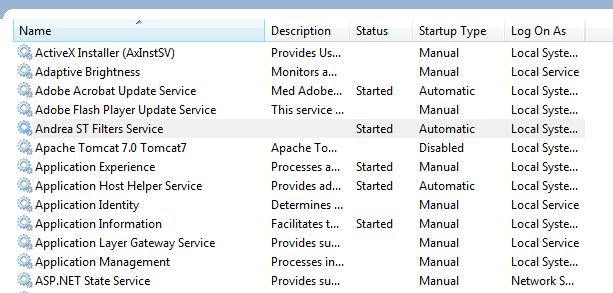
Say you’d like to get a list of all Windows Services and their properties running on the local – “root” – machine, i.e. read the services listed here:

Services window

The following code will find all non-null properties of all Windows services found:

Read more of this post

Flatten sequences with the C# LINQ SelectMany operator

Suppose that we have an object with a collection of other objects, like a customer with order items. Then we can also have a sequence of customers where each customer will have her own list of orders. It happens that we want to analyse all orders regardless of the customer, like how many of product A have been sold. There are several options to collect all orders from all customers and place them into one unified collection for further analysis.

The C# SelectMany operator has been specifically designed to extract collections of objects and flatten those collections into one. This post will provide a couple of examples to demonstrate its usage.

Read more of this post

Summary of thread-safe collections in .NET

The System.Collections.Concurrent namespace has 4 thread-safe collections that you can use in multi-threaded applications. The starting point is that you have a multi-threaded app where the same collection needs to be accessed by different threads. In that case the well-know collection types, like HashSet, List, Dictionary etc. simply won’t be enough.

If many different threads have access to the same resource then there’s no guarantee on the state of that resource in the moment a thread accesses it in some way: deletion, lookup, insertion or modification. Another thread may have accessed the same resource just milliseconds before that and the other thread will access the resource under the wrong assumptions. You’ll end up with buggy code with unpredictable results and ad-hoc fixes and patches that probably won’t solve the root of the problem.

Read more of this post

Creating a read-only collection from an array in C#

The Array class has a number of interesting methods. One of them allows you to easily convert an array of T into a read-only collection of T:

string[] bands = new string[5] { "Queen", "ACDC", "Metallica", "Genesis", "INXS" };
IReadOnlyCollection<string> readOnlyBands = Array.AsReadOnly<string>(bands);

Note that readOnlyBands is, well, read-only, so there’s no Add or Remove method that otherwise are often available on lists.

View all various C# language feature related posts here.

Mixing asymmetric and symmetric encryption, HMAC hash verification and digital signatures in .NET

Introduction

In this post we built a test application where we mixed asymmetric and symmetric encryption with HMAC hash verification. The message sender gets the asymmetric public key of the receiver and uses it to encrypt a symmetric public key. The message is encrypted with a one-time symmetric public key. The symmetric key is also used to calculate the HMAC of the cipher text. The receiver decrypts the symmetric key with her asymmetric private key and calculates the HMAC. If the hashes match then it’s safe to assume that the message hasn’t been tampered with on its way to the sender.

The communication flow is quite secure but we can tighten security even more. In this post we learnt about digital signatures. A digital signature is used to sign the hash of a message with the sender’s private key. The public key that matches the private signature key is sent along all other information to the sender. The sender can then check the validity of the signature using the provided public key. The trust is based on the fact that the public and private keys go hand in hand, therefore signature verification doesn’t need the private key.

The goal of this post is to extend the demo application with digital signatures. The sender will sign the message and the receiver will verify the validity of the signature.

Read more of this post

Extension methods in C#

Introduction

Extension methods in C# allow you to extend the functionality of types that you didn’t write and don’t have direct access to. They look like integral parts of any built-in classes in .NET, e.g.:

DateTime.Now.ToMyCustomDate();
string.ToThreeLetterAbbreviation();

You can extend the following types in C#:

  • Classes
  • Structs
  • Interfaces

You can extend public types of 3rd party libraries. You can also extend generic types, such as List of T and IEnumerable of T. You cannot extend sealed classes.

Read more of this post

A summary of new features in C# 6

Here’s a short list of new features in C# 6 and a link to a blog post explaining their usage:

View all various C# language feature related posts here.

Explicit interface implementation in .NET

Introduction

The generic and well-known Dictionary object and its generic and thread-safe counterpart, i.e. the ConcurrentDictionary object both implement the generic IDictionary interface. The IDictionary interface has an Add method where you can insert a new key-value pair into a dictionary:

Dictionary<string, string> singleThreadedDictionary = new Dictionary<string, string>();
singleThreadedDictionary.Add("Key", "Value");

I can even rewrite the above code as follows:

Read more of this post

Elliot Balynn's Blog

A directory of wonderful thoughts

Software Engineering

Web development

Disparate Opinions

Various tidbits

chsakell's Blog

WEB APPLICATION DEVELOPMENT TUTORIALS WITH OPEN-SOURCE PROJECTS

Once Upon a Camayoc

ARCHIVED: Bite-size insight on Cyber Security for the not too technical.