Determine if two sequences are equal with LINQ C#

Say you have two sequences of objects:

string[] bands = { "ACDC", "Queen", "Aerosmith", "Iron Maiden", "Megadeth", "Metallica", "Cream", "Oasis", "Abba", "Blur", "Chic", "Eurythmics", "Genesis", "INXS", "Midnight Oil", "Kent", "Madness", "Manic Street Preachers"							 , "Noir Desir", "The Offspring", "Pink Floyd", "Rammstein", "Red Hot Chili Peppers", "Tears for Fears"						 , "Deep Purple", "KISS"};

string[] bandsTwo = { "ACDC", "Queen", "Aerosmith", "Iron Maiden", "Megadeth", "Metallica", "Cream", "Oasis", "Abba", "Blur", "Chic", "Eurythmics", "Genesis", "INXS", "Midnight Oil", "Kent", "Madness", "Manic Street Preachers"							 , "Noir Desir", "The Offspring", "Pink Floyd", "Rammstein", "Red Hot Chili Peppers", "Tears for Fears"						 , "Deep Purple", "KISS"};

If you’d like to check whether the two sequences include the same elements then you can use the SequenceEquals LINQ operator:

bool equal = bands.SequenceEqual(bandsTwo);
Console.WriteLine(equal);

This approach works fine for objects where a good built-in comparer exists. .NET can compare two strings, two integers etc. and determine whether they are equal. It’s a different story with reference types such as your custom objects:

public class Singer
{
	public int Id { get; set; }
	public string FirstName { get; set; }
	public string LastName { get; set; }
	public int BirthYear { get; set; }
}

IEnumerable<Singer> singers = new List<Singer>() 
			{
				new Singer(){Id = 1, FirstName = "Freddie", LastName = "Mercury", BirthYear=1964}
				, new Singer(){Id = 2, FirstName = "Elvis", LastName = "Presley", BirthYear = 1954}
				, new Singer(){Id = 3, FirstName = "Chuck", LastName = "Berry", BirthYear = 1954}
				, new Singer(){Id = 4, FirstName = "Ray", LastName = "Charles", BirthYear = 1950}
				, new Singer(){Id = 5, FirstName = "David", LastName = "Bowie", BirthYear = 1964}
			};

IEnumerable<Singer> singersTwo = new List<Singer>() 
			{
				new Singer(){Id = 1, FirstName = "Freddie", LastName = "Mercury", BirthYear=1964}
				, new Singer(){Id = 2, FirstName = "Elvis", LastName = "Presley", BirthYear = 1954}
				, new Singer(){Id = 3, FirstName = "Chuck", LastName = "Berry", BirthYear = 1954}
				, new Singer(){Id = 4, FirstName = "Ray", LastName = "Charles", BirthYear = 1950}
				, new Singer(){Id = 5, FirstName = "David", LastName = "Bowie", BirthYear = 1964}
			};

bool singersEqual = singers.SequenceEqual(singersTwo);
Console.WriteLine(singersEqual);

This will yield false as .NET doesn’t automatically know how to compare the Singer objects in a way that makes sense to you. Instead, the comparison will be based on reference equality.

This is where an overloaded version of SequenceEquals enters the scene, one where you can specify your own equality comparer:

public class DefaultSingerComparer : IEqualityComparer<Singer>
{
	public bool Equals(Singer x, Singer y)
	{
		return x.Id == y.Id;
	}

	public int GetHashCode(Singer obj)
	{
		return obj.Id.GetHashCode();
	}
}

So we say that if the singer Ids are equal then the Singer objects are equal:

bool singersEqual = singers.SequenceEqual(singersTwo, new DefaultSingerComparer());
Console.WriteLine(singersEqual);

…which yields true.

You can view all LINQ-related posts on this blog here.
Determine if all elements fulfil a condition in a sequence with LINQ C#

Say we have the following string list:

string[] bands = { "ACDC", "Queen", "Aerosmith", "Iron Maiden", "Megadeth", "Metallica", "Cream", "Oasis", "Abba", "Blur", "Chic", "Eurythmics", "Genesis", "INXS", "Midnight Oil", "Kent", "Madness", "Manic Street Preachers"
, "Noir Desir", "The Offspring", "Pink Floyd", "Rammstein", "Red Hot Chili Peppers", "Tears for Fears"
, "Deep Purple", "KISS"};

Say we’d like to determine if all elements in the sequence fulfil a certain condition. Nothing could be easier using the All operator:

bool all = bands.All(b => b.StartsWith("A"));
Console.WriteLine(all);

This yields false as not all band names start with an A. However, their length is certainly longer than 2 characters so the below query returns true:

bool all = bands.All(b => b.Length > 2);
Console.WriteLine(all);

You can view all LINQ-related posts on this blog here.

Determine if a sequence contains a certain element with LINQ C#

Say we have the following string list:

string[] bands = { "ACDC", "Queen", "Aerosmith", "Iron Maiden", "Megadeth", "Metallica", "Cream", "Oasis", "Abba", "Blur", "Chic", "Eurythmics", "Genesis", "INXS", "Midnight Oil", "Kent", "Madness", "Manic Street Preachers"
, "Noir Desir", "The Offspring", "Pink Floyd", "Rammstein", "Red Hot Chili Peppers", "Tears for Fears"
, "Deep Purple", "KISS"};

If you’d like to check if a certain string element is present in the sequence then you can use the Contains operator in LINQ:

bool contains = bands.Contains("Queen");
Console.WriteLine(contains);

This yields true as you might expect.

This was a straightforward case as .NET has a good built-in implementation of string equality. It works just as well with primitive types like int or long. .NET can determine if two integers are equal so the default version of Contains is sufficient.

It is different with your custom objects, such as this one:

public class Singer
{
	public int Id { get; set; }
	public string FirstName { get; set; }
	public string LastName { get; set; }
	public int BirthYear { get; set; }
}

Consider the following list:

IEnumerable<Singer> singers = new List<Singer>() 
			{
				new Singer(){Id = 1, FirstName = "Freddie", LastName = "Mercury", BirthYear=1964}
				, new Singer(){Id = 2, FirstName = "Elvis", LastName = "Presley", BirthYear = 1954}
				, new Singer(){Id = 3, FirstName = "Chuck", LastName = "Berry", BirthYear = 1954}
				, new Singer(){Id = 4, FirstName = "Ray", LastName = "Charles", BirthYear = 1950}
				, new Singer(){Id = 5, FirstName = "David", LastName = "Bowie", BirthYear = 1964}
			};

…and the following code:

Singer s = new Singer() { Id = 2, FirstName = "Elvis", LastName = "Presley", BirthYear = 1954 };
bool containsSinger = singers.Contains(s);
Console.WriteLine(containsSinger);

This will of course yield false as equality is based on references and there’s no element in the sequence with the same reference as “s”. In this case we can use the overloaded version of Contains where you can supply an equality comparer:

public class DefaultSingerComparer : IEqualityComparer<Singer>
{
	public bool Equals(Singer x, Singer y)
	{
		return x.Id == y.Id;
	}

	public int GetHashCode(Singer obj)
	{
		return obj.Id.GetHashCode();
	}
}

So equality is based on the ID. We can rewrite our query as follows:

Singer s = new Singer() { Id = 2, FirstName = "Elvis", LastName = "Presley", BirthYear = 1954 };
bool containsSinger = singers.Contains(s, new DefaultSingerComparer());
Console.WriteLine(containsSinger);

…which yields true.

You can view all LINQ-related posts on this blog here.

Reversing a sequence using the Reverse operator in .NET LINQ

Reversing the order of a sequence with LINQ is extremely simple: just use the Reverse() operator.

Example data structure:

string[] bands = { "ACDC", "Queen", "Aerosmith", "Iron Maiden", "Megadeth", "Metallica", "Cream", "Oasis", "Abba", "Blur", "Chic", "Eurythmics", "Genesis", "INXS", "Midnight Oil", "Kent", "Madness", "Manic Street Preachers"						 , "Noir Desir", "The Offspring", "Pink Floyd", "Rammstein", "Red Hot Chili Peppers", "Tears for Fears"						 , "Deep Purple", "KISS"};

You can use the Reverse operator as follows:

IEnumerable<string> bandsReversed = bands.Reverse();
foreach (string item in bandsReversed)
{
	Console.WriteLine(item);
}

…which will print the above array in reverse order, i.e. starting with KISS and finishing with ACDC.

You can view all LINQ-related posts on this blog here.

Creating a grouped join on two sequences using the LINQ GroupJoin operator

The GroupJoin operator is very similar to the Join operator. I won’t repeat the things we discussed there, so I recommend you read that post first if you’re not familiar with that operator.

With GroupJoin we can not only join elements in two sequences but group them at the same time.

GroupJoin has the same signature as Join with one exception. The result selector in Join has the following type:

Func<TOuter, TInner, TResult>

…whereas the result selector in GroupJoin looks as follows:

Func<TOuter, IEnumerable<TInner>, TResult>

We have the following sample data structure:

public class Singer
{
	public int Id { get; set; }
	public string FirstName { get; set; }
	public string LastName { get; set; }
}

public class Concert
{
	public int SingerId { get; set; }
	public int ConcertCount { get; set; }
	public int Year { get; set; }
}

public static IEnumerable<Singer> GetSingers()
{
	return new List<Singer>() 
	{
		new Singer(){Id = 1, FirstName = "Freddie", LastName = "Mercury"} 
		, new Singer(){Id = 2, FirstName = "Elvis", LastName = "Presley"}
		, new Singer(){Id = 3, FirstName = "Chuck", LastName = "Berry"}
		, new Singer(){Id = 4, FirstName = "Ray", LastName = "Charles"}
		, new Singer(){Id = 5, FirstName = "David", LastName = "Bowie"}
	};
}

public static IEnumerable<Concert> GetConcerts()
{
	return new List<Concert>()
	{
		new Concert(){SingerId = 1, ConcertCount = 53, Year = 1979}
		, new Concert(){SingerId = 1, ConcertCount = 74, Year = 1980}
		, new Concert(){SingerId = 1, ConcertCount = 38, Year = 1981}
		, new Concert(){SingerId = 2, ConcertCount = 43, Year = 1970}
		, new Concert(){SingerId = 2, ConcertCount = 64, Year = 1968}
		, new Concert(){SingerId = 3, ConcertCount = 32, Year = 1960}
		, new Concert(){SingerId = 3, ConcertCount = 51, Year = 1961}
		, new Concert(){SingerId = 3, ConcertCount = 95, Year = 1962}
		, new Concert(){SingerId = 4, ConcertCount = 42, Year = 1950}
		, new Concert(){SingerId = 4, ConcertCount = 12, Year = 1951}
		, new Concert(){SingerId = 5, ConcertCount = 53, Year = 1983}
	};
}

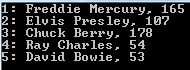
In the example on Join we joined the single elements in the singers list with the concert list based on the singer ids. We will do the same here but at the same time we want to read the total number of concerts for each singer. The following query will do just that:

IEnumerable<Singer> singers = DemoCollections.GetSingers();
IEnumerable<Concert> concerts = DemoCollections.GetConcerts();

var singerConcerts = singers.GroupJoin(concerts, s => s.Id, c => c.SingerId, (s, co) => new
{
	Id = s.Id
	, SingerName = string.Concat(s.FirstName, " ", s.LastName)
	, ConcertCount = co.Sum(c => c.ConcertCount)
});

foreach (var res in singerConcerts)
{
	Console.WriteLine(string.Concat(res.Id, ": ", res.SingerName, ", ", res.ConcertCount));
}

GroupJoin operator output

Each type in the lambda expressions will be inferred by the compiler:

  • ‘s’ is of type Singer for the outer selector
  • ‘c’ is of type Concert for the inner selector
  • ‘co’ is type IEnumerable of Concert which will be used for the grouping function, Sum in this case

Just like the Join operator, GroupJoin can also accept an IEqualityComparer of TKey in case the comparison key requires some special treatment. In the above example only integers are compared so there’s no need for anything extra.

You can view all LINQ-related posts on this blog here.

Selecting a subset of elements in LINQ C# with the Take operator

The Take extension method in LINQ returns a specified number of elements from a sequence. Its usage is very simple. Consider the following data collection:

string[] bands = { "ACDC", "Queen", "Aerosmith", "Iron Maiden", "Megadeth", "Metallica", "Cream", "Oasis", "Abba", "Blur", "Chic", "Eurythmics", "Genesis", "INXS", "Midnight Oil", "Kent", "Madness", "Manic Street Preachers"
, "Noir Desir", "The Offspring", "Pink Floyd", "Rammstein", "Red Hot Chili Peppers", "Tears for Fears"
, "Deep Purple", "KISS"};

The following query returns the first 10 elements from the collection:

IEnumerable<String> topItems = bands.Take(10);
foreach (string item in topItems)
{
	Console.WriteLine(item);
}

…whicl will print the array items 0-9.

You’re free to combine the Take operator with other operators, such as Select. Example:

var anonymous = bands.Take(10).Select(b => new { Name = b, Length = b.Length });
foreach (var anon in anonymous)
{
	Console.WriteLine("Band name: {0}, length: {1}", anon.Name, anon.Length);
}

The query takes the top 10 items and runs the Select operator only on those 10 items, not the entire collection. Here’s the output:

Take operator output

You can view all LINQ-related posts on this blog here.

Joining two collections using the C# Concat LINQ operator

What if you want to join two sequences of the same type into one sequence? It couldn’t be easier with the LINQ Concat() operator.

Data structure:

string[] bands = { "ACDC", "Queen", "Aerosmith", "Iron Maiden", "Megadeth", "Metallica", "Cream", "Oasis", "Abba", "Blur", "Chic", "Eurythmics", "Genesis", "INXS", "Midnight Oil", "Kent", "Madness", "Manic Street Preachers"
, "Noir Desir", "The Offspring", "Pink Floyd", "Rammstein", "Red Hot Chili Peppers", "Tears for Fears"
, "Deep Purple", "KISS"};

Say you’d like to get the first and the last 5 elements of this sequence and build a single sequence. The following LINQ statement will do the trick:

IEnumerable<string> selectedItems = bands.Take(5).Concat(bands.Reverse().Take(5));
foreach (string item in selectedItems)
{
	Console.WriteLine(item);
}

Concat operator output

You can view all LINQ-related posts on this blog here.

Finding the set difference between two sequences using the LINQ Except operator

Say you have the following two sequences:

string[] first = new string[] {"hello", "hi", "good evening", "good day", "good morning", "goodbye" };
string[] second = new string[] {"whatsup", "how are you", "hello", "bye", "hi"};

If you’d like to find the values that only figure in “first” then it’s easy to achieve using the LINQ Except operator:

IEnumerable<string> except = first.Except(second);
foreach (string value in except)
{
	Console.WriteLine(value);
}

The “except” variable will include “good evening”, “good day”, “good morning”, “goodbye” as “hello”, “hi” also figure in “second”.

The Except operator uses a comparer to determine whether two elements are equal. In this case .NET has a built-in default comparer to compare strings so you didn’t have to implement any special comparer. However, if you have custom objects in the two arrays then the default object reference comparer won’t be enough:

public class Singer
{
	public int Id { get; set; }
	public string FirstName { get; set; }
	public string LastName { get; set; }
}

IEnumerable<Singer> singersA = new List<Singer>() 
{
	new Singer(){Id = 1, FirstName = "Freddie", LastName = "Mercury"} 
	, new Singer(){Id = 2, FirstName = "Elvis", LastName = "Presley"}
	, new Singer(){Id = 3, FirstName = "Chuck", LastName = "Berry"}

};

IEnumerable<Singer> singersB = new List<Singer>() 
{
	new Singer(){Id = 1, FirstName = "Freddie", LastName = "Mercury"} 
	, new Singer(){Id = 2, FirstName = "Elvis", LastName = "Presley"}
	, new Singer(){Id = 4, FirstName = "Ray", LastName = "Charles"}
	, new Singer(){Id = 5, FirstName = "David", LastName = "Bowie"}
};

IEnumerable<Singer> singersDiff = singersA.Except(singersB);
foreach (Singer s in singersDiff)
{
	Console.WriteLine(s.Id);
}

The singersDiff sequence will include everything from singersA of course as each object is different as far as their references are concerned. This is where the second prototype of the operator enters the scene where you can define your own comparison function:

public class DefaultSingerComparer : IEqualityComparer<Singer>
{
	public bool Equals(Singer x, Singer y)
	{
		return x.Id == y.Id;
	}

	public int GetHashCode(Singer obj)
	{
		return obj.Id.GetHashCode();
	}
}

So we say that singerA == singerB if their IDs are equal. You can use this comparer as follows:

IEnumerable<Singer> singersDiff = singersA.Except(singersB, new DefaultSingerComparer());
foreach (Singer s in singersDiff)
{
	Console.WriteLine(s.Id);
}

singersDiff will now correctly include singer #3 only.

You can view all LINQ-related posts on this blog here.

Joining unique values from two sequences with the LINQ Union operator

Say you have two sequences of the same object type:

string[] first = new string[] {"hello", "hi", "good evening", "good day", "good morning", "goodbye" };
string[] second = new string[] {"whatsup", "how are you", "hello", "bye", "hi"};

You’d then like to join the two sequences containing the values from both but filtering out duplicates. Here’s how to achieve that with the first prototype of the LINQ Union operator:

IEnumerable<string> union = first.Union(second);
foreach (string value in union)
{
	Console.WriteLine(value);
}

You’ll see that “hello” and “hi” were filtered out from the second sequence as they already figure in the first. This version of the Union operator used a default comparer to compare the string values. As .NET has a good default comparer for strings you could rely on that to filter out duplicates.

However, if you have custom objects then .NET won’t automatically know how to compare them so the comparison will be based on reference equality which is not what you want. Say you have the following object:

public class Singer
{
	public int Id { get; set; }
	public string FirstName { get; set; }
	public string LastName { get; set; }
}

…and the following sequences:

IEnumerable<Singer> singersA = new List<Singer>() 
{
	new Singer(){Id = 1, FirstName = "Freddie", LastName = "Mercury"} 
	, new Singer(){Id = 2, FirstName = "Elvis", LastName = "Presley"}
	, new Singer(){Id = 3, FirstName = "Chuck", LastName = "Berry"}
				
};

IEnumerable<Singer> singersB = new List<Singer>() 
{
	new Singer(){Id = 1, FirstName = "Freddie", LastName = "Mercury"} 
	, new Singer(){Id = 2, FirstName = "Elvis", LastName = "Presley"}
	, new Singer(){Id = 4, FirstName = "Ray", LastName = "Charles"}
	, new Singer(){Id = 5, FirstName = "David", LastName = "Bowie"}
};

If you try the following:

IEnumerable<Singer> singersUnion = singersA.Union(singersB);
foreach (Singer s in singersUnion)
{
	Console.WriteLine(s.Id);
}

…then you’ll see that the duplicates weren’t in fact filtered out and that’s expected. This is where the second version of Union enters the picture where you can provide your custom comparer, like the following:

public class DefaultSingerComparer : IEqualityComparer<Singer>
{
	public bool Equals(Singer x, Singer y)
	{
		return x.Id == y.Id;
	}

	public int GetHashCode(Singer obj)
	{
		return obj.Id.GetHashCode();
	}
}

You can use this comparer as follows:

IEnumerable<Singer> singersUnion = singersA.Union(singersB, new DefaultSingerComparer());
foreach (Singer s in singersUnion)
{
	Console.WriteLine(s.Id);
}

Problem solved!

You can view all LINQ-related posts on this blog here.

Performing joins across two sequences with the LINQ Join operator

With the Join operator in LINQ you can perform joins similar to using the JOIN keyword in SQL: the result will be a join on two sequences based on some common key.

We’ll use the following data structures:

public class Singer
{
	public int Id { get; set; }
	public string FirstName { get; set; }
	public string LastName { get; set; }
}

public class Concert
{
	public int SingerId { get; set; }
	public int ConcertCount { get; set; }
	public int Year { get; set; }
}

public static IEnumerable<Singer> GetSingers()
{
	return new List<Singer>() 
	{
		new Singer(){Id = 1, FirstName = "Freddie", LastName = "Mercury"} 
		, new Singer(){Id = 2, FirstName = "Elvis", LastName = "Presley"}
		, new Singer(){Id = 3, FirstName = "Chuck", LastName = "Berry"}
		, new Singer(){Id = 4, FirstName = "Ray", LastName = "Charles"}
		, new Singer(){Id = 5, FirstName = "David", LastName = "Bowie"}
	};
}

public static IEnumerable<Concert> GetConcerts()
{
	return new List<Concert>()
	{
		new Concert(){SingerId = 1, ConcertCount = 53, Year = 1979}
		, new Concert(){SingerId = 1, ConcertCount = 74, Year = 1980}
		, new Concert(){SingerId = 1, ConcertCount = 38, Year = 1981}
		, new Concert(){SingerId = 2, ConcertCount = 43, Year = 1970}
		, new Concert(){SingerId = 2, ConcertCount = 64, Year = 1968}
		, new Concert(){SingerId = 3, ConcertCount = 32, Year = 1960}
		, new Concert(){SingerId = 3, ConcertCount = 51, Year = 1961}
		, new Concert(){SingerId = 3, ConcertCount = 95, Year = 1962}
		, new Concert(){SingerId = 4, ConcertCount = 42, Year = 1950}
		, new Concert(){SingerId = 4, ConcertCount = 12, Year = 1951}
		, new Concert(){SingerId = 5, ConcertCount = 53, Year = 1983}
	};
}

I think most LINQ operators are quite straightforward to use. Join is probably one of the more complex ones with its Func delegates. The signature of the operator looks as follows:

IEnumerable<TResult> result = IEnumerable<TOuter>.Join<TOuter, TInner, TKey, TResult>(IEnumerable<TInner> inner, Func<TOuter, TKey> outerKeySelector, Func<TInner, TKey> innerKeySelector, Func<TOuter, TInner, TResult> resultSelector);

Let’s see an example of how the singer and concert objects can be joined using the singer ids:

var singerConcerts = singers.Join(concerts, s => s.Id, c => c.SingerId, (s, c) => new
{
	Id = s.Id,
	SingerName = string.Concat(s.FirstName, " ", s.LastName),
	ConcertCount = c.ConcertCount,
	Year = c.Year
});

foreach (var res in singerConcerts)
{
	Console.WriteLine(string.Concat(res.Id, ": ", res.SingerName, ", ", res.Year, ", ", res.ConcertCount));
}

Join operator output

  • ‘singers’ is the outer sequence of the two sequences
  • ‘concerts’ will be the inner sequence
  • s – s.Id: the outer key selector, in this case the singer’s ID
  • c – c.SingerId: the inner key selector, in this case the SingerId secondary key of a Concert object
  • The last element is the result selector where we declare what type of object we want returned from the operation

The Join operator has an overload which accepts an EqualityComparer of TKey. In our case it’s not necessary as the TKey will be the singer ID, i.e. an integer, and .NET can easily compare those. However, if the comparison key is an object, then you can implement the IEqualityComparer interface. Here’s an example how to do that.

You can view all LINQ-related posts on this blog here.

Elliot Balynn's Blog

A directory of wonderful thoughts

Software Engineering

Web development

Disparate Opinions

Various tidbits

chsakell's Blog

WEB APPLICATION DEVELOPMENT TUTORIALS WITH OPEN-SOURCE PROJECTS

Once Upon a Camayoc

ARCHIVED: Bite-size insight on Cyber Security for the not too technical.