Getting rid of unnecessary using statements in Visual Studio 2015
February 19, 2016 4 Comments
Here comes a quick tip for all of you who are bothered by unnecessary using statements in a class file. You know when you have the automatic “using System.Linq” statement and you never use Linq in that class? It’s a breeze to get rid of those in Visual Studio 2015 using the light bulb icon:
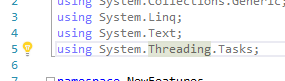
Expand the icon and select “Remove Unnecessary Usings”.
This feature has been available for a long time in NetBeans for Java developers. Visual Studio has finally caught up without having to resort to tools like ReSharper.
 About Andras Nemes
 Exercises in .NET with Andras Nemes
Does this have any impact beside aesthetics? I thought they were loaded on demand, so if they aren’t used they aren’t loaded.
Only aesthetics. //Andras
If your “usings” point to the namespaces within custom assemblies which you have in “References” of your project, then doesn’t matter if you have statesments which point to their namespaces or no, these assemblies must be delivered with your application to avoid possible dependency issues.
some extension is already doing this but good to hear now it’s natively supported.