Using Amazon Kinesis with the AWS.NET API Part 5: validation
December 25, 2014 Leave a comment
Introduction
In the previous post we got as far as having a simple but functioning messaging system. The producer and client apps are both console based and the message handler is the ready-to-use Amazon Kinesis. We have a system that we can built upon and scale up as the message load increases. Kinesis streams can be scaled to handle virtually unlimited amounts of messages.
This post on Kinesis will discuss message validation.
You’ll need to handle the incoming messages from the stream. Normally they should follow the specified format, such as JSON or XML with the predefined property names and casing. However, this is not always guaranteed as Kinesis does not itself validate any incoming message. Also, your system might be subject to fake data. So you’ll almost always need to have some message validation in place and log messages that cannot be processed or are somehow invalid.
Open the demo application we’ve been working on so far and let’s get to it.
Validation
We ended up with the following bit of code in AmazonKinesisConsumer:
if (records.Count > 0)
{
	Console.WriteLine("Received {0} records. ", records.Count);
	foreach (Record record in records)
	{
		string json = Encoding.UTF8.GetString(record.Data.ToArray());
		Console.WriteLine("Json string: " + json);
	}
}
We’ll build up the new code step by step and present the new version of the ReadFromStream() method at the end.
Our first task is to check if “json” is in fact valid JSON. There’s no dedicated method for that in JSON.NET so we’ll just see if the string can be parsed into a generic JToken:
string json = Encoding.UTF8.GetString(record.Data.ToArray());
try
{
        JToken token = JContainer.Parse(json);
}
catch (Exception ex)
{
        //simulate logging
	Console.WriteLine("Could not parse the following message, invalid json: {0}", json);
}
Normally every message that cannot be parsed should be logged and analysed. Here we just print the unparseable message to the console. If you’re interested in logging you can check out the posts on this blog here and here.
Next we want to parse the JSON into a WebTransaction object:
try
{
	JToken token = JContainer.Parse(json);
        try
	{
		WebTransaction wt = JsonConvert.DeserializeObject<WebTransaction>(json);
	}
	catch (Exception ex)
	{
		//simulate logging
		Console.WriteLine("Could not parse the following message to a WebTransaction object: {0}", json);
	}
}
catch (Exception ex)
{
	//simulate logging
	Console.WriteLine("Could not parse the following message, invalid json: {0}", json);
}
Next we can perform some validation on the object itself. We’ll make up some arbitrary rules:
- The web method can only be one of the following: GET, POST, PUT, HEAD, DELETE, OPTIONS, TRACE, CONNECT
- Acceptable range for response times: 0-30000 ms, probably not wide enough, but it’s OK for now
- We only accept valid URLs using a validator function I’ve found here. It might not be perfect but at least we can filter out useless inputs like “this is spam” or “you’ve been hacked”
We’ll add the validation rules to WebTransaction.cs of the AmazonKinesisConsumer app:
public class WebTransaction
{
	private string[] _validMethods = { "get", "post", "put", "delete", "head", "options", "trace", "connect" };
	private int _minResponseTimeMs = 0;
	private int _maxResponseTimeMs = 30000;

        public long UtcDateUnixMs { get; set; }
	public string CustomerName { get; set; }
	public string Url { get; set; }
	public string WebMethod { get; set; }
	public int ResponseTimeMs { get; set; }

	public List<string> Validate()
	{
		List<string> brokenRules = new List<string>();
		if (!IsWebMethodValid())
		{
			brokenRules.Add(string.Format("Invalid web method: {0}", WebMethod));
		}
		if (!IsResponseTimeValid())
		{
			brokenRules.Add(string.Format("Response time outside acceptable limits: {0}", ResponseTimeMs));
		}
		if (!IsValidUrl())
		{
			brokenRules.Add(string.Format("Invalid URL: {0}", Url));
		}
		return brokenRules;
	}

	private bool IsWebMethodValid()
	{
		return _validMethods.Contains(WebMethod.ToLower());
	}

	private bool IsResponseTimeValid()
	{
		if (ResponseTimeMs < _minResponseTimeMs
			|| ResponseTimeMs > _maxResponseTimeMs)
		{
			return false;
		}
        	return true;
	}

	private bool IsValidUrl()
	{
		Uri uri;
		string urlToValidate = Url;
		if (!urlToValidate.Contains(Uri.SchemeDelimiter)) urlToValidate = string.Concat(Uri.UriSchemeHttp, Uri.SchemeDelimiter, urlToValidate);
		if (Uri.TryCreate(urlToValidate, UriKind.RelativeOrAbsolute, out uri))
		{
			try
			{
				if (Dns.GetHostAddresses(uri.DnsSafeHost).Length > 0)
				{
					return true;
				}
			}
			catch
			{
				return false;
			}
		}

		return false;
	}

}
The Validate method will collect all validation errors. IsWebMethodValid() and IsResponseTimeValid() should be quite straightforward. If you don’t understand the IsValidUrl function check out the StackOverflow link referred to above.
We can use the Validate method from within the ReadFromStream() method as follows:
List<WebTransaction> newWebTransactions = new List<WebTransaction>();
foreach (Record record in records)
{
	string json = Encoding.UTF8.GetString(record.Data.ToArray());
	try
	{
        	JToken token = JContainer.Parse(json);
		try
		{
			WebTransaction wt = JsonConvert.DeserializeObject<WebTransaction>(json);
          		List<string> validationErrors = wt.Validate();
			if (!validationErrors.Any())
			{
				Console.WriteLine("Valid entity: {0}", json);
				newWebTransactions.Add(wt);
			}
			else
			{
				StringBuilder exceptionBuilder = new StringBuilder();
				exceptionBuilder.Append("Invalid WebTransaction object from JSON: ")
				.Append(Environment.NewLine).Append(json)
				.Append(Environment.NewLine).Append("Validation errors: ")
				.Append(Environment.NewLine);
				foreach (string error in validationErrors)
				{
					exceptionBuilder.Append(error).Append(Environment.NewLine);
				}
				Console.WriteLine(exceptionBuilder.ToString());
			}
		}
        	catch (Exception ex)
		{
			//simulate logging
			Console.WriteLine("Could not parse the following message to a WebTransaction object: {0}", json);
		}
	}
	catch (Exception ex)
	{
		//simulate logging
		Console.WriteLine("Could not parse the following message, invalid json: {0}", json);
	}
}
As you can see we’re also collecting all valid WebTransaction objects into a list. That’s a preparation for the next post where we’ll store the valid objects on disk.
Here’s the current version of the ReadFromStream method:
private static void ReadFromStream()
{
	AmazonKinesisConfig config = new AmazonKinesisConfig();
	config.RegionEndpoint = Amazon.RegionEndpoint.EUWest1;
	AmazonKinesisClient kinesisClient = new AmazonKinesisClient(config);
	String kinesisStreamName = ConfigurationManager.AppSettings["KinesisStreamName"];

	DescribeStreamRequest describeRequest = new DescribeStreamRequest();
	describeRequest.StreamName = kinesisStreamName;

	DescribeStreamResponse describeResponse = kinesisClient.DescribeStream(describeRequest);
	List<Shard> shards = describeResponse.StreamDescription.Shards;

	foreach (Shard shard in shards)
	{
		GetShardIteratorRequest iteratorRequest = new GetShardIteratorRequest();
		iteratorRequest.StreamName = kinesisStreamName;
		iteratorRequest.ShardId = shard.ShardId;
		iteratorRequest.ShardIteratorType = ShardIteratorType.TRIM_HORIZON;

		GetShardIteratorResponse iteratorResponse = kinesisClient.GetShardIterator(iteratorRequest);
		string iteratorId = iteratorResponse.ShardIterator;

		while (!string.IsNullOrEmpty(iteratorId))
		{
			GetRecordsRequest getRequest = new GetRecordsRequest();
			getRequest.Limit = 1000;
			getRequest.ShardIterator = iteratorId;

			GetRecordsResponse getResponse = kinesisClient.GetRecords(getRequest);
			string nextIterator = getResponse.NextShardIterator;
			List<Record> records = getResponse.Records;

			if (records.Count > 0)
			{
				Console.WriteLine("Received {0} records. ", records.Count);
				List<WebTransaction> newWebTransactions = new List<WebTransaction>();
				foreach (Record record in records)
				{
					string json = Encoding.UTF8.GetString(record.Data.ToArray());
					try
					{
						JToken token = JContainer.Parse(json);
						try
						{
							WebTransaction wt = JsonConvert.DeserializeObject<WebTransaction>(json);
							List<string> validationErrors = wt.Validate();
							if (!validationErrors.Any())
							{
								Console.WriteLine("Valid entity: {0}", json);
								newWebTransactions.Add(wt);
							}
							else
							{
								StringBuilder exceptionBuilder = new StringBuilder();
								exceptionBuilder.Append("Invalid WebTransaction object from JSON: ")
									.Append(Environment.NewLine).Append(json)
									.Append(Environment.NewLine).Append("Validation errors: ")
									.Append(Environment.NewLine);
								foreach (string error in validationErrors)
								{
									exceptionBuilder.Append(error).Append(Environment.NewLine);
								}
								Console.WriteLine(exceptionBuilder.ToString());
							}
						}
						catch (Exception ex)
						{
							//simulate logging
							Console.WriteLine("Could not parse the following message to a WebTransaction object: {0}", json);
						}
					}
					catch (Exception ex)
					{
						//simulate logging
						Console.WriteLine("Could not parse the following message, invalid json: {0}", json);
					}
				}
			}

			iteratorId = nextIterator;
		}
	}
}
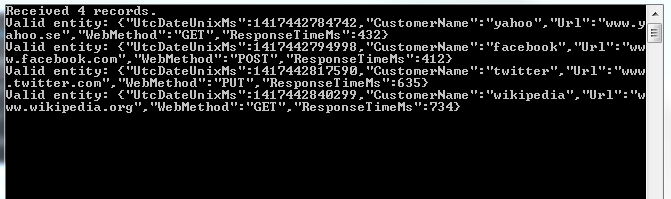
Run the application with F5. This will start the project that is set as the start-up project. You can start the other one using the technique we saw in the previous post: right-click, Debug, Start new instance. You’ll have two console windows running. If you had some messages left in the Kinesis stream then they should be validated now. I can see the following output:
Let’s now send some new messages to Kinesis:
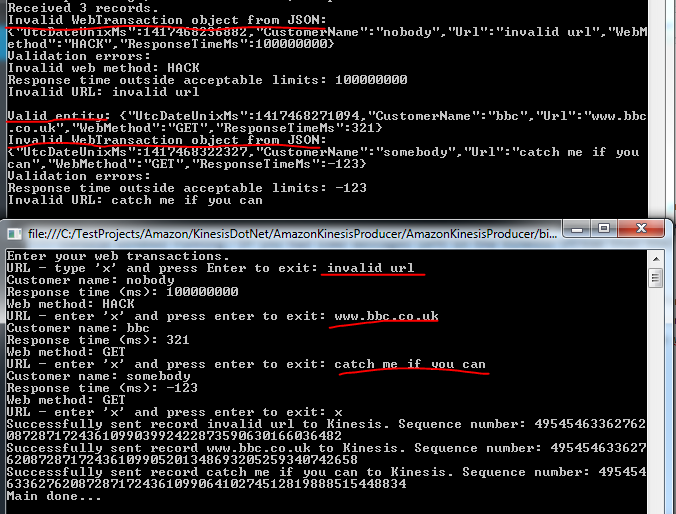
Great, we have some basic validation logic in place.
We’ll discuss storing the messages in the next post which will finish the series on Amazon Kinesis.
View all posts related to Amazon Web Services and Big Data here.
 About Andras Nemes
 Exercises in .NET with Andras Nemes