Big Data: using Amazon Kinesis with the AWS.NET API Part 3: sending to the stream
December 18, 2014 5 Comments
Introduction
In the previous post of this series we set up the Kinesis stream, installed the .NET SDK and inserted a very simple domain object into a Kinesis producer console application.
In this post we’ll start posting to our Kinesis stream.
Open the AmazonKinesisProducer demo application and let’s get to it.
Preparations
We cannot just call the services within the AWS SDK without proper authentication. This is an important reference page to handle your credentials in a safe way. We’ll the take the recommended approach and create a profile in the SDK Store and reference it from app.config.
This series is not about AWS authentication so we won’t go into temporary credentials but later on you may be interested in that option too. Since we’re programmers and it takes a single line of code to set up a profile we’ll go with the programmatic options. Add the following line to Main:
Amazon.Util.ProfileManager.RegisterProfile("demo-aws-profile", "your access key id", "your secret access key");
I suggest you remove the code from the application later on in case you want to distribute it. Run the application and it should execute without exceptions. Next open app.config and add the appSettings section with the following elements:
<appSettings>
        <add key="AWSProfileName" value="demo-aws-profile"/>
	<add key="KinesisStreamName" value="test-stream"/>
</appSettings>
Generating web transactions
We’ll create web transaction objects using the console. Add the following private methods to Program.cs:
private static List<WebTransaction> GetTransactions()
{
	List<WebTransaction> webTransactions = new List<WebTransaction>();
	Console.WriteLine("Enter your web transactions. ");
	Console.Write("URL - type 'x' and press Enter to exit: ");
	string url = Console.ReadLine();
	while (url != "x")
	{
		WebTransaction wt = new WebTransaction();
		wt.Url = url;
		wt.UtcDateUnixMs = ConvertToUnixMillis(DateTime.UtcNow);

		Console.Write("Customer name: ");
		string customerName = Console.ReadLine();
		wt.CustomerName = customerName;

		Console.Write("Response time (ms): ");
		int responseTime = Convert.ToInt32(Console.ReadLine());
		wt.ResponseTimeMs = responseTime;

		Console.Write("Web method: ");
		string method = Console.ReadLine();
		wt.WebMethod = method;

		webTransactions.Add(wt);

		Console.Write("URL - enter 'x' and press enter to exit: ");
		url = Console.ReadLine();
	}
	return webTransactions;
}

private static long ConvertToUnixMillis(DateTime dateToConvert)
{
	return Convert.ToInt64(dateToConvert.Subtract(new DateTime(1970,1,1,0,0,0,0)).TotalMilliseconds);
}
GetTransactions() is a simple loop you must have done in your C# course #2 or 3. Note that I haven’t added any validation, such as the feasibility of the web method or the response time. So be gentle and enter “correct” values later on during the tests. ConvertToUnixMillis simply converts a date to a UNIX timestamp in milliseconds. .NET4.5 doesn’t natively support UNIX dates but it’s coming in C# 6.
Sending the transactions to the stream
We’ll send each message one by one in the following method which you can add to Program.cs:
private static void SendWebTransactionsToQueue(List<WebTransaction> transactions)
{
	AmazonKinesisConfig config = new AmazonKinesisConfig();
	config.RegionEndpoint = Amazon.RegionEndpoint.EUWest1;
	AmazonKinesisClient kinesisClient = new AmazonKinesisClient(config);
	String kinesisStreamName = ConfigurationManager.AppSettings["KinesisStreamName"];

	foreach (WebTransaction wt in transactions)
	{
		string dataAsJson = JsonConvert.SerializeObject(wt);
		byte[] dataAsBytes = Encoding.UTF8.GetBytes(dataAsJson);
		using (MemoryStream memoryStream = new MemoryStream(dataAsBytes))
		{
			try
			{
				PutRecordRequest requestRecord = new PutRecordRequest();
				requestRecord.StreamName = kinesisStreamName;
				requestRecord.PartitionKey = "url-response-times";
				requestRecord.Data = memoryStream;

				PutRecordResponse responseRecord = kinesisClient.PutRecord(requestRecord);
				Console.WriteLine("Successfully sent record {0} to Kinesis. Sequence number: {1}", wt.Url, responseRecord.SequenceNumber);
			}
			catch (Exception ex)
			{
				Console.WriteLine("Failed to send record {0} to Kinesis. Exception: {1}", wt.Url, ex.Message);
			}
		}
	}
}
You’ll need to reference the System.Configuration library to make this work.
We first configure our access to Kinesis using the AmazonKinesisConfig object. We set the region to the one where we set up the stream. In my case it’s eu-west-1, but you may need to provide something else. We also read the stream name from app.config.
Then for each of the WebTransaction objects we go through the following process:
- Get the JSON representation of the object
- Convert the JSON to a byte array
- Put byte array into a MemoryStream
- We set up the PutRecordRequest object with the stream name, the partition key and the data we want to publish
- The record is sent to Kinesis using the PutRecord method
- If it’s successful then we print the sequence number of the message
- Otherwise we print an exception message
What is a partition key? It is a key to group the data within a stream into shards. And a sequence number? It is a unique ID that each message gets upon insertion into the stream. This page with the key concepts will be a good friend of yours while working with Kinesis.
Test
We can call these functions from Main as follows:
List<WebTransaction> webTransactions = GetTransactions();
SendWebTransactionsToQueue(webTransactions);

Console.WriteLine("Main done...");
Console.ReadKey();
Start the application and create a couple of WebTransaction objects using the console. Then if all goes well you should see a printout similar to the following in the console window:

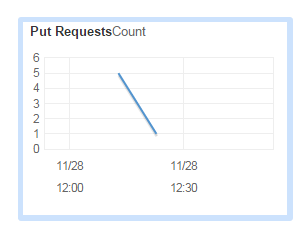
Let’s see what the Kinesis dashboard is telling us:

The PutRequest graph increased to 5 – and since I then put one more message to the stream the number decreased to 1:
In the next post we’ll see how to read the messages from the stream.
View all posts related to Amazon Web Services and Big Data here.
 About Andras Nemes
 Exercises in .NET with Andras Nemes
Very good work! until now everything works perfectly…
Hi,
I have the Visual Studio Community 2015 and for some reason the following line of code does not compile:
AmazonKinesisConfig config = new AmazonKinesisConfig();
config.RegionEndpoint = Amazon.RegionEndpoint.USWest2;
AmazonKinesisClient kinesisClient = new AmazonKinesisClient(config);
…
It complains the AmazonKinesisConfig “could not be found (are you missing a using directive or an assembly reference)”.
I have the using.system.configuration in my code but still does not work. I am about to google it and see if the name were updated or something else.
Thanks in advance.
I solved the problem for my previous questions.
Thanks.
I’m having same problem, can you help me!
im using aws credentail file but getting these errors:The security token included in the request is invalid.
The security token included in the request is invalid.
please help me….